Solved Patch causing start-up freeze. Help to remove?

allemar

New member
Local time
5:45 PM
Messages
5
Hi, it would be great if anyone could help with this please:

My Lenovo G570 laptop, running Windows 7 Home Premium, started to hang on the "starting windows" screen A few weeks ago.

Sometimes it would start up okay, and sometimes it would not. Now it doesn't at all, although a couple of times when I have used F8 and enabled boot logging, it has started. However, this no longer works either.

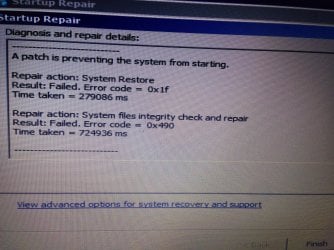
The errors I get on the attached, apparently a patch caused the start up to fail.

Any ideas gratefully received.

Thank you
 

Attachments
  • image.jpg
    image.jpg
    944.2 KB · Views: 0

My Computer

Computer type
Laptop
Computer Manufacturer/Model Number
Lenovo
OS
Windows 7 Home Premium 64bit
CPU
Intel i5 2430M 2.4 GHZ
Memory
6G RAM
Hard Drives
WDC WD7500BPVT-24HXZT3
Antivirus
McAfee
Browser
IE
Did you install any new hardware devices recently?

The errors I get on the attached, apparently a patch caused the start up to fail.

"Try to start your computer in "safe mode with cmd" or any other options. When you are finally able to start windows in any mode ;
Open Device Manger --> Check for all the Network adapters, Sound cards, Graphic cards,........and every driver.
If you see an yellow exclamation on any of the drivers' icon uninstall it. Now, possibly your problem should be solved(Regarding hardware, devices)."


If still having problems, try a sfc/scannow using "Boot into safe Mode with cmd" option.

~~~~~~~~~~~~~~~~~~~~~~~~~~~~~~~~~~~~~~~~~~~~~~~~~~~~~~~~~~~~~~~~
 

My Computer

Computer type
PC/Desktop
Computer Manufacturer/Model Number
Custom Build
OS
Windows 8.1
CPU
Intel - Core i7 4.2GHz
Motherboard
Intel
Memory
8 GB
Graphics Card(s)
Nvidea GeForce 7800GT 2GB
Screen Resolution
1980 X 1280
Hard Drives
1 TB Toshiba
500 GB SATA
Internet Speed
Download - 30 Mbps, Upload - 10 Mbps
Antivirus
BitDefender Internet Security
Browser
Mozilla Firefox,Google Chrome,Internet Explorer
Did you install any new hardware devices recently?

The errors I get on the attached, apparently a patch caused the start up to fail.

"Try to start your computer in "safe mode with cmd" or any other options. When you are finally able to start windows in any mode ;
Open Device Manger --> Check for all the Network adapters, Sound cards, Graphic cards,........and every driver.
If you see an yellow exclamation on any of the drivers' icon uninstall it. Now, possibly your problem should be solved(Regarding hardware, devices)."


If still having problems, try a sfc/scannow using "Boot into safe Mode with cmd" option.

~~~~~~~~~~~~~~~~~~~~~~~~~~~~~~~~~~~~~~~~~~~~~~~~~~~~~~~~~~~~~~~~

Thanks for the reply.

I haven't installed anything.
Safe mode always gets stuck after loading CLASSPNP.SYS
I managed to try sfc/scannow a few days ago along with malware and neither showed anything.
Can't get it to start at all today but will keep trying to check the drivers as you suggest

Thanks again
 

My Computer

Computer type
Laptop
Computer Manufacturer/Model Number
Lenovo
OS
Windows 7 Home Premium 64bit
CPU
Intel i5 2430M 2.4 GHZ
Memory
6G RAM
Hard Drives
WDC WD7500BPVT-24HXZT3
Antivirus
McAfee
Browser
IE
Can't get it to startup at all now.

Does anyone have a suggestion please? If I need to reintstall W7, from where can I get a Disc pls?
 

My Computer

Computer type
Laptop
Computer Manufacturer/Model Number
Lenovo
OS
Windows 7 Home Premium 64bit
CPU
Intel i5 2430M 2.4 GHZ
Memory
6G RAM
Hard Drives
WDC WD7500BPVT-24HXZT3
Antivirus
McAfee
Browser
IE
Can't get it to startup at all now.

Does anyone have a suggestion please? If I need to reintstall W7, from where can I get a Disc pls?

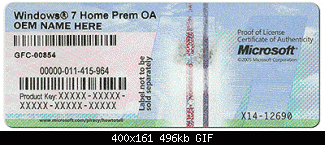
You need to have the Product Key to reactivate the new installation. There is a sticker on your PC which has it. It should look like this ==

Go to this link Windows 7 Direct Download Links, Official Disk Images from Digital River and download this file if your system is 64 bit
Windows 7 Home Premium x64 SP1 U (media refresh)
latest and greatest X17-58997.iso

Or this one if you have a 32 bit system

Windows 7 Home Premium x86 SP1 U (media refresh)
latest and greatestX17-58996.iso

Burn to a DVD and install according to this tutorial http://www.sevenforums.com/tutorials/1649-clean-install-windows-7-a.html
Let us know if you have any questions
 

Attachments

  • coa-stickers.gif
    coa-stickers.gif
    30.4 KB · Views: 33

My Computer

Computer type
PC/Desktop
Computer Manufacturer/Model Number
Custom Build
OS
Windows 7 Home Premium 32-Bit - Build 7600 SP1
CPU
Intel Core i3-2120 3.30Ghz
Motherboard
Asus P8Z68-V LX Intel Z68 Socket H2 ATX
Memory
Kingston 4 GB DDR3 1333 mhz
Graphics Card(s)
AMD Radeon HD6670
Sound Card
Sound Blaster Audigy SE 24-Bit
Monitor(s) Displays
Asus VE228
Screen Resolution
1440 X 900
Hard Drives
OCZ Vertex 3 120 GB Sata 3 SSD ==
Kingston SH103/S3 120 G Hyper X 120 GB SSD ==
Western Digital 500 GB Caviar Green 7200 RPM ==
PSU
Corsair CX600M == 600 Watt
Case
NZXT Apollo - Silver with Clear Side Panel
Cooling
Three 120 mm Fans
Keyboard
Microsoft Natural 4000
Mouse
Microsoft Custom Optical 3000
Internet Speed
AT&T Fiber Optic Wireless Network
Antivirus
Microsoft Security Essentials
Browser
Chrome
Other Info
120 mm Blue LED Fan -- Three Blue LED Lazer Light Sticks
That's great. Thanks.
 

My Computer

Computer type
Laptop
Computer Manufacturer/Model Number
Lenovo
OS
Windows 7 Home Premium 64bit
CPU
Intel i5 2430M 2.4 GHZ
Memory
6G RAM
Hard Drives
WDC WD7500BPVT-24HXZT3
Antivirus
McAfee
Browser
IE
Reinstall seems to have worked. Thanks very much for the help.

Really appreciated.

Cheers
 

My Computer

Computer type
Laptop
Computer Manufacturer/Model Number
Lenovo
OS
Windows 7 Home Premium 64bit
CPU
Intel i5 2430M 2.4 GHZ
Memory
6G RAM
Hard Drives
WDC WD7500BPVT-24HXZT3
Antivirus
McAfee
Browser
IE
Back
Top