PC and TV's

dbtmellis

New member
Member
VIP
Local time
8:05 PM
Messages
114
I had a thread a few days ago about my PC TV Tuner.

Now i want to know out there, how do you all send the TV signal from your PC, to your TV? Do you watch recorded shows only, or do you have a live signal from your cable/antenna?

I have an older TV, a CRT, about 30 feet from my PC. It does not have a VGA port, but it does have an S-Video and A/V Composite (Red,White,Yellow) connections.

what type of equipment do you use? Do you go Ethernet, or wireless?

I'm wanting to do is to set up my TV Tuner on my PC, with a IR blaster and remote control. I will add a 500GB USB hard drive solely for recording.

I want to find a device that i can run an possibly an Ethernet cable (or wireless) from my router to my TV, and then use the connections (s-video, etc) from there. I would like to be able to control live TV as well, as be able to watch recorded shows.

I am wanting to do this because i want to save money each month by not renting a DVR Box from Comcast, plus the Hdd's on them are still small (i believe still less than 100GB). I want to be able to record much more that the capacity they offer.
 

My Computer

Computer type
PC/Desktop
Computer Manufacturer/Model Number
Dell Insprion 530s
OS
Windows 7 Home Premuim 64 Bit
CPU
Intel Core 2 Duo E4600 @ 2.4Ghz
Motherboard
Foxconn
Memory
Crucial 4GB
Graphics Card(s)
ATI Raedon 5450 1GB
Sound Card
Integrated
Monitor(s) Displays
Dell 19 inch
Screen Resolution
4:3
Hard Drives
1TB Western Digital
PSU
Bestec 250w
Keyboard
Dell
Mouse
GE
Antivirus
Microsoft Security Essentinals
Browser
Internet Explorer 11
I am wanting to do this because i want to save money each month by not renting a DVR Box from Comcast, plus the Hdd's on them are still small (i believe still less than 100GB). I want to be able to record much more that the capacity they offer.

Ok... methinks you need to do some reading up on HTPC and Home theater setups...
Google is your friend!

The tuner card in your PC is going to let you view and/or record live TV. It will forward this to your computer's video card which will in turn be connected to the inputs of your television set. No ethernet required... unless you are downloading illegal movies ;)
 

My Computer

Computer Manufacturer/Model Number
Homebrew
OS
XP Pro SP3 X86 / Win7 Pro X86
CPU
Amd 64 x2 4200 (2.4ghz)
Motherboard
Asus M2N-MX SE Plus
Memory
Kingston DDR2 800 2gb
Graphics Card(s)
Nvidia GF-8400
Sound Card
Realtek on Motherboard
Monitor(s) Displays
Acer x-193bw
Screen Resolution
1440 x 900
Hard Drives
Western Digital 500g
PSU
350watt In-Win
Case
In-Win
Cooling
Air
Keyboard
yes
Mouse
yes
Internet Speed
5mpbs
Other Info
Also ASRock ION 330 as HTPC (on XP).
Acer Aspire as GP netbook (on XP).
Well, you should really just do as said above and us a TV Tuner to connect to your cable. Once you've done that you can record and such.

As far as getting the images to your tv, there are many options some wireless, some wired. Others going through an intermediary such as an Xbox or PS3.
 

My Computer

Computer Manufacturer/Model Number
Apple Macbook Pro (April 2009)
OS
W7 Ult. x64 | OS X
CPU
Intel Mobile Core 2 Duo 2.93Ghz [T9800 Penryn]
Motherboard
NVIDIA nForce 730i Rev. B1 [Mac-F2268EC8 (U2E1)]
Memory
4096MB Samsung DDR3 Dual Channel [PC3-8500F 1066Mhz]
Graphics Card(s)
NVIDIA GeForce 9600M GT 512MB [G96M Rev. C1]
Sound Card
SB X-Fi Surround 5.1 USB | Onboard Realtek (Disabled)
Monitor(s) Displays
Acer x223wbd 22" | Apple Anti-Glare 17" (Disabled)
Screen Resolution
{Current} 1440x900 {Acer} 1680x1050 {Apple} 1920x1200
Hard Drives
{Internal}
Seagate Momentus 320GB 2.5" 7200RPM [ST9320421AS]

{Externals}
LaCie 320GB USB 2.0 HDD [301284UR]
LaCie 750GB USB 2.0 FW400 eSATA HDD [301314U]
LaCie 1TB USB 2.0 HDD [301304UR]
PSU
Magsafe
Case
Aluminum/Unibody (MBP52)
Cooling
2 x 6000 RPM Fans
Keyboard
Logitech G-15v2 [PN 920-000379]
Mouse
Logitech G-9 [PN 910-000338]
Internet Speed
12Mbps/2.5Mbps w/ 24Mbps Speed Boost [Comcast]
Other Info
Logitech X-540 Speakers [PN 970223-0122]
Sennheiser PC-151 Headset
Well, you should really just do as said above and us a TV Tuner to connect to your cable. Once you've done that you can record and such.

As far as getting the images to your tv, there are many options some wireless, some wired. Others going through an intermediary such as an Xbox or PS3.

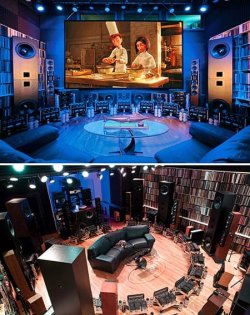
Hense my advice to read up on home theater and HTPC setups... there are endless options ranging from "TV as monitor" all the way to ridiculously complicated setups like in the picture.

6-mill-home-theater.jpg
 

My Computer

Computer Manufacturer/Model Number
Homebrew
OS
XP Pro SP3 X86 / Win7 Pro X86
CPU
Amd 64 x2 4200 (2.4ghz)
Motherboard
Asus M2N-MX SE Plus
Memory
Kingston DDR2 800 2gb
Graphics Card(s)
Nvidia GF-8400
Sound Card
Realtek on Motherboard
Monitor(s) Displays
Acer x-193bw
Screen Resolution
1440 x 900
Hard Drives
Western Digital 500g
PSU
350watt In-Win
Case
In-Win
Cooling
Air
Keyboard
yes
Mouse
yes
Internet Speed
5mpbs
Other Info
Also ASRock ION 330 as HTPC (on XP).
Acer Aspire as GP netbook (on XP).
Now i want to know out there, how do you all send the TV signal from your PC, to your TV? Do you watch recorded shows only, or do you have a live signal from your cable/antenna?
I use a Linksys DMA2100 extender with a wired CAT5 connection through my home network. I have my PC in a different room, and the extender gives me full remote control and all of the MCE functions I could ask for. It runs in HDMI to my TV, and the picture is beautiful. I only use it as a PVR, and only for digital cable, since MCE won't let you set up an HD tuner in Canada (I have both, and if you know how, please tell me.) :(

The only caveat I would suggest is to use a wired connection with an extender or XBox. Mine does wireless, but the picture will sometimes degrade with bandwidth problems. These can be caused by an N wireless system next door, or the cordless phone, yada, yada, yada. The wired connection is constant full bandwidth at Blu-Ray resolution, and almost never fails.
 

My Computer

Computer type
PC/Desktop
Computer Manufacturer/Model Number
Mellon Labs (custom build)
OS
Win 7 Pro x64/Win 10 Pro x64 dual boot
CPU
AMD FX 8350 Vishera @ 4200
Motherboard
ASUS M5A97 R2.0
Memory
16 GB Mushkin Blackline DDR3-2400 @ 1866 (9-10-10-10-31)
Graphics Card(s)
XFX Radeon R9 280 Double D Black Edition
Sound Card
Realtek HD Audio on MB. Sounds great.
Monitor(s) Displays
Acer 24", Acer 22"
Screen Resolution
3840 x 1080
Hard Drives
1 x Mushkin Chronos 120 GB SSD (Win 10)
1 x Samsung 850 EVO 250 GB SSD (Win 7)
1 x WD 1TB SATA Blue
1 x WD 1TB SATA Green
PSU
Corsair TX-750
Case
CoolerMaster HAF 912+
Cooling
Coolermaster Seidon 240M Liquid AIO. 6 case fans
Keyboard
Logitech G710+
Mouse
Logitech G500s
Internet Speed
Much better since I got fiber, but still way overpriced.
Antivirus
MSE, Malware Bytes for scanning
Browser
Firefox
Other Info
Corsair VOID USB headphones.

A Mellon Labs X-1 - LCD Smartie driven system status display.

Brought to you by the letter E
Back
Top