PC crashing, only whilst gaming

Liam64

New member
Local time
5:25 PM
Messages
11
Hi all!

I've been having trouble running some games now for months. After about fifteen minutes or so (usually on more graphically intensive games, although this may be a coincidence) most of my games begin to hang. This usually presents itself in the same way, namely that the game will freeze then one by one the different sound channels will either stop or go into a very annoying loop (by sound channels I mean, for example, first the gunshots in a shooting game will freeze, then the ambient water sounds, then the music etc). After a minute the game will either start working again, or my PC will turn off and sometimes blue screen (always the same blue screen).

I had thought it was a problem with my Realtek onboard audio, after a bit of googling, but installing a creative soundblaster doesn't seem to have altered things (as far as I'm aware I've correctly installed it and disabled the Realtek stuff).

It's causing me an incredible amount of frustration, and I would love it if someone here could track down the problem. Details attached. :)
 

My Computer My Computer

At a glance

Windows 7 64 bit
OS
Windows 7 64 bit
Looks like you're having problems with your hard drive. Bug checks are showing I/O errors.

Code:
iaStor.sys   Thu Jun 04 21:53:40 2009 (4A287AA4)
Update your Intel Rapid Storage driver - http://downloadcenter.intel.com/Detail_Desc.aspx?agr=Y&DwnldID=19607&lang=eng&OSVersion=Windows%207%2C%2064-bit*&DownloadType=Drivers


Run a hard drive scan usings SeaTools - SeaTools for Windows | Seagate - Both long and short tests

C0000005 = ACCESS_VIOLATION


BSOD BUGCHECK SUMMARY
Code:
[FONT=lucida console]
Built by: 7601.17592.amd64fre.win7sp1_gdr.110408-1631
Debug session time: Sat May 28 12:01:52.941 2011 (UTC - 4:00)
System Uptime: 0 days 0:49:24.003
Probably caused by : csrss.exe
PROCESS_NAME:  csrss.exe
BUGCHECK_STR:  0xF4_IOERR
FAILURE_BUCKET_ID:  X64_0xF4_[B][COLOR=Red]IOERR[/COLOR][/B]_IMAGE_csrss.exe
BiosReleaseDate = 05/25/2010
SystemManufacturer = System manufacturer
SystemProductName = System Product Name
CPUID:        "Intel(R) Core(TM) i7 CPU         930  @ 2.80GHz"
MaxSpeed:     2800
CurrentSpeed: 2806
¨¨¨¨¨¨¨¨¨¨¨¨¨¨¨¨¨¨¨¨¨¨¨¨¨¨¨¨¨¨¨¨¨¨¨¨¨¨¨¨¨¨¨¨¨¨¨¨¨¨¨¨¨¨¨¨¨¨¨¨¨¨¨¨¨¨¨¨¨¨¨¨¨¨¨¨¨¨¨¨¨¨¨¨¨¨``
Built by: 7601.17592.amd64fre.win7sp1_gdr.110408-1631
Debug session time: Tue May 17 15:22:11.945 2011 (UTC - 4:00)
System Uptime: 0 days 1:09:29.007
Probably caused by : csrss.exe
PROCESS_NAME:  csrss.exe
BUGCHECK_STR:  0xF4_C0000005
FAILURE_BUCKET_ID:  X64_0xF4_[B][COLOR=Red]C0000005[/COLOR][/B]_IMAGE_csrss.exe
BiosReleaseDate = 05/25/2010
SystemManufacturer = System manufacturer
SystemProductName = System Product Name
CPUID:        "Intel(R) Core(TM) i7 CPU         930  @ 2.80GHz"
MaxSpeed:     2800
CurrentSpeed: 2806
¨¨¨¨¨¨¨¨¨¨¨¨¨¨¨¨¨¨¨¨¨¨¨¨¨¨¨¨¨¨¨¨¨¨¨¨¨¨¨¨¨¨¨¨¨¨¨¨¨¨¨¨¨¨¨¨¨¨¨¨¨¨¨¨¨¨¨¨¨¨¨¨¨¨¨¨¨¨¨¨¨¨¨¨¨¨``
Built by: 7601.17592.amd64fre.win7sp1_gdr.110408-1631
Debug session time: Tue May 17 10:08:27.395 2011 (UTC - 4:00)
System Uptime: 0 days 3:52:02.457
Probably caused by : csrss.exe
PROCESS_NAME:  csrss.exe
BUGCHECK_STR:  0xF4_C0000005
FAILURE_BUCKET_ID:  X64_0xF4_[COLOR=Red][B]C0000005[/B][/COLOR]_IMAGE_csrss.exe
BiosReleaseDate = 05/25/2010
SystemManufacturer = System manufacturer
SystemProductName = System Product Name
CPUID:        "Intel(R) Core(TM) i7 CPU         930  @ 2.80GHz"
MaxSpeed:     2800
CurrentSpeed: 2806
¨¨¨¨¨¨¨¨¨¨¨¨¨¨¨¨¨¨¨¨¨¨¨¨¨¨¨¨¨¨¨¨¨¨¨¨¨¨¨¨¨¨¨¨¨¨¨¨¨¨¨¨¨¨¨¨¨¨¨¨¨¨¨¨¨¨¨¨¨¨¨¨¨¨¨¨¨¨¨¨¨¨¨¨¨¨``
Built by: 7601.17592.amd64fre.win7sp1_gdr.110408-1631
Debug session time: Sat May 14 11:18:31.477 2011 (UTC - 4:00)
System Uptime: 0 days 3:27:29.008
Probably caused by : csrss.exe
PROCESS_NAME:  csrss.exe
BUGCHECK_STR:  0xF4_C0000005
FAILURE_BUCKET_ID:  X64_0xF4_[B][COLOR=Red]C0000005[/COLOR][/B]_IMAGE_csrss.exe
BiosReleaseDate = 05/25/2010
SystemManufacturer = System manufacturer
SystemProductName = System Product Name
CPUID:        "Intel(R) Core(TM) i7 CPU         930  @ 2.80GHz"
MaxSpeed:     2800
CurrentSpeed: 2806
¨¨¨¨¨¨¨¨¨¨¨¨¨¨¨¨¨¨¨¨¨¨¨¨¨¨¨¨¨¨¨¨¨¨¨¨¨¨¨¨¨¨¨¨¨¨¨¨¨¨¨¨¨¨¨¨¨¨¨¨¨¨¨¨¨¨¨¨¨¨¨¨¨¨¨¨¨¨¨¨¨¨¨¨¨¨``
Built by: 7601.17592.amd64fre.win7sp1_gdr.110408-1631
Debug session time: Thu May 12 14:46:21.257 2011 (UTC - 4:00)
System Uptime: 0 days 4:48:12.319
Probably caused by : csrss.exe
PROCESS_NAME:  csrss.exe
BUGCHECK_STR:  0xF4_IOERR
FAILURE_BUCKET_ID:  X64_0xF4_[B][COLOR=Red]IOERR[/COLOR][/B]_IMAGE_csrss.exe
BiosReleaseDate = 05/25/2010
SystemManufacturer = System manufacturer
SystemProductName = System Product Name
CPUID:        "Intel(R) Core(TM) i7 CPU         930  @ 2.80GHz"
MaxSpeed:     2800
CurrentSpeed: 2806
¨¨¨¨¨¨¨¨¨¨¨¨¨¨¨¨¨¨¨¨¨¨¨¨¨¨¨¨¨¨¨¨¨¨¨¨¨¨¨¨¨¨¨¨¨¨¨¨¨¨¨¨¨¨¨¨¨¨¨¨¨¨¨¨¨¨¨¨¨¨¨¨¨¨¨¨¨¨¨¨¨¨¨¨¨¨``
Built by: 7601.17592.amd64fre.win7sp1_gdr.110408-1631
Debug session time: Thu May 12 09:57:05.792 2011 (UTC - 4:00)
System Uptime: 0 days 3:39:05.854
Probably caused by : csrss.exe
PROCESS_NAME:  csrss.exe
BUGCHECK_STR:  0xF4_C0000005
FAILURE_BUCKET_ID:  X64_0xF4_C0000005_IMAGE_csrss.exe
BiosReleaseDate = 05/25/2010
SystemManufacturer = System manufacturer
SystemProductName = System Product Name
CPUID:        "Intel(R) Core(TM) i7 CPU         930  @ 2.80GHz"
MaxSpeed:     2800
CurrentSpeed: 2806
¨¨¨¨¨¨¨¨¨¨¨¨¨¨¨¨¨¨¨¨¨¨¨¨¨¨¨¨¨¨¨¨¨¨¨¨¨¨¨¨¨¨¨¨¨¨¨¨¨¨¨¨¨¨¨¨¨¨¨¨¨¨¨¨¨¨¨¨¨¨¨¨¨¨¨¨¨¨¨¨¨¨¨¨¨¨``
Built by: 7601.17514.amd64fre.win7sp1_rtm.101119-1850
Debug session time: Fri Apr 22 07:57:18.517 2011 (UTC - 4:00)
System Uptime: 0 days 19:13:10.579
*** WARNING: Unable to verify timestamp for dxgmms1.sys
*** ERROR: Module load completed but symbols could not be loaded for dxgmms1.sys
*** WARNING: Unable to verify timestamp for atikmpag.sys
*** ERROR: Module load completed but symbols could not be loaded for atikmpag.sys
Probably caused by : atikmpag.sys ( atikmpag+740c )
BUGCHECK_STR:  0x116
PROCESS_NAME:  System
FAILURE_BUCKET_ID:  X64_0x116_IMAGE_atikmpag.sys
BiosReleaseDate = 05/25/2010
SystemManufacturer = System manufacturer
SystemProductName = System Product Name
CPUID:        "Intel(R) Core(TM) i7 CPU         930  @ 2.80GHz"
MaxSpeed:     2800
CurrentSpeed: 2806
¨¨¨¨¨¨¨¨¨¨¨¨¨¨¨¨¨¨¨¨¨¨¨¨¨¨¨¨¨¨¨¨¨¨¨¨¨¨¨¨¨¨¨¨¨¨¨¨¨¨¨¨¨¨¨¨¨¨¨¨¨¨¨¨¨¨¨¨¨¨¨¨¨¨¨¨¨¨¨¨¨¨¨¨¨¨``
Built by: 7600.16695.amd64fre.win7_gdr.101026-1503
Debug session time: Tue Mar  1 07:48:07.647 2011 (UTC - 4:00)
System Uptime: 0 days 13:34:05.802
Probably caused by : ntkrnlmp.exe ( nt! ?? ::FNODOBFM::`string'+34c0e )
ERROR_CODE: (NTSTATUS) 0xc000000e - A device which does not exist was specified.
BUGCHECK_STR:  0x7a_c000000e
PROCESS_NAME:  atiesrxx.exe
FAILURE_BUCKET_ID:  X64_0x7a_c000000e_nt!_??_::FNODOBFM::_string_+34c0e
BiosReleaseDate = 05/25/2010
SystemManufacturer = System manufacturer
SystemProductName = System Product Name
CPUID:        "Intel(R) Core(TM) i7 CPU         930  @ 2.80GHz"
MaxSpeed:     2800
CurrentSpeed: 2806
¨¨¨¨¨¨¨¨¨¨¨¨¨¨¨¨¨¨¨¨¨¨¨¨¨¨¨¨¨¨¨¨¨¨¨¨¨¨¨¨¨¨¨¨¨¨¨¨¨¨¨¨¨¨¨¨¨¨¨¨¨¨¨¨¨¨¨¨¨¨¨¨¨¨¨¨¨¨¨¨¨¨¨¨¨¨``
Built by: 7600.16617.amd64fre.win7_gdr.100618-1621
Debug session time: Thu Feb  3 19:53:30.847 2011 (UTC - 4:00)
System Uptime: 0 days 3:46:19.003
Probably caused by : [B][COLOR=Red]hardware_disk[/COLOR][/B]
PROCESS_NAME:  csrss.exe
ERROR_CODE: (NTSTATUS) 0xc0000006 - The instruction at 0x%p referenced memory at 0x%p. The required data was not placed into memory because of an I/O error status of 0x%x.
BUGCHECK_STR:  0xF4_IOERR_C000000E
FAILURE_BUCKET_ID:  X64_0xF4_IOERR_C000000E_IMAGE_hardware_disk
BiosReleaseDate = 05/25/2010
SystemManufacturer = System manufacturer
SystemProductName = System Product Name
CPUID:        "Intel(R) Core(TM) i7 CPU         930  @ 2.80GHz"
MaxSpeed:     2800
CurrentSpeed: 2806
¨¨¨¨¨¨¨¨¨¨¨¨¨¨¨¨¨¨¨¨¨¨¨¨¨¨¨¨¨¨¨¨¨¨¨¨¨¨¨¨¨¨¨¨¨¨¨¨¨¨¨¨¨¨¨¨¨¨¨¨¨¨¨¨¨¨¨¨¨¨¨¨¨¨¨¨¨¨¨¨¨¨¨¨¨¨``
Built by: 7600.16617.amd64fre.win7_gdr.100618-1621
Debug session time: Wed Jan 26 13:30:40.719 2011 (UTC - 4:00)
System Uptime: 0 days 3:10:46.874
*** WARNING: Unable to verify timestamp for dxgkrnl.sys
*** ERROR: Module load completed but symbols could not be loaded for dxgkrnl.sys
*** WARNING: Unable to verify timestamp for atikmpag.sys
*** ERROR: Module load completed but symbols could not be loaded for atikmpag.sys
Probably caused by : atikmpag.sys ( atikmpag+6f94 )
TAG_NOT_DEFINED_202b:  *** Unknown TAG in analysis list 202b
BUGCHECK_STR:  0x117
PROCESS_NAME:  System
FAILURE_BUCKET_ID:  X64_0x117_IMAGE_atikmpag.sys
¨¨¨¨¨¨¨¨¨¨¨¨¨¨¨¨¨¨¨¨¨¨¨¨¨¨¨¨¨¨¨¨¨¨¨¨¨¨¨¨¨¨¨¨¨¨¨¨¨¨¨¨¨¨¨¨¨¨¨¨¨¨¨¨¨¨¨¨¨¨¨¨¨¨¨¨¨¨¨¨¨¨¨¨¨¨``
Built by: 7600.16385.amd64fre.win7_rtm.090713-1255
Debug session time: Mon Oct 25 16:33:54.042 2010 (UTC - 4:00)
System Uptime: 0 days 0:37:23.182
*** WARNING: Unable to verify timestamp for atikmpag.sys
*** ERROR: Module load completed but symbols could not be loaded for atikmpag.sys
Probably caused by : atikmpag.sys ( atikmpag+6dcc )
BUGCHECK_STR:  0x116
PROCESS_NAME:  System
FAILURE_BUCKET_ID:  X64_0x116_IMAGE_atikmpag.sys
BiosReleaseDate = 05/25/2010
SystemManufacturer = System manufacturer
SystemProductName = System Product Name
CPUID:        "Intel(R) Core(TM) i7 CPU         930  @ 2.80GHz"
MaxSpeed:     2800
CurrentSpeed: 2806
¨¨¨¨¨¨¨¨¨¨¨¨¨¨¨¨¨¨¨¨¨¨¨¨¨¨¨¨¨¨¨¨¨¨¨¨¨¨¨¨¨¨¨¨¨¨¨¨¨¨¨¨¨¨¨¨¨¨¨¨¨¨¨¨¨¨¨¨¨¨¨¨¨¨¨¨¨¨¨¨¨¨¨¨¨¨``
  
[/FONT]

 

My Computer My Computer

At a glance

Windows 7 Home Premium 64bitIntel Core i5-2500 @ 3.8GHzG.SKILL Ripjaws Series 8GB (2 x 4GB) DDR3 1600NVIDIA GTX 550Ti
Computer Manufacturer/Model Number
Self Built
OS
Windows 7 Home Premium 64bit
CPU
Intel Core i5-2500 @ 3.8GHz
Motherboard
MSI P67A-GD65
Memory
G.SKILL Ripjaws Series 8GB (2 x 4GB) DDR3 1600
Graphics Card(s)
NVIDIA GTX 550Ti
Sound Card
On Board
Monitor(s) Displays
ASUS 23"
Hard Drives
OCZ Vertex 3 VTX3-25SAT3-60G
Keyboard
Wireless
Mouse
Wireless
Thank-you for your super quick response!

I'll give all that a go and report back. :D
 

My Computer My Computer

At a glance

Windows 7 64 bit
OS
Windows 7 64 bit
Okay the hard-drive tests on SeaTools both passed fine, short and long.

But when I tried to install that Rapid Storage Driver I got the following error: "This computer does not meet the minimum requirements for installing the software"

I did a google of the error message and it brought up something about AHCI... and IDE? (I can't remember the exact abbreviations, apologies). Anyway I checked my BIOS config and I have IDE set, not AHCI (which my BIOS does give me the option to change to).

Apologies if that didn't make sense to anyone, I'm not very technically minded. :confused:

I have to admit I'm quite excited in that we seem to be getting somewhere. :p
 

My Computer My Computer

At a glance

Windows 7 64 bit
OS
Windows 7 64 bit
Do you not have a SATA drive? You still have the old fashioned IDE?

That driver is for SATA drives not IDE so it wouldn't mean much for you.

Do you have a spare IDE cable you can swap out? Or maybe try a different port on the motherboard?
 

My Computer My Computer

At a glance

Windows 7 Home Premium 64bitIntel Core i5-2500 @ 3.8GHzG.SKILL Ripjaws Series 8GB (2 x 4GB) DDR3 1600NVIDIA GTX 550Ti
Computer Manufacturer/Model Number
Self Built
OS
Windows 7 Home Premium 64bit
CPU
Intel Core i5-2500 @ 3.8GHz
Motherboard
MSI P67A-GD65
Memory
G.SKILL Ripjaws Series 8GB (2 x 4GB) DDR3 1600
Graphics Card(s)
NVIDIA GTX 550Ti
Sound Card
On Board
Monitor(s) Displays
ASUS 23"
Hard Drives
OCZ Vertex 3 VTX3-25SAT3-60G
Keyboard
Wireless
Mouse
Wireless
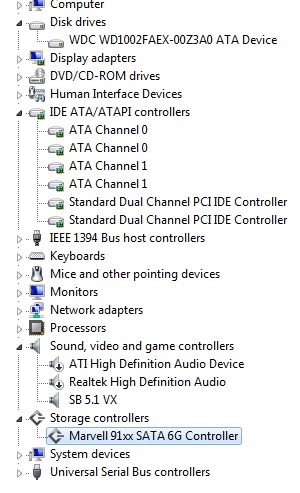
I've also taken a screenshot of my device manager, with my storage devices listed. (If this doesn't help in the slightest feel free to ignore :P) Go into the properties for them and they all say 'this device is working properly'.

IPpWo.jpg
 

My Computer My Computer

At a glance

Windows 7 64 bit
OS
Windows 7 64 bit
Okay I went into the BIOS and altered it to AHCI, which let me install the intel rapid storage driver you linked to. Unfortunately the exact same problem persists. :( Dialogue in games randomly stopping, or taking an age to load, followed by crashing.
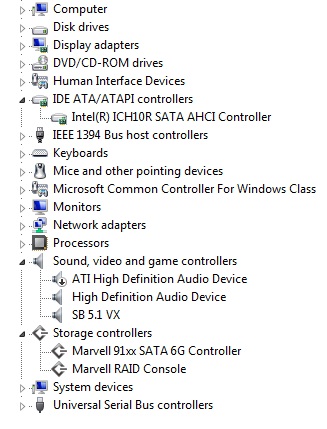
My device manager looks like this after I installed that driver.

NcTWN.jpg
 

My Computer My Computer

At a glance

Windows 7 64 bit
OS
Windows 7 64 bit
Am I boned, then? :huh:
 

My Computer My Computer

At a glance

Windows 7 64 bit
OS
Windows 7 64 bit
Have you tried formatting and re-installing windows?
 

My Computer My Computer

At a glance

Windows 7 Home Premium 64bitIntel Core i5-2500 @ 3.8GHzG.SKILL Ripjaws Series 8GB (2 x 4GB) DDR3 1600NVIDIA GTX 550Ti
Computer Manufacturer/Model Number
Self Built
OS
Windows 7 Home Premium 64bit
CPU
Intel Core i5-2500 @ 3.8GHz
Motherboard
MSI P67A-GD65
Memory
G.SKILL Ripjaws Series 8GB (2 x 4GB) DDR3 1600
Graphics Card(s)
NVIDIA GTX 550Ti
Sound Card
On Board
Monitor(s) Displays
ASUS 23"
Hard Drives
OCZ Vertex 3 VTX3-25SAT3-60G
Keyboard
Wireless
Mouse
Wireless
Yup, that was the first thing I tried after the driver and BIOS updates did nothing.

Is there nothing specific in those error logs then? Every time I play a game I'm getting the same error, and my PC is shutting itself down. Kernel power, event ID 41, task category 63. I've got sixteen identical lined up in my event viewer. The only reason it's not double that is because I didn't switch the PC on for a week, out of frustration. :(
 

My Computer My Computer

At a glance

Windows 7 64 bit
OS
Windows 7 64 bit
Hmm, yesterday I went into my power settings (control panel) and into advanced settings. My HDD was set to turn off after 20 minutes of inactivity, could that have been causing my trouble? I've set it to never turn off, and managed to play a game for a good hour, longer than I ever have before.

It might just be coincidence. Anyone else experiencing the same problem, and reading this, if I don't update within a week assume it fixed everything. :P

Although I personally doubt my problem has gone. I'm starting to think it may be my 600W PSU, perhaps it's not quite enough to power an i7 and my 6870?
 

My Computer My Computer

At a glance

Windows 7 64 bit
OS
Windows 7 64 bit
It wasn't the issue. Still dying.
 

My Computer My Computer

At a glance

Windows 7 64 bit
OS
Windows 7 64 bit
I would try formatting your drive and resetting your BIOS and then reinstalling Windows. The errors from your bug checks were pointing at hard drive issues. This could also be an issue with your motherboard. Have you tried changing SATA ports on the board?
 

My Computer My Computer

At a glance

Windows 7 Home Premium 64bitIntel Core i5-2500 @ 3.8GHzG.SKILL Ripjaws Series 8GB (2 x 4GB) DDR3 1600NVIDIA GTX 550Ti
Computer Manufacturer/Model Number
Self Built
OS
Windows 7 Home Premium 64bit
CPU
Intel Core i5-2500 @ 3.8GHz
Motherboard
MSI P67A-GD65
Memory
G.SKILL Ripjaws Series 8GB (2 x 4GB) DDR3 1600
Graphics Card(s)
NVIDIA GTX 550Ti
Sound Card
On Board
Monitor(s) Displays
ASUS 23"
Hard Drives
OCZ Vertex 3 VTX3-25SAT3-60G
Keyboard
Wireless
Mouse
Wireless
Yup changed SATA ports to no avail.

I'm not going to be too optimistic just yet, but I may have fixed it. I've got my case open and a huge fan pointing at the PC's guts, haven't had a crash in days. Judging by the heat of the individual components, my guess was an overheating PSU. Can't afford a new PSU at the moment, or any proper cooling system, especially when it may not be the problem, but for now my fan seems to be working a treat.

(Watch me post back with the exact same problem next week :P)
 

My Computer My Computer

At a glance

Windows 7 64 bit
OS
Windows 7 64 bit
Back
Top