Solved PC doesn't boot from USB (like it always did)

Tomoms

New member
Local time
2:06 AM
Messages
24
Hi there :-)
Since I installed Windows 7 on my notebook using EFI I'm unable to boot from any USB stick (obviously bootable). For example, if I insert my Windows 7 insallation USB (the same I used to install my system) and I set the correct boot order, my PC boots directly from my hard drive.

Any hint is welcome!
 

My Computer My Computer

Computer type
Laptop
Computer Manufacturer/Model Number
Samsung R530 JA04
OS
Windows 7 Home Premium 64-bit
CPU
Intel Pentium Dual Core T4300 2x2.1 GHz
Motherboard
Samsung Electronics Co. LTD R530/R730
Memory
2x2 GB DDR3 RAM @ 533 MHz
Graphics Card(s)
Intel integrated GMA4500HD
Hard Drives
320 GB
Antivirus
none (Windows Defender)
Browser
Google Chrome/Firefox
Disable EFI

Reinstall windows again.
 

My Computer My Computer

Computer type
PC/Desktop
Computer Manufacturer/Model Number
Skylake Special #666
OS
Windows 10 Pro x64
CPU
Intel Core i7 6700K
Motherboard
Asus Sabertooth Z170 Mark 1
Memory
GSkill TridentZ RGB 16GB 3600 16-16-16-36
Graphics Card(s)
EVGA GTX 980 Ti SC x2
Sound Card
Realtek High Definition
Monitor(s) Displays
AOC G2460PG
Screen Resolution
1920 x 1080 144Hz
Hard Drives
Samsung 860 Pro 256GB, Seagate Barracuda 4TB x2
PSU
EVGA 1000 P2, EVGA White Custom Braided Cables
Case
Corsair Vengeance C70 Gunmetal Black
Cooling
Corsair H100i v2, Corsair ML120 x2, Thermal Grizzly Kryonaut
Keyboard
Logitech G910 Orion Spectrum
Mouse
Logitech G700s
Internet Speed
Verizon Fios Quantum Gateway 75/75
Antivirus
Windows Defender, Malwarebytes Free 3.8.3
Browser
Chrome
Other Info
Corsair SP120 x4, LG Blu-ray Drive, Durabrand HT-395 100 Watt Dolby Digital Amp, Corsair H2100 Wireless 7.1 Headset
Disable EFI

Reinstall windows again.

You may have misunderstood me. I don't want to reinstall Windows again, I just want to boot a Linux distribution or Windows's rescue utility.
 

My Computer My Computer

Computer type
Laptop
Computer Manufacturer/Model Number
Samsung R530 JA04
OS
Windows 7 Home Premium 64-bit
CPU
Intel Pentium Dual Core T4300 2x2.1 GHz
Motherboard
Samsung Electronics Co. LTD R530/R730
Memory
2x2 GB DDR3 RAM @ 533 MHz
Graphics Card(s)
Intel integrated GMA4500HD
Hard Drives
320 GB
Antivirus
none (Windows Defender)
Browser
Google Chrome/Firefox
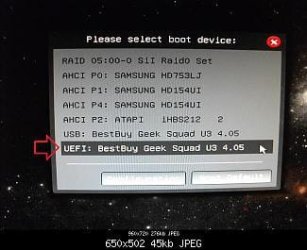
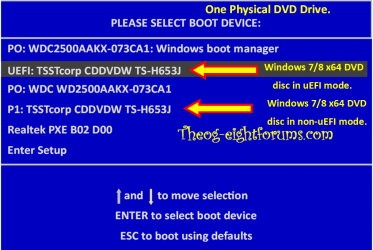
Are you booting the USB in UEFI mode?

UEFI_USB_Boot_Menu.jpg

Windows 8 Downgrade-006 SB for posting.PNG
 

My Computer My Computer

OS
ME/XP/Vista/Win7
Are you booting the USB in UEFI mode?
Yes I am. I haven't got separate entries for EFI/nonEFI mode, I have got an option to enable EFI for all the devices (USBs, HDD, DVDs...) and obviously I've enabled it
 

My Computer My Computer

Computer type
Laptop
Computer Manufacturer/Model Number
Samsung R530 JA04
OS
Windows 7 Home Premium 64-bit
CPU
Intel Pentium Dual Core T4300 2x2.1 GHz
Motherboard
Samsung Electronics Co. LTD R530/R730
Memory
2x2 GB DDR3 RAM @ 533 MHz
Graphics Card(s)
Intel integrated GMA4500HD
Hard Drives
320 GB
Antivirus
none (Windows Defender)
Browser
Google Chrome/Firefox
Disable EFI

Reinstall windows again.

You may have misunderstood me. I don't want to reinstall Windows again, I just want to boot a Linux distribution or Windows's rescue utility.

Why do you want to keep EFI and not go back to Legacy ?
In your other thread Greg asked why you reinstalled in EFI, and you replied "I reinstalled in EFI mode just to try it out".
http://www.sevenforums.com/general-...s-assumes-windows-resuming-2.html#post2874162

To me it seems your problems might be caused by using EFI on this "older laptop" ...
Maybe it's a problem with your laptop/BIOS/EFI ... ???
You could check with Samsung support, but will they support an older product that may need BIOS changes ???

If you didn't have these issues before installing with EFI, why not re-install with Legacy ?
You might be spending more time trying to make things work with EFI than it's worth, and may never work reliably !
:zip:
 

My Computer My Computer

Computer type
PC/Desktop
Computer Manufacturer/Model Number
home built
OS
Multi-Boot W7_Pro_x64 W8.1_Pro_x64 W10_Pro_x64 +Linux_VMs +Chromium_VM
CPU
AMD Athlon II x4 620
Motherboard
Gigabyte GA-MA785G-UD3H
Memory
6GB GSkill DDR2 800
Graphics Card(s)
AMD 4670 GPU + AMD 4200 IGP
Sound Card
on board Realtek ALC889A
Monitor(s) Displays
RCA 40" LCD TV, Insignia 32" LCD TV, HP 15" LCD monitor
Screen Resolution
1680 x 1050
Hard Drives
OCZ Vertex 3 120GB,
Samsung F3 1TB (3),
Several others - WD, Seagate, Hitachi, ...
PSU
Corsair 500 W
Case
Rosewill mid tower
Cooling
CM 90mm rifle
Keyboard
Gyration wireless, Logitech wireless, Dell USB wired
Mouse
Gyration wireless, Logitech wireless, V7 USB wired
Internet Speed
Spectrum - 100Mbps D / 10Mbps U
Antivirus
Avast, MBAM3, EMET, WinPatrol
Browser
Pale Moon, Firefox, IE
Other Info
2 multi-boot PC's
Mainly HTPC/Office/Gen purpose (no gaming).
Trendnet USB KVM.
LG DVD burner/Blue Ray Player.
Tray system for removable SATA backup drives.

Not currently OCd, under-volted.
I use Hybrid sleep, rarely re-boot or shutdown.

Hauppauge HD-PVR, Avermedia PCIe TV Tuner, Hauppauge PCI TV Tuner.
I'm sure this problem is related to Windows simply because on this laptop I've used Linux + EFI for 2 years without these problems. I was able to boot into my Windows USB installer while using Linux in EFI mode, and so I installed Windows.
 

My Computer My Computer

Computer type
Laptop
Computer Manufacturer/Model Number
Samsung R530 JA04
OS
Windows 7 Home Premium 64-bit
CPU
Intel Pentium Dual Core T4300 2x2.1 GHz
Motherboard
Samsung Electronics Co. LTD R530/R730
Memory
2x2 GB DDR3 RAM @ 533 MHz
Graphics Card(s)
Intel integrated GMA4500HD
Hard Drives
320 GB
Antivirus
none (Windows Defender)
Browser
Google Chrome/Firefox
No, I didn`t misunderstand you ;)
 

My Computer My Computer

Computer type
PC/Desktop
Computer Manufacturer/Model Number
Skylake Special #666
OS
Windows 10 Pro x64
CPU
Intel Core i7 6700K
Motherboard
Asus Sabertooth Z170 Mark 1
Memory
GSkill TridentZ RGB 16GB 3600 16-16-16-36
Graphics Card(s)
EVGA GTX 980 Ti SC x2
Sound Card
Realtek High Definition
Monitor(s) Displays
AOC G2460PG
Screen Resolution
1920 x 1080 144Hz
Hard Drives
Samsung 860 Pro 256GB, Seagate Barracuda 4TB x2
PSU
EVGA 1000 P2, EVGA White Custom Braided Cables
Case
Corsair Vengeance C70 Gunmetal Black
Cooling
Corsair H100i v2, Corsair ML120 x2, Thermal Grizzly Kryonaut
Keyboard
Logitech G910 Orion Spectrum
Mouse
Logitech G700s
Internet Speed
Verizon Fios Quantum Gateway 75/75
Antivirus
Windows Defender, Malwarebytes Free 3.8.3
Browser
Chrome
Other Info
Corsair SP120 x4, LG Blu-ray Drive, Durabrand HT-395 100 Watt Dolby Digital Amp, Corsair H2100 Wireless 7.1 Headset
I'm sure this problem is related to Windows simply because on this laptop I've used Linux + EFI for 2 years without these problems. I was able to boot into my Windows USB installer while using Linux in EFI mode, and so I installed Windows.

I didn't know you've been using Linux + EFI ... :shock:

Post a screen print of Disk Management:
http://www.sevenforums.com/tutorials/274797-disk-management-post-screen-capture-image.html

Greg is the top installation guru here.
He may see something in the DM that might help explain things ...
I'll look, but I'm no installation or Linux expert :(
 

My Computer My Computer

Computer type
PC/Desktop
Computer Manufacturer/Model Number
home built
OS
Multi-Boot W7_Pro_x64 W8.1_Pro_x64 W10_Pro_x64 +Linux_VMs +Chromium_VM
CPU
AMD Athlon II x4 620
Motherboard
Gigabyte GA-MA785G-UD3H
Memory
6GB GSkill DDR2 800
Graphics Card(s)
AMD 4670 GPU + AMD 4200 IGP
Sound Card
on board Realtek ALC889A
Monitor(s) Displays
RCA 40" LCD TV, Insignia 32" LCD TV, HP 15" LCD monitor
Screen Resolution
1680 x 1050
Hard Drives
OCZ Vertex 3 120GB,
Samsung F3 1TB (3),
Several others - WD, Seagate, Hitachi, ...
PSU
Corsair 500 W
Case
Rosewill mid tower
Cooling
CM 90mm rifle
Keyboard
Gyration wireless, Logitech wireless, Dell USB wired
Mouse
Gyration wireless, Logitech wireless, V7 USB wired
Internet Speed
Spectrum - 100Mbps D / 10Mbps U
Antivirus
Avast, MBAM3, EMET, WinPatrol
Browser
Pale Moon, Firefox, IE
Other Info
2 multi-boot PC's
Mainly HTPC/Office/Gen purpose (no gaming).
Trendnet USB KVM.
LG DVD burner/Blue Ray Player.
Tray system for removable SATA backup drives.

Not currently OCd, under-volted.
I use Hybrid sleep, rarely re-boot or shutdown.

Hauppauge HD-PVR, Avermedia PCIe TV Tuner, Hauppauge PCI TV Tuner.
I did this test: first thing, I removed my Hard Disk. Then I booted my Linux USB stick and it booted succesfully (EFI=on)! After doing that, I tried with my Windows 7 USB stick and it booted too. So I can say that Windows is causing the problem.
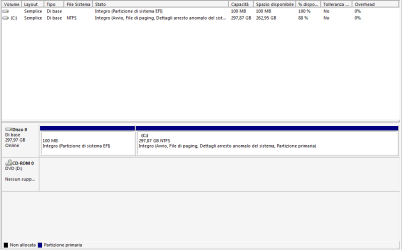
I've attached the screenshot you asked me.
Even though during the installation Windows created 2 little partitions (about 100 MB each) and the main C: drive, Disk Management show only one little partition.
 

Attachments

  • disco.PNG
    disco.PNG
    8.8 KB · Views: 1

My Computer My Computer

Computer type
Laptop
Computer Manufacturer/Model Number
Samsung R530 JA04
OS
Windows 7 Home Premium 64-bit
CPU
Intel Pentium Dual Core T4300 2x2.1 GHz
Motherboard
Samsung Electronics Co. LTD R530/R730
Memory
2x2 GB DDR3 RAM @ 533 MHz
Graphics Card(s)
Intel integrated GMA4500HD
Hard Drives
320 GB
Antivirus
none (Windows Defender)
Browser
Google Chrome/Firefox
It isn't always created but since you say you saw it during install the second MSI Reserved partition is hidden, most likely.

When you can boot media with your HD unplugged that won't otherwise boot it normally is resolved by wiping code from the HD. Even deleting all partitions will not wipe the boot sector of possibly conflicting code (most applicable in this case) or partition table. You'd really need to use Diskpart Clean Command .

I've never seen evidence in a case like this where the HD is clearly blocking media boot that it is caused he OS at all. More likely some conflict with old GRUB code.

You may be wipe the HD while it's plugged in by rebooting with the http://www.carrona.org/hddiag.html CD or Partition Wizard CD in the drive which should autostart. I'd test the HD with the long test anyway to be sure.
 
It isn't always created but since you say you saw it during install the second MSI Reserved partition is hidden, most likely.

When you can boot media with your HD unplugged that won't otherwise boot it normally is resolved by wiping code from the HD. Even deleting all partitions will not wipe the boot sector of possibly conflicting code (most applicable in this case) or partition table. You'd really need to use Diskpart Clean Command .

I've never seen evidence in a case like this where the HD is clearly blocking media boot that it is caused he OS at all. More likely some conflict with old GRUB code.

You may be wipe the HD while it's plugged in by rebooting with the Hard Drive Diagnostic Procedure CD or Partition Wizard CD in the drive which should autostart. I'd test the HD with the long test anyway to be sure.

So the only solution requires wiping the HDD and reinstalling Windows?
 

My Computer My Computer

Computer type
Laptop
Computer Manufacturer/Model Number
Samsung R530 JA04
OS
Windows 7 Home Premium 64-bit
CPU
Intel Pentium Dual Core T4300 2x2.1 GHz
Motherboard
Samsung Electronics Co. LTD R530/R730
Memory
2x2 GB DDR3 RAM @ 533 MHz
Graphics Card(s)
Intel integrated GMA4500HD
Hard Drives
320 GB
Antivirus
none (Windows Defender)
Browser
Google Chrome/Firefox
I solved this problem by booting from USB using a hidden temporary boot menu. I wonder why in the user manual I couldn't find this menu; also, when I chatted with Samsung Support, they didn't told me about it either.
 

My Computer My Computer

Computer type
Laptop
Computer Manufacturer/Model Number
Samsung R530 JA04
OS
Windows 7 Home Premium 64-bit
CPU
Intel Pentium Dual Core T4300 2x2.1 GHz
Motherboard
Samsung Electronics Co. LTD R530/R730
Memory
2x2 GB DDR3 RAM @ 533 MHz
Graphics Card(s)
Intel integrated GMA4500HD
Hard Drives
320 GB
Antivirus
none (Windows Defender)
Browser
Google Chrome/Firefox

My Computer My Computer

Computer type
Laptop
Computer Manufacturer/Model Number
Samsung R530 JA04
OS
Windows 7 Home Premium 64-bit
CPU
Intel Pentium Dual Core T4300 2x2.1 GHz
Motherboard
Samsung Electronics Co. LTD R530/R730
Memory
2x2 GB DDR3 RAM @ 533 MHz
Graphics Card(s)
Intel integrated GMA4500HD
Hard Drives
320 GB
Antivirus
none (Windows Defender)
Browser
Google Chrome/Firefox

My Computer My Computer

Computer type
Laptop
Computer Manufacturer/Model Number
Samsung R530 JA04
OS
Windows 7 Home Premium 64-bit
CPU
Intel Pentium Dual Core T4300 2x2.1 GHz
Motherboard
Samsung Electronics Co. LTD R530/R730
Memory
2x2 GB DDR3 RAM @ 533 MHz
Graphics Card(s)
Intel integrated GMA4500HD
Hard Drives
320 GB
Antivirus
none (Windows Defender)
Browser
Google Chrome/Firefox
Back
Top