
Solved PC doesn't turn on after powering off

cedsays

New member
Local time
9:14 AM
Messages
75
Location
Tampa, FL
Hi

I powered down my computer and it does not turn back on. At first it would power on for maybe a second. I could hear and see the fans spin. There was also no beep the first few times. Confused, I tried again to turn it on again and the same thing happened. Now nothing turns on. The fans don't spin and no lights turn on. The only thing I've noticed was the green light on the motherboard stays on if the powerswitch to the PSU is on. I've tried unplugging everything and replugging one by one. I've tried a different PSU also. I also tried the paper clip test. I'm not sure how accurate that is but for the current PSU (750w) the fan spins for maybe 4 seconds then it stops. On the 450w the fans continue to spin (paper clip test for both) So I tried to switch out the PSU thinking it would help and no luck. Sorry if this is jumbled up and doesn't make sense to anyone.
 

My Computer My Computer

Computer type
PC/Desktop
Computer Manufacturer/Model Number
Cyber Power PC
OS
Microsoft Windows 7 Home Premium 64-bit 7601 Multiprocessor Free Service Pack 1
CPU
AMD Athlon(tm) II X4 630 Processor
Motherboard
ASUSTeK Computer INC. M4A77TD
Memory
4.00 GB
Graphics Card(s)
NVIDIA GeForce GT 220
Sound Card
(1) NVIDIA High Definition Audio (2) NVIDIA High Definitio
Monitor(s) Displays
Generic PnP
Screen Resolution
1920 x 1080 x 32 bits (4294967296 colors) @ 59 Hz
Hard Drives
ST1000DM003-9YN162 ATA Device
PSU
HX Series 750 Watt 80 PLUS® Gold Certified Modular
Keyboard
Rosewill RK-9100
Mouse
Razer Naga
Antivirus
Microsoft Security Essentials & Malwarebytes
Have you checked the power switch connector to the motherboard? Maybe it has come loose.

I've never heard of the paper clip test before. Please enlighten me. :)
 

My Computer My Computer

Computer type
PC/Desktop
Computer Manufacturer/Model Number
Mellon Labs (custom build)
OS
Win 7 Pro x64/Win 10 Pro x64 dual boot
CPU
AMD FX 8350 Vishera @ 4200
Motherboard
ASUS M5A97 R2.0
Memory
16 GB Mushkin Blackline DDR3-2400 @ 1866 (9-10-10-10-31)
Graphics Card(s)
XFX Radeon R9 280 Double D Black Edition
Sound Card
Realtek HD Audio on MB. Sounds great.
Monitor(s) Displays
Acer 24", Acer 22"
Screen Resolution
3840 x 1080
Hard Drives
1 x Mushkin Chronos 120 GB SSD (Win 10)
1 x Samsung 850 EVO 250 GB SSD (Win 7)
1 x WD 1TB SATA Blue
1 x WD 1TB SATA Green
PSU
Corsair TX-750
Case
CoolerMaster HAF 912+
Cooling
Coolermaster Seidon 240M Liquid AIO. 6 case fans
Keyboard
Logitech G710+
Mouse
Logitech G500s
Internet Speed
Much better since I got fiber, but still way overpriced.
Antivirus
MSE, Malware Bytes for scanning
Browser
Firefox
Other Info
Corsair VOID USB headphones.

A Mellon Labs X-1 - LCD Smartie driven system status display.

Brought to you by the letter E
Have you checked the power switch connector to the motherboard? Maybe it has come loose.

I've never heard of the paper clip test before. Please enlighten me. :)

With the PSU not connected to a power cable and switched off You take a paperclip and get it in an U shape. One side goes into green and one into black. Now plug it in and switch it on and you have a running PSU. Can you explain the power switch connector on the mobo?
 

My Computer My Computer

Computer type
PC/Desktop
Computer Manufacturer/Model Number
Cyber Power PC
OS
Microsoft Windows 7 Home Premium 64-bit 7601 Multiprocessor Free Service Pack 1
CPU
AMD Athlon(tm) II X4 630 Processor
Motherboard
ASUSTeK Computer INC. M4A77TD
Memory
4.00 GB
Graphics Card(s)
NVIDIA GeForce GT 220
Sound Card
(1) NVIDIA High Definition Audio (2) NVIDIA High Definitio
Monitor(s) Displays
Generic PnP
Screen Resolution
1920 x 1080 x 32 bits (4294967296 colors) @ 59 Hz
Hard Drives
ST1000DM003-9YN162 ATA Device
PSU
HX Series 750 Watt 80 PLUS® Gold Certified Modular
Keyboard
Rosewill RK-9100
Mouse
Razer Naga
Antivirus
Microsoft Security Essentials & Malwarebytes
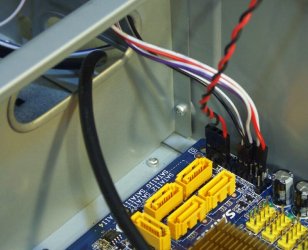
The power switch connector on the mobo is a header that has your power switch, HDD LED, and reset switch connectors from the front panel attached to it. It looks like this:

Power switch 2.jpg

Wired up, it looks like this: (The red and black twisted pair is for your case speaker.)

power switch 3.jpg

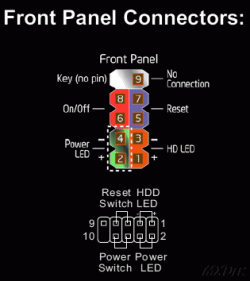
They are pretty much all wired in the same way. In your mobo manual you'll probably see a picture that looks like this:

Power switch 1.gif

Have a look inside your case and try to find the header. It's usually on the front side of the board toward the front side of the case, or along the side of the board. Most of them are toward the front of the case. Make sure that the power switch connection is securely plugged in.
 

My Computer My Computer

Computer type
PC/Desktop
Computer Manufacturer/Model Number
Mellon Labs (custom build)
OS
Win 7 Pro x64/Win 10 Pro x64 dual boot
CPU
AMD FX 8350 Vishera @ 4200
Motherboard
ASUS M5A97 R2.0
Memory
16 GB Mushkin Blackline DDR3-2400 @ 1866 (9-10-10-10-31)
Graphics Card(s)
XFX Radeon R9 280 Double D Black Edition
Sound Card
Realtek HD Audio on MB. Sounds great.
Monitor(s) Displays
Acer 24", Acer 22"
Screen Resolution
3840 x 1080
Hard Drives
1 x Mushkin Chronos 120 GB SSD (Win 10)
1 x Samsung 850 EVO 250 GB SSD (Win 7)
1 x WD 1TB SATA Blue
1 x WD 1TB SATA Green
PSU
Corsair TX-750
Case
CoolerMaster HAF 912+
Cooling
Coolermaster Seidon 240M Liquid AIO. 6 case fans
Keyboard
Logitech G710+
Mouse
Logitech G500s
Internet Speed
Much better since I got fiber, but still way overpriced.
Antivirus
MSE, Malware Bytes for scanning
Browser
Firefox
Other Info
Corsair VOID USB headphones.

A Mellon Labs X-1 - LCD Smartie driven system status display.

Brought to you by the letter E
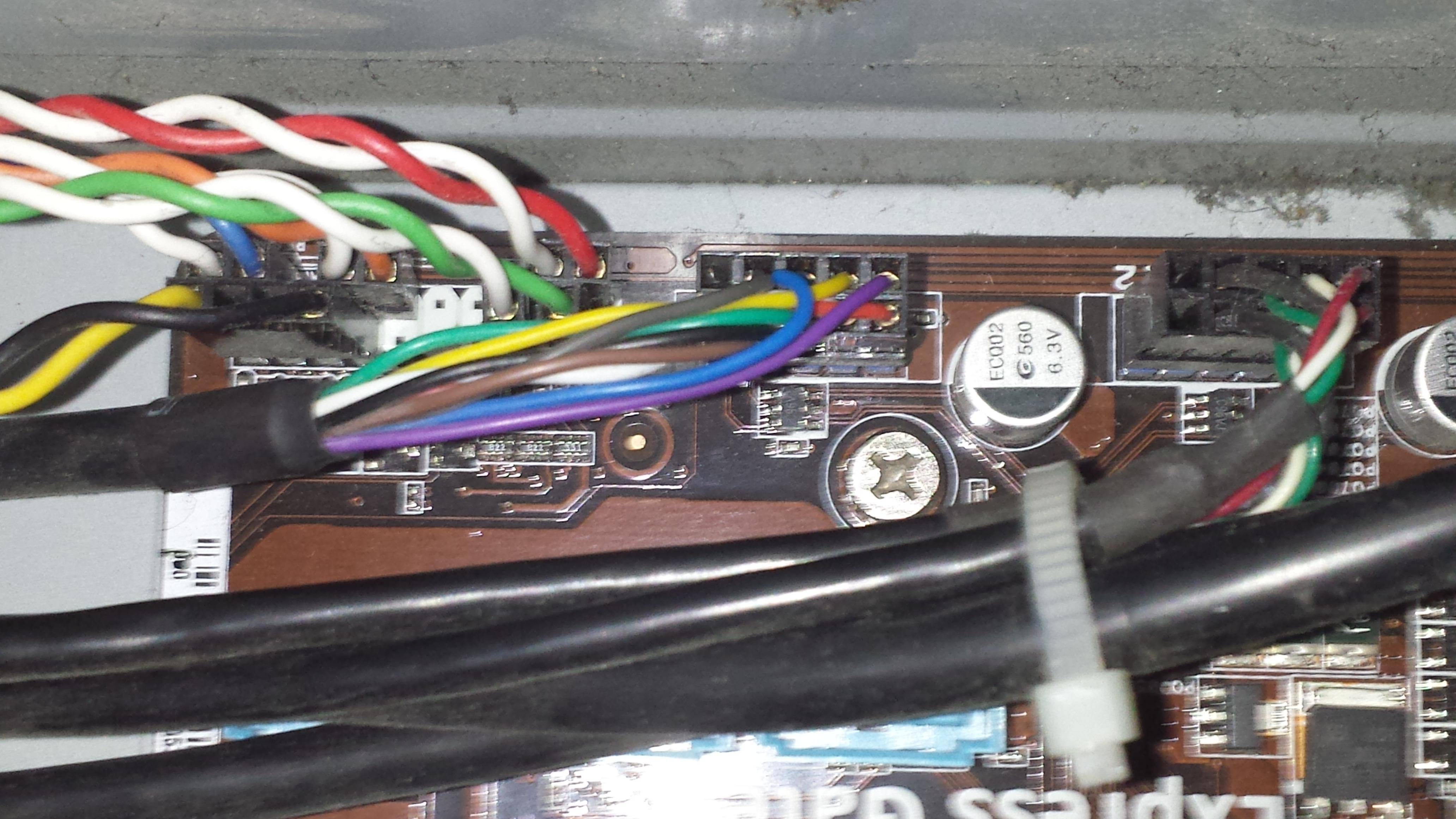
ifydXzc.jpg


Hopefully this is what you were talking about. There was no black and red but this.
 

My Computer My Computer

Computer type
PC/Desktop
Computer Manufacturer/Model Number
Cyber Power PC
OS
Microsoft Windows 7 Home Premium 64-bit 7601 Multiprocessor Free Service Pack 1
CPU
AMD Athlon(tm) II X4 630 Processor
Motherboard
ASUSTeK Computer INC. M4A77TD
Memory
4.00 GB
Graphics Card(s)
NVIDIA GeForce GT 220
Sound Card
(1) NVIDIA High Definition Audio (2) NVIDIA High Definitio
Monitor(s) Displays
Generic PnP
Screen Resolution
1920 x 1080 x 32 bits (4294967296 colors) @ 59 Hz
Hard Drives
ST1000DM003-9YN162 ATA Device
PSU
HX Series 750 Watt 80 PLUS® Gold Certified Modular
Keyboard
Rosewill RK-9100
Mouse
Razer Naga
Antivirus
Microsoft Security Essentials & Malwarebytes
Looks like the right connector. johnsmith45jock reminded me that there is an easy way to test the front power switch. Unplug the power switch wires from that connector on the motherboard and short the two pins together. If the power switch is bad, the computer should start up and stay running. The power switch is momentary, so you just need to short the pins for a half second or so.

Try that and see if it works for you.
 

My Computer My Computer

Computer type
PC/Desktop
Computer Manufacturer/Model Number
Mellon Labs (custom build)
OS
Win 7 Pro x64/Win 10 Pro x64 dual boot
CPU
AMD FX 8350 Vishera @ 4200
Motherboard
ASUS M5A97 R2.0
Memory
16 GB Mushkin Blackline DDR3-2400 @ 1866 (9-10-10-10-31)
Graphics Card(s)
XFX Radeon R9 280 Double D Black Edition
Sound Card
Realtek HD Audio on MB. Sounds great.
Monitor(s) Displays
Acer 24", Acer 22"
Screen Resolution
3840 x 1080
Hard Drives
1 x Mushkin Chronos 120 GB SSD (Win 10)
1 x Samsung 850 EVO 250 GB SSD (Win 7)
1 x WD 1TB SATA Blue
1 x WD 1TB SATA Green
PSU
Corsair TX-750
Case
CoolerMaster HAF 912+
Cooling
Coolermaster Seidon 240M Liquid AIO. 6 case fans
Keyboard
Logitech G710+
Mouse
Logitech G500s
Internet Speed
Much better since I got fiber, but still way overpriced.
Antivirus
MSE, Malware Bytes for scanning
Browser
Firefox
Other Info
Corsair VOID USB headphones.

A Mellon Labs X-1 - LCD Smartie driven system status display.

Brought to you by the letter E
Looks like the right connector. johnsmith45jock reminded me that there is an easy way to test the front power switch. Unplug the power switch wires from that connector on the motherboard and short the two pins together. If the power switch is bad, the computer should start up and stay running. The power switch is momentary, so you just need to short the pins for a half second or so.

Try that and see if it works for you.

I've tried it to the best of my ability and got no results.
 

My Computer My Computer

Computer type
PC/Desktop
Computer Manufacturer/Model Number
Cyber Power PC
OS
Microsoft Windows 7 Home Premium 64-bit 7601 Multiprocessor Free Service Pack 1
CPU
AMD Athlon(tm) II X4 630 Processor
Motherboard
ASUSTeK Computer INC. M4A77TD
Memory
4.00 GB
Graphics Card(s)
NVIDIA GeForce GT 220
Sound Card
(1) NVIDIA High Definition Audio (2) NVIDIA High Definitio
Monitor(s) Displays
Generic PnP
Screen Resolution
1920 x 1080 x 32 bits (4294967296 colors) @ 59 Hz
Hard Drives
ST1000DM003-9YN162 ATA Device
PSU
HX Series 750 Watt 80 PLUS® Gold Certified Modular
Keyboard
Rosewill RK-9100
Mouse
Razer Naga
Antivirus
Microsoft Security Essentials & Malwarebytes
Replace the Motherboard. If you're confident that your wall power, power supply, and power button are working, it's likely that there is a problem with your PC's Motherboard and should be replaced.

John
 

My Computers My Computers

System One System Two

  • Computer type
    PC/Desktop
    Computer Manufacturer/Model Number
    HP Pavilion 6751c
    OS
    Win7, Win10, Win11
    Internet Speed
    100 Mbps
    Antivirus
    Norton 360
    Browser
    IE 11
  • Computer type
    PC/Desktop
    System Manufacturer/Model Number
    HP ENVY 750-514 & Dell XPS 8960
    OS
    Win7, Win10, Win11
    Antivirus
    Norton 360
It was only a matter of time before it kicked off. Going to be a long 4 months until I can afford it. Shall I mark as solved or leave open for a few month until I get it fixed?
 

My Computer My Computer

Computer type
PC/Desktop
Computer Manufacturer/Model Number
Cyber Power PC
OS
Microsoft Windows 7 Home Premium 64-bit 7601 Multiprocessor Free Service Pack 1
CPU
AMD Athlon(tm) II X4 630 Processor
Motherboard
ASUSTeK Computer INC. M4A77TD
Memory
4.00 GB
Graphics Card(s)
NVIDIA GeForce GT 220
Sound Card
(1) NVIDIA High Definition Audio (2) NVIDIA High Definitio
Monitor(s) Displays
Generic PnP
Screen Resolution
1920 x 1080 x 32 bits (4294967296 colors) @ 59 Hz
Hard Drives
ST1000DM003-9YN162 ATA Device
PSU
HX Series 750 Watt 80 PLUS® Gold Certified Modular
Keyboard
Rosewill RK-9100
Mouse
Razer Naga
Antivirus
Microsoft Security Essentials & Malwarebytes
Is this the same computer you have listed in your system specs?

Motherboard: ASUSTeK Computer INC. M4A77TD

Some of our other members may have some additional comments to add. So keep the thread open for awhile longer.

If money is an issue, maybe go with Manufacturer refurbished with 60 day warranty. Cost is about $50. for your Mobo.
 

My Computers My Computers

System One System Two

  • Computer type
    PC/Desktop
    Computer Manufacturer/Model Number
    HP Pavilion 6751c
    OS
    Win7, Win10, Win11
    Internet Speed
    100 Mbps
    Antivirus
    Norton 360
    Browser
    IE 11
  • Computer type
    PC/Desktop
    System Manufacturer/Model Number
    HP ENVY 750-514 & Dell XPS 8960
    OS
    Win7, Win10, Win11
    Antivirus
    Norton 360
Replace the power input cable. May help, can't hurt. Look for any signs of being burnt.
The cable that goes from the wall socket to the power supply.
Make sure it is a cable designed for a power supply and not a video screen. They have the same ends.
My power supply cords are either 14 or 16 AWG. This is found on the cable.
The smaller cables are not rated for the proper amps.

American wire gauge - Wikipedia, the free encyclopedia
 

My Computer My Computer

Computer type
PC/Desktop
Computer Manufacturer/Model Number
Home made Desktop
OS
Windows 10 Pro. 64/ version 1709 Windows 7 Pro/64
CPU
Intel i7-6800K @ 4.3
Motherboard
ASUS X-99 Deluxe II
Memory
Corsair Platinum 16 gig @2400
Graphics Card(s)
EVGA GTX 1070 OC
Monitor(s) Displays
Asus 27" LED LCD/VE278Q
Screen Resolution
1920-1080 or 1280-720 HDMI
Hard Drives
INTEL SSD 730-240 Gb Sata 3.0/
PSU
EVGA Platium 1200W
Case
Phanteks Luxe Tempered Glass 8 fans/ one radiator
Cooling
XSPC/ Water Cooled CPU
Keyboard
Das 4 Professional
Mouse
Logitech M705/MX Anywhere 2-S
Internet Speed
100 mbits
Antivirus
Microsoft Security Essentials/ Malwarebytes Premium 3.0/ SAS
Browser
I.E. 11 default/Firefox/ ISP Time Warner Cable/Spectrum
Other Info
LG BluRay Burner/
Sound system-KLipsch-THX/
Icy Dock ssd Hot Swap bays.
My 2cents worth take a look at this and then test the volts at pin 8 (grey) on the 24 pin if this voltage fluctuates lower than 2.4 or higher than 6.0 volts then the PSU self test is failing and the PSU is faulty.

http://www.tomshardware.com/reviews/power-supply-specifications-atx-reference,3061-2.html

see Power_Good in section 2.

PS Use a digital multimeter not the analogue type RED lead pin 8 BLACK lead any black pin or even the board fixing screws.

It might even be worth testing the resistance between a black 24 pin lead and the board fixing screw. So set to resistance (OHMS) and touch across the machine ideally should be shut down and should read zero ohms.
 

My Computer My Computer

Computer type
PC/Desktop
Computer Manufacturer/Model Number
Own build (new) Desk1 / Asus ROG Win 7 / Desk2 1st build
OS
Desk1 7 Home Prem / Desk2 10 Pro / Main lap Asus ROG 10 Pro 2 laptop Toshiba 7 Pro Asus P2520 7 & 10
CPU
Desk1 i5 3750K / Laptop i7 GTX 860M / Desk2 i5 2500
Motherboard
Desk1 Asus P877-V / Desk2 Gigabyte H67 UD3H / Laptop ?
Memory
Desk1 8GB (1866) / Desk2 16GB (1333) / Laptop 8Gb DDR3
Graphics Card(s)
Desk 1& 2NVidia GTX 650 & Laptops on board Intel
Sound Card
Desk 1 & 2 -XONAR DG Realtek High Def audio Laptop
Monitor(s) Displays
Desk 1 Benq HD 2450 / Desk2 Philips 24" / Laptop 17.5"
Screen Resolution
1920x1080 D1 & D2 & Laptop 1
Hard Drives
Desk1 Samsung 120GB 830 SSD
Asus ROG 256GB 850 Pro SSD
Desk2 Samsung 840 256 SSD
Toshiba 120GB EVO
PSU
Desk 1 Corsair HX 1050/ Laptop ? / Desk 2 Corsair HX 650
Case
Desk 1 Cooler HAF XM ? Toshiba laptop / Desk2 Coolermaster
Cooling
Fans on all Desk1 -2 Desk2 - all Coolermasters 5 Laptop ?
Keyboard
Desk 1 MS Sidewinder X6 Desk 2 MS Sidewinder X 4
Mouse
Desk 1&2 - Gigabyte MS 900 gamer - laptop - Logitec wireless
Internet Speed
ADSL2+
Other Info
One other Desktop (tester) and spare Toshba laptop both with SSD's
Running Kaspersky 2016 ISS on all machines config'd identically
Logitec audio stereo systems on each machine (x3)
Canon MG5250MFC
Router/modem TP-Link running WPA2SK
Unplug all PSU cables except the 24 pin and 4 pin atx mobo cables. If it still powers on for just a few seconds it's probably a short in the mobo.
 

My Computer My Computer

Computer type
PC/Desktop
Computer Manufacturer/Model Number
Custom, Dell and Lenono LT's
OS
Win8/8.1,Win7-U64, Vista U64, uncounted Linux distor's
CPU
AMD and Intell, 9590, 8350, i5 3570k
Motherboard
CFVFZ, GA990FXA, Z77e-itx
Memory
Corsair G Skill
Graphics Card(s)
Crossfired Sapphire HD 7950 Vapor-X, ASUS R9 280X TOP
Sound Card
Realtek ALC889
Monitor(s) Displays
ViewSonic VX2770SMH 27" / ViewSonic VX2433 LCD 24"
Screen Resolution
1080i HD
Hard Drives
Samsung SSD 840 Pro
OCZ Agility 3's
OCZ Vector's
WD's Blue, red, green, Velociraptors
Seagate USB3 & Hybrid's
ASUS Blu-Ray
ASUS DVD
PSU
Corsair AX1200i, Seasonice 850 Gold
Case
Cooler Master HAF 922 & HAF 932, Lian Li Train case.
Cooling
Air, Glacer 240L expanded, custom EK loop with duel D5's
Keyboard
Microsoft SideWinder X4 USB Keyboard / Logitech 250 PS2
Mouse
Logitech G500 / MS wireless 5000
Internet Speed
Best of 5ms / 75+ dn / 12+ up More or less.
Antivirus
MS esentials-MalwareBytes
Browser
Firefox Chromebook
Unplug all PSU cables except the 24 pin and 4 pin atx mobo cables. If it still powers on for just a few seconds it's probably a short in the mobo.

I've tried this. There is a green light on the mobo but nothing powers on
 

My Computer My Computer

Computer type
PC/Desktop
Computer Manufacturer/Model Number
Cyber Power PC
OS
Microsoft Windows 7 Home Premium 64-bit 7601 Multiprocessor Free Service Pack 1
CPU
AMD Athlon(tm) II X4 630 Processor
Motherboard
ASUSTeK Computer INC. M4A77TD
Memory
4.00 GB
Graphics Card(s)
NVIDIA GeForce GT 220
Sound Card
(1) NVIDIA High Definition Audio (2) NVIDIA High Definitio
Monitor(s) Displays
Generic PnP
Screen Resolution
1920 x 1080 x 32 bits (4294967296 colors) @ 59 Hz
Hard Drives
ST1000DM003-9YN162 ATA Device
PSU
HX Series 750 Watt 80 PLUS® Gold Certified Modular
Keyboard
Rosewill RK-9100
Mouse
Razer Naga
Antivirus
Microsoft Security Essentials & Malwarebytes
The green motherboard light means it's getting power, but doesn't mean the motherboard is working.

Pull out the RAM sticks, then try one stick at a time. See if it will start.

You can also, take the CPU to a shop and have it tested.

Perhaps, some of our others members will have more suggestions.
 

My Computers My Computers

System One System Two

  • Computer type
    PC/Desktop
    Computer Manufacturer/Model Number
    HP Pavilion 6751c
    OS
    Win7, Win10, Win11
    Internet Speed
    100 Mbps
    Antivirus
    Norton 360
    Browser
    IE 11
  • Computer type
    PC/Desktop
    System Manufacturer/Model Number
    HP ENVY 750-514 & Dell XPS 8960
    OS
    Win7, Win10, Win11
    Antivirus
    Norton 360
Mate try leaving the 24 pin in and just test the cables to the CPU and GPU etc etc if there is no volts coming through then that may indicate that the CPU (or the GPU) is getting no supply.

Do you get any beeps at all on power up? Maybe the RAM is shot might be worth trying this.

MEMTEST

http://www.sevenforums.com/tutorials/105647-ram-test-memtest86.htmlthis one you will need to make a bootable disk set the BIOSto optical (or USB if preferred) boot the machine and let it run for at LEAST 8 passes unless the errors come upstraight away. Takes a fair time to complete and some leave it runningovernight.

If you do get errors and have morethan one stick then you will need to test each one separately and maybe even inthe separate slots.
 

My Computer My Computer

Computer type
PC/Desktop
Computer Manufacturer/Model Number
Own build (new) Desk1 / Asus ROG Win 7 / Desk2 1st build
OS
Desk1 7 Home Prem / Desk2 10 Pro / Main lap Asus ROG 10 Pro 2 laptop Toshiba 7 Pro Asus P2520 7 & 10
CPU
Desk1 i5 3750K / Laptop i7 GTX 860M / Desk2 i5 2500
Motherboard
Desk1 Asus P877-V / Desk2 Gigabyte H67 UD3H / Laptop ?
Memory
Desk1 8GB (1866) / Desk2 16GB (1333) / Laptop 8Gb DDR3
Graphics Card(s)
Desk 1& 2NVidia GTX 650 & Laptops on board Intel
Sound Card
Desk 1 & 2 -XONAR DG Realtek High Def audio Laptop
Monitor(s) Displays
Desk 1 Benq HD 2450 / Desk2 Philips 24" / Laptop 17.5"
Screen Resolution
1920x1080 D1 & D2 & Laptop 1
Hard Drives
Desk1 Samsung 120GB 830 SSD
Asus ROG 256GB 850 Pro SSD
Desk2 Samsung 840 256 SSD
Toshiba 120GB EVO
PSU
Desk 1 Corsair HX 1050/ Laptop ? / Desk 2 Corsair HX 650
Case
Desk 1 Cooler HAF XM ? Toshiba laptop / Desk2 Coolermaster
Cooling
Fans on all Desk1 -2 Desk2 - all Coolermasters 5 Laptop ?
Keyboard
Desk 1 MS Sidewinder X6 Desk 2 MS Sidewinder X 4
Mouse
Desk 1&2 - Gigabyte MS 900 gamer - laptop - Logitec wireless
Internet Speed
ADSL2+
Other Info
One other Desktop (tester) and spare Toshba laptop both with SSD's
Running Kaspersky 2016 ISS on all machines config'd identically
Logitec audio stereo systems on each machine (x3)
Canon MG5250MFC
Router/modem TP-Link running WPA2SK
It was only a matter of time before it kicked off. Going to be a long 4 months until I can afford it. Shall I mark as solved or leave open for a few month until I get it fixed?
Not sure this will help, but I would try it before I replaced the Mobo. Shutdown and disconnect the power cord. Wait for about 20 seconds.

Remove and replace the CMOS battery and restart your computer. This will start you off fresh as with a new build.

It is a lot of work, but not so much if it works. Hope this helps.
 

My Computer My Computer

Computer type
PC/Desktop
Computer Manufacturer/Model Number
home built
OS
Windows 7 Professional 64bit
CPU
AMD 8 core 8350 Black Edition
Motherboard
ASUS Sabertooth 990FX R2.0
Memory
GSkill 1866 16 GB ddr3
Graphics Card(s)
XFX R7850 Double Dissipation PCI Express 2GB DDR5
Hard Drives
256GB SSD
128GB SSD
TB 6GB/s
TB 3GB/s
Antivirus
ClamAv
Browser
Firefox/Explorer
For what it is worth I had the same thing happen a couple of years back. First thought was PSU. Didn't help but needed better on anyway. We were travelling around the Yukon and Alaska at the time and really needed the computer. Desperation says WTF can't do any worse,(maybe) so I tried removing all the cards on mobo, tuners, video etc. Obviously with video out nothing is visible but lo and behold, a miracle. When powered on the HDD active light is keeping its flash a second seek light going. Put cards in one at a time and it was the video card killing it. Found new video card (this part hurt) $125 for a cheapie that cost $37 in Calgary but beggars can't be choosers and it worked perfectly for the rest of the summer.

This may or may not help you but the price is free. Good luck,
Art.
 

My Computer My Computer

Computer type
PC/Desktop
Computer Manufacturer/Model Number
Home built
OS
Win7 sp1 Pro 64bit / XP sp2 Pro (games only)
CPU
Intel Core 2 Duo E8400 @ 3.00GHz
Motherboard
Intel Corporation DP35DP (CPU1)
Memory
8.00 GB Dual-Channel DDR2 @ 400MHz (5-5-5-18)
Graphics Card(s)
1024MB GeForce GTX 560
Sound Card
NVIDIA High Definition Audio
Monitor(s) Displays
SyncMaster (2048x1152@60Hz)
Hard Drives
240GB Sandisc Extreme Pro SSD
244GB Seagate ST3250410AS
488GB Seagate ST500DM002-1BD142
931GB Western Digital WDC WD1003FZEX
PSU
Corsair 720
Case
ATX
Keyboard
HID Keyboard Device Logitech
Mouse
HID-compliant mouse Microsoft
Other Info
TSSTcorp CDDVDW SH-S223L

HL-DT-ST BD-RE BH12LS35
I just dealt with a power switch problem on one of my computers. To test if the motherboard headers were working correctly you can jump the circuit without the power switch (carefully with a screwdriver). I fixed the issue by going to radioshack and buying a momentary power switch. Any momentary power switch should do because all your doing in connecting a circuit. I cut off the old switch and wired on the new one. Computer works great now.
 

My Computer My Computer

Computer type
PC/Desktop
Computer Manufacturer/Model Number
custom
OS
Windows 7 64-bit
CPU
Intel 4690K
Motherboard
Asus Tuf Gryphon Z97
Memory
Corsair Vengeance 2133
Graphics Card(s)
EVGA GTX1060
Screen Resolution
1080p
Hard Drives
Crucial m500 SSD 240gb
PSU
EVGA
Case
Fractal Design
Cooling
H7
Browser
Chrome
It's been a few months but I'm back! I've finally purchased a new motherboard and CPU. My problem now is the hard drive isn't booting. "reboot and select proper boot device. I've tried everything to get into BIOS but no luck. Would I need to purchase a new hard drive to work with a new mobo/cpu?
 

My Computer My Computer

Computer type
PC/Desktop
Computer Manufacturer/Model Number
Cyber Power PC
OS
Microsoft Windows 7 Home Premium 64-bit 7601 Multiprocessor Free Service Pack 1
CPU
AMD Athlon(tm) II X4 630 Processor
Motherboard
ASUSTeK Computer INC. M4A77TD
Memory
4.00 GB
Graphics Card(s)
NVIDIA GeForce GT 220
Sound Card
(1) NVIDIA High Definition Audio (2) NVIDIA High Definitio
Monitor(s) Displays
Generic PnP
Screen Resolution
1920 x 1080 x 32 bits (4294967296 colors) @ 59 Hz
Hard Drives
ST1000DM003-9YN162 ATA Device
PSU
HX Series 750 Watt 80 PLUS® Gold Certified Modular
Keyboard
Rosewill RK-9100
Mouse
Razer Naga
Antivirus
Microsoft Security Essentials & Malwarebytes
Back
Top