Solved PC doesn't turn on after powering off

As far as I know, you shouldn't need a new HDD after changing the CPU/MB. (You might need a fresh install of windows tho)

Do you have only one HDD?
If so, under BIOS, is the HDD as the primary boot device? (Press DEL during PRE to go into BIOS)
 

My Computer My Computer

Computer type
PC/Desktop
Computer Manufacturer/Model Number
Custom build
OS
Windows 7 ultimate x64
CPU
AMD Athlon II x2 245
Motherboard
Asrock N68C-GS FX
Memory
6 GB DDR3 1800 mhz
Graphics Card(s)
nVidia GeForce GT220
Sound Card
Creative SB Audigy SE
Monitor(s) Displays
Acer V226HQL
Screen Resolution
1920x1080
Browser
Google Chrome
As breaker syas mate you should be able to get into the bIOS before the OS fires up with the DEL key being tapped on power on.

If you cannot then try removing the CMOS battery and wait for a minute or so then replace it and try again.

If it still will not go into BIOS then I am thinking you may have a faulty board:(
 

My Computer My Computer

Computer type
PC/Desktop
Computer Manufacturer/Model Number
Own build (new) Desk1 / Asus ROG Win 7 / Desk2 1st build
OS
Desk1 7 Home Prem / Desk2 10 Pro / Main lap Asus ROG 10 Pro 2 laptop Toshiba 7 Pro Asus P2520 7 & 10
CPU
Desk1 i5 3750K / Laptop i7 GTX 860M / Desk2 i5 2500
Motherboard
Desk1 Asus P877-V / Desk2 Gigabyte H67 UD3H / Laptop ?
Memory
Desk1 8GB (1866) / Desk2 16GB (1333) / Laptop 8Gb DDR3
Graphics Card(s)
Desk 1& 2NVidia GTX 650 & Laptops on board Intel
Sound Card
Desk 1 & 2 -XONAR DG Realtek High Def audio Laptop
Monitor(s) Displays
Desk 1 Benq HD 2450 / Desk2 Philips 24" / Laptop 17.5"
Screen Resolution
1920x1080 D1 & D2 & Laptop 1
Hard Drives
Desk1 Samsung 120GB 830 SSD
Asus ROG 256GB 850 Pro SSD
Desk2 Samsung 840 256 SSD
Toshiba 120GB EVO
PSU
Desk 1 Corsair HX 1050/ Laptop ? / Desk 2 Corsair HX 650
Case
Desk 1 Cooler HAF XM ? Toshiba laptop / Desk2 Coolermaster
Cooling
Fans on all Desk1 -2 Desk2 - all Coolermasters 5 Laptop ?
Keyboard
Desk 1 MS Sidewinder X6 Desk 2 MS Sidewinder X 4
Mouse
Desk 1&2 - Gigabyte MS 900 gamer - laptop - Logitec wireless
Internet Speed
ADSL2+
Other Info
One other Desktop (tester) and spare Toshba laptop both with SSD's
Running Kaspersky 2016 ISS on all machines config'd identically
Logitec audio stereo systems on each machine (x3)
Canon MG5250MFC
Router/modem TP-Link running WPA2SK
I've tried my old drive to see what happens and it says "Hard Disk: S.M.A.R.T. Status Bad, Backup and Replace" With this drive I can get into BIOS. With my last drive, the one that was working before everything went sour, it goes straight to "Reboot and select proper boot device or insert boot media in selected boot device" I'm not able to get into BIOS with it.
 

My Computer My Computer

Computer type
PC/Desktop
Computer Manufacturer/Model Number
Cyber Power PC
OS
Microsoft Windows 7 Home Premium 64-bit 7601 Multiprocessor Free Service Pack 1
CPU
AMD Athlon(tm) II X4 630 Processor
Motherboard
ASUSTeK Computer INC. M4A77TD
Memory
4.00 GB
Graphics Card(s)
NVIDIA GeForce GT 220
Sound Card
(1) NVIDIA High Definition Audio (2) NVIDIA High Definitio
Monitor(s) Displays
Generic PnP
Screen Resolution
1920 x 1080 x 32 bits (4294967296 colors) @ 59 Hz
Hard Drives
ST1000DM003-9YN162 ATA Device
PSU
HX Series 750 Watt 80 PLUS® Gold Certified Modular
Keyboard
Rosewill RK-9100
Mouse
Razer Naga
Antivirus
Microsoft Security Essentials & Malwarebytes
Ok well get into the BIOS with the old drive and set the boot to the first boot feature.

Then try again with the new drive if things go awry then there is something wrong with the new drive.

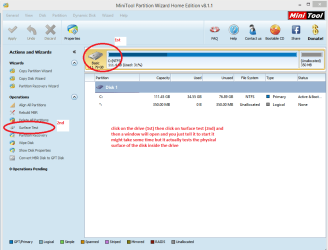
One thing you could do is to boot with the old drive and hook up the new drive as an external and test it with something like this SeaTools for Windows | Seagate and another physical test is this surface test with Partition Wizard.
Best Free Partition Manager Freeware and free partition magic for Windows 7, Windows 8, Windows Vista and Windows XP 32 bit & 64 bit. MiniTool Free Partition Manager Software Home Edition. see my pic for how to do.
 

Attachments

  • MINI TOOL SURFACE.PNG
    MINI TOOL SURFACE.PNG
    31.4 KB · Views: 3

My Computer My Computer

Computer type
PC/Desktop
Computer Manufacturer/Model Number
Own build (new) Desk1 / Asus ROG Win 7 / Desk2 1st build
OS
Desk1 7 Home Prem / Desk2 10 Pro / Main lap Asus ROG 10 Pro 2 laptop Toshiba 7 Pro Asus P2520 7 & 10
CPU
Desk1 i5 3750K / Laptop i7 GTX 860M / Desk2 i5 2500
Motherboard
Desk1 Asus P877-V / Desk2 Gigabyte H67 UD3H / Laptop ?
Memory
Desk1 8GB (1866) / Desk2 16GB (1333) / Laptop 8Gb DDR3
Graphics Card(s)
Desk 1& 2NVidia GTX 650 & Laptops on board Intel
Sound Card
Desk 1 & 2 -XONAR DG Realtek High Def audio Laptop
Monitor(s) Displays
Desk 1 Benq HD 2450 / Desk2 Philips 24" / Laptop 17.5"
Screen Resolution
1920x1080 D1 & D2 & Laptop 1
Hard Drives
Desk1 Samsung 120GB 830 SSD
Asus ROG 256GB 850 Pro SSD
Desk2 Samsung 840 256 SSD
Toshiba 120GB EVO
PSU
Desk 1 Corsair HX 1050/ Laptop ? / Desk 2 Corsair HX 650
Case
Desk 1 Cooler HAF XM ? Toshiba laptop / Desk2 Coolermaster
Cooling
Fans on all Desk1 -2 Desk2 - all Coolermasters 5 Laptop ?
Keyboard
Desk 1 MS Sidewinder X6 Desk 2 MS Sidewinder X 4
Mouse
Desk 1&2 - Gigabyte MS 900 gamer - laptop - Logitec wireless
Internet Speed
ADSL2+
Other Info
One other Desktop (tester) and spare Toshba laptop both with SSD's
Running Kaspersky 2016 ISS on all machines config'd identically
Logitec audio stereo systems on each machine (x3)
Canon MG5250MFC
Router/modem TP-Link running WPA2SK
Both Hard drives are old. the oldest (2nd) I know for sure is bad,which is why I bought the 1st one. I can get into BIOS on the bad one but I can not get it to boot my windows disk. The newest of the two goes straight to the reboot with proper device screen without the chance to get into BIOS.

Sorry if confusing.
 

My Computer My Computer

Computer type
PC/Desktop
Computer Manufacturer/Model Number
Cyber Power PC
OS
Microsoft Windows 7 Home Premium 64-bit 7601 Multiprocessor Free Service Pack 1
CPU
AMD Athlon(tm) II X4 630 Processor
Motherboard
ASUSTeK Computer INC. M4A77TD
Memory
4.00 GB
Graphics Card(s)
NVIDIA GeForce GT 220
Sound Card
(1) NVIDIA High Definition Audio (2) NVIDIA High Definitio
Monitor(s) Displays
Generic PnP
Screen Resolution
1920 x 1080 x 32 bits (4294967296 colors) @ 59 Hz
Hard Drives
ST1000DM003-9YN162 ATA Device
PSU
HX Series 750 Watt 80 PLUS® Gold Certified Modular
Keyboard
Rosewill RK-9100
Mouse
Razer Naga
Antivirus
Microsoft Security Essentials & Malwarebytes
Cedsays mate try accessing the BIOS without any hard drive in at all if this doesn't work then we might be in trouble with the motherboard.

I am still leaning towards a faulty or bad board to be honest.

One method of booting into anything is this

BOOTABLE UBUNTU

Make a bootable Ubuntu disk http://www.ubuntu.com/download

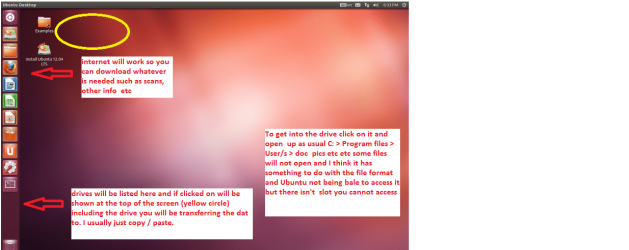
Set the BIOS to boot from theoptical when the machine boots it will show you a screen with TRY or INSTALL> select TRYnot INSTALL

When it is finished - it takes verylittle time you will get a screen like in the pic .

Open the drive you want > Userand dig down until you get to the data / settings you may be able to copy /paste the material you want to an external source or other installed drive doingthis.

I am not sure if it will but I haverecovered tons of data etc using this method both on "dead" or justplain drives that you cannot get data from using Windows.

Of course where I state set the BIOS you need not bother as if there are no hard drives installed then it your machine will look for another boot source. But when that TRY or INSTALL comes up just pick TRY as in my screed.
Now if this works then the BIOS is working because it has found the optical drive in a BIOS boot setting.
 

Attachments

  • Ubuntu screen.PNG
    Ubuntu screen.PNG
    103 KB · Views: 2

My Computer My Computer

Computer type
PC/Desktop
Computer Manufacturer/Model Number
Own build (new) Desk1 / Asus ROG Win 7 / Desk2 1st build
OS
Desk1 7 Home Prem / Desk2 10 Pro / Main lap Asus ROG 10 Pro 2 laptop Toshiba 7 Pro Asus P2520 7 & 10
CPU
Desk1 i5 3750K / Laptop i7 GTX 860M / Desk2 i5 2500
Motherboard
Desk1 Asus P877-V / Desk2 Gigabyte H67 UD3H / Laptop ?
Memory
Desk1 8GB (1866) / Desk2 16GB (1333) / Laptop 8Gb DDR3
Graphics Card(s)
Desk 1& 2NVidia GTX 650 & Laptops on board Intel
Sound Card
Desk 1 & 2 -XONAR DG Realtek High Def audio Laptop
Monitor(s) Displays
Desk 1 Benq HD 2450 / Desk2 Philips 24" / Laptop 17.5"
Screen Resolution
1920x1080 D1 & D2 & Laptop 1
Hard Drives
Desk1 Samsung 120GB 830 SSD
Asus ROG 256GB 850 Pro SSD
Desk2 Samsung 840 256 SSD
Toshiba 120GB EVO
PSU
Desk 1 Corsair HX 1050/ Laptop ? / Desk 2 Corsair HX 650
Case
Desk 1 Cooler HAF XM ? Toshiba laptop / Desk2 Coolermaster
Cooling
Fans on all Desk1 -2 Desk2 - all Coolermasters 5 Laptop ?
Keyboard
Desk 1 MS Sidewinder X6 Desk 2 MS Sidewinder X 4
Mouse
Desk 1&2 - Gigabyte MS 900 gamer - laptop - Logitec wireless
Internet Speed
ADSL2+
Other Info
One other Desktop (tester) and spare Toshba laptop both with SSD's
Running Kaspersky 2016 ISS on all machines config'd identically
Logitec audio stereo systems on each machine (x3)
Canon MG5250MFC
Router/modem TP-Link running WPA2SK
Will this work from a USB? I don't have any disc

edit: Holy..This says it'll take 10 hours to download.I'll run this overnight
Also, I was able to get into BIOS without any hard drive connected. I set to boot from CD but when I saved and changed settings, it did not start the the windows installer.
 

My Computer My Computer

Computer type
PC/Desktop
Computer Manufacturer/Model Number
Cyber Power PC
OS
Microsoft Windows 7 Home Premium 64-bit 7601 Multiprocessor Free Service Pack 1
CPU
AMD Athlon(tm) II X4 630 Processor
Motherboard
ASUSTeK Computer INC. M4A77TD
Memory
4.00 GB
Graphics Card(s)
NVIDIA GeForce GT 220
Sound Card
(1) NVIDIA High Definition Audio (2) NVIDIA High Definitio
Monitor(s) Displays
Generic PnP
Screen Resolution
1920 x 1080 x 32 bits (4294967296 colors) @ 59 Hz
Hard Drives
ST1000DM003-9YN162 ATA Device
PSU
HX Series 750 Watt 80 PLUS® Gold Certified Modular
Keyboard
Rosewill RK-9100
Mouse
Razer Naga
Antivirus
Microsoft Security Essentials & Malwarebytes
Yes mate it will go from a stick no problems you just need to set the BIOS to USB boot.
But I don't think it will be necessary now because the BIOS is showing up without the hard drives being in there.

But the best news of all is the BIOS is there and well it might just have to be a new drive the data from the old ones could be retrieved to a greater extent with Ubuntu as I said in my screed and copied / pasted to the new drive after you have the install up and running.

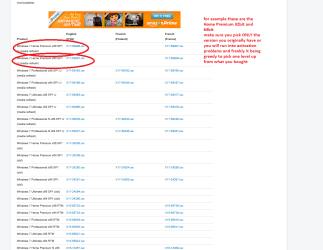
If you haven't got the original media for the OS then use this all you need is the right ISO and the activation code from the original install
http://www.sevenforums.com/tutorials/219487-clean-reinstall-factory-oem-windows-7-a.html
but read it thoroughly first if you go with it.
 

Attachments

  • ISO.PNG
    ISO.PNG
    37.1 KB · Views: 2

My Computer My Computer

Computer type
PC/Desktop
Computer Manufacturer/Model Number
Own build (new) Desk1 / Asus ROG Win 7 / Desk2 1st build
OS
Desk1 7 Home Prem / Desk2 10 Pro / Main lap Asus ROG 10 Pro 2 laptop Toshiba 7 Pro Asus P2520 7 & 10
CPU
Desk1 i5 3750K / Laptop i7 GTX 860M / Desk2 i5 2500
Motherboard
Desk1 Asus P877-V / Desk2 Gigabyte H67 UD3H / Laptop ?
Memory
Desk1 8GB (1866) / Desk2 16GB (1333) / Laptop 8Gb DDR3
Graphics Card(s)
Desk 1& 2NVidia GTX 650 & Laptops on board Intel
Sound Card
Desk 1 & 2 -XONAR DG Realtek High Def audio Laptop
Monitor(s) Displays
Desk 1 Benq HD 2450 / Desk2 Philips 24" / Laptop 17.5"
Screen Resolution
1920x1080 D1 & D2 & Laptop 1
Hard Drives
Desk1 Samsung 120GB 830 SSD
Asus ROG 256GB 850 Pro SSD
Desk2 Samsung 840 256 SSD
Toshiba 120GB EVO
PSU
Desk 1 Corsair HX 1050/ Laptop ? / Desk 2 Corsair HX 650
Case
Desk 1 Cooler HAF XM ? Toshiba laptop / Desk2 Coolermaster
Cooling
Fans on all Desk1 -2 Desk2 - all Coolermasters 5 Laptop ?
Keyboard
Desk 1 MS Sidewinder X6 Desk 2 MS Sidewinder X 4
Mouse
Desk 1&2 - Gigabyte MS 900 gamer - laptop - Logitec wireless
Internet Speed
ADSL2+
Other Info
One other Desktop (tester) and spare Toshba laptop both with SSD's
Running Kaspersky 2016 ISS on all machines config'd identically
Logitec audio stereo systems on each machine (x3)
Canon MG5250MFC
Router/modem TP-Link running WPA2SK
My car was literally just towed so I'm ordering the hard drive from amazon. I'll have it Saturday. I'll post back with the results of the new drive. Thank you very much for the help.
 

My Computer My Computer

Computer type
PC/Desktop
Computer Manufacturer/Model Number
Cyber Power PC
OS
Microsoft Windows 7 Home Premium 64-bit 7601 Multiprocessor Free Service Pack 1
CPU
AMD Athlon(tm) II X4 630 Processor
Motherboard
ASUSTeK Computer INC. M4A77TD
Memory
4.00 GB
Graphics Card(s)
NVIDIA GeForce GT 220
Sound Card
(1) NVIDIA High Definition Audio (2) NVIDIA High Definitio
Monitor(s) Displays
Generic PnP
Screen Resolution
1920 x 1080 x 32 bits (4294967296 colors) @ 59 Hz
Hard Drives
ST1000DM003-9YN162 ATA Device
PSU
HX Series 750 Watt 80 PLUS® Gold Certified Modular
Keyboard
Rosewill RK-9100
Mouse
Razer Naga
Antivirus
Microsoft Security Essentials & Malwarebytes
Ok mate just keep us posted:)
 

My Computer My Computer

Computer type
PC/Desktop
Computer Manufacturer/Model Number
Own build (new) Desk1 / Asus ROG Win 7 / Desk2 1st build
OS
Desk1 7 Home Prem / Desk2 10 Pro / Main lap Asus ROG 10 Pro 2 laptop Toshiba 7 Pro Asus P2520 7 & 10
CPU
Desk1 i5 3750K / Laptop i7 GTX 860M / Desk2 i5 2500
Motherboard
Desk1 Asus P877-V / Desk2 Gigabyte H67 UD3H / Laptop ?
Memory
Desk1 8GB (1866) / Desk2 16GB (1333) / Laptop 8Gb DDR3
Graphics Card(s)
Desk 1& 2NVidia GTX 650 & Laptops on board Intel
Sound Card
Desk 1 & 2 -XONAR DG Realtek High Def audio Laptop
Monitor(s) Displays
Desk 1 Benq HD 2450 / Desk2 Philips 24" / Laptop 17.5"
Screen Resolution
1920x1080 D1 & D2 & Laptop 1
Hard Drives
Desk1 Samsung 120GB 830 SSD
Asus ROG 256GB 850 Pro SSD
Desk2 Samsung 840 256 SSD
Toshiba 120GB EVO
PSU
Desk 1 Corsair HX 1050/ Laptop ? / Desk 2 Corsair HX 650
Case
Desk 1 Cooler HAF XM ? Toshiba laptop / Desk2 Coolermaster
Cooling
Fans on all Desk1 -2 Desk2 - all Coolermasters 5 Laptop ?
Keyboard
Desk 1 MS Sidewinder X6 Desk 2 MS Sidewinder X 4
Mouse
Desk 1&2 - Gigabyte MS 900 gamer - laptop - Logitec wireless
Internet Speed
ADSL2+
Other Info
One other Desktop (tester) and spare Toshba laptop both with SSD's
Running Kaspersky 2016 ISS on all machines config'd identically
Logitec audio stereo systems on each machine (x3)
Canon MG5250MFC
Router/modem TP-Link running WPA2SK
New hard drive came in and still no luck. BIOS recognizes both the hard drive and the cd/dvd drive. Is there any possibility my windows 7 installer CD is causing this? I attempted to create a bootable usb drive because I do still have the activation key but when I select the x17 etc.. with the tool it says it's not a proper iso image. I'm not sure what else there is to do.
 

My Computer My Computer

Computer type
PC/Desktop
Computer Manufacturer/Model Number
Cyber Power PC
OS
Microsoft Windows 7 Home Premium 64-bit 7601 Multiprocessor Free Service Pack 1
CPU
AMD Athlon(tm) II X4 630 Processor
Motherboard
ASUSTeK Computer INC. M4A77TD
Memory
4.00 GB
Graphics Card(s)
NVIDIA GeForce GT 220
Sound Card
(1) NVIDIA High Definition Audio (2) NVIDIA High Definitio
Monitor(s) Displays
Generic PnP
Screen Resolution
1920 x 1080 x 32 bits (4294967296 colors) @ 59 Hz
Hard Drives
ST1000DM003-9YN162 ATA Device
PSU
HX Series 750 Watt 80 PLUS® Gold Certified Modular
Keyboard
Rosewill RK-9100
Mouse
Razer Naga
Antivirus
Microsoft Security Essentials & Malwarebytes
I don't think windows is booting because the optical drive isn't working I guess. I was listening and opened the disk tray. Noticed that it didn't move at all. I moved it and closed the tray again. Rebooted pc and choose cd boot and nothing happened, so I opened the tray again. It was still in the same position I left it in. I've tried different cables and ports. It shows in the bios. and when I hit f8 to boot from cd. But the odd is not playing the disc. I do not have any I do not have any USB drives and no $ to buy one atm. I just spent 10 dollars on these blank dvds. Not sure what to donow
 

My Computer My Computer

Computer type
PC/Desktop
Computer Manufacturer/Model Number
Cyber Power PC
OS
Microsoft Windows 7 Home Premium 64-bit 7601 Multiprocessor Free Service Pack 1
CPU
AMD Athlon(tm) II X4 630 Processor
Motherboard
ASUSTeK Computer INC. M4A77TD
Memory
4.00 GB
Graphics Card(s)
NVIDIA GeForce GT 220
Sound Card
(1) NVIDIA High Definition Audio (2) NVIDIA High Definitio
Monitor(s) Displays
Generic PnP
Screen Resolution
1920 x 1080 x 32 bits (4294967296 colors) @ 59 Hz
Hard Drives
ST1000DM003-9YN162 ATA Device
PSU
HX Series 750 Watt 80 PLUS® Gold Certified Modular
Keyboard
Rosewill RK-9100
Mouse
Razer Naga
Antivirus
Microsoft Security Essentials & Malwarebytes

Wish I could help you out mate as I have several spare opto drives as Ithink the old one is bad - it will show in the BIOS but if it doesn't work thenI guess we are stuck with the stick boot.


Now maybe if you haven't done it already is to reseat both the power and data cables to the opto they could be just a tad loose or even dirty, Another thing is you could run a cleaner through the drive too.

I am not sure why it is telling you that the version is wrong?? In the pic is the one you want from that tutorial.
 

Attachments

  • ISO2.PNG
    ISO2.PNG
    21.8 KB · Views: 1

My Computer My Computer

Computer type
PC/Desktop
Computer Manufacturer/Model Number
Own build (new) Desk1 / Asus ROG Win 7 / Desk2 1st build
OS
Desk1 7 Home Prem / Desk2 10 Pro / Main lap Asus ROG 10 Pro 2 laptop Toshiba 7 Pro Asus P2520 7 & 10
CPU
Desk1 i5 3750K / Laptop i7 GTX 860M / Desk2 i5 2500
Motherboard
Desk1 Asus P877-V / Desk2 Gigabyte H67 UD3H / Laptop ?
Memory
Desk1 8GB (1866) / Desk2 16GB (1333) / Laptop 8Gb DDR3
Graphics Card(s)
Desk 1& 2NVidia GTX 650 & Laptops on board Intel
Sound Card
Desk 1 & 2 -XONAR DG Realtek High Def audio Laptop
Monitor(s) Displays
Desk 1 Benq HD 2450 / Desk2 Philips 24" / Laptop 17.5"
Screen Resolution
1920x1080 D1 & D2 & Laptop 1
Hard Drives
Desk1 Samsung 120GB 830 SSD
Asus ROG 256GB 850 Pro SSD
Desk2 Samsung 840 256 SSD
Toshiba 120GB EVO
PSU
Desk 1 Corsair HX 1050/ Laptop ? / Desk 2 Corsair HX 650
Case
Desk 1 Cooler HAF XM ? Toshiba laptop / Desk2 Coolermaster
Cooling
Fans on all Desk1 -2 Desk2 - all Coolermasters 5 Laptop ?
Keyboard
Desk 1 MS Sidewinder X6 Desk 2 MS Sidewinder X 4
Mouse
Desk 1&2 - Gigabyte MS 900 gamer - laptop - Logitec wireless
Internet Speed
ADSL2+
Other Info
One other Desktop (tester) and spare Toshba laptop both with SSD's
Running Kaspersky 2016 ISS on all machines config'd identically
Logitec audio stereo systems on each machine (x3)
Canon MG5250MFC
Router/modem TP-Link running WPA2SK
Today is that day! I'm finally up and running. Since my usb wasn't working and my optical drive is also broken, I used my laptop to burn an iso image to a disc. Then did cd boot -> bootsect.exe /nt60 f: (found online) Got the files copied onto usb and booted my PC from the usb. Everything seems fine now. My keyboard doesn't work but I'm emailing the manufactured now. I also got a BSOD. think it said win32.sys? I'll be making a new post in the correct section with the mini dump. Thank you to everyone who has been helping me. you're all great people.
 

My Computer My Computer

Computer type
PC/Desktop
Computer Manufacturer/Model Number
Cyber Power PC
OS
Microsoft Windows 7 Home Premium 64-bit 7601 Multiprocessor Free Service Pack 1
CPU
AMD Athlon(tm) II X4 630 Processor
Motherboard
ASUSTeK Computer INC. M4A77TD
Memory
4.00 GB
Graphics Card(s)
NVIDIA GeForce GT 220
Sound Card
(1) NVIDIA High Definition Audio (2) NVIDIA High Definitio
Monitor(s) Displays
Generic PnP
Screen Resolution
1920 x 1080 x 32 bits (4294967296 colors) @ 59 Hz
Hard Drives
ST1000DM003-9YN162 ATA Device
PSU
HX Series 750 Watt 80 PLUS® Gold Certified Modular
Keyboard
Rosewill RK-9100
Mouse
Razer Naga
Antivirus
Microsoft Security Essentials & Malwarebytes
Good to hear that something is happening mate and look forward to hearing the follow up.:)
 

My Computer My Computer

Computer type
PC/Desktop
Computer Manufacturer/Model Number
Own build (new) Desk1 / Asus ROG Win 7 / Desk2 1st build
OS
Desk1 7 Home Prem / Desk2 10 Pro / Main lap Asus ROG 10 Pro 2 laptop Toshiba 7 Pro Asus P2520 7 & 10
CPU
Desk1 i5 3750K / Laptop i7 GTX 860M / Desk2 i5 2500
Motherboard
Desk1 Asus P877-V / Desk2 Gigabyte H67 UD3H / Laptop ?
Memory
Desk1 8GB (1866) / Desk2 16GB (1333) / Laptop 8Gb DDR3
Graphics Card(s)
Desk 1& 2NVidia GTX 650 & Laptops on board Intel
Sound Card
Desk 1 & 2 -XONAR DG Realtek High Def audio Laptop
Monitor(s) Displays
Desk 1 Benq HD 2450 / Desk2 Philips 24" / Laptop 17.5"
Screen Resolution
1920x1080 D1 & D2 & Laptop 1
Hard Drives
Desk1 Samsung 120GB 830 SSD
Asus ROG 256GB 850 Pro SSD
Desk2 Samsung 840 256 SSD
Toshiba 120GB EVO
PSU
Desk 1 Corsair HX 1050/ Laptop ? / Desk 2 Corsair HX 650
Case
Desk 1 Cooler HAF XM ? Toshiba laptop / Desk2 Coolermaster
Cooling
Fans on all Desk1 -2 Desk2 - all Coolermasters 5 Laptop ?
Keyboard
Desk 1 MS Sidewinder X6 Desk 2 MS Sidewinder X 4
Mouse
Desk 1&2 - Gigabyte MS 900 gamer - laptop - Logitec wireless
Internet Speed
ADSL2+
Other Info
One other Desktop (tester) and spare Toshba laptop both with SSD's
Running Kaspersky 2016 ISS on all machines config'd identically
Logitec audio stereo systems on each machine (x3)
Canon MG5250MFC
Router/modem TP-Link running WPA2SK
Back
Top