Pc freeze or crash playing videos from browser or dvd

kochab

New member
Local time
11:55 PM
Messages
7
Hello all

When im watching movies, videos, from internet brownser, dvd, the pc freezes or crash for 1-2 min, like press pause button, and stars again normally. This issue happens often times, without any error message.

I check every thing that i remenber to do, anti-virus, spyware. malware, drivers updates,install and desintall programs , but the problem still remain.

I check this errors that could be the problem:

2012-04-04 17:30:23 SYSTEM MsiInstaller 1015: failure connect to server Error: 0x800401F0

Erro 101 2012-03-31 23:45:13 Application Hang 1002: ID do Processo: fc0 start time: 01cd0f85fcff54a5 end time: 106 adress:C:\Users\KOCHAB\AppData\Local\Google\Chrome\Application\chrome.exe ID report: 2519e156-7b83-11e1-a003-001bfcd637e6


Any idea about this problem, i dont.

I have notebook Asus G1S with the following specifications:

PC Type PC in X86 ACPI (Mobile)
OS Microsoft Windows 7 Ultimate - sp 1
Processor Mobile DualCore Intel Core 2 Duo T7500, 1200 MHz (6 x 200)
graphic driver NVIDIA GeForce 9500M GS (512 MB)
Hard disk Hitachi HTS541616J9SA00 ATA Device (160 GB, 5400 RPM, SATA)
system memory 2048 MB (DDR2-667 DDR2 SDRAM)

thks in advance
 

My Computer My Computer

At a glance

Microsoft Windows 7 Ultimate SP 1 x32Mobile DualCore Intel Core 2 Duo T7500, 1200 ...2048 MB (DDR2-667 DDR2 SDRAM)NVIDIA GeForce 9500M GS (512 MB)
Computer Manufacturer/Model Number
Notebook ASUS G1S series
OS
Microsoft Windows 7 Ultimate SP 1 x32
CPU
Mobile DualCore Intel Core 2 Duo T7500, 1200 Mhz (6x200)
Motherboard
ASUSTeK Computer Inc. vers. 202
Memory
2048 MB (DDR2-667 DDR2 SDRAM)
Graphics Card(s)
NVIDIA GeForce 9500M GS (512 MB)
Sound Card
Realtek ALC1200 @ Intel 82801HBM ICH8M - Hi
Monitor(s) Displays
Chi Mei N154C3-L02
Screen Resolution
1440x900
Hard Drives
Hitachi HTS541616J9SA00 ATA Device (160 GB, 5400 RPM, SATA)
Open Task Manager (or Process Explorer if you have it) and see which processes are using up your CPU cycles.
 

My Computer My Computer

At a glance

W7 Ultimate SP1, LM19.2 MATE, W10 Home 1703, ...AMD Phenom II x6 1100T, 3.3 GHz12GB DDR3 1333 G-Skill (4GB x 2), G-Skill (2G...NVIDIA GeForce GTX 660
Computer type
PC/Desktop
Computer Manufacturer/Model Number
n/a
OS
W7 Ultimate SP1, LM19.2 MATE, W10 Home 1703, W10 Pro 1703 VM, #All 64 bit
CPU
AMD Phenom II x6 1100T, 3.3 GHz
Motherboard
ASUS M4A88T-M/USB3 (AM3)
Memory
12GB DDR3 1333 G-Skill (4GB x 2), G-Skill (2GB x 2)
Graphics Card(s)
NVIDIA GeForce GTX 660
Sound Card
Realtek?
Monitor(s) Displays
Samsung S23B350
Screen Resolution
1920x1080
Hard Drives
WD Green 2TB (SATA), WD Green 3TB (SATA), WD Blue 4TB (SATA), WD Blue 6TB (SATA)
PSU
Cooler Master
Case
Antec GX300 Tower
Cooling
3x Antec TRICOOL 120mm Fans
Mouse
Wired Optical
Internet Speed
DSL
Antivirus
Avast
Browser
Pale Moon (64 bit)
Other Info
2018-12-27 Upgraded HDDs
2015-12-10 Upgraded case, graphics card, storage
2015-08-15 Upgraded motherboard & RAM
2015-07-15 Upgraded LM17.1 to LM17.2
Hi

Thks for th help.

Should i look to any process in particulary or all?

Kochab
 

My Computer My Computer

At a glance

Microsoft Windows 7 Ultimate SP 1 x32Mobile DualCore Intel Core 2 Duo T7500, 1200 ...2048 MB (DDR2-667 DDR2 SDRAM)NVIDIA GeForce 9500M GS (512 MB)
Computer Manufacturer/Model Number
Notebook ASUS G1S series
OS
Microsoft Windows 7 Ultimate SP 1 x32
CPU
Mobile DualCore Intel Core 2 Duo T7500, 1200 Mhz (6x200)
Motherboard
ASUSTeK Computer Inc. vers. 202
Memory
2048 MB (DDR2-667 DDR2 SDRAM)
Graphics Card(s)
NVIDIA GeForce 9500M GS (512 MB)
Sound Card
Realtek ALC1200 @ Intel 82801HBM ICH8M - Hi
Monitor(s) Displays
Chi Mei N154C3-L02
Screen Resolution
1440x900
Hard Drives
Hitachi HTS541616J9SA00 ATA Device (160 GB, 5400 RPM, SATA)
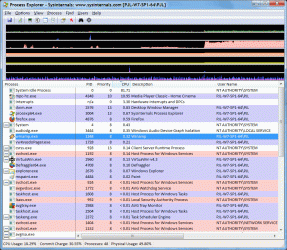
"Screenshots are your friends."

When you are playing a video, you shouldn't really see much CPU usage.

Any processes that are using a large amount of your CPU, could be affecting your machine's performance.
A screenshot showing them, could help someone here identify the problem, or suggest a solution. :)

Do you know how to take a screenshot of your Task Manager?
http://www.sevenforums.com/tutorials/9717-screenshot-paint.html

Here's what Process Explorer shows, when I play a 1080p mkv video (with MPC-HC).
Click on the picture for an animation.
PrEx - 1080p Video.gif
MPC-HC is using ~11% of my CPU power
Others are using ~7% of my CPU power
System Idle ~82% (that is CPU power available for other uses).

MPC-HC is using ~99% of my GPU power though.
 

My Computer My Computer

At a glance

W7 Ultimate SP1, LM19.2 MATE, W10 Home 1703, ...AMD Phenom II x6 1100T, 3.3 GHz12GB DDR3 1333 G-Skill (4GB x 2), G-Skill (2G...NVIDIA GeForce GTX 660
Computer type
PC/Desktop
Computer Manufacturer/Model Number
n/a
OS
W7 Ultimate SP1, LM19.2 MATE, W10 Home 1703, W10 Pro 1703 VM, #All 64 bit
CPU
AMD Phenom II x6 1100T, 3.3 GHz
Motherboard
ASUS M4A88T-M/USB3 (AM3)
Memory
12GB DDR3 1333 G-Skill (4GB x 2), G-Skill (2GB x 2)
Graphics Card(s)
NVIDIA GeForce GTX 660
Sound Card
Realtek?
Monitor(s) Displays
Samsung S23B350
Screen Resolution
1920x1080
Hard Drives
WD Green 2TB (SATA), WD Green 3TB (SATA), WD Blue 4TB (SATA), WD Blue 6TB (SATA)
PSU
Cooler Master
Case
Antec GX300 Tower
Cooling
3x Antec TRICOOL 120mm Fans
Mouse
Wired Optical
Internet Speed
DSL
Antivirus
Avast
Browser
Pale Moon (64 bit)
Other Info
2018-12-27 Upgraded HDDs
2015-12-10 Upgraded case, graphics card, storage
2015-08-15 Upgraded motherboard & RAM
2015-07-15 Upgraded LM17.1 to LM17.2
Hi

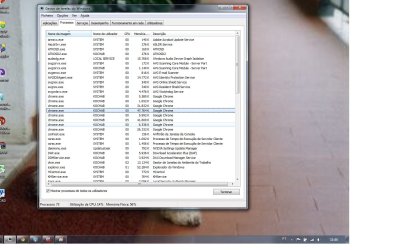
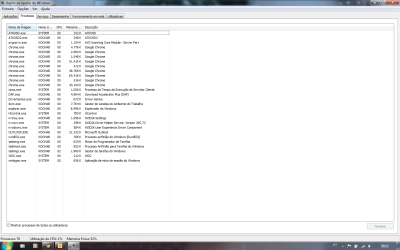
Here the screenshot that u request, hope will help.
Note, that in the time i took the sreenshot, only with chrome 1 page open (game)

Thks
 

Attachments

  • Sem Título.png
    Sem Título.png
    43.3 KB · Views: 55

My Computer My Computer

At a glance

Microsoft Windows 7 Ultimate SP 1 x32Mobile DualCore Intel Core 2 Duo T7500, 1200 ...2048 MB (DDR2-667 DDR2 SDRAM)NVIDIA GeForce 9500M GS (512 MB)
Computer Manufacturer/Model Number
Notebook ASUS G1S series
OS
Microsoft Windows 7 Ultimate SP 1 x32
CPU
Mobile DualCore Intel Core 2 Duo T7500, 1200 Mhz (6x200)
Motherboard
ASUSTeK Computer Inc. vers. 202
Memory
2048 MB (DDR2-667 DDR2 SDRAM)
Graphics Card(s)
NVIDIA GeForce 9500M GS (512 MB)
Sound Card
Realtek ALC1200 @ Intel 82801HBM ICH8M - Hi
Monitor(s) Displays
Chi Mei N154C3-L02
Screen Resolution
1440x900
Hard Drives
Hitachi HTS541616J9SA00 ATA Device (160 GB, 5400 RPM, SATA)
Apart from Chrome ...

Are you sure your graphics driver installed properly?
It seems like every 2nd NVidia driver update causes problems for me. :(

Nothing seemed to be using any CPU power.
Was your computer behaving normally?
Were you playing a video?

You will need to tick the box in the bottom left corner.
Click on picture for animation
Task Manager 01.gif
It will probably take a least two screenshots to show all of the processes.
You can see that my screenshot is only showing about 50% of the running processes.
Make sure you are playing a video when you take the screenshots (if it is possible).

I don't use Google Chrome.
It seems to be running a lot of processes.
I don't know if that is normal or not. :confused:

One of your error messages refers to Chrome.

Open your Task Manager.
Make sure Chrome is not running and no chrome processes appear in your list.
Try to play a DVD and see what happens.

If you click on the column headers in Task Manager the processes will be sorted (e.g. click on CPU and the processes will be sorted by CPU usage).
If your machine plays up, try to take a screenshot.
Hopefully we will see which process is causing trouble.

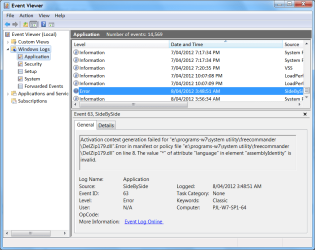
Do you know how to view the "Event Viewer"?

  • Open the "Start Menu".
  • Type "Event Viewer".
  • Choose "Event Viewer" from the results.
  • Go to Windows Logs > Application
Look for any red exclamation marks labelled "Error".
You may see information about what is causing your problem.
Event Viewer.png
Have you tried using the "Troubleshooting" tool?

  • Open the "Start Menu".
  • Type "Troubleshooting".
  • Choose "Troubleshooting" from the results.
 

My Computer My Computer

At a glance

W7 Ultimate SP1, LM19.2 MATE, W10 Home 1703, ...AMD Phenom II x6 1100T, 3.3 GHz12GB DDR3 1333 G-Skill (4GB x 2), G-Skill (2G...NVIDIA GeForce GTX 660
Computer type
PC/Desktop
Computer Manufacturer/Model Number
n/a
OS
W7 Ultimate SP1, LM19.2 MATE, W10 Home 1703, W10 Pro 1703 VM, #All 64 bit
CPU
AMD Phenom II x6 1100T, 3.3 GHz
Motherboard
ASUS M4A88T-M/USB3 (AM3)
Memory
12GB DDR3 1333 G-Skill (4GB x 2), G-Skill (2GB x 2)
Graphics Card(s)
NVIDIA GeForce GTX 660
Sound Card
Realtek?
Monitor(s) Displays
Samsung S23B350
Screen Resolution
1920x1080
Hard Drives
WD Green 2TB (SATA), WD Green 3TB (SATA), WD Blue 4TB (SATA), WD Blue 6TB (SATA)
PSU
Cooler Master
Case
Antec GX300 Tower
Cooling
3x Antec TRICOOL 120mm Fans
Mouse
Wired Optical
Internet Speed
DSL
Antivirus
Avast
Browser
Pale Moon (64 bit)
Other Info
2018-12-27 Upgraded HDDs
2015-12-10 Upgraded case, graphics card, storage
2015-08-15 Upgraded motherboard & RAM
2015-07-15 Upgraded LM17.1 to LM17.2
Hi

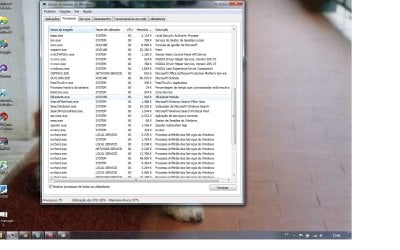
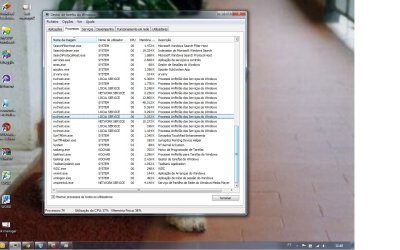
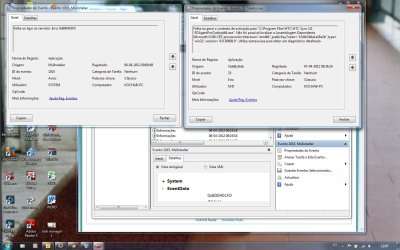
In attach files, fotos of task manager, viewing a movie from internet (Chrome).Send as well foto of the warning and error in event log.

Recentelly, update nvidia driver, could that may the cause of this problem? and revert to older one and check if the problem is the same?

Hope will help

THKS
 

Attachments

  • task manager 1.jpg
    task manager 1.jpg
    140.2 KB · Views: 25
  • task manager2.jpg
    task manager2.jpg
    148.6 KB · Views: 9
  • task manager 3.jpg
    task manager 3.jpg
    158.7 KB · Views: 13
  • event log.jpg
    event log.jpg
    146 KB · Views: 29

My Computer My Computer

At a glance

Microsoft Windows 7 Ultimate SP 1 x32Mobile DualCore Intel Core 2 Duo T7500, 1200 ...2048 MB (DDR2-667 DDR2 SDRAM)NVIDIA GeForce 9500M GS (512 MB)
Computer Manufacturer/Model Number
Notebook ASUS G1S series
OS
Microsoft Windows 7 Ultimate SP 1 x32
CPU
Mobile DualCore Intel Core 2 Duo T7500, 1200 Mhz (6x200)
Motherboard
ASUSTeK Computer Inc. vers. 202
Memory
2048 MB (DDR2-667 DDR2 SDRAM)
Graphics Card(s)
NVIDIA GeForce 9500M GS (512 MB)
Sound Card
Realtek ALC1200 @ Intel 82801HBM ICH8M - Hi
Monitor(s) Displays
Chi Mei N154C3-L02
Screen Resolution
1440x900
Hard Drives
Hitachi HTS541616J9SA00 ATA Device (160 GB, 5400 RPM, SATA)
Uninstall & Reinstall

I can only read English.
Sorry. :(

Was your PC freezing up?
The Task Manager looks normal.

Try uninstalling and then reinstalling your video driver.
Try to make sure that the minimum number of programs are running when you do the install.
Try temporarily disabling as many programs as you can (e.g. AV, unplug your network if you do that).

I had an NVidia driver problem last year.
When I installed an NVidia driver in XP, it "hosed" my entire PC (Windows 7 and XP)!
After I restored the backup HDD image and tried again, it worked perfectly. :confused:
 

My Computer My Computer

At a glance

W7 Ultimate SP1, LM19.2 MATE, W10 Home 1703, ...AMD Phenom II x6 1100T, 3.3 GHz12GB DDR3 1333 G-Skill (4GB x 2), G-Skill (2G...NVIDIA GeForce GTX 660
Computer type
PC/Desktop
Computer Manufacturer/Model Number
n/a
OS
W7 Ultimate SP1, LM19.2 MATE, W10 Home 1703, W10 Pro 1703 VM, #All 64 bit
CPU
AMD Phenom II x6 1100T, 3.3 GHz
Motherboard
ASUS M4A88T-M/USB3 (AM3)
Memory
12GB DDR3 1333 G-Skill (4GB x 2), G-Skill (2GB x 2)
Graphics Card(s)
NVIDIA GeForce GTX 660
Sound Card
Realtek?
Monitor(s) Displays
Samsung S23B350
Screen Resolution
1920x1080
Hard Drives
WD Green 2TB (SATA), WD Green 3TB (SATA), WD Blue 4TB (SATA), WD Blue 6TB (SATA)
PSU
Cooler Master
Case
Antec GX300 Tower
Cooling
3x Antec TRICOOL 120mm Fans
Mouse
Wired Optical
Internet Speed
DSL
Antivirus
Avast
Browser
Pale Moon (64 bit)
Other Info
2018-12-27 Upgraded HDDs
2015-12-10 Upgraded case, graphics card, storage
2015-08-15 Upgraded motherboard & RAM
2015-07-15 Upgraded LM17.1 to LM17.2
Hi

Sorry about the my language, forgot it!!!! I know that ur portughese is terrible! LOL

To change my graphic driver, should i use any program or uninstall manually?ex: driver sweeper??
How to find the right driver for my notebook? in nvidia?? or other webpage?there is a tutorial to do that?

THKS
 

My Computer My Computer

At a glance

Microsoft Windows 7 Ultimate SP 1 x32Mobile DualCore Intel Core 2 Duo T7500, 1200 ...2048 MB (DDR2-667 DDR2 SDRAM)NVIDIA GeForce 9500M GS (512 MB)
Computer Manufacturer/Model Number
Notebook ASUS G1S series
OS
Microsoft Windows 7 Ultimate SP 1 x32
CPU
Mobile DualCore Intel Core 2 Duo T7500, 1200 Mhz (6x200)
Motherboard
ASUSTeK Computer Inc. vers. 202
Memory
2048 MB (DDR2-667 DDR2 SDRAM)
Graphics Card(s)
NVIDIA GeForce 9500M GS (512 MB)
Sound Card
Realtek ALC1200 @ Intel 82801HBM ICH8M - Hi
Monitor(s) Displays
Chi Mei N154C3-L02
Screen Resolution
1440x900
Hard Drives
Hitachi HTS541616J9SA00 ATA Device (160 GB, 5400 RPM, SATA)
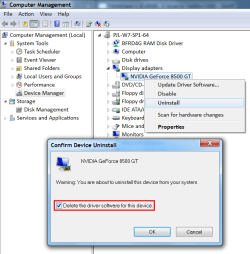
Device Manager

I normally use the "Device Manager" to uninstall the device and the driver.
Device Manager - Uninstall Device.png

If you get the installer from NVidia, I would suggest that:

  • You only install the driver (unless you need the other items).
  • You choose the clean install option.
 
Last edited:

My Computer My Computer

At a glance

W7 Ultimate SP1, LM19.2 MATE, W10 Home 1703, ...AMD Phenom II x6 1100T, 3.3 GHz12GB DDR3 1333 G-Skill (4GB x 2), G-Skill (2G...NVIDIA GeForce GTX 660
Computer type
PC/Desktop
Computer Manufacturer/Model Number
n/a
OS
W7 Ultimate SP1, LM19.2 MATE, W10 Home 1703, W10 Pro 1703 VM, #All 64 bit
CPU
AMD Phenom II x6 1100T, 3.3 GHz
Motherboard
ASUS M4A88T-M/USB3 (AM3)
Memory
12GB DDR3 1333 G-Skill (4GB x 2), G-Skill (2GB x 2)
Graphics Card(s)
NVIDIA GeForce GTX 660
Sound Card
Realtek?
Monitor(s) Displays
Samsung S23B350
Screen Resolution
1920x1080
Hard Drives
WD Green 2TB (SATA), WD Green 3TB (SATA), WD Blue 4TB (SATA), WD Blue 6TB (SATA)
PSU
Cooler Master
Case
Antec GX300 Tower
Cooling
3x Antec TRICOOL 120mm Fans
Mouse
Wired Optical
Internet Speed
DSL
Antivirus
Avast
Browser
Pale Moon (64 bit)
Other Info
2018-12-27 Upgraded HDDs
2015-12-10 Upgraded case, graphics card, storage
2015-08-15 Upgraded motherboard & RAM
2015-07-15 Upgraded LM17.1 to LM17.2
Hi

Following ur advice, ive change the driver of nvidia, but the problem is there.
Sometimes are the plugins stop runing (divx plugin), the OS stops runing, if the videos are larger in size.ive uninstall and install, Chrome, dvix webplayer, to fix it, but nothing.

One of usuals error are:

<Event xmlns="http://schemas.microsoft.com/win/2004/08/events/event">
- <System>
<Provider Name="atapi" />
<EventID Qualifiers="49156">11</EventID>
<Level>2</Level>
<Task>0</Task>
<Keywords>0x80000000000000</Keywords>
<TimeCreated SystemTime="2012-04-11T08:17:03.003857900Z" />
<EventRecordID>42508</EventRecordID>
<Channel>System</Channel>
<Computer>KOCHAB-PC</Computer>
<Security />
</System>
- <EventData>
<Data>\Device\Ide\IdePort1</Data>
<Binary>0000100001000000000000000B0004C002000000850100C00000000000000000000000000000000000000000000000000000000004100000</Binary>
</EventData>
</Event>

EventSourceName="Service Control Manager" />
<EventID Qualifiers="49152">7003</EventID>
<Version>0</Version>
<Level>2</Level>
<Task>0</Task>
<Opcode>0</Opcode>
<Keywords>0x8080000000000000</Keywords>
<TimeCreated SystemTime="2012-04-11T06:31:09.164282200Z" />
<EventRecordID>42418</EventRecordID>
<Correlation />
<Execution ProcessID="780" ThreadID="784" />
<Channel>System</Channel>
<Computer>KOCHAB-PC</Computer>
<Security />
</System>
- <EventData>
<Data Name="param1">ATKGFNEX Service</Data>
<Data Name="param2">ASMMAP</Data>
</EventData>
</Event>

The link explain the problem: Event ID 11_ATAPI

Thks
 

My Computer My Computer

At a glance

Microsoft Windows 7 Ultimate SP 1 x32Mobile DualCore Intel Core 2 Duo T7500, 1200 ...2048 MB (DDR2-667 DDR2 SDRAM)NVIDIA GeForce 9500M GS (512 MB)
Computer Manufacturer/Model Number
Notebook ASUS G1S series
OS
Microsoft Windows 7 Ultimate SP 1 x32
CPU
Mobile DualCore Intel Core 2 Duo T7500, 1200 Mhz (6x200)
Motherboard
ASUSTeK Computer Inc. vers. 202
Memory
2048 MB (DDR2-667 DDR2 SDRAM)
Graphics Card(s)
NVIDIA GeForce 9500M GS (512 MB)
Sound Card
Realtek ALC1200 @ Intel 82801HBM ICH8M - Hi
Monitor(s) Displays
Chi Mei N154C3-L02
Screen Resolution
1440x900
Hard Drives
Hitachi HTS541616J9SA00 ATA Device (160 GB, 5400 RPM, SATA)
sfc /scannow

Have you tried sfc?

You may need to open the "Command Prompt" and execute:
sfc /scannow
Tutorial:
SFC /SCANNOW Command - System File Checker

I'm starting to run out of ideas.
I've alerted Brink, so he (or someone else) may be able to provide a solution to your problem.
 
Last edited:

My Computer My Computer

At a glance

W7 Ultimate SP1, LM19.2 MATE, W10 Home 1703, ...AMD Phenom II x6 1100T, 3.3 GHz12GB DDR3 1333 G-Skill (4GB x 2), G-Skill (2G...NVIDIA GeForce GTX 660
Computer type
PC/Desktop
Computer Manufacturer/Model Number
n/a
OS
W7 Ultimate SP1, LM19.2 MATE, W10 Home 1703, W10 Pro 1703 VM, #All 64 bit
CPU
AMD Phenom II x6 1100T, 3.3 GHz
Motherboard
ASUS M4A88T-M/USB3 (AM3)
Memory
12GB DDR3 1333 G-Skill (4GB x 2), G-Skill (2GB x 2)
Graphics Card(s)
NVIDIA GeForce GTX 660
Sound Card
Realtek?
Monitor(s) Displays
Samsung S23B350
Screen Resolution
1920x1080
Hard Drives
WD Green 2TB (SATA), WD Green 3TB (SATA), WD Blue 4TB (SATA), WD Blue 6TB (SATA)
PSU
Cooler Master
Case
Antec GX300 Tower
Cooling
3x Antec TRICOOL 120mm Fans
Mouse
Wired Optical
Internet Speed
DSL
Antivirus
Avast
Browser
Pale Moon (64 bit)
Other Info
2018-12-27 Upgraded HDDs
2015-12-10 Upgraded case, graphics card, storage
2015-08-15 Upgraded motherboard & RAM
2015-07-15 Upgraded LM17.1 to LM17.2

My Computer My Computer

At a glance

windows Home Premium 64 bit
Computer Manufacturer/Model Number
Custom Build
OS
windows Home Premium 64 bit
Hi

I think now the problem as been solved, 2 programs are the source of the problem. from HTC(mobile phone), type pc suite and ASUS, in event log. Think when i updated both drivers, could be the source of the problem and uninstall them. i watch a movie streaming online, long one, to the end without any failure (freezing or crash).

Follow ur advice, with the SFC/SCANNOW, i run it without any problems in my OS.

If ive again similar issue, i will post it

i heard from many sources, that are a bug problem with the adobe flash player and shockwave, when playing videos or games, sometimes show warning that both stops or fail to run. Is that true or a rumour?

Many thanks for help me to solve this issue
 

My Computer My Computer

At a glance

Microsoft Windows 7 Ultimate SP 1 x32Mobile DualCore Intel Core 2 Duo T7500, 1200 ...2048 MB (DDR2-667 DDR2 SDRAM)NVIDIA GeForce 9500M GS (512 MB)
Computer Manufacturer/Model Number
Notebook ASUS G1S series
OS
Microsoft Windows 7 Ultimate SP 1 x32
CPU
Mobile DualCore Intel Core 2 Duo T7500, 1200 Mhz (6x200)
Motherboard
ASUSTeK Computer Inc. vers. 202
Memory
2048 MB (DDR2-667 DDR2 SDRAM)
Graphics Card(s)
NVIDIA GeForce 9500M GS (512 MB)
Sound Card
Realtek ALC1200 @ Intel 82801HBM ICH8M - Hi
Monitor(s) Displays
Chi Mei N154C3-L02
Screen Resolution
1440x900
Hard Drives
Hitachi HTS541616J9SA00 ATA Device (160 GB, 5400 RPM, SATA)
There are a lot of third party softwares which conflict with Windows OS. Their drivers are not certified by Microsoft. Some softwares are not compatible with one another. There's bugs and there's fixes. There's Malware, Spyware, Adware, and Viruses. So, there security patches. Man I could go on all day!

Welcome to Microsoft Windows 7! :party:
 

My Computer My Computer

At a glance

windows Home Premium 64 bit
Computer Manufacturer/Model Number
Custom Build
OS
windows Home Premium 64 bit
Back
Top