Solved PC freeze when startup

unlockAVSO

New member
Local time
11:47 PM
Messages
57
hi , I have a laptop (Win 7) but sometimes when i startup it freezes and i cannot do anything except turn it off on its button.I have scanned with Eset nod32 full but nothing.Help
 

My Computer

Computer type
Laptop
Computer Manufacturer/Model Number
Dell Latitude D630
OS
Windows 7 Ultimate 32bit
CPU
Dual Core T8100 2.10 (2CPU)
Motherboard
Dell
Memory
2gb
Graphics Card(s)
Mobile Intel(R) 965 Express Chipset Family
Monitor(s) Displays
ACER 19 inch
Mouse
Logitech 2$ mouse but it's awesome
Internet Speed
10.0 mb/s
Antivirus
Eset Nod32 6 Full
Browser
Google Chrome

My Computer

Computer type
PC/Desktop
Computer Manufacturer/Model Number
Custom assembled by me :}
OS
Win-7-Pro64bit 7-H-Prem-64bit
CPU
i7-5930K 2nd i9-9940x both water blocked VRM's too
Motherboard
ASUS SABERTOOTH X99 2nd ASUS x299 Apex
Memory
Trident-z 3200C14 2nd Trident-z 3600C16
Graphics Card(s)
EVGA 1080ti ftw3 2nd Titan Xp both water blocked
Sound Card
Built-in Realtek
Monitor(s) Displays
1-AOC G2460PG 24"G-Sync 144Hz/ 2nd 1-ASUS VG248QE 24" 144Hz
Screen Resolution
1920 x 1080 144Hz
Hard Drives
2-Samsung M.2 Evo & Evo Plus
2-Samsung 850 EVO 500GB SSD's/ 3-2.5 W.D. Black 1tb-&3-1tb/3-3.5 WD Black 1tb hdd's
PSU
EVGA SuperNOVA 1000-P2 2nd 1200-P2
Case
2-Corsair Obsidian Series 450D Black ATX Mid Tower
Cooling
Custom water loops
Keyboard
Logitech G710+/ 2nd Logitech G910
Mouse
2-RedDragon M901 Perdition 16400 dpi Gaming mouse = wired
Internet Speed
Comcast Ping 19ms 89.31mbps download speed 6.12mbps upload
Antivirus
Malwarebytes Pro/ Superantispyware Pro
Browser
FireFox & Pale moon
Other Info
2nd ASUS X299 Apex/Intel i9-9940x with Custom water loop/7H-Prem-x64/Corsair 450D case/Ram Trident-z 3600C16 4x8gb / Samsung970Evo plus 500gb SSD/Dual ssd EZ swap evo/PSU EVGA SuperNova 1200w-P2 80+Platinum/GPU Titan Xp /8-ML-140 on push-pull on 2-280GTX rads
that is useless,I knew all of those things,I am thinking for any registry problem but idk.Another help ?
 

My Computer

Computer type
Laptop
Computer Manufacturer/Model Number
Dell Latitude D630
OS
Windows 7 Ultimate 32bit
CPU
Dual Core T8100 2.10 (2CPU)
Motherboard
Dell
Memory
2gb
Graphics Card(s)
Mobile Intel(R) 965 Express Chipset Family
Monitor(s) Displays
ACER 19 inch
Mouse
Logitech 2$ mouse but it's awesome
Internet Speed
10.0 mb/s
Antivirus
Eset Nod32 6 Full
Browser
Google Chrome
hi , I have a laptop (Win 7) but sometimes when i startup it freezes and i cannot do anything except turn it off on its button.I have scanned with Eset nod32 full but nothing.Help

Sorry from your two sentence question I did not see Everything noted you had tried,
Possibly post exactly what you found useless about the link I'm sure everyone would like to know,
Also you scanned with eset okay well what is your primary security is it the same ?
Have you made any recent changes ?
Cheers.
 

My Computer

Computer type
PC/Desktop
Computer Manufacturer/Model Number
Custom assembled by me :}
OS
Win-7-Pro64bit 7-H-Prem-64bit
CPU
i7-5930K 2nd i9-9940x both water blocked VRM's too
Motherboard
ASUS SABERTOOTH X99 2nd ASUS x299 Apex
Memory
Trident-z 3200C14 2nd Trident-z 3600C16
Graphics Card(s)
EVGA 1080ti ftw3 2nd Titan Xp both water blocked
Sound Card
Built-in Realtek
Monitor(s) Displays
1-AOC G2460PG 24"G-Sync 144Hz/ 2nd 1-ASUS VG248QE 24" 144Hz
Screen Resolution
1920 x 1080 144Hz
Hard Drives
2-Samsung M.2 Evo & Evo Plus
2-Samsung 850 EVO 500GB SSD's/ 3-2.5 W.D. Black 1tb-&3-1tb/3-3.5 WD Black 1tb hdd's
PSU
EVGA SuperNOVA 1000-P2 2nd 1200-P2
Case
2-Corsair Obsidian Series 450D Black ATX Mid Tower
Cooling
Custom water loops
Keyboard
Logitech G710+/ 2nd Logitech G910
Mouse
2-RedDragon M901 Perdition 16400 dpi Gaming mouse = wired
Internet Speed
Comcast Ping 19ms 89.31mbps download speed 6.12mbps upload
Antivirus
Malwarebytes Pro/ Superantispyware Pro
Browser
FireFox & Pale moon
Other Info
2nd ASUS X299 Apex/Intel i9-9940x with Custom water loop/7H-Prem-x64/Corsair 450D case/Ram Trident-z 3600C16 4x8gb / Samsung970Evo plus 500gb SSD/Dual ssd EZ swap evo/PSU EVGA SuperNova 1200w-P2 80+Platinum/GPU Titan Xp /8-ML-140 on push-pull on 2-280GTX rads
unlockAVSO it would be a lot easier for us to help you if you made a list of all the computer things you know so we don't make the mistake that ThrashZone made.
 

My Computer

Computer type
PC/Desktop
Computer Manufacturer/Model Number
Home made Desktop
OS
Windows 10 Pro. 64/ version 1709 Windows 7 Pro/64
CPU
Intel i7-6800K @ 4.3
Motherboard
ASUS X-99 Deluxe II
Memory
Corsair Platinum 16 gig @2400
Graphics Card(s)
EVGA GTX 1070 OC
Monitor(s) Displays
Asus 27" LED LCD/VE278Q
Screen Resolution
1920-1080 or 1280-720 HDMI
Hard Drives
INTEL SSD 730-240 Gb Sata 3.0/
PSU
EVGA Platium 1200W
Case
Phanteks Luxe Tempered Glass 8 fans/ one radiator
Cooling
XSPC/ Water Cooled CPU
Keyboard
Das 4 Professional
Mouse
Logitech M705/MX Anywhere 2-S
Internet Speed
100 mbits
Antivirus
Microsoft Security Essentials/ Malwarebytes Premium 3.0/ SAS
Browser
I.E. 11 default/Firefox/ ISP Time Warner Cable/Spectrum
Other Info
LG BluRay Burner/
Sound system-KLipsch-THX/
Icy Dock ssd Hot Swap bays.
Hi,
I suppose this would be a first place to try things,
Troubleshooting for win-7,
http://www.sevenforums.com/tutorials/220165-troubleshooting-steps-windows-7-a.html
This is everything but useless, please do this;
Possibly post exactly what you found useless about the link I'm sure everyone would like to know,
Also you scanned with eset okay well what is your primary security is it the same ?
Have you made any recent changes ?

Please also follow the BSOD Posting Instructions and upload the .zip file created. It will give us more insights into your system to that we can pinpoint the cause more easily.


Nommy
 

My Computer

Computer type
Laptop
Computer Manufacturer/Model Number
Dell Inspiron 5547
OS
Microsoft Windows 8.1 64-bit Professional
CPU
Intel(R) Core(TM) i7-4510U CPU @ 2.00GHz
Motherboard
Dell Inc. 08KNCD
Memory
8.00 GB (2 x 4.00 GB)
Graphics Card(s)
AMD Radeon R7 M265
Screen Resolution
1366 x 768 x 4294967296 colors
Hard Drives
(1) 1TB ST1000LM024 HN-M101MBB (2) 2TB Western Digital external hard drive (3) 500GB Packard Bell external hard drive
Mouse
Corsair Vengeance M60
Antivirus
Windows Defender & Malwarebytes
Browser
Firefox, Chromium
Other Info
+ Acer TravelMate 7730G with 32bit Ubuntu 14.04 LTS Trusty Tahr.
My mistake,
I did defragment,/sfc scannow,scanned with malawarebytes(19 infected),i always keep my laptop good i do not install stupid things,auto update and firewall is on,restore,check core temp + i always clean it from inside
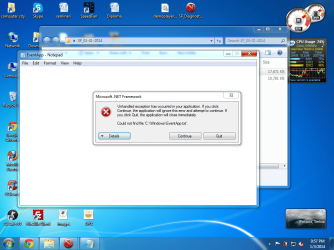
Yes I have Blue Screen of the Death but I can say that it never appears because i keep my pc well.I did a scan with that program but it gave me an framework error,when i click detailed
Code:
See the end of this message for details on invoking 
just-in-time (JIT) debugging instead of this dialog box.

************** Exception Text **************
System.IO.FileNotFoundException: Could not find file 'C:\Windows\EventApp.txt'.
File name: 'C:\Windows\EventApp.txt'
   at Microsoft.VisualBasic.FileIO.FileSystem.CopyOrMoveFile(CopyOrMove operation, String sourceFileName, String destinationFileName, Boolean overwrite, UIOptionInternal showUI, UICancelOption onUserCancel)
   at Microsoft.VisualBasic.FileIO.FileSystem.CopyFile(String sourceFileName, String destinationFileName, UIOption showUI, UICancelOption onUserCancel)
   at Microsoft.VisualBasic.MyServices.FileSystemProxy.CopyFile(String sourceFileName, String destinationFileName, UIOption showUI, UICancelOption onUserCancel)
   at SF_Diagnostic_Tool.Form1.Button1_Click(Object sender, EventArgs e)
   at System.Windows.Forms.Control.OnClick(EventArgs e)
   at System.Windows.Forms.Button.OnClick(EventArgs e)
   at System.Windows.Forms.Button.OnMouseUp(MouseEventArgs mevent)
   at System.Windows.Forms.Control.WmMouseUp(Message& m, MouseButtons button, Int32 clicks)
   at System.Windows.Forms.Control.WndProc(Message& m)
   at System.Windows.Forms.ButtonBase.WndProc(Message& m)
   at System.Windows.Forms.Button.WndProc(Message& m)
   at System.Windows.Forms.Control.ControlNativeWindow.OnMessage(Message& m)
   at System.Windows.Forms.Control.ControlNativeWindow.WndProc(Message& m)
   at System.Windows.Forms.NativeWindow.Callback(IntPtr hWnd, Int32 msg, IntPtr wparam, IntPtr lparam)


************** Loaded Assemblies **************
mscorlib
    Assembly Version: 2.0.0.0
    Win32 Version: 2.0.50727.5472 (Win7SP1GDR.050727-5400)
    CodeBase: file:///C:/Windows/Microsoft.NET/Framework/v2.0.50727/mscorlib.dll
----------------------------------------
SF Diagnostic Tool
    Assembly Version: 5.0.0.6
    Win32 Version: 5.0.0.6
    CodeBase: file:///C:/Users/computer%20city/Desktop/SF_Diagnostic_Tool.exe
----------------------------------------
Microsoft.VisualBasic
    Assembly Version: 8.0.0.0
    Win32 Version: 8.0.50727.5420 (Win7SP1.050727-5400)
    CodeBase: file:///C:/Windows/assembly/GAC_MSIL/Microsoft.VisualBasic/8.0.0.0__b03f5f7f11d50a3a/Microsoft.VisualBasic.dll
----------------------------------------
System
    Assembly Version: 2.0.0.0
    Win32 Version: 2.0.50727.5467 (Win7SP1GDR.050727-5400)
    CodeBase: file:///C:/Windows/assembly/GAC_MSIL/System/2.0.0.0__b77a5c561934e089/System.dll
----------------------------------------
System.Windows.Forms
    Assembly Version: 2.0.0.0
    Win32 Version: 2.0.50727.5468 (Win7SP1GDR.050727-5400)
    CodeBase: file:///C:/Windows/assembly/GAC_MSIL/System.Windows.Forms/2.0.0.0__b77a5c561934e089/System.Windows.Forms.dll
----------------------------------------
System.Drawing
    Assembly Version: 2.0.0.0
    Win32 Version: 2.0.50727.5467 (Win7SP1GDR.050727-5400)
    CodeBase: file:///C:/Windows/assembly/GAC_MSIL/System.Drawing/2.0.0.0__b03f5f7f11d50a3a/System.Drawing.dll
----------------------------------------
System.Runtime.Remoting
    Assembly Version: 2.0.0.0
    Win32 Version: 2.0.50727.5420 (Win7SP1.050727-5400)
    CodeBase: file:///C:/Windows/assembly/GAC_MSIL/System.Runtime.Remoting/2.0.0.0__b77a5c561934e089/System.Runtime.Remoting.dll
----------------------------------------

************** JIT Debugging **************
To enable just-in-time (JIT) debugging, the .config file for this
application or computer (machine.config) must have the
jitDebugging value set in the system.windows.forms section.
The application must also be compiled with debugging
enabled.

For example:

<configuration>
    <system.windows.forms jitDebugging="true" />
</configuration>

When JIT debugging is enabled, any unhandled exception

And I have my results of SF...
 

Attachments

My Computer

Computer type
Laptop
Computer Manufacturer/Model Number
Dell Latitude D630
OS
Windows 7 Ultimate 32bit
CPU
Dual Core T8100 2.10 (2CPU)
Motherboard
Dell
Memory
2gb
Graphics Card(s)
Mobile Intel(R) 965 Express Chipset Family
Monitor(s) Displays
ACER 19 inch
Mouse
Logitech 2$ mouse but it's awesome
Internet Speed
10.0 mb/s
Antivirus
Eset Nod32 6 Full
Browser
Google Chrome
See that the steps aren't useless?

Now as for the SF Diagnostic Tool, your .zip only contains the eventapp and eventsys files.
I have asked someone to take a peep at the error, in the mean time please rerun the tool and wait five to ten minutes for it to completely gather all files.

Alternatively, if you can't get the tool to run (make sure to run it as an administrator), you can give most of the files by following these instructions:
Please upload your MSINFO32;

  1. Open an Evevated Command Prompt.
  2. Copy the following;
    msinfo32 /nfo %USERPROFILE%\Desktop\MSINFO32.NFO
  3. In Command Prompt; Click on the CMD icon in the upper left corner.
  4. Click on Edit, then click on Paste. Hit ENTER.
    A file called MSINFO32.nfo will be created on your desktop, this may take a while, please be patient.
  5. Right click the file, and select Send to, click on Compressed (zipped) folder.
    A .zip called MSINFO32.zip will be created on your desktop.
  6. Upload the .zip by following this tutorial.

----------

Please upload your SystemInfo.txt;

  1. Open an Evevated Command Prompt.
  2. Copy the following;
    systeminfo.exe >%USERPROFILE%\Desktop\systeminfo.txt
  3. In Command Prompt; Click on the CMD icon in the upper left corner.
  4. Click on Edit, then click on Paste. Hit ENTER.
    A file called SystemInfo.txt will be created on your desktop.
  5. Right click the file, and select Send to, click on Compressed (zipped) folder.
    A .zip called SystemInfo.zip will be created on your desktop.
  6. Upload the .zip by following this tutorial.

----------

Please follow this to upload your dump files;

  1. Navigate to C:\WINDOWS\Minidump (Replace C: with the letter of the drive where you installed Windows on).
  2. Select all the files there by clicking on the first file, holding down the SHIFT key, and clicking on the last file.
  3. Copy all files by hitting Ctrl+C.
  4. Create a folder on your desktop called "Dumpfiles" and paste all .dmp files in that folder.
  5. Right click on the folder and click on Send to. Then click on Compressed (zipped) folder.
    This will create a .zip called Dumpfiles.zip on your desktop.
  6. Please upload the .zip file by following this tutorial.
    • If your Windows is not set to create dump files upon a BSOD, please follow this tutorial to configure it.
    • If no dump files are found in that folder, please report back.

----------

Did SFC /SCANNOW find and repair any integrity violations? If so, please upload the files by following this:

  1. Click on the :orb:.
  2. Open an elevated command prompt.
  3. Type (or copy) the following, this will create a .txt file on your desktop;
    findstr /c:"[SR]" %windir%\Logs\CBS\CBS.log >"%userprofile%\Desktop\sfcdetails.txt"
  4. In your next reply, please attach this file using the method displayed in this tutorial.
----------

Please also include the Malwarebytes log file, you can do so by following this;
  1. Please open Malwarebytes.
  2. Update MBAM if requested.
  3. In Malwarebytes, click on Logs in the top menu.
  4. Find the most recent log file (It will be named mbam-log-2014-DD-MM).
    DD is the day, MM is the month.
  5. Once found, double click on it to open in notepad.
  6. In notepad, click on File and then on Save as... and save it to the desktop.
  7. In your next reply, please attach this file using the method displayed in this tutorial.
----------

Have you ran CHKDSK yet to test your hard drive for errors?
If not, please do so;
   Warning
Do not do this step if your hard drive is an SSD!
Please scan your hard drive with Chkdsk.

  1. Click on the :orb:
  2. Open an Elevated Command Prompt.
  3. Type the following;
    chkdsk C: /F
    :ar:Replace C: with the letter of your hard drive.
  4. You will get a message that your drive is in use and that Chkdsk will be run at start up.
  5. Please exit the command prompt, close and save any open programs and restart your machine. Chkdsk will now scan at boot.
   Warning
Do not attempt to cancel or stop the scan, this might result in a loss in data and could render your Windows unusable!


Good luck and keep us posted,
Nommy
 

My Computer

Computer type
Laptop
Computer Manufacturer/Model Number
Dell Inspiron 5547
OS
Microsoft Windows 8.1 64-bit Professional
CPU
Intel(R) Core(TM) i7-4510U CPU @ 2.00GHz
Motherboard
Dell Inc. 08KNCD
Memory
8.00 GB (2 x 4.00 GB)
Graphics Card(s)
AMD Radeon R7 M265
Screen Resolution
1366 x 768 x 4294967296 colors
Hard Drives
(1) 1TB ST1000LM024 HN-M101MBB (2) 2TB Western Digital external hard drive (3) 500GB Packard Bell external hard drive
Mouse
Corsair Vengeance M60
Antivirus
Windows Defender & Malwarebytes
Browser
Firefox, Chromium
Other Info
+ Acer TravelMate 7730G with 32bit Ubuntu 14.04 LTS Trusty Tahr.
I agree with the others as we need concise info in order to help you out. Without the proper info etc we can't help to determine the resolution to issues
 

My Computer

Computer type
PC/Desktop
Computer Manufacturer/Model Number
custom built
OS
Windows 7 ultimate 64-bit
CPU
Intel I7 2600K 3.4ghz
Motherboard
Asus Evo P8P67
Memory
Corsair 16gb ddr3 1600mhz
Graphics Card(s)
Nvidia Geforce gt 430
Sound Card
Sound Blaster Titanium x-fi pci express
Monitor(s) Displays
Dell E198WFP
Hard Drives
1 western digital 2TB drive.
PSU
Antec 1200 watt
Case
Inwin Dragon Rider
Cooling
6 case supplied cooling fans
Keyboard
logitech mk700
Mouse
logitech m705
Internet Speed
25-50mbps download; 10mbps upload(i think)
Antivirus
avg free 2014
Browser
mozilla firefox
Other Info
Also have a pretty bad speaker setup which is a klipsch promedia 5.1 surround speaker setup with huge subwoofer and lg blu ray player/writer. Also a hp officejet pro 8600 plus wireless all in one and a logitech s7500 webcam.
I agree with the others as we need concise info in order to help you out. Without the proper info etc we can't help to determine the resolution to issues

if u agree with the other pm them and say I AGREE WITH YOU dont spam on my topic.

thanks I fixed it,installed Wise Registry Cleaner make an scan
I defragmented my Registry Editor (regedit) and now it's done.And fixed manually registries that WiseRC could not do it.
I like this forum it saved my life 2 times :D
 

My Computer

Computer type
Laptop
Computer Manufacturer/Model Number
Dell Latitude D630
OS
Windows 7 Ultimate 32bit
CPU
Dual Core T8100 2.10 (2CPU)
Motherboard
Dell
Memory
2gb
Graphics Card(s)
Mobile Intel(R) 965 Express Chipset Family
Monitor(s) Displays
ACER 19 inch
Mouse
Logitech 2$ mouse but it's awesome
Internet Speed
10.0 mb/s
Antivirus
Eset Nod32 6 Full
Browser
Google Chrome
Mate theres no need to be cheeky, everyone here is trying to help, your not making it very easy mate, remember that everyone is giving up their FREE time to help you.
 

My Computer

Computer type
Laptop
Computer Manufacturer/Model Number
Packard Bell
OS
Windows 7 Home Premium 64Bit
CPU
AMD A6-3420M 1.5GHZ OC - 2.0GHZ
Memory
4GB DDR3 1600MHZ
Graphics Card(s)
AMD RADEON 6520G+AMD RADEON HD7470M 1GB DDR3
Screen Resolution
1366x768
Hard Drives
500GB SATA
Internet Speed
18Mb Unlimited
Antivirus
AVAST!
Browser
MOZILLA FIREFOX
I agree with the others as we need concise info in order to help you out. Without the proper info etc we can't help to determine the resolution to issues

if u agree with the other pm them and say I AGREE WITH YOU dont spam on my topic.

thanks I fixed it,installed Wise Registry Cleaner make an scan
I defragmented my Registry Editor (regedit) and now it's done.And fixed manually registries that WiseRC could not do it.
I like this forum it saved my life 2 times :D


Well don't come out attacking me like that! We are all suppose to be in this together to help one another when the need arises! Not attacking someone!. I was not spamming anything so don't say I was! U don't have to be hasty about it either.
 

My Computer

Computer type
PC/Desktop
Computer Manufacturer/Model Number
custom built
OS
Windows 7 ultimate 64-bit
CPU
Intel I7 2600K 3.4ghz
Motherboard
Asus Evo P8P67
Memory
Corsair 16gb ddr3 1600mhz
Graphics Card(s)
Nvidia Geforce gt 430
Sound Card
Sound Blaster Titanium x-fi pci express
Monitor(s) Displays
Dell E198WFP
Hard Drives
1 western digital 2TB drive.
PSU
Antec 1200 watt
Case
Inwin Dragon Rider
Cooling
6 case supplied cooling fans
Keyboard
logitech mk700
Mouse
logitech m705
Internet Speed
25-50mbps download; 10mbps upload(i think)
Antivirus
avg free 2014
Browser
mozilla firefox
Other Info
Also have a pretty bad speaker setup which is a klipsch promedia 5.1 surround speaker setup with huge subwoofer and lg blu ray player/writer. Also a hp officejet pro 8600 plus wireless all in one and a logitech s7500 webcam.
there were 3 other peoples saying that and i said sorry my mistake and you writed it again.Better leave,sorry again.
 

My Computer

Computer type
Laptop
Computer Manufacturer/Model Number
Dell Latitude D630
OS
Windows 7 Ultimate 32bit
CPU
Dual Core T8100 2.10 (2CPU)
Motherboard
Dell
Memory
2gb
Graphics Card(s)
Mobile Intel(R) 965 Express Chipset Family
Monitor(s) Displays
ACER 19 inch
Mouse
Logitech 2$ mouse but it's awesome
Internet Speed
10.0 mb/s
Antivirus
Eset Nod32 6 Full
Browser
Google Chrome
there were 3 other peoples saying that and i said sorry my mistake and you writed it again.Better leave,sorry again.

Thank you. That is definitely better and accepted.
 

My Computer

Computer type
PC/Desktop
Computer Manufacturer/Model Number
custom built
OS
Windows 7 ultimate 64-bit
CPU
Intel I7 2600K 3.4ghz
Motherboard
Asus Evo P8P67
Memory
Corsair 16gb ddr3 1600mhz
Graphics Card(s)
Nvidia Geforce gt 430
Sound Card
Sound Blaster Titanium x-fi pci express
Monitor(s) Displays
Dell E198WFP
Hard Drives
1 western digital 2TB drive.
PSU
Antec 1200 watt
Case
Inwin Dragon Rider
Cooling
6 case supplied cooling fans
Keyboard
logitech mk700
Mouse
logitech m705
Internet Speed
25-50mbps download; 10mbps upload(i think)
Antivirus
avg free 2014
Browser
mozilla firefox
Other Info
Also have a pretty bad speaker setup which is a klipsch promedia 5.1 surround speaker setup with huge subwoofer and lg blu ray player/writer. Also a hp officejet pro 8600 plus wireless all in one and a logitech s7500 webcam.

My Computer

Computer Manufacturer/Model Number
Hewlett packard/p6512uk
OS
Microsoft Windows 7 Home Premium 64-bit 7600
CPU
IIx4 amd athelon 635 processor
Motherboard
FOXCONN 2AA9
Memory
2x2gb
Graphics Card(s)
ati radeon HD 5450
Sound Card
(1) Realtek High Definition Audio (2) AMD High Definition
Monitor(s) Displays
samsung lcd tv 32"
Screen Resolution
1360x 768
Hard Drives
(1) WDC WD10 01FAES-60Z2A0 SATA Disk Device (2) Maxtor OneTouch USB Device (3) ST310003 33AS USB Device (4) WD My Book 1111 USB Device
PSU
?
Cooling
air!
Keyboard
wireless hp
Mouse
wireless Hp,optical
Internet Speed
1.10mb/s
Antivirus
MSE
Browser
Firefox
I agree with the others as we need concise info in order to help you out. Without the proper info etc we can't help to determine the resolution to issues

if u agree with the other pm them and say I AGREE WITH YOU dont spam on my topic.

thanks I fixed it,installed Wise Registry Cleaner make an scan
I defragmented my Registry Editor (regedit) and now it's done.And fixed manually registries that WiseRC could not do it.
I like this forum it saved my life 2 times :D
Shit, I was going to add something, but since it's YOUR topic....

You may check here after using your Wise reg cleaner.
http://www.sevenforums.com/bsod-help-support/
 

My Computer

Computer type
PC/Desktop
Computer Manufacturer/Model Number
Home Built Desktop By DataTech
OS
Windows 7 Ultimate X64 SP1
CPU
Intel i5-2550K, Differing ~4.4-4.8GHz No built in GPU
Motherboard
ASUS P8Z68-V PRO/GEN3
Memory
16GB G.Skill Sniper 1866MHz @ 2133MHz 2x8GB
Graphics Card(s)
ASUS GTX650TIB-DC2OC-2GD5, (650TI Boost)
Sound Card
Onboard Realtek 5-1
Monitor(s) Displays
Samsung P2570HD
Screen Resolution
1920x1080
Hard Drives
Samsung 840 Pro 256GB SSD for OS, 500GB Seagate Constellation (Enterprise drive) for Data
PSU
Corsair HX650W
Case
Inwin Dragon Rider
Cooling
Hyper 212 EVO w/two Noctua fans, push-pull, @1300 RPM
Keyboard
E-Z Eyes, bright yellow keys with large characters
Mouse
steelseries SENSEI Laser Pro Gaming
Internet Speed
48-51Mbs Mbs down, 11 Mbs up Xfinity Cable
Antivirus
Norton Internet Security 2013
Browser
IE 10, Opera, Pale Moon if needed
Other Info
4 case fans, LG BluRay-RE, ASUS DVD-RW, Mr. Fusion power supply, 1.21 gigawatts.
what did you mean with that bro ?
 

My Computer

Computer type
Laptop
Computer Manufacturer/Model Number
Dell Latitude D630
OS
Windows 7 Ultimate 32bit
CPU
Dual Core T8100 2.10 (2CPU)
Motherboard
Dell
Memory
2gb
Graphics Card(s)
Mobile Intel(R) 965 Express Chipset Family
Monitor(s) Displays
ACER 19 inch
Mouse
Logitech 2$ mouse but it's awesome
Internet Speed
10.0 mb/s
Antivirus
Eset Nod32 6 Full
Browser
Google Chrome
Registry cleaners are very well known to mess up Windows, they do more harm than good.
Wise being the one of the registry cleaners that messes up a lot of systems.

Take a look at this custom search to see a few of the threads in the BSoD Help and Support forum that have registry cleaners as a cause.
If that isn't enough reason to remove the registry cleaner, look at this thread to get an idea of what they can do to your system.


Nommy
 

My Computer

Computer type
Laptop
Computer Manufacturer/Model Number
Dell Inspiron 5547
OS
Microsoft Windows 8.1 64-bit Professional
CPU
Intel(R) Core(TM) i7-4510U CPU @ 2.00GHz
Motherboard
Dell Inc. 08KNCD
Memory
8.00 GB (2 x 4.00 GB)
Graphics Card(s)
AMD Radeon R7 M265
Screen Resolution
1366 x 768 x 4294967296 colors
Hard Drives
(1) 1TB ST1000LM024 HN-M101MBB (2) 2TB Western Digital external hard drive (3) 500GB Packard Bell external hard drive
Mouse
Corsair Vengeance M60
Antivirus
Windows Defender & Malwarebytes
Browser
Firefox, Chromium
Other Info
+ Acer TravelMate 7730G with 32bit Ubuntu 14.04 LTS Trusty Tahr.
Back
Top