PC Freezes and makes Buzzing Noise when Running Games

Dafian

New member
Local time
9:23 PM
Messages
6
Location
Norway
Hello, just recently joined the forums, yay! ;)

I'll tell you about my problem, if anyone could help I would really appreciate it.

My computer is from 2010 Custom made. It's been working like it should been for the last years while upgrading different parts for more demanding games. Everything except the motherboard and the CPU is upgraded.

I don't know exactly but 3 months + ago my computer suddenly started to freeze and sometimes make a buzzing sound. Mark my words, this only happens when I play computer games. I noticed the freezing when I were playing Rome Total War 2, after 15 - 30min the computer freezes and I need to force shutdown/restart. Then I stopped playing it for months and then I wanted to play the game again, and yet again it happend.

Today I bought and installed Civilization Beyond Earth and after 8-12min of gameplay the computer freezes. Don't know why this happen, but I thought my computer only freezed because Rome Total War 2 is such a big game and is demanding performance and my computer can't handle it. But when civilization is on 2-4GB well.. I don't know.

I have been following this case from 2012: http://www.sevenforums.com/bsod-hel...akes-buzzing-noise-when-running-programs.html but no luck.

I think I have the exactly same problem, also tried to follow the steps but I must admit. It's a little to advanced for me. I also saw that this was suggested: http://www.sevenforums.com/bsod-help-support/96879-blue-screen-death-bsod-posting-instructions.html
I've done "Option One", that's the file attached.


If anyone could help, I would really appreciate it. Tried to update drivers etc etc but no luck.
 

Attachments

My Computer My Computer

At a glance

64 Windows 7 ProfessionalIntel(R) Core(TM) i7 CPU 860 @ 2.80GHz (8 CPU...8 GB - 12 GBGigabyte Radeon HD 7870 2GB GDDR5
Computer type
PC/Desktop
Computer Manufacturer/Model Number
Custom build
OS
64 Windows 7 Professional
CPU
Intel(R) Core(TM) i7 CPU 860 @ 2.80GHz (8 CPUs)- 3.6GHz
Motherboard
MS - 7583
Memory
8 GB - 12 GB
Graphics Card(s)
Gigabyte Radeon HD 7870 2GB GDDR5
Hard Drives
Samsung SSD 840 EVO 120 GB ATA Device
Samsung HD103SJ ATA Device (1 TB)
Antivirus
None
Browser
Firefox
well first thing which would be the simple way to go is to completely uninstall those 2 games using revo uninstaller which will not only uninstall the games; but also uninstall the windows registry entries windows puts in when something is installed. What that hopefully will do is sort of create a fresh clean slate on which to reinstall those games. here is the link to revo uninstaller:

Download Revo Uninstaller Freeware - Free and Full Download - Uninstall software, remove programs, solve uninstall problems

download, install, and run it and select the 2 games; let it uninstall them; then reboot; then try reinstalling the games again. IF that does not do anything; the next thing i would do is take a look at how much ram your system has. Your system ideally should have at the very least 8gb ram to run games but i would reccomend 12gb as the more ram there is the better the system performance will be. if no results still; post back and we can go from there.
 

My Computer My Computer

At a glance

Windows 7 ultimate 64-bitIntel I7 2600K 3.4ghzCorsair 16gb ddr3 1600mhzNvidia Geforce gt 430
Computer type
PC/Desktop
Computer Manufacturer/Model Number
custom built
OS
Windows 7 ultimate 64-bit
CPU
Intel I7 2600K 3.4ghz
Motherboard
Asus Evo P8P67
Memory
Corsair 16gb ddr3 1600mhz
Graphics Card(s)
Nvidia Geforce gt 430
Sound Card
Sound Blaster Titanium x-fi pci express
Monitor(s) Displays
Dell E198WFP
Hard Drives
1 western digital 2TB drive.
PSU
Antec 1200 watt
Case
Inwin Dragon Rider
Cooling
6 case supplied cooling fans
Keyboard
logitech mk700
Mouse
logitech m705
Internet Speed
25-50mbps download; 10mbps upload(i think)
Antivirus
avg free 2014
Browser
mozilla firefox
Other Info
Also have a pretty bad speaker setup which is a klipsch promedia 5.1 surround speaker setup with huge subwoofer and lg blu ray player/writer. Also a hp officejet pro 8600 plus wireless all in one and a logitech s7500 webcam.
Hi Dafian, welcome to 7F! :)

I took a look at your .dbg report and you have one of the more difficult errors (124) to solve.

First follow matts advice, but just uninstall the one game that doesn't make your machine "buzzz" as much, we may need the one that does for a stress test.

Then take a look at your video card, its got a fan on it, right? That may be what's buzzing.

Start with the video tests here: Hardware Diagnostics and with the report mentioning the processor, that has a heat sink fan, right? Check around the mounts to make sure nothings loose.

Playing these games causes a lot of stress, and demand on the machine and sometimes it'll buzz back at you to let you know you're doing something it doesn't like. Could be the games are producing so much heat that the fans are stressin' out to a point where their over revin'.

It's getting late here for me, I'll read the rest of the BSOD report tomorrow morning and get back to you 'bout 3pm your time.


Code:
*******************************************************************************
*                                                                             *
*                        Bugcheck Analysis                                    *
*                                                                             *
*******************************************************************************

WHEA_UNCORRECTABLE_ERROR (124)
A fatal hardware error has occurred. Parameter 1 identifies the type of error
source that reported the error. Parameter 2 holds the address of the
WHEA_ERROR_RECORD structure that describes the error conditon.
Arguments:
Arg1: 0000000000000000, Machine Check Exception
Arg2: fffffa80071b78f8, Address of the WHEA_ERROR_RECORD structure.
Arg3: 0000000000000000, High order 32-bits of the MCi_STATUS value.
Arg4: 0000000000000000, Low order 32-bits of the MCi_STATUS value.

Debugging Details:
------------------


BUGCHECK_STR:  0x124_GenuineIntel

CUSTOMER_CRASH_COUNT:  1

DEFAULT_BUCKET_ID:  VISTA_DRIVER_FAULT

PROCESS_NAME:  System

CURRENT_IRQL:  0

STACK_TEXT:  
fffff880`0335b6f0 fffff800`0330ccb9 : fffffa80`071b78d0 fffffa80`06a4bb50 00000000`00000015 00000000`00000000 : nt!WheapCreateLiveTriageDump+0x6c
fffff880`0335bc10 fffff800`031edea7 : fffffa80`071b78d0 fffff800`032672d8 fffffa80`06a4bb50 00000000`00000000 : nt!WheapCreateTriageDumpFromPreviousSession+0x49
fffff880`0335bc40 fffff800`03155275 : fffff800`032c8d00 00000000`00000001 fffffa80`0729e630 fffffa80`06a4bb50 : nt!WheapProcessWorkQueueItem+0x57
fffff880`0335bc80 fffff800`030cb261 : fffff880`01137e00 fffff800`03155250 fffffa80`06a4bb00 00000000`00000000 : nt!WheapWorkQueueWorkerRoutine+0x25
fffff880`0335bcb0 fffff800`0335d73a : 00000000`00000000 fffffa80`06a4bb50 00000000`00000080 fffffa80`06a20040 : nt!ExpWorkerThread+0x111
fffff880`0335bd40 fffff800`030b28e6 : fffff880`03186180 fffffa80`06a4bb50 fffff880`031910c0 00000000`00000000 : nt!PspSystemThreadStartup+0x5a
fffff880`0335bd80 00000000`00000000 : fffff880`0335c000 fffff880`03356000 fffff880`0335b9e0 00000000`00000000 : nt!KiStartSystemThread+0x16


STACK_COMMAND:  kb

FOLLOWUP_NAME:  MachineOwner

MODULE_NAME: hardware

IMAGE_NAME:  hardware

DEBUG_FLR_IMAGE_TIMESTAMP:  0

FAILURE_BUCKET_ID:  X64_0x124_GenuineIntel_PROCESSOR_BUS_PRV

BUCKET_ID:  X64_0x124_GenuineIntel_PROCESSOR_BUS_PRV

Followup: MachineOwner
---------

5: kd> lmvm hardware
start             end                 module name
Mini Kernel Dump does not contain unloaded driver list
 

My Computer My Computer

At a glance

Originally Win 7 Hm Prem x64 Ver 6.1.7600 Bui...Intel i3 530 2.93GHz, 2933MHz 2 Cores 4 Logic...6GB of 1,333MHz DDR3 SDRAM32MB Intel Graphics Media Accelerator HD IGChip
Computer type
PC/Desktop
Computer Manufacturer/Model Number
Gateway DX4831-01e (Mid-Tower Desktop)
OS
Originally Win 7 Hm Prem x64 Ver 6.1.7600 Build 7601-SP1 | Upgraded to Windows 10 December 14, 2019
CPU
Intel i3 530 2.93GHz, 2933MHz 2 Cores 4 Logical Processors
Motherboard
Gateway H57M01 133 megahertz
Memory
6GB of 1,333MHz DDR3 SDRAM
Graphics Card(s)
32MB Intel Graphics Media Accelerator HD IGChip
Sound Card
Realtek High Definition Audio
Monitor(s) Displays
Gateway HX2000 20inch TFT active matrix TN
Screen Resolution
1600 x 900 x 59 hertz
Hard Drives
WDC WD10EADS-00M2B0 [HDD] (1000.20 GB) -- drive 0,
HL-DT-ST DVDRAM GH41N [CD-ROM dr]
Four card readers, and Four USB 2.0
PSU
300watts.
Case
Mid-Tower Desktop
Cooling
Stock from Gateway
Keyboard
Natural Ergonomic Keyboard 4000, see Other Info
Mouse
Orig. Gateway wore out now using Insignia USB wired optical
Internet Speed
Vz FIOS 10ms png 57.64Mbps down 65.53Mbps up Speedtest.org
Antivirus
Zamana Anti-logger with Anti-malware, MSE, Windows Firewall,
Browser
IE11.0.9600.19399-Upd ver11.0.135, Firefox 68.0.1 x64
Other Info
System Specs by Belarc.

BIOS: American Megatrends Inc. P01-A0 11/17/2009

Replaced the MS 'Natural' Standard PS/2 Enhanced 101-102 Keyboard with a new Natural Ergonomic Keyboard 4000 on August 1st 2014.

Canon Pixma MG3222 Printer.

Updated to IE11 on 12102015 | Fios Quantum Router g1100

Additional AV: SpywareBlaster, manual Mbam, SAS
Reinstalled the game, deleted the stuff. Doing the diagnostics now (Video stress test)

Forgot to mention, the processor does not have a sink fan.
I have a liquid cooler, Corsair H55 Hydro Series CPU
http://www.corsair.com/zh-cn/hydro-series-h55-quiet-cpu-cooler
Had some issues installing it but managed. Though the freezing problem was before I got this cooler.
Got the liquid cooler 2 months ago.
 

Attachments

Last edited:

My Computer My Computer

At a glance

64 Windows 7 ProfessionalIntel(R) Core(TM) i7 CPU 860 @ 2.80GHz (8 CPU...8 GB - 12 GBGigabyte Radeon HD 7870 2GB GDDR5
Computer type
PC/Desktop
Computer Manufacturer/Model Number
Custom build
OS
64 Windows 7 Professional
CPU
Intel(R) Core(TM) i7 CPU 860 @ 2.80GHz (8 CPUs)- 3.6GHz
Motherboard
MS - 7583
Memory
8 GB - 12 GB
Graphics Card(s)
Gigabyte Radeon HD 7870 2GB GDDR5
Hard Drives
Samsung SSD 840 EVO 120 GB ATA Device
Samsung HD103SJ ATA Device (1 TB)
Antivirus
None
Browser
Firefox
Sound alot like overheating issues or somepart breaking down internally best bet would be graph or HDD or as Anak posted the processor. And check all connections inside the case so none of them are loose or shortcutted. If all fails check the capacitors so none of them are hurt. They usually rounded on top or dropped out some liquid shit XD.
 

My Computer My Computer

At a glance

windows 7 professional x64intel core i7 2600kCorsair 8GB (2x4096MB) CL9 1600Mhz VENGEANCE LPgeforce matrix gtx 580 platinum ---> geforce ...
OS
windows 7 professional x64
CPU
intel core i7 2600k
Motherboard
Asus P8Z68 DELUXE GEN3
Memory
Corsair 8GB (2x4096MB) CL9 1600Mhz VENGEANCE LP
Graphics Card(s)
geforce matrix gtx 580 platinum ---> geforce gtx 680 top
Monitor(s) Displays
Samsung 22"
Screen Resolution
1680x1050
Hard Drives
SSD Corsair Force GT Sata 3 120gb ---> Intel 520 120gb
WD Black Caviar 1tb
PSU
Corsair AX850
Case
NZXT Phantom White
Cooling
Corsair Cooling Hydro H100
Keyboard
Logitech g510
Mouse
Razor
Most likely you're right that it's overheating. I was about to do the stress test on the CPU (program Prime95)
The computer runs on 32°C - 45°C average in OC mode. Then I started the test and it went over 78°C +
Then the computer freezed with the buzzing sound and a bluescreen came up.:eek:

Notice, before I had the new CPU Cooler(liquid) my computer were running on 72°C - 99°C prob over that too. And I know its dangerous levels, and it have prob messed up the CPU. I don't know.
The thing was that the old cooler was bad and I bought a new one and dropped to 30°C - 42°C, but in hope for fixing the buzzing sound I OC the computer a day or two ago. No luck

But let's say if it is a overheating issue. Why will it "overheat" / "freeze" when I run a game that is on 2 - 4 GB and the game isn't demanding? While the other game is 28GB with the newest textues etc etc and the game is demanding.

I just think it's strange, I got more demanding games on the computer but they are working fine.:confused:
 

My Computer My Computer

At a glance

64 Windows 7 ProfessionalIntel(R) Core(TM) i7 CPU 860 @ 2.80GHz (8 CPU...8 GB - 12 GBGigabyte Radeon HD 7870 2GB GDDR5
Computer type
PC/Desktop
Computer Manufacturer/Model Number
Custom build
OS
64 Windows 7 Professional
CPU
Intel(R) Core(TM) i7 CPU 860 @ 2.80GHz (8 CPUs)- 3.6GHz
Motherboard
MS - 7583
Memory
8 GB - 12 GB
Graphics Card(s)
Gigabyte Radeon HD 7870 2GB GDDR5
Hard Drives
Samsung SSD 840 EVO 120 GB ATA Device
Samsung HD103SJ ATA Device (1 TB)
Antivirus
None
Browser
Firefox
Stop OCing until you get this figured out.

Forgot to mention, the processor does not have a sink fan.
Make sure you're following the procedures to mount the water cooler. I'm unfamiliar with them, do the instructions say you have to remove the sink fan to mount it?

But let's say if it is a overheating issue. Why will it "overheat" / "freeze" when I run a game that is on 2 - 4 GB and the game isn't demanding? While the other game is 28GB with the newest textues etc etc and the game is demanding.

I just think it's strange, I got more demanding games on the computer but they are working fine.
This is probably due to poorly written programs/drivers.


In going over your reports I found several items.

I found this in your Hosts file:
255.255.255.255 bolscripts.net
255.255.255.255 Products | BoL Scripts
Usually the Hosts file is empty, were you trying to override the search process and go to bolscripts faster? If you don't need them, delete them.

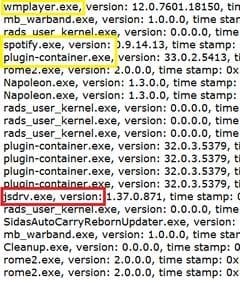
This pix is from your System Information error reporting, the first eleven days of November are down to the two Napoleons, down from there covers the last two weeks of October:
problems.jpg
The entries in yellow cover winamp, and spotify, check to make sure they're up to date, the one about plug-in container is Firefox. you have 33.0.2 the newest stable is 33.1 update it, and the Firefox error is complaining that you have hardware acceleration turned on, turn it off, see chosen solution: https://support.mozilla.org/en-US/questions/1025262
If you're using a separate graphics card make sure you have the on-board one (Intel?) turned off.

The one in red jsdrv.exe is ShopperPro\JSDriver. You should try to remove that: SystemLookup - Global Search The X means; X = Malware, spyware, adware, or other potentially unwanted items

Start with this, download and run: https://toolslib.net/downloads/viewdownload/1-adwcleaner/ Delete anything it finds.

I meant to mention this yesterday, but I find it incredulous that you don't have an antivrius program listed in your System Specs, as a gamer you should have the strongest antivirus out there.

You go through all the trouble to custom build a high end machine and you leave the front door wide open.
 

My Computer My Computer

At a glance

Originally Win 7 Hm Prem x64 Ver 6.1.7600 Bui...Intel i3 530 2.93GHz, 2933MHz 2 Cores 4 Logic...6GB of 1,333MHz DDR3 SDRAM32MB Intel Graphics Media Accelerator HD IGChip
Computer type
PC/Desktop
Computer Manufacturer/Model Number
Gateway DX4831-01e (Mid-Tower Desktop)
OS
Originally Win 7 Hm Prem x64 Ver 6.1.7600 Build 7601-SP1 | Upgraded to Windows 10 December 14, 2019
CPU
Intel i3 530 2.93GHz, 2933MHz 2 Cores 4 Logical Processors
Motherboard
Gateway H57M01 133 megahertz
Memory
6GB of 1,333MHz DDR3 SDRAM
Graphics Card(s)
32MB Intel Graphics Media Accelerator HD IGChip
Sound Card
Realtek High Definition Audio
Monitor(s) Displays
Gateway HX2000 20inch TFT active matrix TN
Screen Resolution
1600 x 900 x 59 hertz
Hard Drives
WDC WD10EADS-00M2B0 [HDD] (1000.20 GB) -- drive 0,
HL-DT-ST DVDRAM GH41N [CD-ROM dr]
Four card readers, and Four USB 2.0
PSU
300watts.
Case
Mid-Tower Desktop
Cooling
Stock from Gateway
Keyboard
Natural Ergonomic Keyboard 4000, see Other Info
Mouse
Orig. Gateway wore out now using Insignia USB wired optical
Internet Speed
Vz FIOS 10ms png 57.64Mbps down 65.53Mbps up Speedtest.org
Antivirus
Zamana Anti-logger with Anti-malware, MSE, Windows Firewall,
Browser
IE11.0.9600.19399-Upd ver11.0.135, Firefox 68.0.1 x64
Other Info
System Specs by Belarc.

BIOS: American Megatrends Inc. P01-A0 11/17/2009

Replaced the MS 'Natural' Standard PS/2 Enhanced 101-102 Keyboard with a new Natural Ergonomic Keyboard 4000 on August 1st 2014.

Canon Pixma MG3222 Printer.

Updated to IE11 on 12102015 | Fios Quantum Router g1100

Additional AV: SpywareBlaster, manual Mbam, SAS
Yes Sir! I will complete the tasks you've given me! - Thanks.

Well yeah, you may find it strange. I used to have an anti virus but i have formated the computer a lot of times now so I don't rly have given it any thought.

And thanks for looking through everything, amazing how you can find theese things ^^
 

My Computer My Computer

At a glance

64 Windows 7 ProfessionalIntel(R) Core(TM) i7 CPU 860 @ 2.80GHz (8 CPU...8 GB - 12 GBGigabyte Radeon HD 7870 2GB GDDR5
Computer type
PC/Desktop
Computer Manufacturer/Model Number
Custom build
OS
64 Windows 7 Professional
CPU
Intel(R) Core(TM) i7 CPU 860 @ 2.80GHz (8 CPUs)- 3.6GHz
Motherboard
MS - 7583
Memory
8 GB - 12 GB
Graphics Card(s)
Gigabyte Radeon HD 7870 2GB GDDR5
Hard Drives
Samsung SSD 840 EVO 120 GB ATA Device
Samsung HD103SJ ATA Device (1 TB)
Antivirus
None
Browser
Firefox
There's a lot there, take your time and be thorough.

That jsdrv.exe can overload a machine by itself, when you run the AdwCleaner:

  • Make sure everything is closed.

  • Double click on adwcleaner.exe to run the tool.

  • Click on Scan button.

  • When the scan has finished click on Clean button.

  • Your computer will be rebooted automatically. A text file will open after the restart.

  • You can post that txt file if you like.
You should still run Mbam, and or SAS to make sure.

You should reconsider forgetting to run antivirus programs. I use MSE, but some like Avast or Avira, all free.

You're welcome, it takes experience, after a while you get to know what to look for and what stands out. There are other members here that could probably find more than me.
 

My Computer My Computer

At a glance

Originally Win 7 Hm Prem x64 Ver 6.1.7600 Bui...Intel i3 530 2.93GHz, 2933MHz 2 Cores 4 Logic...6GB of 1,333MHz DDR3 SDRAM32MB Intel Graphics Media Accelerator HD IGChip
Computer type
PC/Desktop
Computer Manufacturer/Model Number
Gateway DX4831-01e (Mid-Tower Desktop)
OS
Originally Win 7 Hm Prem x64 Ver 6.1.7600 Build 7601-SP1 | Upgraded to Windows 10 December 14, 2019
CPU
Intel i3 530 2.93GHz, 2933MHz 2 Cores 4 Logical Processors
Motherboard
Gateway H57M01 133 megahertz
Memory
6GB of 1,333MHz DDR3 SDRAM
Graphics Card(s)
32MB Intel Graphics Media Accelerator HD IGChip
Sound Card
Realtek High Definition Audio
Monitor(s) Displays
Gateway HX2000 20inch TFT active matrix TN
Screen Resolution
1600 x 900 x 59 hertz
Hard Drives
WDC WD10EADS-00M2B0 [HDD] (1000.20 GB) -- drive 0,
HL-DT-ST DVDRAM GH41N [CD-ROM dr]
Four card readers, and Four USB 2.0
PSU
300watts.
Case
Mid-Tower Desktop
Cooling
Stock from Gateway
Keyboard
Natural Ergonomic Keyboard 4000, see Other Info
Mouse
Orig. Gateway wore out now using Insignia USB wired optical
Internet Speed
Vz FIOS 10ms png 57.64Mbps down 65.53Mbps up Speedtest.org
Antivirus
Zamana Anti-logger with Anti-malware, MSE, Windows Firewall,
Browser
IE11.0.9600.19399-Upd ver11.0.135, Firefox 68.0.1 x64
Other Info
System Specs by Belarc.

BIOS: American Megatrends Inc. P01-A0 11/17/2009

Replaced the MS 'Natural' Standard PS/2 Enhanced 101-102 Keyboard with a new Natural Ergonomic Keyboard 4000 on August 1st 2014.

Canon Pixma MG3222 Printer.

Updated to IE11 on 12102015 | Fios Quantum Router g1100

Additional AV: SpywareBlaster, manual Mbam, SAS
Hey again, sorry for a slow reply. Haven't had network in the area for two days.
Bad weather here in Norway.:sarc:


I did the adwScan,
15 Nov and another on 17 Nov.
 

Attachments

My Computer My Computer

At a glance

64 Windows 7 ProfessionalIntel(R) Core(TM) i7 CPU 860 @ 2.80GHz (8 CPU...8 GB - 12 GBGigabyte Radeon HD 7870 2GB GDDR5
Computer type
PC/Desktop
Computer Manufacturer/Model Number
Custom build
OS
64 Windows 7 Professional
CPU
Intel(R) Core(TM) i7 CPU 860 @ 2.80GHz (8 CPUs)- 3.6GHz
Motherboard
MS - 7583
Memory
8 GB - 12 GB
Graphics Card(s)
Gigabyte Radeon HD 7870 2GB GDDR5
Hard Drives
Samsung SSD 840 EVO 120 GB ATA Device
Samsung HD103SJ ATA Device (1 TB)
Antivirus
None
Browser
Firefox
We seem to have drifted away from the temperatures you reported, if prime95 fails quickly then this is almost certainly an overheating issue

Did you fit the cooler properly, are you familiar with the process and did you invest in some decent thermal compound
I know you say temps dropped after you fitted water cooling but 40+ at idle sounds high to me for water cooling

But that aside if your machine is crashing under gaming then gfx temps need to be looked at also, check gfx fans are spinning freely and clear of dust
0x124 errors are hardware based, although this is not always true it is the place to start
 

My Computer My Computer

At a glance

Win7 Ultimate X64Intel i5 3570K8GB DDR3 1600Onboard
Computer type
PC/Desktop
Computer Manufacturer/Model Number
Pauly Special
OS
Win7 Ultimate X64
CPU
Intel i5 3570K
Motherboard
Gigabyte Z77X-DS3H
Memory
8GB DDR3 1600
Graphics Card(s)
Onboard
Sound Card
Onboard
Screen Resolution
1280x1024
Hard Drives
Samsung 840 Evo SSD (OS)
1TB Spinner (Data)
PSU
800W Arctic
Case
Cooler Master
Cooling
3x120mm Fans
Keyboard
MS Wireless
Mouse
MS Wireless
Internet Speed
20M
I think I will agree with you, it must be an heating issue.
As you remember I said that i had some difficulties installing the water cooling system.
Checked everything when I boughr the water cooler that it matches, socket-1156,1155.
But when I got it and were going to install it, it was like a little to big.
Followed the instruction were your supposed to place a metal thingy over the plastic though the plastic didn't fit 100% so I needed to use an knfie to cut some off to get it on place.

And the bolts that are going into the mother board from the cooler:
3 of them is standing 90 degrees fit perfectly
While the last one is.. what can I say? Unable to get it right. if I force it in its standing like 70-80 degrees + I am not able to fit it 100% its just a loose bolt you could say.:huh:
 

My Computer My Computer

At a glance

64 Windows 7 ProfessionalIntel(R) Core(TM) i7 CPU 860 @ 2.80GHz (8 CPU...8 GB - 12 GBGigabyte Radeon HD 7870 2GB GDDR5
Computer type
PC/Desktop
Computer Manufacturer/Model Number
Custom build
OS
64 Windows 7 Professional
CPU
Intel(R) Core(TM) i7 CPU 860 @ 2.80GHz (8 CPUs)- 3.6GHz
Motherboard
MS - 7583
Memory
8 GB - 12 GB
Graphics Card(s)
Gigabyte Radeon HD 7870 2GB GDDR5
Hard Drives
Samsung SSD 840 EVO 120 GB ATA Device
Samsung HD103SJ ATA Device (1 TB)
Antivirus
None
Browser
Firefox
Back
Top