Solved PC Freezes at widows splash screen:

mtebaldi

New member
Local time
8:11 PM
Messages
14
This problem started about 1 yr ago. My system would freeze at splash screen I would reboot and all good. The frequency intenseified and the reboots that would fix the issue before took several reboots. Running repair or restore did nothing to help. I ran chkdsk /r and there were 2 issues that could not be resolved. Read some fourms and the finding was that this was a symptom of a HD starting to fail. I had two new 2.5 500gb HDD which I did a fresh install of Windows 7 32bit. I installed security software Norton, and MB and Video software. When I rebooted the same issue. When the issue happens the HD light blinks as windows is loading but stops when the system freezes at the splash screen. I can reboot into safemode no issues.

OS Name Microsoft Windows 7 Ultimate
Version 6.1.7600 Build 7600
Other OS Description Not Available
OS Manufacturer Microsoft Corporation
System Name Me
System Manufacturer Gigabyte Technology Co., Ltd.
System Model P55-USB3
System Type X86-based PC
Processor Intel(R) Core(TM) i7 CPU 860 @ 2.80GHz, 2794 Mhz, 4 Core(s), 8 Logical Processor(s)
BIOS Version/Date Award Software International, Inc. F2, 12/24/2009
SMBIOS Version 2.4
Windows Directory C:\Windows
System Directory C:\Windows\system32
Boot Device \Device\HarddiskVolume1
Locale United States
Hardware Abstraction Layer Version = "6.1.7600.16385"
User Name Me
Time Zone Pacific Daylight Time
Installed Physical Memory (RAM) 4.00 GB
Total Physical Memory 3.50 GB
Available Physical Memory 2.26 GB
Total Virtual Memory 6.99 GB
Available Virtual Memory 5.66 GB
Page File Space 3.50 GB
Page File C:\pagefile.sys
 

My Computer

Computer type
PC/Desktop
Computer Manufacturer/Model Number
custom build
OS
Windows 7 Home Premium 32bit
CPU
Intel 860 I7
Motherboard
GA-P55-USB3
Memory
4g Gskill
Graphics Card(s)
asus Geforce GTX 660
Hard Drives
WD 1TB Caviar Black uninstalled.
WDC WD5000BPKT-00PK4T0 ATA Device
PSU
Corsair TX750w
Case
Cooler Master Storm Sniper
Keyboard
ZBoard wired
Mouse
Razer Diamondback wired
Internet Speed
Wired Broadband 178.48Mbps download & 12.16Mbps Upload
Antivirus
Norton 360
Browser
IE/Chrome
Hello and welcome mate mate I see straight away a problem in that if I ma reading it right you have not got Service Pack 1 in the install the build should read 7601 not 7600 that was the old original build and the SP1 was a major update.

If you can get it to run for just a while go to Start type "msinfo32" (no quote marks) and then click on the highlighted blue box that comes up and then see what is in the window that opens - see pic

For my curiosity just how old is the machine and could you also run this ditty of mine for us too

Using HW Info

PART A:

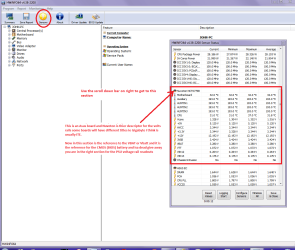
You can test the volts on the PSU with HW Info HWiNFO, HWiNFO32/64 - Download < download the right bit version and close the right handwindow select Sensors and scroll down to the power section where you will seewhat the volts are doing see my pic. In my pic the section (Nuvoton) with VBATT is a dead give awayyou are in the section for the rail voltages. There are other section titlesand one that pops up often is ITE

Now the voltage on the different rails have to be within 5% =+/-of what is required or the machine will not work properly if at all.

See this for the rail voltage info

http://www.tomshardware.com/reviews/power-supply-specifications-atx-reference,3061.html (Section 2.)

The original right hand window shows the machine running and ishandy for that but for looking at the components in some detail close it anduse the main left hand side panel

FOR OTHER COMPONENTS

PART B:

Open each small square with + in it on the section thecomponents are in and then click on the individual component/s (it will highlight in blue) - in the righthand side will appear all sorts of details including brands speeds and otheressential info that particular device. See pic for example.
Use PART A:
 

Attachments

  • MSINFO SP1.PNG
    MSINFO SP1.PNG
    17.4 KB · Views: 0
  • HW INFO DESKTOP PSU.PNG
    HW INFO DESKTOP PSU.PNG
    157.7 KB · Views: 1

My Computer

Computer type
PC/Desktop
Computer Manufacturer/Model Number
Own build (new) Desk1 / Asus ROG Win 7 / Desk2 1st build
OS
Desk1 7 Home Prem / Desk2 10 Pro / Main lap Asus ROG 10 Pro 2 laptop Toshiba 7 Pro Asus P2520 7 & 10
CPU
Desk1 i5 3750K / Laptop i7 GTX 860M / Desk2 i5 2500
Motherboard
Desk1 Asus P877-V / Desk2 Gigabyte H67 UD3H / Laptop ?
Memory
Desk1 8GB (1866) / Desk2 16GB (1333) / Laptop 8Gb DDR3
Graphics Card(s)
Desk 1& 2NVidia GTX 650 & Laptops on board Intel
Sound Card
Desk 1 & 2 -XONAR DG Realtek High Def audio Laptop
Monitor(s) Displays
Desk 1 Benq HD 2450 / Desk2 Philips 24" / Laptop 17.5"
Screen Resolution
1920x1080 D1 & D2 & Laptop 1
Hard Drives
Desk1 Samsung 120GB 830 SSD
Asus ROG 256GB 850 Pro SSD
Desk2 Samsung 840 256 SSD
Toshiba 120GB EVO
PSU
Desk 1 Corsair HX 1050/ Laptop ? / Desk 2 Corsair HX 650
Case
Desk 1 Cooler HAF XM ? Toshiba laptop / Desk2 Coolermaster
Cooling
Fans on all Desk1 -2 Desk2 - all Coolermasters 5 Laptop ?
Keyboard
Desk 1 MS Sidewinder X6 Desk 2 MS Sidewinder X 4
Mouse
Desk 1&2 - Gigabyte MS 900 gamer - laptop - Logitec wireless
Internet Speed
ADSL2+
Other Info
One other Desktop (tester) and spare Toshba laptop both with SSD's
Running Kaspersky 2016 ISS on all machines config'd identically
Logitec audio stereo systems on each machine (x3)
Canon MG5250MFC
Router/modem TP-Link running WPA2SK
Thanks ICIT2LOL for the reply. Here is the info that you related to in your original reply. I am running 7601 SP1 and voltages look good. Tried several other things that were in some threads here. Accesschk and another software that was suggested here I forget the name bit nothing helped. So I re-imaged my 1tb HDD and had no further issues with screen freezing at the "windows startup screen". so even though the problem was not solved through a actual fix it was solved by a format and re-image..
 

My Computer

Computer type
PC/Desktop
Computer Manufacturer/Model Number
custom build
OS
Windows 7 Home Premium 32bit
CPU
Intel 860 I7
Motherboard
GA-P55-USB3
Memory
4g Gskill
Graphics Card(s)
asus Geforce GTX 660
Hard Drives
WD 1TB Caviar Black uninstalled.
WDC WD5000BPKT-00PK4T0 ATA Device
PSU
Corsair TX750w
Case
Cooler Master Storm Sniper
Keyboard
ZBoard wired
Mouse
Razer Diamondback wired
Internet Speed
Wired Broadband 178.48Mbps download & 12.16Mbps Upload
Antivirus
Norton 360
Browser
IE/Chrome
Back
Top