PC Games Don't Auto Launch

Brandonn2010

New member
Local time
3:50 PM
Messages
42
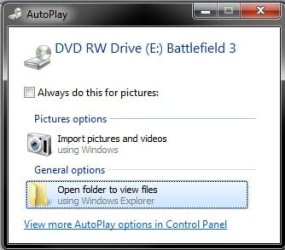
Like the title says, when I insert a game into a disk drive, they don't automatically run, even though I have it set to do that in Autoplay. However, when Autoplay launches when a game is inserted, it asks what I want to do for pictures? Even though it's a game, not pictures or a camera.

Unrelated, while I was typing this earlier, my computer restarted by itself right after Adobe Reader finished updating. Is it supposed to do that?

Thanks!
 

My Computer

OS
Windows 7 Professional x64
CPU
AMD Phenom II X4 925 @ 3.5GHz
Motherboard
ASUS M4A79XTD EVO
Memory
4x2GB G.SKILL @1333MHz
Graphics Card(s)
2x Sapphire HD 6950 Flex Edition
Sound Card
Onboard
Monitor(s) Displays
SAMSUNG SyncMaster 2343
Screen Resolution
2048x1152 @60Hz
Hard Drives
250GB Seagate Barracuda
PSU
750W Corsair TX
Case
Cooler Master HAF X
Cooling
Sunbeam Core Contact Freezer 120mm
Keyboard
Acer
Mouse
Cooler Master Storm Sentinel
Internet Speed
20Mbps
Hello Brandon,

Find and click on "Default Programs". Inside, find auto play or such option and click it. Under games and programs, select run automatically. The terminology is not exact. Let me know if it works!
 

My Computer

Computer type
PC/Desktop
Computer Manufacturer/Model Number
Custom Asus Build
OS
Microsoft Windows 8.1 Pro 64-bit
CPU
Intel(R) Core(TM) i3-4130 CPU @ 3.40GHz
Motherboard
B85M-E
Memory
8.00 GB
Graphics Card(s)
None
Sound Card
Realtek High Definition Audio
Monitor(s) Displays
Asus 23.6" Monitor
Screen Resolution
1920 x 1080 x 32 bits (4294967296 colors) @ 60 Hz
Hard Drives
INTEL SSDSC2BW180A4
Samsung SSD 840 PRO Series
PSU
Seasonic S12II-380Bronze
Case
Lian Li
Cooling
Fan, Passive
Keyboard
Logitech K120
Mouse
Microsoft Touch Mouse
Internet Speed
4ms Ping, 19.0 Mbps Download, 19.0 Mbps Upload
Antivirus
Eset Endpoint
Browser
Internet Explorer, Chrome
Hello Brandon,

Find and click on "Default Programs". Inside, find auto play or such option and click it. Under games and programs, select run automatically. The terminology is not exact. Let me know if it works!

I had already done that before posting. Here is a picture of what pops up when I put in a game. Note it happens with other games than Battlefield 3.
 

Attachments

  • example.jpg
    example.jpg
    34.8 KB · Views: 3

My Computer

OS
Windows 7 Professional x64
CPU
AMD Phenom II X4 925 @ 3.5GHz
Motherboard
ASUS M4A79XTD EVO
Memory
4x2GB G.SKILL @1333MHz
Graphics Card(s)
2x Sapphire HD 6950 Flex Edition
Sound Card
Onboard
Monitor(s) Displays
SAMSUNG SyncMaster 2343
Screen Resolution
2048x1152 @60Hz
Hard Drives
250GB Seagate Barracuda
PSU
750W Corsair TX
Case
Cooler Master HAF X
Cooling
Sunbeam Core Contact Freezer 120mm
Keyboard
Acer
Mouse
Cooler Master Storm Sentinel
Internet Speed
20Mbps
Hello Brandon,

Find and click on "Default Programs". Inside, find auto play or such option and click it. Under games and programs, select run automatically. The terminology is not exact. Let me know if it works!

I had already done that before posting. Here is a picture of what pops up when I put in a game. Note it happens with other games than Battlefield 3.

If you press the button at the bottom that says more autoplay options, you'll come to a menu that should solve your problems. You can select what to do when any type of disc is inserted, and you most likely have "Take no action" selected for software and games, so it notices picures on the disc and treats it as a disc with just images. I personally have it set to ask everytime for any disc, because I can't stand autoplay :P
 

My Computer

Computer Manufacturer/Model Number
Custom
OS
Windows 7 Ultimate x64
CPU
AMD Phenom II X4 965 Black Edition Deneb 3.4GHz Socket AM3
Motherboard
ASRock M3A770DE AM3 AMD 770 ATX AMD Motherboard
Memory
ADATA XPG Gaming Series 4GB (2 x 2GB)
Graphics Card(s)
MSI N260GTX Twin Frozr OC
Sound Card
Integrated
Monitor(s) Displays
eMachines HD LCD Monitor 19" Widescreen
Screen Resolution
1440x900
Hard Drives
Seagate Barracuda 7200 1 TB
PSU
APEVIA JAVA ATX-JV650W
Case
Rosewill R6425 SL Silver SGCC Steel ATX Mid Tower
Cooling
COOLER MASTER GeminII S RR-CCH-PBU1-GP
Keyboard
Microsoft Sidewinder x4
Mouse
Cyborg R.A.T. 3
Hello Brandon,

Find and click on "Default Programs". Inside, find auto play or such option and click it. Under games and programs, select run automatically. The terminology is not exact. Let me know if it works!

I had already done that before posting. Here is a picture of what pops up when I put in a game. Note it happens with other games than Battlefield 3.

If you press the button at the bottom that says more autoplay options, you'll come to a menu that should solve your problems. You can select what to do when any type of disc is inserted, and you most likely have "Take no action" selected for software and games, so it notices picures on the disc and treats it as a disc with just images. I personally have it set to ask everytime for any disc, because I can't stand autoplay :P

Like I said in my OP and last post, I have it set to that already but it shows up as pictures as shown in my last post.
 

My Computer

OS
Windows 7 Professional x64
CPU
AMD Phenom II X4 925 @ 3.5GHz
Motherboard
ASUS M4A79XTD EVO
Memory
4x2GB G.SKILL @1333MHz
Graphics Card(s)
2x Sapphire HD 6950 Flex Edition
Sound Card
Onboard
Monitor(s) Displays
SAMSUNG SyncMaster 2343
Screen Resolution
2048x1152 @60Hz
Hard Drives
250GB Seagate Barracuda
PSU
750W Corsair TX
Case
Cooler Master HAF X
Cooling
Sunbeam Core Contact Freezer 120mm
Keyboard
Acer
Mouse
Cooler Master Storm Sentinel
Internet Speed
20Mbps
Try this:
  1. Click on Start>All Programs>Accessories, and then right-click Command Prompt; select "Run as administrator".
  2. At the command prompt, type "net start shellhwdetection" without quotes, and then press ENTER.
  3. Restart your computer.
Troubleshoot problems: Troubleshoot AutoPlay problems

See if this tutorial offers any further help: Fix a corrupted user profile

~Advice summarized from Nithyananda J, Support Engineer, Microsoft Answers: http://answers.microsoft.com/en-us/...ont-work/69ac674b-ef1b-491d-9be2-f7a1d675956c
 

My Computer

Computer type
PC/Desktop
Computer Manufacturer/Model Number
Custom Asus Build
OS
Microsoft Windows 8.1 Pro 64-bit
CPU
Intel(R) Core(TM) i3-4130 CPU @ 3.40GHz
Motherboard
B85M-E
Memory
8.00 GB
Graphics Card(s)
None
Sound Card
Realtek High Definition Audio
Monitor(s) Displays
Asus 23.6" Monitor
Screen Resolution
1920 x 1080 x 32 bits (4294967296 colors) @ 60 Hz
Hard Drives
INTEL SSDSC2BW180A4
Samsung SSD 840 PRO Series
PSU
Seasonic S12II-380Bronze
Case
Lian Li
Cooling
Fan, Passive
Keyboard
Logitech K120
Mouse
Microsoft Touch Mouse
Internet Speed
4ms Ping, 19.0 Mbps Download, 19.0 Mbps Upload
Antivirus
Eset Endpoint
Browser
Internet Explorer, Chrome
Back
Top