PC hangs at shutdown

joem

New member
Local time
4:41 PM
Messages
9
Location
England
--SOLVED--

The culprit of my hanging shutdowns was a cheap PCI to USB card.

------------

Hi everyone,
I'm a new guy with a problem.

My PC hangs at shutdown, indefinitely. I am running Windows 7 RC1 and when I click the shutdown button in the start menu it logs off normally, then exits to the screen that says 'Shutting Down' and stays there. As far as I can tell nothing is actually happening, no HDD access etc.

I think I can point the finger of blame to one (or both) of two new pieces of hardware I installed yesterday that could have caused this.
Firstly, I installed a cheapo graphics card (Gigabyte HD 4350) which is powered by an ATI Radeon HD 4350 GPU, and so has installed with itself a bunch of ATI drivers and a piece of software called ATI Catalyst.
I have updated the drivers from their website to the very latest Windows 7/Vista ones, but my PC still won't shutdown. Although the card and software all works fine, I still suspect it is something from ATI causing this problem.

The other thing I installed yesterday (although I would be surprised if this were the problem) was a USB PCI card, popped it into a spare PCI slot and I have an extra 4 USB ports. No software needed obviously. That is working fine as well.

I did actually install one other thing yesterday, although this can't have caused the problem. It was an Antec Earthwatts 380W PSU.

Funnily enough, once the PC hangs at shutdown and I can see there is nothing going on anymore, I can simply hold down my PC's power button and it will turn off - without consequence - i.e. Windows sees this as a normal shutdown and doesn't flag up the error screen of 'Windows was not shut down properly' or whatever it is, when I next boot up.

Anyways, if anyone could help I would be very grateful, I assume you'll need some more detailed information, so just lemme know exactly what and I'll post it up ASAP.

Thanks,
Rory.
 
Last edited:

My Computer

OS
Windows 7 RC1 32-Bit
CPU
AMD Sempron 2800+
Motherboard
ASRock K8NF4G-SATA2
Memory
1GB (2x 512mb Non-ECC DDR400 PC3200)
Graphics Card(s)
Gigabyte HD 4350 512MB GDDR2
Sound Card
Integrated Realtek ALC850 7.1 channel AC'97
Monitor(s) Displays
Samsung Syncmaster 2032MW 20" LCD HD Monitor
Screen Resolution
1680x1050
Hard Drives
80GB Western Digital 7200rpm 8MB Cache
PSU
Antec Earthwatts 380W
Cooling
1 x CPU Fan, 1 x Hiper Rear Case Fan
Keyboard
Logitech Ultra Flat Wired Keyboard
Mouse
Labtec Wireless Optical Mouse Pro
Internet Speed
ADSL (ZyXEL Prestige 660HW-T1 Router)
I had the same problem with my new build a few yrs back. After troubleshooting, I said the heck with it. A few months passed by and tried fixing it by calling ASUS. After getting back and forth with ASUS(i thought the mobo was the problem), they pinpointed me to the Power Supply. I was very skeptical but then found out a few PS werent compatible with the motherboard. And the problem turned out to be PS related. Since a PS came with my new case, I used that instead and problem solved.
 

My Computer

OS
Windows XP Media Center, Windows XP Pro, Leopard OSX
CPU
Intel Core 2 Duo 2.66Ghz E8200
Motherboard
ASUS P5E-VM DO
Memory
2 GB Patriot
Graphics Card(s)
Nvidia 7900GS
Monitor(s) Displays
Vizio 22" HDTV 1080p
Hard Drives
160 WD HD
Mmm, interesting idea.
I see no reason why this PSU should have a problem, it is a 20+4 pin connector that detaches and plugs into the 20-pin socket on my motherboard, it is a powerful enough PSU for my very modest needs, and it is from a reputable and reliable brand.
 

My Computer

OS
Windows 7 RC1 32-Bit
CPU
AMD Sempron 2800+
Motherboard
ASRock K8NF4G-SATA2
Memory
1GB (2x 512mb Non-ECC DDR400 PC3200)
Graphics Card(s)
Gigabyte HD 4350 512MB GDDR2
Sound Card
Integrated Realtek ALC850 7.1 channel AC'97
Monitor(s) Displays
Samsung Syncmaster 2032MW 20" LCD HD Monitor
Screen Resolution
1680x1050
Hard Drives
80GB Western Digital 7200rpm 8MB Cache
PSU
Antec Earthwatts 380W
Cooling
1 x CPU Fan, 1 x Hiper Rear Case Fan
Keyboard
Logitech Ultra Flat Wired Keyboard
Mouse
Labtec Wireless Optical Mouse Pro
Internet Speed
ADSL (ZyXEL Prestige 660HW-T1 Router)

Well, I have attached some screenshots showing my currently running processes, services, and the startup programs I have enabled.
 

Attachments

  • Processes.JPG
    Processes.JPG
    141.8 KB · Views: 310
  • Services 1.JPG
    Services 1.JPG
    153.7 KB · Views: 146
  • Services 2.JPG
    Services 2.JPG
    24.2 KB · Views: 68
  • Startup Programs.JPG
    Startup Programs.JPG
    33.7 KB · Views: 95

My Computer

OS
Windows 7 RC1 32-Bit
CPU
AMD Sempron 2800+
Motherboard
ASRock K8NF4G-SATA2
Memory
1GB (2x 512mb Non-ECC DDR400 PC3200)
Graphics Card(s)
Gigabyte HD 4350 512MB GDDR2
Sound Card
Integrated Realtek ALC850 7.1 channel AC'97
Monitor(s) Displays
Samsung Syncmaster 2032MW 20" LCD HD Monitor
Screen Resolution
1680x1050
Hard Drives
80GB Western Digital 7200rpm 8MB Cache
PSU
Antec Earthwatts 380W
Cooling
1 x CPU Fan, 1 x Hiper Rear Case Fan
Keyboard
Logitech Ultra Flat Wired Keyboard
Mouse
Labtec Wireless Optical Mouse Pro
Internet Speed
ADSL (ZyXEL Prestige 660HW-T1 Router)
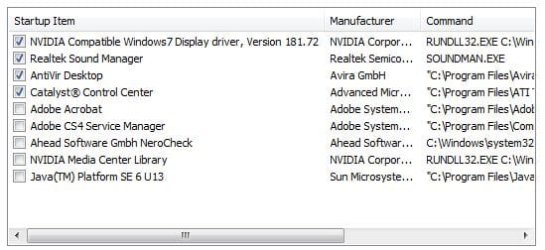
First thing you should try is manually end processes "MOM.exe" and "CCC.exe" (right click and choose "end process")
Then try to shutdown system.If that works pm me and we'll go from there.

I have had issues with W7 not being able to stop services after installing drivers causing shutdown to hang.In my case it was sound drivers and I had to write a script that ran at shutdown forcing audio services to stop.

You may also want to try ending process "SOUNDMAN.exe" and try shutdown since W7 seems to have problems ending audio services with a lot of sound cards, although I'm not aware of any issues with realtek.

If all else fails remove the pci card you recently installed.
 

My Computer

Computer Manufacturer/Model Number
billdo build
OS
Windows 7 x64 rtm
CPU
Intel Q9550 @3.7Ghz
Motherboard
Gigabyte ep45 UD3P
Memory
8GB OCZ Reaper
Graphics Card(s)
Geforce 9800gtx+
Sound Card
M-Audio 192
Monitor(s) Displays
24" Sammy
Screen Resolution
1920x1200
Hard Drives
System HD:2x Super Talent SX ssd 64GB raid 0(128GB)--
- Storage HD: WD 640GB AAK
PSU
650
Case
Generic box w/little window and pretty blue lights
Cooling
Air
Keyboard
Razor Lycosa
Mouse
Logitech MX518
Internet Speed
unpredictable cable
Other Info
Monkeys are EVIL!!!!!!
Hi billdo,
thanks for your reply.

I tried ending all three of those processes and then shutting down, but my PC still hung.
I will try removing both the graphics card and the USB PCI card tomorrow (if I get the time) and report back on the outcome.
 

My Computer

OS
Windows 7 RC1 32-Bit
CPU
AMD Sempron 2800+
Motherboard
ASRock K8NF4G-SATA2
Memory
1GB (2x 512mb Non-ECC DDR400 PC3200)
Graphics Card(s)
Gigabyte HD 4350 512MB GDDR2
Sound Card
Integrated Realtek ALC850 7.1 channel AC'97
Monitor(s) Displays
Samsung Syncmaster 2032MW 20" LCD HD Monitor
Screen Resolution
1680x1050
Hard Drives
80GB Western Digital 7200rpm 8MB Cache
PSU
Antec Earthwatts 380W
Cooling
1 x CPU Fan, 1 x Hiper Rear Case Fan
Keyboard
Logitech Ultra Flat Wired Keyboard
Mouse
Labtec Wireless Optical Mouse Pro
Internet Speed
ADSL (ZyXEL Prestige 660HW-T1 Router)
Leave the ATI card in. If you stopped the CCC,MOM processes chances are that is not the problem.I would bet on the pci usb card. I don't know what model you have, but from my experience in the past when researching to buy one I noticed most were very cheap and outdated with very little support.The one I purchased worked fine in XP but had flakey drivers that caused problems with vista.
If problem still persist after removing usb pci card, then you may want to try what ChrisNYC suggests and look at power supply.
 

My Computer

Computer Manufacturer/Model Number
billdo build
OS
Windows 7 x64 rtm
CPU
Intel Q9550 @3.7Ghz
Motherboard
Gigabyte ep45 UD3P
Memory
8GB OCZ Reaper
Graphics Card(s)
Geforce 9800gtx+
Sound Card
M-Audio 192
Monitor(s) Displays
24" Sammy
Screen Resolution
1920x1200
Hard Drives
System HD:2x Super Talent SX ssd 64GB raid 0(128GB)--
- Storage HD: WD 640GB AAK
PSU
650
Case
Generic box w/little window and pretty blue lights
Cooling
Air
Keyboard
Razor Lycosa
Mouse
Logitech MX518
Internet Speed
unpredictable cable
Other Info
Monkeys are EVIL!!!!!!
I removed the PCI USB card earlier today, and hey presto my PC shuts down fine.
Bizarrely, the thing does work with my scanner plugged in, but anything else just fails, so it is definitely flakey like you said.

It was a cheapo card so I didn't expect much, and I will now send it back and get a better one with some up to date vista/7 drivers.

Thanks for your help billdo,
Rory.
 

My Computer

OS
Windows 7 RC1 32-Bit
CPU
AMD Sempron 2800+
Motherboard
ASRock K8NF4G-SATA2
Memory
1GB (2x 512mb Non-ECC DDR400 PC3200)
Graphics Card(s)
Gigabyte HD 4350 512MB GDDR2
Sound Card
Integrated Realtek ALC850 7.1 channel AC'97
Monitor(s) Displays
Samsung Syncmaster 2032MW 20" LCD HD Monitor
Screen Resolution
1680x1050
Hard Drives
80GB Western Digital 7200rpm 8MB Cache
PSU
Antec Earthwatts 380W
Cooling
1 x CPU Fan, 1 x Hiper Rear Case Fan
Keyboard
Logitech Ultra Flat Wired Keyboard
Mouse
Labtec Wireless Optical Mouse Pro
Internet Speed
ADSL (ZyXEL Prestige 660HW-T1 Router)
Thanks for the tip

I've been pulling my hair for a couple of days on the same issue (on Windows 7 64). After reading this thread, I pulled a USB/1394 el cheapo ebay combo card I had installed many moons ago and the computer now shuts down and restarts normally. Strange though - that card had worked fine with both XP Pro 32 and Vista Ultimate 32.
 

My Computer

OS
windows 7
What a pain!
Glad to see this thread helped you out though.
 

My Computer

OS
Windows 7 RC1 32-Bit
CPU
AMD Sempron 2800+
Motherboard
ASRock K8NF4G-SATA2
Memory
1GB (2x 512mb Non-ECC DDR400 PC3200)
Graphics Card(s)
Gigabyte HD 4350 512MB GDDR2
Sound Card
Integrated Realtek ALC850 7.1 channel AC'97
Monitor(s) Displays
Samsung Syncmaster 2032MW 20" LCD HD Monitor
Screen Resolution
1680x1050
Hard Drives
80GB Western Digital 7200rpm 8MB Cache
PSU
Antec Earthwatts 380W
Cooling
1 x CPU Fan, 1 x Hiper Rear Case Fan
Keyboard
Logitech Ultra Flat Wired Keyboard
Mouse
Labtec Wireless Optical Mouse Pro
Internet Speed
ADSL (ZyXEL Prestige 660HW-T1 Router)
Well my BSOD was due to not switching off my Tascam FW-1884 connected by firewire before shutdown.
 

My Computer

OS
Windows 7 x64
CPU
Intel Q6600
Motherboard
ASUS P5K Pro
Memory
6 gig
Graphics Card(s)
Radeon X600
Sound Card
external firewire
Monitor(s) Displays
dual 20"
So you could mark this solved right?
 

My Computer

Computer Manufacturer/Model Number
HP Pavillion dv-7 1005 Tx
OS
Win 8 Release candidate 8400
CPU
[email protected]
Memory
4 gigs
Graphics Card(s)
Nvidia 9600M
Sound Card
HD built-in
Monitor(s) Displays
17" Wxga
Screen Resolution
1440x900
Cooling
none
Internet Speed
45Mb down 5Mb up
So you could mark this solved right?

Unfortunately, NO!

If the FW-1884 is connected when shutting down.....BSOD
If I switch FW-1884 off while connected to firewire port......BSOD

Conclusion........ It took a serious amount of time for Tascam to come up with Vista x64 drivers v1.70..... I'm not holding my breath for W7.
 

My Computer

OS
Windows 7 x64
CPU
Intel Q6600
Motherboard
ASUS P5K Pro
Memory
6 gig
Graphics Card(s)
Radeon X600
Sound Card
external firewire
Monitor(s) Displays
dual 20"
And the vista drivers dont work on 7 even in compat mode?
K
 

My Computer

Computer Manufacturer/Model Number
HP Pavillion dv-7 1005 Tx
OS
Win 8 Release candidate 8400
CPU
[email protected]
Memory
4 gigs
Graphics Card(s)
Nvidia 9600M
Sound Card
HD built-in
Monitor(s) Displays
17" Wxga
Screen Resolution
1440x900
Cooling
none
Internet Speed
45Mb down 5Mb up
And the vista drivers dont work on 7 even in compat mode?
K

Well I was assuming the Tascam v1.70 x64 driver to be the culprit but just maybe it's the hardware firewire link on the motherboard.
In fact it can't be the driver as the FW-1884 works perfectly well until power down of either the unit or the computer.

I do have a separate pci firewire card but no free slot to try it on.

I've now removed the FW-1884 from my desk while playing with Cubase 5 x64 on W7. I tend not to convert my midi instrument tracks to audio before mixdown so it's been fairly redundant of late.
A far bigger concern for me is the lack of x64 version for many vst and vsti plugins. The Steinberg 32bit bridge in Cubase 5 x64 is near useless and other developers like jBridge although better still can't convert all. Particularly Audioease Altiverb which is my goto "space" creator.
 

My Computer

OS
Windows 7 x64
CPU
Intel Q6600
Motherboard
ASUS P5K Pro
Memory
6 gig
Graphics Card(s)
Radeon X600
Sound Card
external firewire
Monitor(s) Displays
dual 20"
you were using vista 32 drivers before, are you sure you got the right drivers for it?
 

My Computer

OS
Windows XP Media Center, Windows XP Pro, Leopard OSX
CPU
Intel Core 2 Duo 2.66Ghz E8200
Motherboard
ASUS P5E-VM DO
Memory
2 GB Patriot
Graphics Card(s)
Nvidia 7900GS
Monitor(s) Displays
Vizio 22" HDTV 1080p
Hard Drives
160 WD HD
you were using vista 32 drivers before, are you sure you got the right drivers for it?
I have installed Windows 7 x64 as a replacement for Vista x64 therefore all hardware connected to my computer only worked because I used the most recent x64 drivers for them including the FW-1884.

I better update my comment on the jBridge app for using 32bit vst in Cubase x64. Altiverb 6.3.3 is running without crashing so for the fist time, I'm happy to use Cubase 5 x64 now as my go to DAW.
 

My Computer

OS
Windows 7 x64
CPU
Intel Q6600
Motherboard
ASUS P5K Pro
Memory
6 gig
Graphics Card(s)
Radeon X600
Sound Card
external firewire
Monitor(s) Displays
dual 20"
Hi - I've had the same problem as the original poster, and Im 99% sure the culprit is the same. However I badly need those extra USB ports so am trying to find a workaround at the minute (because ultimatley waiting for the system to get to the shutdown screen, stop hard disk activitiy, then manually power-off is just what we all had to do back in the days of windows 98).

What I've tried so far, is running gpedit.msc, then going Userconfiguratoin --> Windows settings --> Scripts --> Logoff.

Ive written a .bat file that tries to stop all of the usb services on my computer at logoff. The file reads:
net stop "usbuhci"
net stop "usbehci"
net stop "usbohci"
net stop "AmUStor"
net stop "usbhub"

Ive then told windows to run that script at logoff to try and stop the USB devices from doing anything, but it hasnt worked. Ive tried the same thing, but with the file add as part of the shutdown process (so if in gpedit.msc you went Computerconfiguratoin --> Windows Settings --> Scripts --> Shutdown, and did the same thing there).

Anyone have any ideas for other things I could try? Or add to that script?

Thanks,
Tarsanth
 

My Computer

OS
Windows 7 x64
CPU
AMD Athlon x2 64 2.8 GhZ
Motherboard
MSI K9N2 Diamond
Memory
Corsair 2x1Gb @ 800 MhZ
Graphics Card(s)
Nvidia 8800GT
Sound Card
Soundblaster Z-Fi Xtreme Audio
Hard Drives
Samsung 320Gb (OS disk)
Western Digital 500Gb (Storage)
PSU
Thermaltake TR-2 500W
Case
Thermaltake SopranoRS
I've been pulling my hair for a couple of days on the same issue (on Windows 7 64). After reading this thread, I pulled a USB/1394 el cheapo ebay combo card I had installed many moons ago and the computer now shuts down and restarts normally. Strange though - that card had worked fine with both XP Pro 32 and Vista Ultimate 32.

So i am also having the same problems and i also have an old cheap ( USB/1394 ) i will take it out and update You if it works or now ... But i must say that i am happy find a reasonable reason y this is happening to me

Update u later thanks much
 

My Computer

OS
Windows 7 64bit
It worked amazing so my question is should i buy a new usb/PCI and put it in there or this means i cant use an extra 2 or 3 usb ???
 

My Computer

OS
Windows 7 64bit
Back
Top