PC Not Accessible Over Network

Baffled

New member
Local time
9:34 PM
Messages
3
Hi All

I have 4 PCs on a home network. All are connected by ethernet cable (2 via TP Link round the electrical main) and all run either Windows 7 Home Premium or Windows 7 Ultimate.

The main PC, connected to the ZTE modem is running Home Premium.

All 4 PCs use ESET Nod 32.

From the main PC I can see and access all the other 3 PCs, but none of the other PCs can access mine!

Originally it kept coming up with a message saying I may not be authorised to access the PC and to contact the system admin, but now the other PCs cannot even see the main one.

All 4 have access to the internet without any problems. Only the main PC can access the shared printers. The other PCs cannot see them.

I have been researching this on the internet for weeks and have got nowhere. Other threads with a similar problem seem to relate to different editions of Windows.

I have checked all the network adaptors, the firewalls and everything else that I can think of, but still no luck.

It was all working properly but suddenly the problems started. System restore wouldn't cure it either.

Does anyone have any ideas as this is driving me nuts!

Thanks in advance for any help.

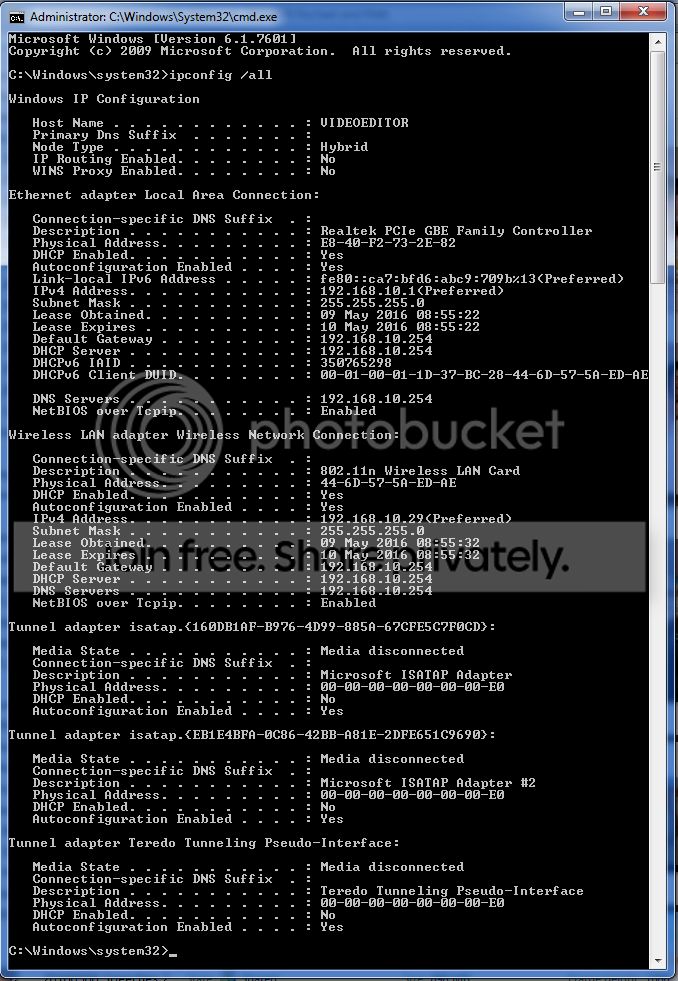
Main PC
01%20main%20pc_zpsvgbdw3yv.jpg


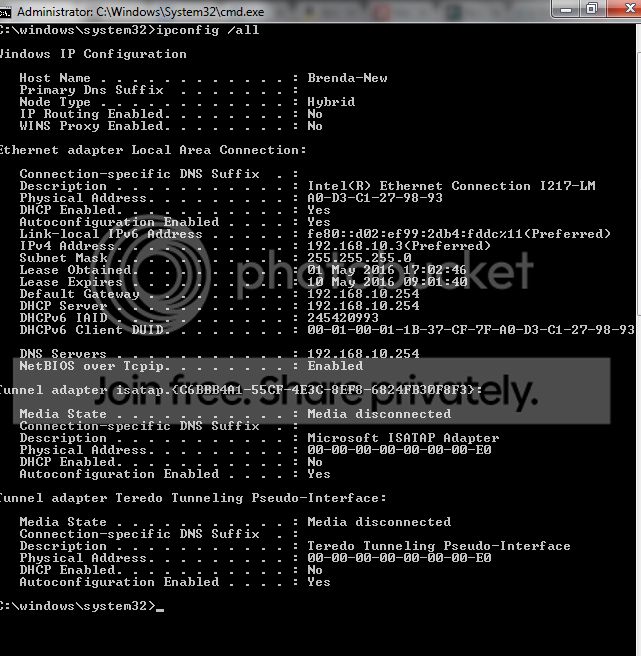
PC2
01%20pc2_zpsalojcxco.jpg


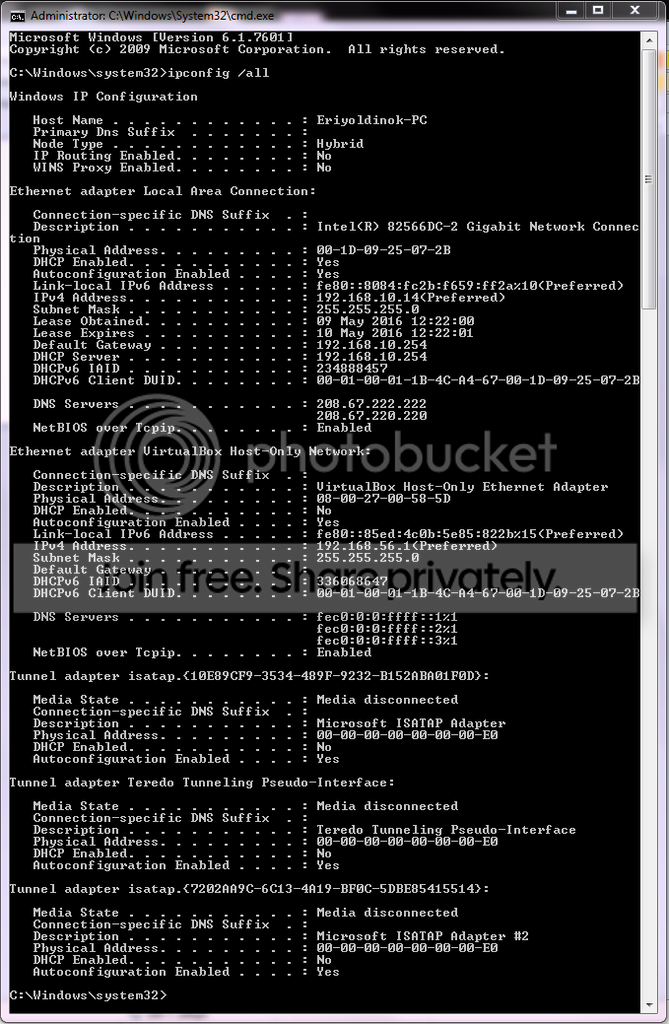
PC3
01%20pc3_zpseuow0vrn.jpg


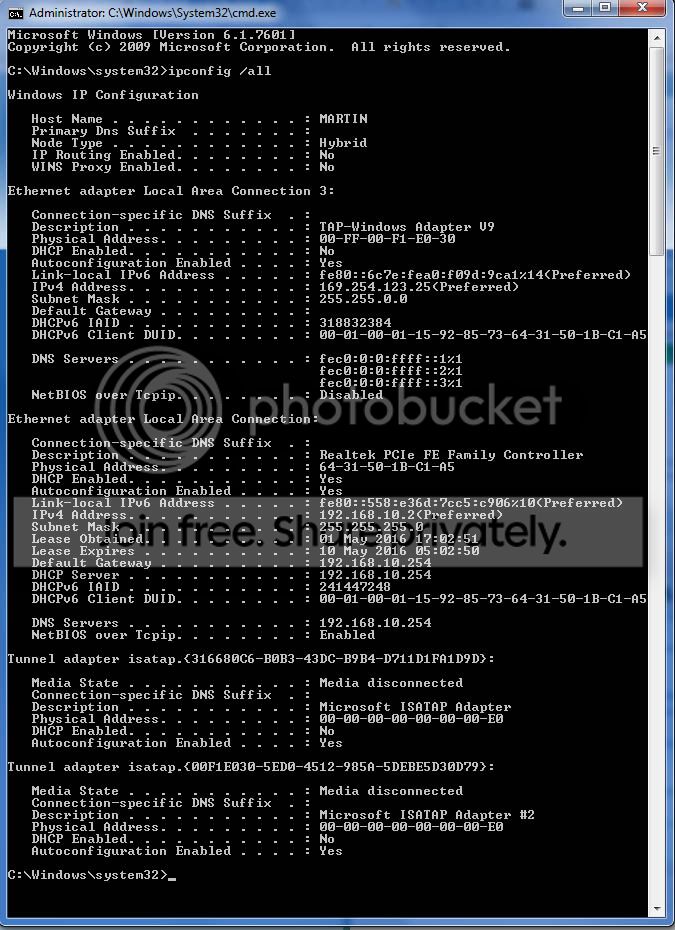
PC4
01%20PC4_zpsiopjkg4o.png
 

My Computer

Computer type
PC/Desktop
Computer Manufacturer/Model Number
HP
OS
64 bit home premium and ultimate
CPU
i7
Memory
8Gb
Graphics Card(s)
GeForce 7800 series
Hard Drives
1Tb
Antivirus
ESET Nod 32
Browser
Chrome
Are they all in the same workgroup still, and why does PC4 use a different DNS server then the others? Have you set static address's for all the computers or are they using DHCP, you should definitely set your printer to at least a static address.
 

My Computer

Computer type
PC/Desktop
Computer Manufacturer/Model Number
Custom
OS
10 Pro x64
CPU
Ryzen 9 3900X
Motherboard
Asrock x370 Tachi
Memory
64GB(4x16GB) DDR4
Graphics Card(s)
EVGA 1080ti FTW3
Sound Card
ASUS Xonar Essence STX (V4 Bursons), ODAC rev B, NFB-11, O2
Monitor(s) Displays
3xASUS PB278Q/R, Optoma HD142X
Screen Resolution
3x1440p, 1080p
Hard Drives
512GB 850 EVO(OS, Programs)
4TB (Movies)
3TB (Downloads)
3TB (Programs)
1TB HDD (Games)
2x6TB R1 (videos)
PSU
AX760
Case
Fractal Define R5
Cooling
NH-D15S
Keyboard
Massdrop Ctrl with Box Navy's
Mouse
G903, Alioth XXL Mat
Internet Speed
280/40
Antivirus
MBAM, ESET
Browser
Canary 64 Bit
Other Info
I also own a Thinkpad P50 Xeon 4K, X220T, X1C5
Hi

Thanks very much for the reply.

Unfortunately I am teetering on the brink of my networking knowledge here!

I don't know why PC4 has a different DNS server. As far as I know they are all on Workgroup. They don't have static addresses.

What I can say for certain is that a few weeks ago it was all working fine (apart from PC4 which has never hooked up to the network properly, so presumably is DNS server related).
 

My Computer

Computer type
PC/Desktop
Computer Manufacturer/Model Number
HP
OS
64 bit home premium and ultimate
CPU
i7
Memory
8Gb
Graphics Card(s)
GeForce 7800 series
Hard Drives
1Tb
Antivirus
ESET Nod 32
Browser
Chrome
Try this first (even though you probably have already), turn off the all the computers, unplug your modem and router (sounds like you just have one box so it's a combo unit) leave it unplugged for a minute then plug it in and wait about 5 minutes for it to come fully back up then turn on your computers again and see if there is any change. If no change then go to the network and sharing center then change adapter settings on the left. Follow this guide: How to Assign a Static IP Address in Windows 7, 8, 10, XP, or Vista Make the address's on each computer the one it already has under preferred in the command prompt windows you posted before so write that info down before starting the process to the computers. For your subnet mask it will put it in for you but it should be 255.255.255.0 and your gateway should be in your case your combo box of 192.168.10.254 . For the DNS area for testing use the first line as your gateway again then put 8.8.8.8 on the second line (this is googles public DNS servers). Once all the computers have their address's as static then your at a better place to keep troubleshooting.
 

My Computer

Computer type
PC/Desktop
Computer Manufacturer/Model Number
Custom
OS
10 Pro x64
CPU
Ryzen 9 3900X
Motherboard
Asrock x370 Tachi
Memory
64GB(4x16GB) DDR4
Graphics Card(s)
EVGA 1080ti FTW3
Sound Card
ASUS Xonar Essence STX (V4 Bursons), ODAC rev B, NFB-11, O2
Monitor(s) Displays
3xASUS PB278Q/R, Optoma HD142X
Screen Resolution
3x1440p, 1080p
Hard Drives
512GB 850 EVO(OS, Programs)
4TB (Movies)
3TB (Downloads)
3TB (Programs)
1TB HDD (Games)
2x6TB R1 (videos)
PSU
AX760
Case
Fractal Define R5
Cooling
NH-D15S
Keyboard
Massdrop Ctrl with Box Navy's
Mouse
G903, Alioth XXL Mat
Internet Speed
280/40
Antivirus
MBAM, ESET
Browser
Canary 64 Bit
Other Info
I also own a Thinkpad P50 Xeon 4K, X220T, X1C5
Thank you so much for that.

I have done everything in your post, but nothing has changed regarding accessing the main PC, it still isn't visible to the other 3 PCs although the main PC can still access them.

Interestingly, and as an aside, I ran some Windows updates before I rebooted my main PC, running Home Premium, but when it rebooted it is now running Windows Ultimate!

Any ideas where I go from here?
 

My Computer

Computer type
PC/Desktop
Computer Manufacturer/Model Number
HP
OS
64 bit home premium and ultimate
CPU
i7
Memory
8Gb
Graphics Card(s)
GeForce 7800 series
Hard Drives
1Tb
Antivirus
ESET Nod 32
Browser
Chrome
Did you install an upgrade or did it just become ultimate or says it is? Can you post a pic of this screen, and did you buy your computer second hand?
system-properties-window-windows-7.png
 

My Computer

Computer type
PC/Desktop
Computer Manufacturer/Model Number
Custom
OS
10 Pro x64
CPU
Ryzen 9 3900X
Motherboard
Asrock x370 Tachi
Memory
64GB(4x16GB) DDR4
Graphics Card(s)
EVGA 1080ti FTW3
Sound Card
ASUS Xonar Essence STX (V4 Bursons), ODAC rev B, NFB-11, O2
Monitor(s) Displays
3xASUS PB278Q/R, Optoma HD142X
Screen Resolution
3x1440p, 1080p
Hard Drives
512GB 850 EVO(OS, Programs)
4TB (Movies)
3TB (Downloads)
3TB (Programs)
1TB HDD (Games)
2x6TB R1 (videos)
PSU
AX760
Case
Fractal Define R5
Cooling
NH-D15S
Keyboard
Massdrop Ctrl with Box Navy's
Mouse
G903, Alioth XXL Mat
Internet Speed
280/40
Antivirus
MBAM, ESET
Browser
Canary 64 Bit
Other Info
I also own a Thinkpad P50 Xeon 4K, X220T, X1C5
Back
Top