pc off for a day

OCIR

New member
Power User
Local time
8:41 AM
Messages
239
Location
HOUSTON TX
Just to ask i can have my pc off for a day or too and when I log on its fine for a bit than it acts stuped it my freezzz up or my desktop my go blank and my taskbar my look like the xp taskber i do a restart and it well be fine all day . sorry its late and i am about to fall out of this chair, my grammar is terrible.
 

My Computer

Computer type
PC/Desktop
Computer Manufacturer/Model Number
home built
OS
windows 7 home permium 64 bits
CPU
i7 950
Motherboard
asus sabetooth x58
Memory
dominator memory 16gigs
Graphics Card(s)
asus gtx680 dcii oc,
Sound Card
asus xonar phoebus ,sennheiser pro headphones
Monitor(s) Displays
BenQ XL2420T 24" Class Widescreen LED Backlit Gaming Monito
Hard Drives
"Intel® SSD 520 Series (240GB, 2.5in SATA 6Gb/s, 25nm, MLC/ Samsung evo 1tb ssd
2X wd 1tb 64mb cash sata 6oo/6g hdd
PSU
corsair ax850 watt psu
Case
tk v51
Cooling
cpu h100i gtx case 4x140 riing fans 1x120 riing fan
Keyboard
CORSAIR k70 rgb
Mouse
corsair m65 rgb
Internet Speed
120 down 15.0 up
Antivirus
webroot/mwb
Browser
IE /crome
If the problem recently occured in your computer. You can try System restore. Any changes which you think may be reason of this kind problem, can be undo via System Restore. :D
 
Last edited:

My Computer

OS
32 bit windows 7 home basic
Could be graphics drivers not initializing properly.
If they've been updated recently try and roll them back to their previous versions.

Otherwise boot in to safe mode and run cc cleaner, that could help.
 

My Computer

OS
Windows 7 Professional 32bit
When you say your computer is off do you mean completely? Not sleep or hibernate.
Is this computer a single or duel boot?
 

My Computer

Computer type
PC/Desktop
Computer Manufacturer/Model Number
Home made Desktop
OS
Windows 10 Pro. 64/ version 1709 Windows 7 Pro/64
CPU
Intel i7-6800K @ 4.3
Motherboard
ASUS X-99 Deluxe II
Memory
Corsair Platinum 16 gig @2400
Graphics Card(s)
EVGA GTX 1070 OC
Monitor(s) Displays
Asus 27" LED LCD/VE278Q
Screen Resolution
1920-1080 or 1280-720 HDMI
Hard Drives
INTEL SSD 730-240 Gb Sata 3.0/
PSU
EVGA Platium 1200W
Case
Phanteks Luxe Tempered Glass 8 fans/ one radiator
Cooling
XSPC/ Water Cooled CPU
Keyboard
Das 4 Professional
Mouse
Logitech M705/MX Anywhere 2-S
Internet Speed
100 mbits
Antivirus
Microsoft Security Essentials/ Malwarebytes Premium 3.0/ SAS
Browser
I.E. 11 default/Firefox/ ISP Time Warner Cable/Spectrum
Other Info
LG BluRay Burner/
Sound system-KLipsch-THX/
Icy Dock ssd Hot Swap bays.
completely off and my nvidia driver is 306.97 out of all the old ones it worked the best but i have not used the newest one yet,
 

My Computer

Computer type
PC/Desktop
Computer Manufacturer/Model Number
home built
OS
windows 7 home permium 64 bits
CPU
i7 950
Motherboard
asus sabetooth x58
Memory
dominator memory 16gigs
Graphics Card(s)
asus gtx680 dcii oc,
Sound Card
asus xonar phoebus ,sennheiser pro headphones
Monitor(s) Displays
BenQ XL2420T 24" Class Widescreen LED Backlit Gaming Monito
Hard Drives
"Intel® SSD 520 Series (240GB, 2.5in SATA 6Gb/s, 25nm, MLC/ Samsung evo 1tb ssd
2X wd 1tb 64mb cash sata 6oo/6g hdd
PSU
corsair ax850 watt psu
Case
tk v51
Cooling
cpu h100i gtx case 4x140 riing fans 1x120 riing fan
Keyboard
CORSAIR k70 rgb
Mouse
corsair m65 rgb
Internet Speed
120 down 15.0 up
Antivirus
webroot/mwb
Browser
IE /crome
Reaching for straws. By chance is the computer booting into Safe Mode on a cold boot.
 

My Computer

Computer type
PC/Desktop
Computer Manufacturer/Model Number
Home made Desktop
OS
Windows 10 Pro. 64/ version 1709 Windows 7 Pro/64
CPU
Intel i7-6800K @ 4.3
Motherboard
ASUS X-99 Deluxe II
Memory
Corsair Platinum 16 gig @2400
Graphics Card(s)
EVGA GTX 1070 OC
Monitor(s) Displays
Asus 27" LED LCD/VE278Q
Screen Resolution
1920-1080 or 1280-720 HDMI
Hard Drives
INTEL SSD 730-240 Gb Sata 3.0/
PSU
EVGA Platium 1200W
Case
Phanteks Luxe Tempered Glass 8 fans/ one radiator
Cooling
XSPC/ Water Cooled CPU
Keyboard
Das 4 Professional
Mouse
Logitech M705/MX Anywhere 2-S
Internet Speed
100 mbits
Antivirus
Microsoft Security Essentials/ Malwarebytes Premium 3.0/ SAS
Browser
I.E. 11 default/Firefox/ ISP Time Warner Cable/Spectrum
Other Info
LG BluRay Burner/
Sound system-KLipsch-THX/
Icy Dock ssd Hot Swap bays.
Rightclick an empty area on the desktop to choose Personalize, choose an Aero theme to get out of Classic theme.

If you have no Aero transparent frames type Aero in Start Search box to Find and Fix problems with Aero.

If Aero is not available for your adapter then choose a Basic theme.

Try a more recent Display driver to see if this resolves the problem. Your adapter may not support Aero or even Win7. Run the Windows 7 Upgrade Advisor.

Work through these Troubleshooting Steps for Windows 7 to check logs and System Resources, establish a Clean boot and test your hardware.

If Win7 becomes unbootable then use these steps for Troubleshooting Windows 7 Failure to Start
 
Last edited:
Reaching for straws. By chance is the computer booting into Safe Mode on a cold boot.
It boots fine ,look like it allway does. But after about 5 mins it gos stupid it goes to basic theme ,all icons are gone ,i do a restart and all is fine it only happens 1 time if i have the computer off for a few days. ps i have let it run for a week staight with no prob ,i just shut it down now i have too many lights in it red lights lol
 

My Computer

Computer type
PC/Desktop
Computer Manufacturer/Model Number
home built
OS
windows 7 home permium 64 bits
CPU
i7 950
Motherboard
asus sabetooth x58
Memory
dominator memory 16gigs
Graphics Card(s)
asus gtx680 dcii oc,
Sound Card
asus xonar phoebus ,sennheiser pro headphones
Monitor(s) Displays
BenQ XL2420T 24" Class Widescreen LED Backlit Gaming Monito
Hard Drives
"Intel® SSD 520 Series (240GB, 2.5in SATA 6Gb/s, 25nm, MLC/ Samsung evo 1tb ssd
2X wd 1tb 64mb cash sata 6oo/6g hdd
PSU
corsair ax850 watt psu
Case
tk v51
Cooling
cpu h100i gtx case 4x140 riing fans 1x120 riing fan
Keyboard
CORSAIR k70 rgb
Mouse
corsair m65 rgb
Internet Speed
120 down 15.0 up
Antivirus
webroot/mwb
Browser
IE /crome
I don't know what you mean you have too many lights in the red.
It hard to understand what one reboot solves all the problems.
It may be startup programs.
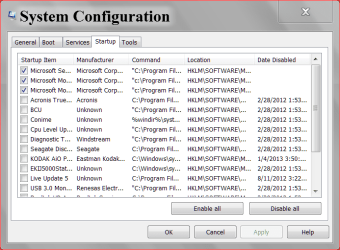
Start and type msconfig then go to Start Up and show us this.
msconfig Start UP.PNG

Do you have anything scheduled at Start Up like a scan of some kind, backup, ect?
 

My Computer

Computer type
PC/Desktop
Computer Manufacturer/Model Number
Home made Desktop
OS
Windows 10 Pro. 64/ version 1709 Windows 7 Pro/64
CPU
Intel i7-6800K @ 4.3
Motherboard
ASUS X-99 Deluxe II
Memory
Corsair Platinum 16 gig @2400
Graphics Card(s)
EVGA GTX 1070 OC
Monitor(s) Displays
Asus 27" LED LCD/VE278Q
Screen Resolution
1920-1080 or 1280-720 HDMI
Hard Drives
INTEL SSD 730-240 Gb Sata 3.0/
PSU
EVGA Platium 1200W
Case
Phanteks Luxe Tempered Glass 8 fans/ one radiator
Cooling
XSPC/ Water Cooled CPU
Keyboard
Das 4 Professional
Mouse
Logitech M705/MX Anywhere 2-S
Internet Speed
100 mbits
Antivirus
Microsoft Security Essentials/ Malwarebytes Premium 3.0/ SAS
Browser
I.E. 11 default/Firefox/ ISP Time Warner Cable/Spectrum
Other Info
LG BluRay Burner/
Sound system-KLipsch-THX/
Icy Dock ssd Hot Swap bays.

My Computer

Computer type
PC/Desktop
Computer Manufacturer/Model Number
Home made Desktop
OS
Windows 10 Pro. 64/ version 1709 Windows 7 Pro/64
CPU
Intel i7-6800K @ 4.3
Motherboard
ASUS X-99 Deluxe II
Memory
Corsair Platinum 16 gig @2400
Graphics Card(s)
EVGA GTX 1070 OC
Monitor(s) Displays
Asus 27" LED LCD/VE278Q
Screen Resolution
1920-1080 or 1280-720 HDMI
Hard Drives
INTEL SSD 730-240 Gb Sata 3.0/
PSU
EVGA Platium 1200W
Case
Phanteks Luxe Tempered Glass 8 fans/ one radiator
Cooling
XSPC/ Water Cooled CPU
Keyboard
Das 4 Professional
Mouse
Logitech M705/MX Anywhere 2-S
Internet Speed
100 mbits
Antivirus
Microsoft Security Essentials/ Malwarebytes Premium 3.0/ SAS
Browser
I.E. 11 default/Firefox/ ISP Time Warner Cable/Spectrum
Other Info
LG BluRay Burner/
Sound system-KLipsch-THX/
Icy Dock ssd Hot Swap bays.
i run it all the time ,malwarebyte ok it just happend agen and i got this
the instruction at 0x00000000763d090c referenced memory at 0x000000006d9df568. the required data was not placed into memory because of an I/O error status of 0xc000009d.


but for now i have been on for over 1 hr and no prob
 

My Computer

Computer type
PC/Desktop
Computer Manufacturer/Model Number
home built
OS
windows 7 home permium 64 bits
CPU
i7 950
Motherboard
asus sabetooth x58
Memory
dominator memory 16gigs
Graphics Card(s)
asus gtx680 dcii oc,
Sound Card
asus xonar phoebus ,sennheiser pro headphones
Monitor(s) Displays
BenQ XL2420T 24" Class Widescreen LED Backlit Gaming Monito
Hard Drives
"Intel® SSD 520 Series (240GB, 2.5in SATA 6Gb/s, 25nm, MLC/ Samsung evo 1tb ssd
2X wd 1tb 64mb cash sata 6oo/6g hdd
PSU
corsair ax850 watt psu
Case
tk v51
Cooling
cpu h100i gtx case 4x140 riing fans 1x120 riing fan
Keyboard
CORSAIR k70 rgb
Mouse
corsair m65 rgb
Internet Speed
120 down 15.0 up
Antivirus
webroot/mwb
Browser
IE /crome
and how can i take a pic of the msconfig prtscn well not do it
 

My Computer

Computer type
PC/Desktop
Computer Manufacturer/Model Number
home built
OS
windows 7 home permium 64 bits
CPU
i7 950
Motherboard
asus sabetooth x58
Memory
dominator memory 16gigs
Graphics Card(s)
asus gtx680 dcii oc,
Sound Card
asus xonar phoebus ,sennheiser pro headphones
Monitor(s) Displays
BenQ XL2420T 24" Class Widescreen LED Backlit Gaming Monito
Hard Drives
"Intel® SSD 520 Series (240GB, 2.5in SATA 6Gb/s, 25nm, MLC/ Samsung evo 1tb ssd
2X wd 1tb 64mb cash sata 6oo/6g hdd
PSU
corsair ax850 watt psu
Case
tk v51
Cooling
cpu h100i gtx case 4x140 riing fans 1x120 riing fan
Keyboard
CORSAIR k70 rgb
Mouse
corsair m65 rgb
Internet Speed
120 down 15.0 up
Antivirus
webroot/mwb
Browser
IE /crome
Just establish a Clean Boot as described in Troubleshooting Steps for Windows 7 so that only the AV is starting with WIn7 or running in Services after hiding all MS Services.

Still waiting for you to start posting back results of each step we've suggested.
 
I don't fully understand exactly whats happening.
When you turn your computer on, It boots up fine. But after 5 minutes or so, Your desktop icons disappear, and your Task Bar goes into Classic view?.
Are you running anything that uses JAVA? sometimes java will disable Aero theme to run its application

As for your desktop Icons dissapearing, I can only suggest Scanning for Viruses?. Use Trojan Remover: http://www.simplysup.com/

As requested by others, Take a shot of your msconfig/Startup screen.
 

My Computer

Computer Manufacturer/Model Number
Cooler Master
OS
Windows 7 Home Premium 64 Bit
CPU
Core I7 1155 3.4GHZ
Memory
8GB DDR 1600
Hard Drives
64 GB SSD - OS
1TB - DATA
PSU
340 Watt Corsair
Case
Cooler Master
Cooling
Cooler Master
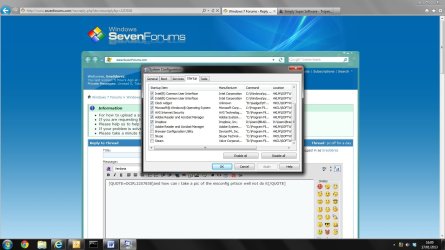
and how can i take a pic of the msconfig prtscn well not do it


PRT Scr will work. Make sure the Windows is selected.

Press and hold CTRL then press PRT SCR

Head over to paint, And paste it in, Save as Jpeg.

Should look like this:

Untitled.jpg
 

My Computer

Computer Manufacturer/Model Number
Cooler Master
OS
Windows 7 Home Premium 64 Bit
CPU
Core I7 1155 3.4GHZ
Memory
8GB DDR 1600
Hard Drives
64 GB SSD - OS
1TB - DATA
PSU
340 Watt Corsair
Case
Cooler Master
Cooling
Cooler Master
OK thanks i well do all this when i get home and report back


and just to ask in windows 7 I can uncheck every thing in msconfig start up, just check the AV , I was allways told you should not uncheck every thing ,but that was back in the windows xp days thanks
 

My Computer

Computer type
PC/Desktop
Computer Manufacturer/Model Number
home built
OS
windows 7 home permium 64 bits
CPU
i7 950
Motherboard
asus sabetooth x58
Memory
dominator memory 16gigs
Graphics Card(s)
asus gtx680 dcii oc,
Sound Card
asus xonar phoebus ,sennheiser pro headphones
Monitor(s) Displays
BenQ XL2420T 24" Class Widescreen LED Backlit Gaming Monito
Hard Drives
"Intel® SSD 520 Series (240GB, 2.5in SATA 6Gb/s, 25nm, MLC/ Samsung evo 1tb ssd
2X wd 1tb 64mb cash sata 6oo/6g hdd
PSU
corsair ax850 watt psu
Case
tk v51
Cooling
cpu h100i gtx case 4x140 riing fans 1x120 riing fan
Keyboard
CORSAIR k70 rgb
Mouse
corsair m65 rgb
Internet Speed
120 down 15.0 up
Antivirus
webroot/mwb
Browser
IE /crome
OK thanks i well do all this when i get home and report back


and just to ask in windows 7 I can uncheck every thing in msconfig start up, just check the AV , I was allways told you should not uncheck every thing ,but that was back in the windows xp days thanks


All depends what you want, As you can see from mine, I didnt want Skype to open up at Start up, Along with Adobe Reader, Itunes etc etc, All I want is OS, and Anti Virus, If i want something opening, I'll do it myself.

Id recommend leaving Items from Microsoft, and Intel on though,
 

My Computer

Computer Manufacturer/Model Number
Cooler Master
OS
Windows 7 Home Premium 64 Bit
CPU
Core I7 1155 3.4GHZ
Memory
8GB DDR 1600
Hard Drives
64 GB SSD - OS
1TB - DATA
PSU
340 Watt Corsair
Case
Cooler Master
Cooling
Cooler Master
Yes you can uncheck everything except AV safely in msconfig>Startup and >Services after hiding all MS Services. This is not XP or even close.

You do not need Intel or Nvidia startup or Service items checked in msconfig unless you overclock or use other specialized settings in your display device software. You reallly don't even need the software, just the driver.

If you notice something you really need to start up with Win7 like a messenger, gadgets, etc. then go back into msconfig>Startup to find it and add it back. But most programs should wait until you actually open them to run (What a concept!).
 

My Computer

Computer type
PC/Desktop
Computer Manufacturer/Model Number
Home made Desktop
OS
Windows 10 Pro. 64/ version 1709 Windows 7 Pro/64
CPU
Intel i7-6800K @ 4.3
Motherboard
ASUS X-99 Deluxe II
Memory
Corsair Platinum 16 gig @2400
Graphics Card(s)
EVGA GTX 1070 OC
Monitor(s) Displays
Asus 27" LED LCD/VE278Q
Screen Resolution
1920-1080 or 1280-720 HDMI
Hard Drives
INTEL SSD 730-240 Gb Sata 3.0/
PSU
EVGA Platium 1200W
Case
Phanteks Luxe Tempered Glass 8 fans/ one radiator
Cooling
XSPC/ Water Cooled CPU
Keyboard
Das 4 Professional
Mouse
Logitech M705/MX Anywhere 2-S
Internet Speed
100 mbits
Antivirus
Microsoft Security Essentials/ Malwarebytes Premium 3.0/ SAS
Browser
I.E. 11 default/Firefox/ ISP Time Warner Cable/Spectrum
Other Info
LG BluRay Burner/
Sound system-KLipsch-THX/
Icy Dock ssd Hot Swap bays.
Back
Top