PC screen hang after display timeout

yellowragz

New member
Local time
4:46 AM
Messages
28
Sometimes, after long time idle and the display goes black, but not sleep and hdd not timeout, when i woke it the screen was hang, maybe black or with taskbar (but can not click any icon or start orb in taskbar), i still can move my pointer and press ctrl+alt+delete than goes to screen with logon screen background, for example to open task manager but after back to desktop still hang and the task manager not show up, any help would be appreciated :D

Sorry for my bad English, I'm Indonesian :D
 

My Computer

Computer type
PC/Desktop
Computer Manufacturer/Model Number
Custom Build
OS
Microsoft Windows 7 Professional 64-bit 7600 Multiprocessor Free
CPU
Intel(R) Core(TM) i7-3770K CPU @ 3.50GHz
Motherboard
Gigabyte Technology Co., Ltd. G1.Sniper M3-CF
Memory
16.00 GB
Graphics Card(s)
ASUS HD7870 Series
Sound Card
Sound Blaster Recon3Di
Monitor(s) Displays
ViewSonic VA702b
Screen Resolution
1280 x 1024 x 32 bits (4294967296 colors) @ 75 Hz
Hard Drives
ST3000DM001-1CH166
PSU
Corsair HX 1050 80+ Gold
Case
Corsair Carbide 300R
Cooling
Just Fan
Keyboard
Logitech MK 320 Keyboard
Mouse
Logitech MK 320 Mouse
Internet Speed
3Mbps
Antivirus
Microsoft Security Essentials
Browser
Google Chrome

My Computer

Computer type
PC/Desktop
Computer Manufacturer/Model Number
Self Built Custom
OS
Windows 7 Ultimate Retail Box (64-bit installed) + Service Pack 1
CPU
AMD FX-8350 CPU v1.15 (or 1.0F) BIOS was required!
Motherboard
MSI 890FXA-GD70
Memory
8G CAS-7 G-Skill DDR3 @1333 (2 fours) [mobo nonOC max rec'd]
Graphics Card(s)
Radeon HD 7950 [3 gigs of GDDR5] MSI Twin Frozr model
Sound Card
Realtek High Definition Audio (onboard mobo, ALC-889 chip)
Monitor(s) Displays
2 WS LED Monitors: One LG One Viewsonic
Screen Resolution
1920 by 1080
Hard Drives
SSD for OS: Samsung 840 Pro
SSD for VM and utilities: Adata SX900
7200 RPM SATA HDs for the rest: Hitachi and Seagate
PSU
Corsair TX850 - 850W max, in service since August 2010.
Case
Thermaltake Armor A90
Cooling
Thermaltake Spin Q CPU Cooler, in service since August 2010
Keyboard
Logitech G11
Mouse
Logitech M310 Wireless
Internet Speed
100 Megabit broadband supposedly upgraded from 50 (Cable)
Antivirus
Bitdefender Internet Security 2014 suite
Browser
Pale Moon 64-bit main, also IceDragon, Opera, and Maxthon.
Other Info
CompTIA A+ certified (220-800 series) in July 2013.
@Faladu : sorry for a long time to reply :) , thanks for Your help, umm I'm sorry that I haven't tried SFC /scannow in cmd, but I noticed that what make my PC like that is because display driver amdkmdap stopped responding, so, how to fix it ? I my original Asus driver & CCC and its already up to date. thanks for your attention and help Faladu, thank you :)
 

My Computer

Computer type
PC/Desktop
Computer Manufacturer/Model Number
Custom Build
OS
Microsoft Windows 7 Professional 64-bit 7600 Multiprocessor Free
CPU
Intel(R) Core(TM) i7-3770K CPU @ 3.50GHz
Motherboard
Gigabyte Technology Co., Ltd. G1.Sniper M3-CF
Memory
16.00 GB
Graphics Card(s)
ASUS HD7870 Series
Sound Card
Sound Blaster Recon3Di
Monitor(s) Displays
ViewSonic VA702b
Screen Resolution
1280 x 1024 x 32 bits (4294967296 colors) @ 75 Hz
Hard Drives
ST3000DM001-1CH166
PSU
Corsair HX 1050 80+ Gold
Case
Corsair Carbide 300R
Cooling
Just Fan
Keyboard
Logitech MK 320 Keyboard
Mouse
Logitech MK 320 Mouse
Internet Speed
3Mbps
Antivirus
Microsoft Security Essentials
Browser
Google Chrome
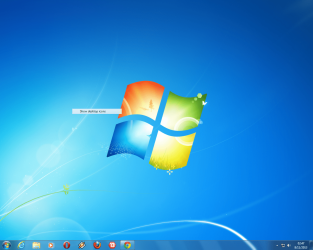
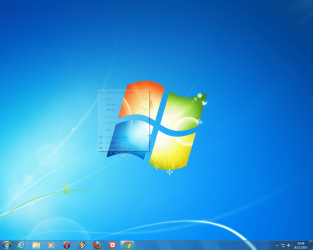
Oh and when I noticed some moment ago that my right click on desktop or right click on notification icons to be semi transparent, it will be visible when my cursor hover on it then after click some menu then that menu will stuck on my screen, anybody, please help :) thank you :)
 

Attachments

  • Untitled.png
    Untitled.png
    371.5 KB · Views: 0
  • Untitled (2).png
    Untitled (2).png
    369.7 KB · Views: 0

My Computer

Computer type
PC/Desktop
Computer Manufacturer/Model Number
Custom Build
OS
Microsoft Windows 7 Professional 64-bit 7600 Multiprocessor Free
CPU
Intel(R) Core(TM) i7-3770K CPU @ 3.50GHz
Motherboard
Gigabyte Technology Co., Ltd. G1.Sniper M3-CF
Memory
16.00 GB
Graphics Card(s)
ASUS HD7870 Series
Sound Card
Sound Blaster Recon3Di
Monitor(s) Displays
ViewSonic VA702b
Screen Resolution
1280 x 1024 x 32 bits (4294967296 colors) @ 75 Hz
Hard Drives
ST3000DM001-1CH166
PSU
Corsair HX 1050 80+ Gold
Case
Corsair Carbide 300R
Cooling
Just Fan
Keyboard
Logitech MK 320 Keyboard
Mouse
Logitech MK 320 Mouse
Internet Speed
3Mbps
Antivirus
Microsoft Security Essentials
Browser
Google Chrome
Do the SFC /scannow to check that Windows 7 critical install files aren't corrupt, it's just a must when Windows 7 itself acts wacko.

Get cpu-z and gpu-z freeware from cpuid.com and monitor temps on the CPU and Video card, and see if high, this can indicate heatsink/fan or thermal paste failures.

Clean any fans on the case, including check the power supply one, use a can of compressed air.

Reseat your video card and RAM sticks and clean the slots, of course with no power cord attached.

Look in video settings for transparency, not sure how you'd get that changed without doing it directly.

Ah, scan system for viruses too.

See where you are at, after that.
 

My Computer

Computer type
PC/Desktop
Computer Manufacturer/Model Number
Self Built Custom
OS
Windows 7 Ultimate Retail Box (64-bit installed) + Service Pack 1
CPU
AMD FX-8350 CPU v1.15 (or 1.0F) BIOS was required!
Motherboard
MSI 890FXA-GD70
Memory
8G CAS-7 G-Skill DDR3 @1333 (2 fours) [mobo nonOC max rec'd]
Graphics Card(s)
Radeon HD 7950 [3 gigs of GDDR5] MSI Twin Frozr model
Sound Card
Realtek High Definition Audio (onboard mobo, ALC-889 chip)
Monitor(s) Displays
2 WS LED Monitors: One LG One Viewsonic
Screen Resolution
1920 by 1080
Hard Drives
SSD for OS: Samsung 840 Pro
SSD for VM and utilities: Adata SX900
7200 RPM SATA HDs for the rest: Hitachi and Seagate
PSU
Corsair TX850 - 850W max, in service since August 2010.
Case
Thermaltake Armor A90
Cooling
Thermaltake Spin Q CPU Cooler, in service since August 2010
Keyboard
Logitech G11
Mouse
Logitech M310 Wireless
Internet Speed
100 Megabit broadband supposedly upgraded from 50 (Cable)
Antivirus
Bitdefender Internet Security 2014 suite
Browser
Pale Moon 64-bit main, also IceDragon, Opera, and Maxthon.
Other Info
CompTIA A+ certified (220-800 series) in July 2013.
Ok, its done :) and after reboot my logon screen back to default (I change my logon screen wallpaper) << can this make a problem like that ? I mean display driver stopped working
 

My Computer

Computer type
PC/Desktop
Computer Manufacturer/Model Number
Custom Build
OS
Microsoft Windows 7 Professional 64-bit 7600 Multiprocessor Free
CPU
Intel(R) Core(TM) i7-3770K CPU @ 3.50GHz
Motherboard
Gigabyte Technology Co., Ltd. G1.Sniper M3-CF
Memory
16.00 GB
Graphics Card(s)
ASUS HD7870 Series
Sound Card
Sound Blaster Recon3Di
Monitor(s) Displays
ViewSonic VA702b
Screen Resolution
1280 x 1024 x 32 bits (4294967296 colors) @ 75 Hz
Hard Drives
ST3000DM001-1CH166
PSU
Corsair HX 1050 80+ Gold
Case
Corsair Carbide 300R
Cooling
Just Fan
Keyboard
Logitech MK 320 Keyboard
Mouse
Logitech MK 320 Mouse
Internet Speed
3Mbps
Antivirus
Microsoft Security Essentials
Browser
Google Chrome
I mean I'm done with SFC /scannow hehe, ok maybe I will do de rest tomorrow :) I will post back about updated situations , thanks Faladu :)
 

My Computer

Computer type
PC/Desktop
Computer Manufacturer/Model Number
Custom Build
OS
Microsoft Windows 7 Professional 64-bit 7600 Multiprocessor Free
CPU
Intel(R) Core(TM) i7-3770K CPU @ 3.50GHz
Motherboard
Gigabyte Technology Co., Ltd. G1.Sniper M3-CF
Memory
16.00 GB
Graphics Card(s)
ASUS HD7870 Series
Sound Card
Sound Blaster Recon3Di
Monitor(s) Displays
ViewSonic VA702b
Screen Resolution
1280 x 1024 x 32 bits (4294967296 colors) @ 75 Hz
Hard Drives
ST3000DM001-1CH166
PSU
Corsair HX 1050 80+ Gold
Case
Corsair Carbide 300R
Cooling
Just Fan
Keyboard
Logitech MK 320 Keyboard
Mouse
Logitech MK 320 Mouse
Internet Speed
3Mbps
Antivirus
Microsoft Security Essentials
Browser
Google Chrome
Allright, about gpu temp its ok (36-37) C, no viruses after scan (with malwarebytes and security essential), about transperancy, it fixed after restart, then all parts already clean.. and also I disabled hardware acceleration in flash.., I will tell you when this driver stopped works again.. thank you Faladu :)
 

My Computer

Computer type
PC/Desktop
Computer Manufacturer/Model Number
Custom Build
OS
Microsoft Windows 7 Professional 64-bit 7600 Multiprocessor Free
CPU
Intel(R) Core(TM) i7-3770K CPU @ 3.50GHz
Motherboard
Gigabyte Technology Co., Ltd. G1.Sniper M3-CF
Memory
16.00 GB
Graphics Card(s)
ASUS HD7870 Series
Sound Card
Sound Blaster Recon3Di
Monitor(s) Displays
ViewSonic VA702b
Screen Resolution
1280 x 1024 x 32 bits (4294967296 colors) @ 75 Hz
Hard Drives
ST3000DM001-1CH166
PSU
Corsair HX 1050 80+ Gold
Case
Corsair Carbide 300R
Cooling
Just Fan
Keyboard
Logitech MK 320 Keyboard
Mouse
Logitech MK 320 Mouse
Internet Speed
3Mbps
Antivirus
Microsoft Security Essentials
Browser
Google Chrome
Back
Top