PC Shuts Down by Itself and then Immediately Reboots

PARTICIPANT

New member
Local time
8:44 PM
Messages
4
Hi! My PC shuts down by itself (like it is being unplugged without any given time interval) and then immediately reboots. Sometimes the problem occurs even after a few seconds after booting.

My Desktop is Acer Aspire M1641 and it is broken (unable to boot) for about 3 years. About a month ago, I had the opportunity to brought it to a technician to fix it. The technician replaced the motherboard and the processor with a brandnew Biostar A55 MGC motherboard and a brandnew AMD A4-3300 with Radeon (tm) with HD Graphics 2.50 Ghz processor. The technician also changed the OS from Windows Vista Home Basic to Windows 7 Ultimate.

When I brought the PC home, it looks like that it is operating normally. After approximately 2 days, the problem occured (shuts down by itself "like it is being unplugged" and then immediately reboots).

"Mysearchresults" browser hijacker infected it but I cant remember if the PC's problem occured first before the infection so I cant tell if it is a factor. (By the way I fallowed the instructions here : http://www.wintips.org/remove-mysearchresults-search-toolbar/ to remove mysearchresults). After fallowing the instructions to remove mysearchresults I scanned it with Microsoft Security Essentials which turned out to be ok. To make sure, I uninstalled the Microsoft Security Essentials and installed ESET NOD32 Antivirus 4 (not yet updated) and scanned it which turned out to be ok too.

I installed "PC Wizard 2012" to check the PC's temperature. Most of the time the temperature of the processor plays around 8-27 degree Celsius which is normal (67 degree Celsius limit), the motherboard plays around 25-30 degree Celsius (which I think normal), the hard disk drive plays around 32-40 degree Celsius (which I think normal).

The PC is plugged into a UPS (Ablerex 500) and I bought a new PSU (Cougar SL 500W) and replaced the old 250W PSU but the problem still exist.

I also unplugged the hardwares like the CD burner, memory card readers, extra USB & audio ports but the problem is still there.

Now what should I do? Should I reformat it or should I just buy a new Hard Disk Drive which is a bit old (about 5 years old) that is also been fixed by the the technician from "bad sectors"? Do you have any other suggestions? Please help, I dont have the time to take it to a technician for now. Thanks! "my english is not that good, sorry =)"
 

My Computer My Computer

At a glance

Windows 7 Ultimate 32 Bit
Computer type
PC/Desktop
OS
Windows 7 Ultimate 32 Bit
you've done a good analysis already but there are a few other things to check. cpu and mobo temp already, but what about graphics card temp? you can use gpu-z to get the gpu temp. higher than normal temp may cause this kind of problem. another possibility is with one of the device drivers. see if this auto-reboot still happens when you use windows in safe mode. safe mode bypasses normal drivers n just use basic the most basic ones to enter windows. if no reboot happens, then you know it is caused by one of the drivers. no, it's unlikely the problem with the psu, and no you don't need to reformat the hard drive cause this is not windows/software problem but more often hardware.
for general n quick fix now, you can use your seven installation disc to enter 'system recovery options' then do startup repair and windows memory diagnostic. it doesn't always address the problem but there's nothing wrong to try though. startup repair will fix problems with system files, memory diagnostic will scan the ram to make sure it's working correctly.
tell us how it goes after all these steps, the results may lead to the correct fix.
 

My Computer My Computer

At a glance

Windows 7 Ultimate x86
Computer type
PC/Desktop
OS
Windows 7 Ultimate x86
Hi! I dont have a graphics card that is plugged in in the mobo but gpu-z said that the gpu temp plays around 7-8 degree Celsius, is that normal? The problem is still there even while I am in the safe mode (lately it blackouts again just 10 minutes after booting in safe mode and then reboots again). I dont have a seven installation disk. What should I do now? Thanks!
 

My Computer My Computer

At a glance

Windows 7 Ultimate 32 Bit
Computer type
PC/Desktop
OS
Windows 7 Ultimate 32 Bit
I would take it back to the technician to have him fix the involuntary restart as it needs to have the mobo checked over.

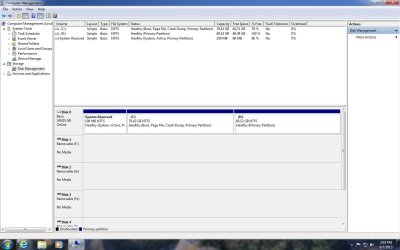
Also post back a screenshot of Disk Management - Post a Screen Capture Image - Windows 7 Help Forums so we can look over the disk configuration to see if anything is obvious.

Run a full scan with the recommended tools Malwarebytes and SUPERAntiSpyware.com - Downloads declining their Trial offer and turning off Starting with Windows in SAS Preferences.

Establish a Clean Boot and work through the other Troubleshooting Steps for Windows 7 including the hardware tests. Uninstall any bloatware AV and install the recommended, run a full scan.
 
First off, don`t reformat, I doubt if it has anything with your problem, it could, but don`t reformat just yet until we`ve tried some things. Have you plugged it straight into the wall socket yet. Skip the UPS, you don`t need it.

Also, a hard drive with bad sectors cannot be fixed, don`t know why the tech told you he did.

Plug it into the wall and let us know if it still reboots on it`s own.
 

My Computer My Computer

At a glance

Windows 10 Pro x64Intel Core i7 6700KGSkill TridentZ RGB 16GB 3600 16-16-16-36EVGA GTX 980 Ti SC x2
Computer type
PC/Desktop
Computer Manufacturer/Model Number
Skylake Special #666
OS
Windows 10 Pro x64
CPU
Intel Core i7 6700K
Motherboard
Asus Sabertooth Z170 Mark 1
Memory
GSkill TridentZ RGB 16GB 3600 16-16-16-36
Graphics Card(s)
EVGA GTX 980 Ti SC x2
Sound Card
Realtek High Definition
Monitor(s) Displays
AOC G2460PG
Screen Resolution
1920 x 1080 144Hz
Hard Drives
Samsung 860 Pro 256GB, Seagate Barracuda 4TB x2
PSU
EVGA 1000 P2, EVGA White Custom Braided Cables
Case
Corsair Vengeance C70 Gunmetal Black
Cooling
Corsair H100i v2, Corsair ML120 x2, Thermal Grizzly Kryonaut
Keyboard
Logitech G910 Orion Spectrum
Mouse
Logitech G700s
Internet Speed
Verizon Fios Quantum Gateway 75/75
Antivirus
Windows Defender, Malwarebytes Free 3.8.3
Browser
Chrome
Other Info
Corsair SP120 x4, LG Blu-ray Drive, Durabrand HT-395 100 Watt Dolby Digital Amp, Corsair H2100 Wireless 7.1 Headset
gpu temp 7c is not normal, it's supposed to be around 30-40c. either gpu-z report is faulty or indeed the internal display is this cold causing reboot is still unconfirmed. yes, you should take the pc back to the repair guy, he's the one setting up the system so he'll know what happens. tell him about the gpu-z reported internal display as 7c too, he may have an explanation for this. he should also have the 7 installation disc. but if you'd like to repair yourself, there's a way. as it happens in safe mode also, meaning it's not problem related to drivers. rather, it's with the devices attached to the computer. it can be anything attached to the mobo. i suggest detaching the ram sticks out and reinstalling, rams are basic necessities for any pc, along with cpu and display adapter. then, check the conditon of the cpu. is the cpu fan cable properly attached to mobo? when you take it out, is the thermal paste applied well?
Now a more advanced analysis if all else failed. open this link first : MCCI :: How to Enable Kernel Memory Dumps
follow the link and make changes to the settings accordingly, except for the 'Automatically Restart' option, you should UNCHECK the box. unchecking the box will prevent windows from auto rebooting itself. when error happens, it will instead stop while displaying bluescreen with error codes. you can then take notes of the info displayed by the bluescreen that can pinpoint what causes the error. let's deal with this later after you get to this point.
 

My Computer My Computer

At a glance

Windows 7 Ultimate x86
Computer type
PC/Desktop
OS
Windows 7 Ultimate x86
Short answer. Take it back to the shop who did all the work and while you are there make sure you leave with the COA sticker for your new operating system Windows 7 Ultimate.
 

My Computer My Computer

At a glance

Windows 10 Pro. 64/ version 1709 Windows 7 Pr...Intel i7-6800K @ 4.3Corsair Platinum 16 gig @2400EVGA GTX 1070 OC
Computer type
PC/Desktop
Computer Manufacturer/Model Number
Home made Desktop
OS
Windows 10 Pro. 64/ version 1709 Windows 7 Pro/64
CPU
Intel i7-6800K @ 4.3
Motherboard
ASUS X-99 Deluxe II
Memory
Corsair Platinum 16 gig @2400
Graphics Card(s)
EVGA GTX 1070 OC
Monitor(s) Displays
Asus 27" LED LCD/VE278Q
Screen Resolution
1920-1080 or 1280-720 HDMI
Hard Drives
INTEL SSD 730-240 Gb Sata 3.0/
PSU
EVGA Platium 1200W
Case
Phanteks Luxe Tempered Glass 8 fans/ one radiator
Cooling
XSPC/ Water Cooled CPU
Keyboard
Das 4 Professional
Mouse
Logitech M705/MX Anywhere 2-S
Internet Speed
100 mbits
Antivirus
Microsoft Security Essentials/ Malwarebytes Premium 3.0/ SAS
Browser
I.E. 11 default/Firefox/ ISP Time Warner Cable/Spectrum
Other Info
LG BluRay Burner/
Sound system-KLipsch-THX/
Icy Dock ssd Hot Swap bays.
Hi guys! I will try to follow all of the troubleshooting instructions from each of you even though some of it is really confusing, it may take me a number of days =) . For now I attached here the Disk Management print screen like what gregrocker requested http://www.sevenforums.com/attachment.php?attachmentid=271497&stc=1&d=1370653339 . I am also planning to just take it to the technician again since I will go back to school in less than 3 days. If the technician fixed it I will post their findings here.

By the way, can a simple ant can short a computer for a while? I did a massive hardware cleaning lately
and I saw a number of ants walking in the mobo and some cables =).
 

Attachments

  • Disk Management Print Screen.jpg
    Disk Management Print Screen.jpg
    91.5 KB · Views: 7

My Computer My Computer

At a glance

Windows 7 Ultimate 32 Bit
Computer type
PC/Desktop
OS
Windows 7 Ultimate 32 Bit
Sure a ant can short out things. I had a spider do funny things to my motherboard. After removing the spider no damage was done.
Do remember that ants are normally looking for food. Have you spilled something on your computer that might be drawing the little critters?
 

My Computer My Computer

At a glance

Windows 10 Pro. 64/ version 1709 Windows 7 Pr...Intel i7-6800K @ 4.3Corsair Platinum 16 gig @2400EVGA GTX 1070 OC
Computer type
PC/Desktop
Computer Manufacturer/Model Number
Home made Desktop
OS
Windows 10 Pro. 64/ version 1709 Windows 7 Pro/64
CPU
Intel i7-6800K @ 4.3
Motherboard
ASUS X-99 Deluxe II
Memory
Corsair Platinum 16 gig @2400
Graphics Card(s)
EVGA GTX 1070 OC
Monitor(s) Displays
Asus 27" LED LCD/VE278Q
Screen Resolution
1920-1080 or 1280-720 HDMI
Hard Drives
INTEL SSD 730-240 Gb Sata 3.0/
PSU
EVGA Platium 1200W
Case
Phanteks Luxe Tempered Glass 8 fans/ one radiator
Cooling
XSPC/ Water Cooled CPU
Keyboard
Das 4 Professional
Mouse
Logitech M705/MX Anywhere 2-S
Internet Speed
100 mbits
Antivirus
Microsoft Security Essentials/ Malwarebytes Premium 3.0/ SAS
Browser
I.E. 11 default/Firefox/ ISP Time Warner Cable/Spectrum
Other Info
LG BluRay Burner/
Sound system-KLipsch-THX/
Icy Dock ssd Hot Swap bays.
The Disk Mgmt config looks correct. Ask the tech to find out what is causing your PC to shut down and reboot. It is something he should correct since he replaced the mobo.
 
hi,did you checked with any antivirus.No virus it will be the computer motherboard problem,otherwise hard-disk problem.
 

My Computer My Computer

At a glance

Windows 7
Computer type
PC/Desktop
OS
Windows 7
Motherboard
Intel
Browser
firefox
Two days since I plugged it directly to the wall and disassembled everything out of the case then cleaned everything even though its not that dirty, the problem stopped. I thought that the problem was really fixed, but lately it happened again. I checked the comp and I saw this ants lined up and going inside again. I am not sure if these ants is the reason why this happens. Also, I dont think that I spilled something that might attract the ants to go inside, maybe they are just searching for a new nest. Lately, I discovered that some holes in my desktop table is actually a nest with eggs inside =). I will clean the comp again, relocate it and observe if it will work =). If it still happens I will take it to the technician.

By the way, when it reboots it is always saying that "windows did not shut down succesfully...etc." and asking me what to choose from safe mode, start windows normally, etc. What does it mean when this screen appears?
 

My Computer My Computer

At a glance

Windows 7 Ultimate 32 Bit
Computer type
PC/Desktop
OS
Windows 7 Ultimate 32 Bit
it means the system is not shut down properly through normal windows shutdown option. this happens when the pc suddenly turned off by itself then reboot, it's the same as manually pushing the off button to force shutdown the pc. well, if possible you'd better choose last known good configuration.
 

My Computer My Computer

At a glance

Windows 7 Ultimate x86
Computer type
PC/Desktop
OS
Windows 7 Ultimate x86
Post #12

I discovered that some holes in my desktop table is actually a nest with eggs inside =). I will clean the comp again, relocate it and observe if it will work =).

First never assume their is only one problem.

Secondly you got to do something with you ant problem. No electronics like small critters that conduct small amount of electricity. Remember todays computers have many parts and circuits that use very small amounts of current and volts.
I know it sounds dumb but your ants are one of your problems.
 

My Computer My Computer

At a glance

Windows 10 Pro. 64/ version 1709 Windows 7 Pr...Intel i7-6800K @ 4.3Corsair Platinum 16 gig @2400EVGA GTX 1070 OC
Computer type
PC/Desktop
Computer Manufacturer/Model Number
Home made Desktop
OS
Windows 10 Pro. 64/ version 1709 Windows 7 Pro/64
CPU
Intel i7-6800K @ 4.3
Motherboard
ASUS X-99 Deluxe II
Memory
Corsair Platinum 16 gig @2400
Graphics Card(s)
EVGA GTX 1070 OC
Monitor(s) Displays
Asus 27" LED LCD/VE278Q
Screen Resolution
1920-1080 or 1280-720 HDMI
Hard Drives
INTEL SSD 730-240 Gb Sata 3.0/
PSU
EVGA Platium 1200W
Case
Phanteks Luxe Tempered Glass 8 fans/ one radiator
Cooling
XSPC/ Water Cooled CPU
Keyboard
Das 4 Professional
Mouse
Logitech M705/MX Anywhere 2-S
Internet Speed
100 mbits
Antivirus
Microsoft Security Essentials/ Malwarebytes Premium 3.0/ SAS
Browser
I.E. 11 default/Firefox/ ISP Time Warner Cable/Spectrum
Other Info
LG BluRay Burner/
Sound system-KLipsch-THX/
Icy Dock ssd Hot Swap bays.
Back
Top