Pc shuts down

haza

New member
Local time
3:54 AM
Messages
17
Hi all
PC shuts down no warning just as though plug has been pulled out

But this only happens when playing a game or using format factory sometimes it will be after a hour or after 10 mins or so

Had the same problem using windows 7 32bit so formated pc new install of windows 7 64 bit all windows updates and drivers had same problem when playing game pc shut down

Thanks if you need any more info let me know
 

Attachments

Last edited:

My Computer

OS
Windows 7 Ultimate x64
CPU
AMD Athlon(tm) 64 X2 Dual Core Processor 4200+
Motherboard
gigabyte GA-K8N-SLi
Graphics Card(s)
NVIDIA GeForce 9800 GT
Sound Card
Creative X-Fi Audio Processor
Hard Drives
NVIDIA STRIPE 596.17G
Case
antec 300
DLoad install and run speedfan...
Post a screenshot of your temps...both at idle and under load.
 

My Computer

Computer Manufacturer/Model Number
Self-Built
OS
Vista Ultimate X64/ Windows 7 Dual-boot
CPU
Q6600
Motherboard
ASUS P5K
Memory
4G OCZ PC2 8500 Platinum
Graphics Card(s)
EVGA 8800GTS Vid Card
Hard Drives
500G Seagate SATA
200G Seagate SATA
100G WD Caviar SATA
80G WD Caviar IDE
PSU
OCZ Elite 800W PSU
Case
RaidMax Smilodon Case
Just curious but when was the last time you opened the computer and checked to see if it needed a good cleaning. I suggest at least twice a year and if the desktop sits on carpet then I would say every 2-4 months minimum.
 

My Computer

Computer type
PC/Desktop
Computer Manufacturer/Model Number
A blend of brains, brawn and dumb luck.
OS
Windows 7 Ultimate 64
CPU
i7 3770k OC'd 4.6 @ 1.17v, also FX 8120 & i5 miniITX
Motherboard
MSI P67A-GD80 b3
Memory
32 gb G.Skill Sniper DDR3 10-12-12-31 @ 2133
Graphics Card(s)
XFX Radeon 7870 2GB DDR5
Sound Card
Sound Blaster Z Series Card
Monitor(s) Displays
(2) LG LED 23" 1920 x 1080 2ms Monitors via mini d-port
Screen Resolution
1680 X 1050 p
Hard Drives
Samsung 256 gb 830 SSD sata III
(1) 1 tb WD Black
(2) 1 tb Hitachi deskmates/sata II
(2) 1 tb WD green/sata II
(2) 3 tb Seagate Barracuda
(1) 120 gb OCZ Vertex SS
(1) Drobo 5N w/5 Seagate 3tb
PSU
EVGA modular 1000G2 80% gold rating & APC 1200 RS
Case
CoolerMaster Storm Styker
Cooling
7 case fans 140mm & 120mm, NZXT Kraken X60
Keyboard
(2) Logitech Illuminated Keyboards (1) usb (1) wireless
Mouse
Logitech G700 & T-BC21 - nano nx for the laptop
Internet Speed
Basic 120mbps down
Antivirus
Trend Micro Titanium Max Security & Malwarebytes Premium
Browser
Chrome and IE 10
Other Info
5 Noctua case fans + 3 Noctua in p/p on NZXT cooler
Integrated hot swap drive bays for 2.5" Drives
(2) Lite-on dvd/cd/Blu Ray optical 22X
Integrated fan controller and led on/off
HP Officejet Pro 8630 all-n-one
Hot-swappable 3.5" hard drive bay
Netgear Nighthawk router
Asus USB 3 & sata 6 PCIe card
Vantec IDE to sata adptr./Ultra sata adptr
Lenovo L420 i5 lappy with m sata
Drobo 5N advanced NAS
Ok thanks for quick responce

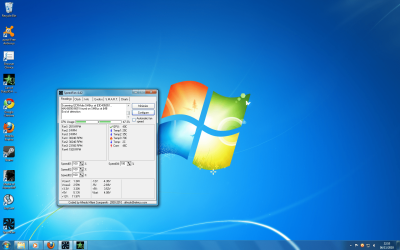
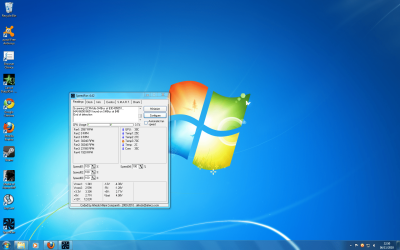
Screen shots attached

I can see temp 3 is high would you know what this is


And will have a clean see if this helps

Thanks
 

Attachments

  • load 1.png
    load 1.png
    453.3 KB · Views: 26
  • load 2.png
    load 2.png
    456.4 KB · Views: 10
  • no load.png
    no load.png
    449.9 KB · Views: 10

My Computer

OS
Windows 7 Ultimate x64
CPU
AMD Athlon(tm) 64 X2 Dual Core Processor 4200+
Motherboard
gigabyte GA-K8N-SLi
Graphics Card(s)
NVIDIA GeForce 9800 GT
Sound Card
Creative X-Fi Audio Processor
Hard Drives
NVIDIA STRIPE 596.17G
Case
antec 300
I have found that home computers make excellent air cleaners they draw in dusty air and the dust sticks to all the charged components, fins and fans. At lease once a year you need to clean the fan blades, it is for sure no fun but when done it will make a huge difference. No different from the fan we use in the summer to stay cool, clean the blades and cover and it feels like it's twice as powerful and likely is. Not saying this is your issue but if it is or isn't it's all good info !
 

My Computer

Computer type
PC/Desktop
Computer Manufacturer/Model Number
A blend of brains, brawn and dumb luck.
OS
Windows 7 Ultimate 64
CPU
i7 3770k OC'd 4.6 @ 1.17v, also FX 8120 & i5 miniITX
Motherboard
MSI P67A-GD80 b3
Memory
32 gb G.Skill Sniper DDR3 10-12-12-31 @ 2133
Graphics Card(s)
XFX Radeon 7870 2GB DDR5
Sound Card
Sound Blaster Z Series Card
Monitor(s) Displays
(2) LG LED 23" 1920 x 1080 2ms Monitors via mini d-port
Screen Resolution
1680 X 1050 p
Hard Drives
Samsung 256 gb 830 SSD sata III
(1) 1 tb WD Black
(2) 1 tb Hitachi deskmates/sata II
(2) 1 tb WD green/sata II
(2) 3 tb Seagate Barracuda
(1) 120 gb OCZ Vertex SS
(1) Drobo 5N w/5 Seagate 3tb
PSU
EVGA modular 1000G2 80% gold rating & APC 1200 RS
Case
CoolerMaster Storm Styker
Cooling
7 case fans 140mm & 120mm, NZXT Kraken X60
Keyboard
(2) Logitech Illuminated Keyboards (1) usb (1) wireless
Mouse
Logitech G700 & T-BC21 - nano nx for the laptop
Internet Speed
Basic 120mbps down
Antivirus
Trend Micro Titanium Max Security & Malwarebytes Premium
Browser
Chrome and IE 10
Other Info
5 Noctua case fans + 3 Noctua in p/p on NZXT cooler
Integrated hot swap drive bays for 2.5" Drives
(2) Lite-on dvd/cd/Blu Ray optical 22X
Integrated fan controller and led on/off
HP Officejet Pro 8630 all-n-one
Hot-swappable 3.5" hard drive bay
Netgear Nighthawk router
Asus USB 3 & sata 6 PCIe card
Vantec IDE to sata adptr./Ultra sata adptr
Lenovo L420 i5 lappy with m sata
Drobo 5N advanced NAS
Thanks will give it a clean

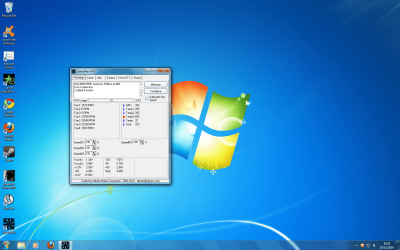
screen shot is on start up after been off for 10hrs or so, this is still showing temp 3 high! can anyone tell me what temp 3 is actualy reading

Thanks
 

Attachments

  • start up from cold.png
    start up from cold.png
    456.1 KB · Views: 9

My Computer

OS
Windows 7 Ultimate x64
CPU
AMD Athlon(tm) 64 X2 Dual Core Processor 4200+
Motherboard
gigabyte GA-K8N-SLi
Graphics Card(s)
NVIDIA GeForce 9800 GT
Sound Card
Creative X-Fi Audio Processor
Hard Drives
NVIDIA STRIPE 596.17G
Case
antec 300
Ok have cleaned all fans (not that bad)

This is screen shot on start up temp 3 still high will try a game to see if i can get temps after it shuts down.
 

Attachments

  • start up from cold.png
    start up from cold.png
    456.1 KB · Views: 5

My Computer

OS
Windows 7 Ultimate x64
CPU
AMD Athlon(tm) 64 X2 Dual Core Processor 4200+
Motherboard
gigabyte GA-K8N-SLi
Graphics Card(s)
NVIDIA GeForce 9800 GT
Sound Card
Creative X-Fi Audio Processor
Hard Drives
NVIDIA STRIPE 596.17G
Case
antec 300
I'm not sure what the different temps are. I recommend clicking configure and see if it gives any more info about which is which. If you're not sure exactly what you are looking at, post another screen cap.
 

My Computer

Computer type
Laptop
Computer Manufacturer/Model Number
Toshiba P775-S7100
OS
Windows 7 Professional SP1 64-bit
CPU
Intel Core i5-2450M @2.5 GHz
Memory
6 GB DDR3 1333MHz
Graphics Card(s)
Intel HD 3000
Monitor(s) Displays
Built-in 17.3" LED; 22" Insignia NS-L22Q-10A
Screen Resolution
1600x900; 1360x768
Hard Drives
750 GB Hitachi
1TB Seagate FreeAgent External
Internet Speed
Verizon DSL Speed(Down/Up): 3360 Kbps / 800 Kbps
Antivirus
MSE and MBAM Pro
Browser
IE10
I'm not sure what the different temps are. I recommend clicking configure and see if it gives any more info about which is which. If you're not sure exactly what you are looking at, post another screen cap.

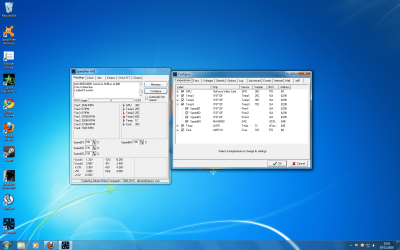
thanks screen shot of configure
 

Attachments

  • requested.png
    requested.png
    378.5 KB · Views: 10

My Computer

OS
Windows 7 Ultimate x64
CPU
AMD Athlon(tm) 64 X2 Dual Core Processor 4200+
Motherboard
gigabyte GA-K8N-SLi
Graphics Card(s)
NVIDIA GeForce 9800 GT
Sound Card
Creative X-Fi Audio Processor
Hard Drives
NVIDIA STRIPE 596.17G
Case
antec 300
From what I can figure out temp three seems to be from a sensor on your motherboard. I'm not sure what it is reading so your best bet, in my opinion, is to start the computer with the case open, wait for everything to warm up, then carefully feel around for a hot spot. I recommend lightly touching the PSU, hard drive and heat sink for to CPU first. Report back anything you find out.
 

My Computer

Computer type
Laptop
Computer Manufacturer/Model Number
Toshiba P775-S7100
OS
Windows 7 Professional SP1 64-bit
CPU
Intel Core i5-2450M @2.5 GHz
Memory
6 GB DDR3 1333MHz
Graphics Card(s)
Intel HD 3000
Monitor(s) Displays
Built-in 17.3" LED; 22" Insignia NS-L22Q-10A
Screen Resolution
1600x900; 1360x768
Hard Drives
750 GB Hitachi
1TB Seagate FreeAgent External
Internet Speed
Verizon DSL Speed(Down/Up): 3360 Kbps / 800 Kbps
Antivirus
MSE and MBAM Pro
Browser
IE10
Back
Top