PC slow After full Format

awesome19sunny

New member
Local time
12:53 PM
Messages
50
Location
Takiyapar, Danapur, Patna, India,
Windows 7 slows down after full format of HDD.. Booting speed also Slows down..
Windows icon freezes for 5 min at startup.
System Specs-
Windows 7 Ultimate SP1
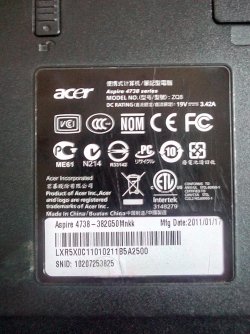
Acer Aspire 4738 Series
Model-ZQ8
Ram- DDR3 6GB
Please Refer Attachment for PC Desc.
 

Attachments

  • System Config.jpg
    System Config.jpg
    775.9 KB · Views: 1

My Computer

Computer type
Laptop
Computer Manufacturer/Model Number
Toshiba/PSC2UG-012001
OS
Windows 7 Ultimate x64
CPU
Intel (R) Core (TM) i5-2430 2.40ghz
Motherboard
Toshiba
Memory
4096 mb
Hard Drives
Toshiba mk5075gsx (s1)
Internet Speed
3Mbps
Antivirus
Quick heal Antivirus Pro
Browser
Chrome
Hi,
Run a surface test on the hdd using free mini tool
Best Free Partition Manager for Windows | MiniTool Partition Free

Not sure what you mean by "Full format" you have another question about how to factory restore which is far from full format :)

Use that SNID on Acer website to get all of your drivers for this machine and put them on a flash drive
Buy a new hdd or ssd and clean install windows.
 

My Computer

Computer type
PC/Desktop
Computer Manufacturer/Model Number
Custom assembled by me :}
OS
Win-7-Pro64bit 7-H-Prem-64bit
CPU
i7-5930K 2nd i9-9940x both water blocked VRM's too
Motherboard
ASUS SABERTOOTH X99 2nd ASUS x299 Apex
Memory
Trident-z 3200C14 2nd Trident-z 3600C16
Graphics Card(s)
EVGA 1080ti ftw3 2nd Titan Xp both water blocked
Sound Card
Built-in Realtek
Monitor(s) Displays
1-AOC G2460PG 24"G-Sync 144Hz/ 2nd 1-ASUS VG248QE 24" 144Hz
Screen Resolution
1920 x 1080 144Hz
Hard Drives
2-Samsung M.2 Evo & Evo Plus
2-Samsung 850 EVO 500GB SSD's/ 3-2.5 W.D. Black 1tb-&3-1tb/3-3.5 WD Black 1tb hdd's
PSU
EVGA SuperNOVA 1000-P2 2nd 1200-P2
Case
2-Corsair Obsidian Series 450D Black ATX Mid Tower
Cooling
Custom water loops
Keyboard
Logitech G710+/ 2nd Logitech G910
Mouse
2-RedDragon M901 Perdition 16400 dpi Gaming mouse = wired
Internet Speed
Comcast Ping 19ms 89.31mbps download speed 6.12mbps upload
Antivirus
Malwarebytes Pro/ Superantispyware Pro
Browser
FireFox & Pale moon
Other Info
2nd ASUS X299 Apex/Intel i9-9940x with Custom water loop/7H-Prem-x64/Corsair 450D case/Ram Trident-z 3600C16 4x8gb / Samsung970Evo plus 500gb SSD/Dual ssd EZ swap evo/PSU EVGA SuperNova 1200w-P2 80+Platinum/GPU Titan Xp /8-ML-140 on push-pull on 2-280GTX rads
Full format means Zero level format. But even now Installation of Windows Slows as well as System also slows down.


I have also run Surface Test. Nothing happen. I have full formatted my HDD, No data in HDD. Still pc Stucks at Startup(Windows icon freezes).
 
Last edited:

My Computer

Computer type
Laptop
Computer Manufacturer/Model Number
Toshiba/PSC2UG-012001
OS
Windows 7 Ultimate x64
CPU
Intel (R) Core (TM) i5-2430 2.40ghz
Motherboard
Toshiba
Memory
4096 mb
Hard Drives
Toshiba mk5075gsx (s1)
Internet Speed
3Mbps
Antivirus
Quick heal Antivirus Pro
Browser
Chrome
Is there no one to solve my problem.
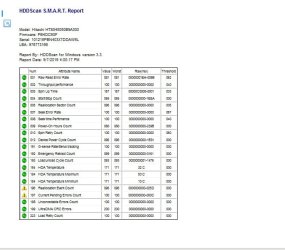
Attachment shows HDDScan Smart Report.
 

Attachments

  • HDDSCAN Smart Report.jpg
    HDDSCAN Smart Report.jpg
    45.8 KB · Views: 21

My Computer

Computer type
Laptop
Computer Manufacturer/Model Number
Toshiba/PSC2UG-012001
OS
Windows 7 Ultimate x64
CPU
Intel (R) Core (TM) i5-2430 2.40ghz
Motherboard
Toshiba
Memory
4096 mb
Hard Drives
Toshiba mk5075gsx (s1)
Internet Speed
3Mbps
Antivirus
Quick heal Antivirus Pro
Browser
Chrome
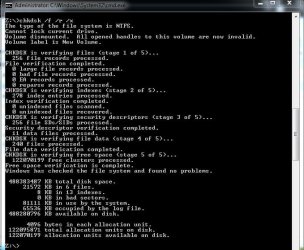
CHKDSK Report
 

Attachments

  • CHKDSK.jpg
    CHKDSK.jpg
    64 KB · Views: 17
Last edited:

My Computer

Computer type
Laptop
Computer Manufacturer/Model Number
Toshiba/PSC2UG-012001
OS
Windows 7 Ultimate x64
CPU
Intel (R) Core (TM) i5-2430 2.40ghz
Motherboard
Toshiba
Memory
4096 mb
Hard Drives
Toshiba mk5075gsx (s1)
Internet Speed
3Mbps
Antivirus
Quick heal Antivirus Pro
Browser
Chrome
I have also run Surface Test. Nothing happen.
Hi,
What does nothing happen mean ?
Did the surface test complete ?
What were the results any bad sectors reported ?
 

My Computer

Computer type
PC/Desktop
Computer Manufacturer/Model Number
Custom assembled by me :}
OS
Win-7-Pro64bit 7-H-Prem-64bit
CPU
i7-5930K 2nd i9-9940x both water blocked VRM's too
Motherboard
ASUS SABERTOOTH X99 2nd ASUS x299 Apex
Memory
Trident-z 3200C14 2nd Trident-z 3600C16
Graphics Card(s)
EVGA 1080ti ftw3 2nd Titan Xp both water blocked
Sound Card
Built-in Realtek
Monitor(s) Displays
1-AOC G2460PG 24"G-Sync 144Hz/ 2nd 1-ASUS VG248QE 24" 144Hz
Screen Resolution
1920 x 1080 144Hz
Hard Drives
2-Samsung M.2 Evo & Evo Plus
2-Samsung 850 EVO 500GB SSD's/ 3-2.5 W.D. Black 1tb-&3-1tb/3-3.5 WD Black 1tb hdd's
PSU
EVGA SuperNOVA 1000-P2 2nd 1200-P2
Case
2-Corsair Obsidian Series 450D Black ATX Mid Tower
Cooling
Custom water loops
Keyboard
Logitech G710+/ 2nd Logitech G910
Mouse
2-RedDragon M901 Perdition 16400 dpi Gaming mouse = wired
Internet Speed
Comcast Ping 19ms 89.31mbps download speed 6.12mbps upload
Antivirus
Malwarebytes Pro/ Superantispyware Pro
Browser
FireFox & Pale moon
Other Info
2nd ASUS X299 Apex/Intel i9-9940x with Custom water loop/7H-Prem-x64/Corsair 450D case/Ram Trident-z 3600C16 4x8gb / Samsung970Evo plus 500gb SSD/Dual ssd EZ swap evo/PSU EVGA SuperNova 1200w-P2 80+Platinum/GPU Titan Xp /8-ML-140 on push-pull on 2-280GTX rads
It seem you do all the checks, such as; Full format, Zero format, Surface test.
Hence, this is where you problem lies.
This way may even destroy certain sectors of the HDD.
By doing this, it mean that you are using old HDD, which was not stable before.

Surface test is a simply test, and not able to do a write test mode.
Your write test mode is by doing the zero format.

Booting will also depend on the HDD condition.

Hence, your Windows 7 slow down due to the all the test you had done.


Why don't you try to use Disk Defragmenter
Location: Start -> Accessories -> System Tool.
Select the partition/drive and do a "Analyze disk".
If this result is not favorably, this is no good.
As most the result is less than 5%.

On whether you want to do it or not, it is up to you.

Depend on this result, than we can move to next.

 

My Computer

Computer type
Laptop
Computer Manufacturer/Model Number
Toshiba L630 and L735
OS
Windows 7 x64
Hard Drives
240 GB SSD
Back
Top