Solved PC Starts but doesn't display anything

crazykilla

New member
Member
VIP
Local time
1:29 PM
Messages
143
Hello, I'm CrazyKilla

By this i mean, i got a new motherboard, MSI X79A-GD45 8D, i plugged in all the fans, water cooling, the 24 or something pin power cable into the motherboard, an 8 pin cable in to the motherboard, the 2 hdds, the 2 gpus, disc reader and plugged in 8gbs of ram.
I push the power button and it turns on, all the fans are spinning and LEDs are working, but nothing happens, monitors don't display anything.
If i swith the ram to different colored slots, and i turn the PC on then it will just restart itself every 20 seconds. Is this the ram problem or something else?
 

My Computer

Computer type
PC/Desktop
Computer Manufacturer/Model Number
Custom Build
OS
Windows 7 Ultimate 64-bit
CPU
Intel i7-3820 @ 3.60GHz
Motherboard
MSI X79A-GD45 8D
Memory
24GB
Graphics Card(s)
2xNvidea GTS 450 SLI
Monitor(s) Displays
HP w2408h 24" monitor
Screen Resolution
1920x1200
Hard Drives
2 Terrabyte 6GB/s HDD
Case
Cooler Master 912 HAF
Cooling
Intel Water Cooling for CPU, 6 Fans.
Internet Speed
100MB/s
Antivirus
None - Like a Boss
Whenever a new build does not start as it is supposed to the procedure then must be to simplify the system and test each component to find the problem.

New System Failure Diagnostic

Basic diagnostic procedure is to uninstall the entire build and start over. Some people do this out of the case by placing the motherboard on an anti-static surface. This eliminates the possibility that there is a short circuit between the motherboard and the case through the connection posts (stand-offs). A standoff in the wrong location or a sloppy job will cause a short.

The Test (power off, power cord unplugged):

  • Disconnect everything externally connected except the mouse and keyboard (printers, USB devices, etc). If you are not using a wired mouse and keyboard see if you can borrow one. The wireless device is just another component you have to deal with.
  • Disconnect the power and data cables from all the drives inside the computer (Hard drives, DVD/CD drives, etc).
  • Remove all the cards installed in the expansion slots (PCI/PCI-e) including the video card. (Be careful handling them and place them on a non conductive surface while testing).
  • Remove all the RAM sticks (same rules as above).
Now connect the power cord and turn the PC on.

  • The motherboard should start beeping. You should get a beep code that tells you there is no memory. This is good, it means the processor is functioning and the motherboard is good so far.
  • Now add one stick of memory in Slot A1 and power on. More beeping: "no video card" beep code. This is good.
  • Then add the video card (one video card) and connect it to the monitor. You should get no beeping and you should see the BIOS start screens, ending with the message that there is no boot device.
  • If you get no video then switch the one memory stick installed for another one and test.
  • If you do get video then start adding components back, one at a time, until the system fails to boot. The last component you added is then the problem component.
This test has been complicated in recent months due to the fact that many new motherboards do not have speakers on them and you can't hear any beep codes. These boards rely instead on 2-character codes displayed on the board. So on these you must consult your manual to see if the code displayed corresponds to the missing component condition you have created in order to check that the board is reporting correctly.
 

My Computer

Computer type
PC/Desktop
Computer Manufacturer/Model Number
Home Built - Jan 2013
OS
Windows 7 64 Bit Home Premium SP1
CPU
i7-3820
Motherboard
Asus P9X79-PRO - Bios 4608
Memory
GSkill F3-14900CL9Q - 16GB
Graphics Card(s)
EVGA GeForce GTX660 - Driver 352.86
Sound Card
On board Realtek ALC898
Monitor(s) Displays
Acer S271HL
Screen Resolution
1920 x 1080
Hard Drives
#1- Samsung 840 Pro Series
#2- Western Digital WD1002FAEX Sata3 Black
#3- Western Digital WD1002FAEX Sata3 Black
PSU
Corsair CMPSU-850TX-V2 - 850 watt (by Seasonic)
Case
Corsair Obsidian 550D
Cooling
Standard 3 120mm case fans, Cooler Master Hyper 212 EVO
Keyboard
MS KC-0405
Mouse
Intellimouse 5-button
Internet Speed
56 Mbits/Sec (on a good day)
Antivirus
Avast & Malwarebytes
Browser
Firefox
Other Info
Asus DVD - DRW-24B1ST 24X
Sorry but you just posted all of that whilst the solution is simple, there are 8 ram slots and 4 channels, i don't know how it works but i THINK that you can't have different types of ram in the same channel, i made sure my 2 corsair 4gbs were in the same channel and my 2 kingston 4gbs were in another channel.
Thankyou though for atleast replying.
 

My Computer

Computer type
PC/Desktop
Computer Manufacturer/Model Number
Custom Build
OS
Windows 7 Ultimate 64-bit
CPU
Intel i7-3820 @ 3.60GHz
Motherboard
MSI X79A-GD45 8D
Memory
24GB
Graphics Card(s)
2xNvidea GTS 450 SLI
Monitor(s) Displays
HP w2408h 24" monitor
Screen Resolution
1920x1200
Hard Drives
2 Terrabyte 6GB/s HDD
Case
Cooler Master 912 HAF
Cooling
Intel Water Cooling for CPU, 6 Fans.
Internet Speed
100MB/s
Antivirus
None - Like a Boss
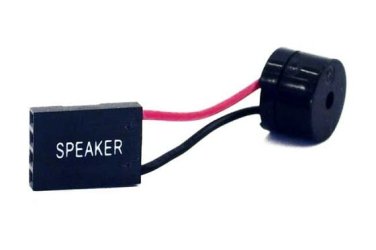
By the way, my mb doesn't beep, is this something i have to buy and attach to the board or is this for certain boards only?
 

My Computer

Computer type
PC/Desktop
Computer Manufacturer/Model Number
Custom Build
OS
Windows 7 Ultimate 64-bit
CPU
Intel i7-3820 @ 3.60GHz
Motherboard
MSI X79A-GD45 8D
Memory
24GB
Graphics Card(s)
2xNvidea GTS 450 SLI
Monitor(s) Displays
HP w2408h 24" monitor
Screen Resolution
1920x1200
Hard Drives
2 Terrabyte 6GB/s HDD
Case
Cooler Master 912 HAF
Cooling
Intel Water Cooling for CPU, 6 Fans.
Internet Speed
100MB/s
Antivirus
None - Like a Boss
Yes, you can buy a piezo speaker that will connect to the speaker header on the motherboard.

P.jpg

Yes my long winded diagnostic (cut & paste, by the way) is really just saying "check your build, you may have installed something incorrectly".
But it works for a variety of different no-boot postings and is instructive to other people who may be looking at this thread for information on a similar problem.

Glad you got it figured out (and without all that work!)
 

My Computer

Computer type
PC/Desktop
Computer Manufacturer/Model Number
Home Built - Jan 2013
OS
Windows 7 64 Bit Home Premium SP1
CPU
i7-3820
Motherboard
Asus P9X79-PRO - Bios 4608
Memory
GSkill F3-14900CL9Q - 16GB
Graphics Card(s)
EVGA GeForce GTX660 - Driver 352.86
Sound Card
On board Realtek ALC898
Monitor(s) Displays
Acer S271HL
Screen Resolution
1920 x 1080
Hard Drives
#1- Samsung 840 Pro Series
#2- Western Digital WD1002FAEX Sata3 Black
#3- Western Digital WD1002FAEX Sata3 Black
PSU
Corsair CMPSU-850TX-V2 - 850 watt (by Seasonic)
Case
Corsair Obsidian 550D
Cooling
Standard 3 120mm case fans, Cooler Master Hyper 212 EVO
Keyboard
MS KC-0405
Mouse
Intellimouse 5-button
Internet Speed
56 Mbits/Sec (on a good day)
Antivirus
Avast & Malwarebytes
Browser
Firefox
Other Info
Asus DVD - DRW-24B1ST 24X
Back
Top