Solved PC takes around 10 minutes or less to fully boot

Slems

New member
Local time
11:21 PM
Messages
16
Hello fellow windows 7 users, I seem to have encountered this problem and I'll try to describe the issue as detailed as I can. My PC is custom built, I built it myself and installed everything myself. It was working just fine for like two months but recently, more specific, since last month, my PC takes A LONG time to boot, as mentioned in the title. I do get BSOD from time to time, but I'll post about it in an appropriate thread. As for the boot time, I obviously don't know what's causing the issue. I'm not really sure as to what information I could provide you with, I did fill my system specs in my profile page. If you need anything else, like logs and stuff, just say.

Oh and I forgot to mention that I disabled some things in the startup on CCleaner, but it doesn't feel like it helped much.
 

My Computer My Computer

At a glance

Windows 7 Ultimate x64Intel Core i5 44608.00GB Single-Channel DDR3 @ 665MHz (9-9-9-24)3071MB NVIDIA GeForce GTX 580 (EVGA)
Computer type
PC/Desktop
Computer Manufacturer/Model Number
Custom build
OS
Windows 7 Ultimate x64
CPU
Intel Core i5 4460
Motherboard
ASUSTeK COMPUTER INC. B85M-K (SOCKET 1150)
Memory
8.00GB Single-Channel DDR3 @ 665MHz (9-9-9-24)
Graphics Card(s)
3071MB NVIDIA GeForce GTX 580 (EVGA)
Sound Card
Realtek High Definition Audio
Monitor(s) Displays
VA2431 Series (1920x1080@60Hz)
Screen Resolution
(1920x1080@60Hz
Hard Drives
465GB SAMSUNG HD503HI SCSI Disk Device (SATA)
PSU
TacensMARS GAMING MP700 700W
Case
Tracer X-Ray
Keyboard
Genesis RX55
Mouse
CM Storm Alcor
Antivirus
Microsoft Essentials
Browser
Google Chrome
Hi and welcome to SevenForums,
Please post the bsod info because that is most likely tied to the original issues
http://www.sevenforums.com/bsod-help-support/96879-blue-screen-death-bsod-posting-instructions.html

Use Clean boot,
http://www.sevenforums.com/tutorial...ation-conflicts-performing-clean-startup.html
Click Start and type in the search box,
msconfig
Click on the suggestion on top or hit the Enter key,
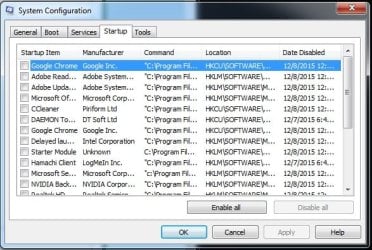
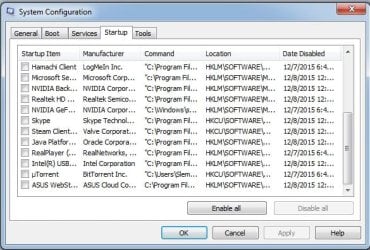
Go to the Startup section and take some screen shots for a complete list,
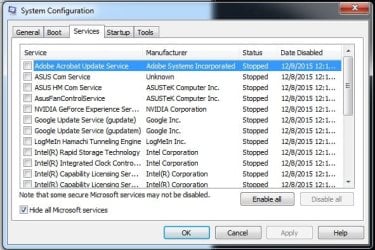
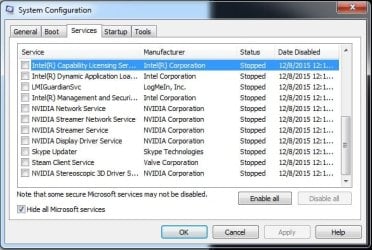
Go to the Services section and on the bottom left Check the box to Hide All Microsoft services,
Repeat the screen shots,
See the links above my signature on how to take and upload screen shots here,
Cheers.
 

My Computer My Computer

At a glance

Win-7-Pro64bit 7-H-Prem-64biti7-5930K 2nd i9-9940x both water blocked VRM'...Trident-z 3200C14 2nd Trident-z 3600C16EVGA 1080ti ftw3 2nd Titan Xp both water blocked
Computer type
PC/Desktop
Computer Manufacturer/Model Number
Custom assembled by me :}
OS
Win-7-Pro64bit 7-H-Prem-64bit
CPU
i7-5930K 2nd i9-9940x both water blocked VRM's too
Motherboard
ASUS SABERTOOTH X99 2nd ASUS x299 Apex
Memory
Trident-z 3200C14 2nd Trident-z 3600C16
Graphics Card(s)
EVGA 1080ti ftw3 2nd Titan Xp both water blocked
Sound Card
Built-in Realtek
Monitor(s) Displays
1-AOC G2460PG 24"G-Sync 144Hz/ 2nd 1-ASUS VG248QE 24" 144Hz
Screen Resolution
1920 x 1080 144Hz
Hard Drives
2-Samsung M.2 Evo & Evo Plus
2-Samsung 850 EVO 500GB SSD's/ 3-2.5 W.D. Black 1tb-&3-1tb/3-3.5 WD Black 1tb hdd's
PSU
EVGA SuperNOVA 1000-P2 2nd 1200-P2
Case
2-Corsair Obsidian Series 450D Black ATX Mid Tower
Cooling
Custom water loops
Keyboard
Logitech G710+/ 2nd Logitech G910
Mouse
2-RedDragon M901 Perdition 16400 dpi Gaming mouse = wired
Internet Speed
Comcast Ping 19ms 89.31mbps download speed 6.12mbps upload
Antivirus
Malwarebytes Pro/ Superantispyware Pro
Browser
FireFox & Pale moon
Other Info
2nd ASUS X299 Apex/Intel i9-9940x with Custom water loop/7H-Prem-x64/Corsair 450D case/Ram Trident-z 3600C16 4x8gb / Samsung970Evo plus 500gb SSD/Dual ssd EZ swap evo/PSU EVGA SuperNova 1200w-P2 80+Platinum/GPU Titan Xp /8-ML-140 on push-pull on 2-280GTX rads
Thank you for responding so quickly! I did all you asked.

Here are the screenshots of the startup programs while in Clean Boot mode:
377502d1449527428-pc-takes-around-10-minutes-less-fully-boot-startup-1.jpg

377503d1449527428-pc-takes-around-10-minutes-less-fully-boot-startup-2.jpg


And here are the screenshots of services tab while in Clean Boot mode:
377504d1449527428-pc-takes-around-10-minutes-less-fully-boot-services-1.jpg

377505d1449527428-pc-takes-around-10-minutes-less-fully-boot-services-2.jpg


And here is the BSOD log file or whatever it's called:
View attachment SLEMS-PC-Tue_12_08_2015__00653_49.zip

EDIT: I didn't realize the added pictures would show at the bottom.
 

Attachments

  • Startup 1.jpg
    Startup 1.jpg
    54.1 KB · Views: 121
  • Startup 2.jpg
    Startup 2.jpg
    52.6 KB · Views: 120
  • Services 1.jpg
    Services 1.jpg
    52.6 KB · Views: 122
  • Services 2.jpg
    Services 2.jpg
    48.6 KB · Views: 121
Last edited:

My Computer My Computer

At a glance

Windows 7 Ultimate x64Intel Core i5 44608.00GB Single-Channel DDR3 @ 665MHz (9-9-9-24)3071MB NVIDIA GeForce GTX 580 (EVGA)
Computer type
PC/Desktop
Computer Manufacturer/Model Number
Custom build
OS
Windows 7 Ultimate x64
CPU
Intel Core i5 4460
Motherboard
ASUSTeK COMPUTER INC. B85M-K (SOCKET 1150)
Memory
8.00GB Single-Channel DDR3 @ 665MHz (9-9-9-24)
Graphics Card(s)
3071MB NVIDIA GeForce GTX 580 (EVGA)
Sound Card
Realtek High Definition Audio
Monitor(s) Displays
VA2431 Series (1920x1080@60Hz)
Screen Resolution
(1920x1080@60Hz
Hard Drives
465GB SAMSUNG HD503HI SCSI Disk Device (SATA)
PSU
TacensMARS GAMING MP700 700W
Case
Tracer X-Ray
Keyboard
Genesis RX55
Mouse
CM Storm Alcor
Antivirus
Microsoft Essentials
Browser
Google Chrome
Hi and thanks,
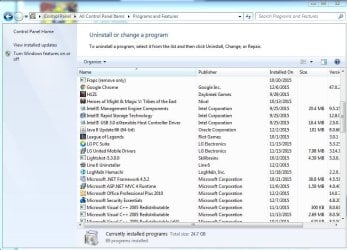
Do you have an entry in uninstall a program for Intel management and security ?
 

My Computer My Computer

At a glance

Win-7-Pro64bit 7-H-Prem-64biti7-5930K 2nd i9-9940x both water blocked VRM'...Trident-z 3200C14 2nd Trident-z 3600C16EVGA 1080ti ftw3 2nd Titan Xp both water blocked
Computer type
PC/Desktop
Computer Manufacturer/Model Number
Custom assembled by me :}
OS
Win-7-Pro64bit 7-H-Prem-64bit
CPU
i7-5930K 2nd i9-9940x both water blocked VRM's too
Motherboard
ASUS SABERTOOTH X99 2nd ASUS x299 Apex
Memory
Trident-z 3200C14 2nd Trident-z 3600C16
Graphics Card(s)
EVGA 1080ti ftw3 2nd Titan Xp both water blocked
Sound Card
Built-in Realtek
Monitor(s) Displays
1-AOC G2460PG 24"G-Sync 144Hz/ 2nd 1-ASUS VG248QE 24" 144Hz
Screen Resolution
1920 x 1080 144Hz
Hard Drives
2-Samsung M.2 Evo & Evo Plus
2-Samsung 850 EVO 500GB SSD's/ 3-2.5 W.D. Black 1tb-&3-1tb/3-3.5 WD Black 1tb hdd's
PSU
EVGA SuperNOVA 1000-P2 2nd 1200-P2
Case
2-Corsair Obsidian Series 450D Black ATX Mid Tower
Cooling
Custom water loops
Keyboard
Logitech G710+/ 2nd Logitech G910
Mouse
2-RedDragon M901 Perdition 16400 dpi Gaming mouse = wired
Internet Speed
Comcast Ping 19ms 89.31mbps download speed 6.12mbps upload
Antivirus
Malwarebytes Pro/ Superantispyware Pro
Browser
FireFox & Pale moon
Other Info
2nd ASUS X299 Apex/Intel i9-9940x with Custom water loop/7H-Prem-x64/Corsair 450D case/Ram Trident-z 3600C16 4x8gb / Samsung970Evo plus 500gb SSD/Dual ssd EZ swap evo/PSU EVGA SuperNova 1200w-P2 80+Platinum/GPU Titan Xp /8-ML-140 on push-pull on 2-280GTX rads
Hi, no, there is no such thing in uninstall or change a program. Those three are the only ones it seems. There is however something with management.
 

Attachments

  • Uninstall a program INTEL.JPG
    Uninstall a program INTEL.JPG
    95.4 KB · Views: 6

My Computer My Computer

At a glance

Windows 7 Ultimate x64Intel Core i5 44608.00GB Single-Channel DDR3 @ 665MHz (9-9-9-24)3071MB NVIDIA GeForce GTX 580 (EVGA)
Computer type
PC/Desktop
Computer Manufacturer/Model Number
Custom build
OS
Windows 7 Ultimate x64
CPU
Intel Core i5 4460
Motherboard
ASUSTeK COMPUTER INC. B85M-K (SOCKET 1150)
Memory
8.00GB Single-Channel DDR3 @ 665MHz (9-9-9-24)
Graphics Card(s)
3071MB NVIDIA GeForce GTX 580 (EVGA)
Sound Card
Realtek High Definition Audio
Monitor(s) Displays
VA2431 Series (1920x1080@60Hz)
Screen Resolution
(1920x1080@60Hz
Hard Drives
465GB SAMSUNG HD503HI SCSI Disk Device (SATA)
PSU
TacensMARS GAMING MP700 700W
Case
Tracer X-Ray
Keyboard
Genesis RX55
Mouse
CM Storm Alcor
Antivirus
Microsoft Essentials
Browser
Google Chrome
Hi,
Reason I asked is because Intel owns Mcafee security and has renamed it to I'm guessing Intel management and security :/
I would personally remove that utility I have a Intel cpu and do not have it installed
I don't have rapid storage either but that was just perferance you might actually use that feature ;)
View attachment 377554

Seeing you have MSE installed it isn't the best but I would use a few scanners to see what they come up with
Post the scan results
Review Jacee’s instructions to run Adwcleaner here post #7,
Ignore the title of the thread,
http://www.sevenforums.com/system-security/316404-instant-savings-app.html
On the BleepingComputer site use the button that looks like this,
adwcleaner-button.JPG

You can use these free tools to see if they find anything,
Manually Update them before running full scans,
Try not to use your computer while the scans are running, (one at a time of course).
See this tutorial on how to download and run Malwarebytes,
http://www.sevenforums.com/tutorials/338716-malwarebytes-anti-malware-free.html
Also use the Custom scan option not the Threat scan,

Malwarebytes | Free Anti-Malware Detection & Removal Software
SAS is safe to remove anything it finds ;)
SUPERAntiSpyware | Remove Malware | Remove Spyware - AntiMalware, AntiSpyware, AntiAdware!
 
Last edited:

My Computer My Computer

At a glance

Win-7-Pro64bit 7-H-Prem-64biti7-5930K 2nd i9-9940x both water blocked VRM'...Trident-z 3200C14 2nd Trident-z 3600C16EVGA 1080ti ftw3 2nd Titan Xp both water blocked
Computer type
PC/Desktop
Computer Manufacturer/Model Number
Custom assembled by me :}
OS
Win-7-Pro64bit 7-H-Prem-64bit
CPU
i7-5930K 2nd i9-9940x both water blocked VRM's too
Motherboard
ASUS SABERTOOTH X99 2nd ASUS x299 Apex
Memory
Trident-z 3200C14 2nd Trident-z 3600C16
Graphics Card(s)
EVGA 1080ti ftw3 2nd Titan Xp both water blocked
Sound Card
Built-in Realtek
Monitor(s) Displays
1-AOC G2460PG 24"G-Sync 144Hz/ 2nd 1-ASUS VG248QE 24" 144Hz
Screen Resolution
1920 x 1080 144Hz
Hard Drives
2-Samsung M.2 Evo & Evo Plus
2-Samsung 850 EVO 500GB SSD's/ 3-2.5 W.D. Black 1tb-&3-1tb/3-3.5 WD Black 1tb hdd's
PSU
EVGA SuperNOVA 1000-P2 2nd 1200-P2
Case
2-Corsair Obsidian Series 450D Black ATX Mid Tower
Cooling
Custom water loops
Keyboard
Logitech G710+/ 2nd Logitech G910
Mouse
2-RedDragon M901 Perdition 16400 dpi Gaming mouse = wired
Internet Speed
Comcast Ping 19ms 89.31mbps download speed 6.12mbps upload
Antivirus
Malwarebytes Pro/ Superantispyware Pro
Browser
FireFox & Pale moon
Other Info
2nd ASUS X299 Apex/Intel i9-9940x with Custom water loop/7H-Prem-x64/Corsair 450D case/Ram Trident-z 3600C16 4x8gb / Samsung970Evo plus 500gb SSD/Dual ssd EZ swap evo/PSU EVGA SuperNova 1200w-P2 80+Platinum/GPU Titan Xp /8-ML-140 on push-pull on 2-280GTX rads
Hi,
I have ran all the tools, they did find some things, but those things were just a couple of old game cracks that I used like couple of years ago (when re-installing windows, I transfer one folder with my important files, such as pictures, music etc.).
And I believe there was a misunderstanding, there is no entry with the name "Intel management and security" in the 'uninstall or change a program' window. Only those three that I showed the picture of before.
The boot time haven't changed, it's still extremely long.
 

My Computer My Computer

At a glance

Windows 7 Ultimate x64Intel Core i5 44608.00GB Single-Channel DDR3 @ 665MHz (9-9-9-24)3071MB NVIDIA GeForce GTX 580 (EVGA)
Computer type
PC/Desktop
Computer Manufacturer/Model Number
Custom build
OS
Windows 7 Ultimate x64
CPU
Intel Core i5 4460
Motherboard
ASUSTeK COMPUTER INC. B85M-K (SOCKET 1150)
Memory
8.00GB Single-Channel DDR3 @ 665MHz (9-9-9-24)
Graphics Card(s)
3071MB NVIDIA GeForce GTX 580 (EVGA)
Sound Card
Realtek High Definition Audio
Monitor(s) Displays
VA2431 Series (1920x1080@60Hz)
Screen Resolution
(1920x1080@60Hz
Hard Drives
465GB SAMSUNG HD503HI SCSI Disk Device (SATA)
PSU
TacensMARS GAMING MP700 700W
Case
Tracer X-Ray
Keyboard
Genesis RX55
Mouse
CM Storm Alcor
Antivirus
Microsoft Essentials
Browser
Google Chrome

My Computer My Computer

At a glance

Win-7-Pro64bit 7-H-Prem-64biti7-5930K 2nd i9-9940x both water blocked VRM'...Trident-z 3200C14 2nd Trident-z 3600C16EVGA 1080ti ftw3 2nd Titan Xp both water blocked
Computer type
PC/Desktop
Computer Manufacturer/Model Number
Custom assembled by me :}
OS
Win-7-Pro64bit 7-H-Prem-64bit
CPU
i7-5930K 2nd i9-9940x both water blocked VRM's too
Motherboard
ASUS SABERTOOTH X99 2nd ASUS x299 Apex
Memory
Trident-z 3200C14 2nd Trident-z 3600C16
Graphics Card(s)
EVGA 1080ti ftw3 2nd Titan Xp both water blocked
Sound Card
Built-in Realtek
Monitor(s) Displays
1-AOC G2460PG 24"G-Sync 144Hz/ 2nd 1-ASUS VG248QE 24" 144Hz
Screen Resolution
1920 x 1080 144Hz
Hard Drives
2-Samsung M.2 Evo & Evo Plus
2-Samsung 850 EVO 500GB SSD's/ 3-2.5 W.D. Black 1tb-&3-1tb/3-3.5 WD Black 1tb hdd's
PSU
EVGA SuperNOVA 1000-P2 2nd 1200-P2
Case
2-Corsair Obsidian Series 450D Black ATX Mid Tower
Cooling
Custom water loops
Keyboard
Logitech G710+/ 2nd Logitech G910
Mouse
2-RedDragon M901 Perdition 16400 dpi Gaming mouse = wired
Internet Speed
Comcast Ping 19ms 89.31mbps download speed 6.12mbps upload
Antivirus
Malwarebytes Pro/ Superantispyware Pro
Browser
FireFox & Pale moon
Other Info
2nd ASUS X299 Apex/Intel i9-9940x with Custom water loop/7H-Prem-x64/Corsair 450D case/Ram Trident-z 3600C16 4x8gb / Samsung970Evo plus 500gb SSD/Dual ssd EZ swap evo/PSU EVGA SuperNova 1200w-P2 80+Platinum/GPU Titan Xp /8-ML-140 on push-pull on 2-280GTX rads
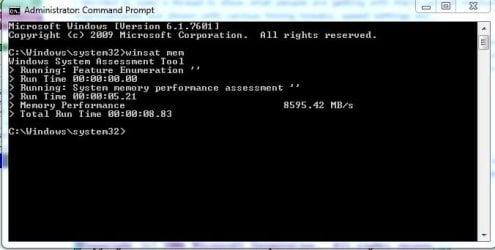
There you go.

I want to address something. It says that the PC restarted in 190+ seconds. After I got this message, only then did my Skype, Steam, torrent program and other stuff started loading. Oh and by the way, the last thing that gets loaded is always this AISuite3.exe. I always get the interface for it the last, don't know if it has anything to do with anything.
 

Attachments

  • restart time.jpg
    restart time.jpg
    6.4 KB · Views: 32
  • Winsat mem.jpg
    Winsat mem.jpg
    26.3 KB · Views: 33

My Computer My Computer

At a glance

Windows 7 Ultimate x64Intel Core i5 44608.00GB Single-Channel DDR3 @ 665MHz (9-9-9-24)3071MB NVIDIA GeForce GTX 580 (EVGA)
Computer type
PC/Desktop
Computer Manufacturer/Model Number
Custom build
OS
Windows 7 Ultimate x64
CPU
Intel Core i5 4460
Motherboard
ASUSTeK COMPUTER INC. B85M-K (SOCKET 1150)
Memory
8.00GB Single-Channel DDR3 @ 665MHz (9-9-9-24)
Graphics Card(s)
3071MB NVIDIA GeForce GTX 580 (EVGA)
Sound Card
Realtek High Definition Audio
Monitor(s) Displays
VA2431 Series (1920x1080@60Hz)
Screen Resolution
(1920x1080@60Hz
Hard Drives
465GB SAMSUNG HD503HI SCSI Disk Device (SATA)
PSU
TacensMARS GAMING MP700 700W
Case
Tracer X-Ray
Keyboard
Genesis RX55
Mouse
CM Storm Alcor
Antivirus
Microsoft Essentials
Browser
Google Chrome

My Computer My Computer

At a glance

Win-7-Pro64bit 7-H-Prem-64biti7-5930K 2nd i9-9940x both water blocked VRM'...Trident-z 3200C14 2nd Trident-z 3600C16EVGA 1080ti ftw3 2nd Titan Xp both water blocked
Computer type
PC/Desktop
Computer Manufacturer/Model Number
Custom assembled by me :}
OS
Win-7-Pro64bit 7-H-Prem-64bit
CPU
i7-5930K 2nd i9-9940x both water blocked VRM's too
Motherboard
ASUS SABERTOOTH X99 2nd ASUS x299 Apex
Memory
Trident-z 3200C14 2nd Trident-z 3600C16
Graphics Card(s)
EVGA 1080ti ftw3 2nd Titan Xp both water blocked
Sound Card
Built-in Realtek
Monitor(s) Displays
1-AOC G2460PG 24"G-Sync 144Hz/ 2nd 1-ASUS VG248QE 24" 144Hz
Screen Resolution
1920 x 1080 144Hz
Hard Drives
2-Samsung M.2 Evo & Evo Plus
2-Samsung 850 EVO 500GB SSD's/ 3-2.5 W.D. Black 1tb-&3-1tb/3-3.5 WD Black 1tb hdd's
PSU
EVGA SuperNOVA 1000-P2 2nd 1200-P2
Case
2-Corsair Obsidian Series 450D Black ATX Mid Tower
Cooling
Custom water loops
Keyboard
Logitech G710+/ 2nd Logitech G910
Mouse
2-RedDragon M901 Perdition 16400 dpi Gaming mouse = wired
Internet Speed
Comcast Ping 19ms 89.31mbps download speed 6.12mbps upload
Antivirus
Malwarebytes Pro/ Superantispyware Pro
Browser
FireFox & Pale moon
Other Info
2nd ASUS X299 Apex/Intel i9-9940x with Custom water loop/7H-Prem-x64/Corsair 450D case/Ram Trident-z 3600C16 4x8gb / Samsung970Evo plus 500gb SSD/Dual ssd EZ swap evo/PSU EVGA SuperNova 1200w-P2 80+Platinum/GPU Titan Xp /8-ML-140 on push-pull on 2-280GTX rads
Yeah AI suite is horrendous and even after you uninstall all of its stuff it will have stuff leftover so reboot after removing it then run this https://rog.asus.com/forum/showthread.php?34503-AI-Suite-III-Cleaner and reboot again. Also by single channel I think Slems means they have one stick of ram.

Slems do you still have the LG devices that you have drivers and software for?
 

My Computer My Computer

At a glance

10 Pro x64Ryzen 9 3900X64GB(4x16GB) DDR4EVGA 1080ti FTW3
Computer type
PC/Desktop
Computer Manufacturer/Model Number
Custom
OS
10 Pro x64
CPU
Ryzen 9 3900X
Motherboard
Asrock x370 Tachi
Memory
64GB(4x16GB) DDR4
Graphics Card(s)
EVGA 1080ti FTW3
Sound Card
ASUS Xonar Essence STX (V4 Bursons), ODAC rev B, NFB-11, O2
Monitor(s) Displays
3xASUS PB278Q/R, Optoma HD142X
Screen Resolution
3x1440p, 1080p
Hard Drives
512GB 850 EVO(OS, Programs)
4TB (Movies)
3TB (Downloads)
3TB (Programs)
1TB HDD (Games)
2x6TB R1 (videos)
PSU
AX760
Case
Fractal Define R5
Cooling
NH-D15S
Keyboard
Massdrop Ctrl with Box Navy's
Mouse
G903, Alioth XXL Mat
Internet Speed
280/40
Antivirus
MBAM, ESET
Browser
Canary 64 Bit
Other Info
I also own a Thinkpad P50 Xeon 4K, X220T, X1C5
Hi,
It's actually a single 8Gb stick, my Motherboard is mini ATX so it has only 2 slots for RAM.
 
Last edited:

My Computer My Computer

At a glance

Windows 7 Ultimate x64Intel Core i5 44608.00GB Single-Channel DDR3 @ 665MHz (9-9-9-24)3071MB NVIDIA GeForce GTX 580 (EVGA)
Computer type
PC/Desktop
Computer Manufacturer/Model Number
Custom build
OS
Windows 7 Ultimate x64
CPU
Intel Core i5 4460
Motherboard
ASUSTeK COMPUTER INC. B85M-K (SOCKET 1150)
Memory
8.00GB Single-Channel DDR3 @ 665MHz (9-9-9-24)
Graphics Card(s)
3071MB NVIDIA GeForce GTX 580 (EVGA)
Sound Card
Realtek High Definition Audio
Monitor(s) Displays
VA2431 Series (1920x1080@60Hz)
Screen Resolution
(1920x1080@60Hz
Hard Drives
465GB SAMSUNG HD503HI SCSI Disk Device (SATA)
PSU
TacensMARS GAMING MP700 700W
Case
Tracer X-Ray
Keyboard
Genesis RX55
Mouse
CM Storm Alcor
Antivirus
Microsoft Essentials
Browser
Google Chrome
Yeah AI suite is horrendous and even after you uninstall all of its stuff it will have stuff leftover so reboot after removing it then run this https://rog.asus.com/forum/showthread.php?34503-AI-Suite-III-Cleaner and reboot again. Also by single channel I think Slems means they have one stick of ram.

Slems do you still have the LG devices that you have drivers and software for?

Yes, it's my phone. But I don't even use the LG Suite so I can remove it.

EDIT: I am presented with this, maybe any suggestions as to which programs I should remove?
 

Attachments

  • aisuite3.jpg
    aisuite3.jpg
    32.9 KB · Views: 2

My Computer My Computer

At a glance

Windows 7 Ultimate x64Intel Core i5 44608.00GB Single-Channel DDR3 @ 665MHz (9-9-9-24)3071MB NVIDIA GeForce GTX 580 (EVGA)
Computer type
PC/Desktop
Computer Manufacturer/Model Number
Custom build
OS
Windows 7 Ultimate x64
CPU
Intel Core i5 4460
Motherboard
ASUSTeK COMPUTER INC. B85M-K (SOCKET 1150)
Memory
8.00GB Single-Channel DDR3 @ 665MHz (9-9-9-24)
Graphics Card(s)
3071MB NVIDIA GeForce GTX 580 (EVGA)
Sound Card
Realtek High Definition Audio
Monitor(s) Displays
VA2431 Series (1920x1080@60Hz)
Screen Resolution
(1920x1080@60Hz
Hard Drives
465GB SAMSUNG HD503HI SCSI Disk Device (SATA)
PSU
TacensMARS GAMING MP700 700W
Case
Tracer X-Ray
Keyboard
Genesis RX55
Mouse
CM Storm Alcor
Antivirus
Microsoft Essentials
Browser
Google Chrome
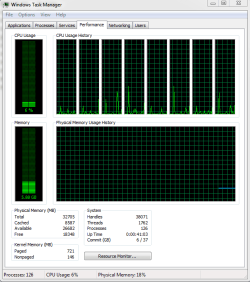
How much ram are you using at idle once everything is loaded? Post a pic of your task manger like this.
 

Attachments

  • mem taks.PNG
    mem taks.PNG
    13.9 KB · Views: 2

My Computer My Computer

At a glance

10 Pro x64Ryzen 9 3900X64GB(4x16GB) DDR4EVGA 1080ti FTW3
Computer type
PC/Desktop
Computer Manufacturer/Model Number
Custom
OS
10 Pro x64
CPU
Ryzen 9 3900X
Motherboard
Asrock x370 Tachi
Memory
64GB(4x16GB) DDR4
Graphics Card(s)
EVGA 1080ti FTW3
Sound Card
ASUS Xonar Essence STX (V4 Bursons), ODAC rev B, NFB-11, O2
Monitor(s) Displays
3xASUS PB278Q/R, Optoma HD142X
Screen Resolution
3x1440p, 1080p
Hard Drives
512GB 850 EVO(OS, Programs)
4TB (Movies)
3TB (Downloads)
3TB (Programs)
1TB HDD (Games)
2x6TB R1 (videos)
PSU
AX760
Case
Fractal Define R5
Cooling
NH-D15S
Keyboard
Massdrop Ctrl with Box Navy's
Mouse
G903, Alioth XXL Mat
Internet Speed
280/40
Antivirus
MBAM, ESET
Browser
Canary 64 Bit
Other Info
I also own a Thinkpad P50 Xeon 4K, X220T, X1C5
How much ram are you using at idle once everything is loaded? Post a pic of your task manger like this.

CPU usage goes between 0-5% while I'm just staring at it, Google Chrome off, Skype and Steam on.
 

Attachments

  • performance.jpg
    performance.jpg
    93.4 KB · Views: 2

My Computer My Computer

At a glance

Windows 7 Ultimate x64Intel Core i5 44608.00GB Single-Channel DDR3 @ 665MHz (9-9-9-24)3071MB NVIDIA GeForce GTX 580 (EVGA)
Computer type
PC/Desktop
Computer Manufacturer/Model Number
Custom build
OS
Windows 7 Ultimate x64
CPU
Intel Core i5 4460
Motherboard
ASUSTeK COMPUTER INC. B85M-K (SOCKET 1150)
Memory
8.00GB Single-Channel DDR3 @ 665MHz (9-9-9-24)
Graphics Card(s)
3071MB NVIDIA GeForce GTX 580 (EVGA)
Sound Card
Realtek High Definition Audio
Monitor(s) Displays
VA2431 Series (1920x1080@60Hz)
Screen Resolution
(1920x1080@60Hz
Hard Drives
465GB SAMSUNG HD503HI SCSI Disk Device (SATA)
PSU
TacensMARS GAMING MP700 700W
Case
Tracer X-Ray
Keyboard
Genesis RX55
Mouse
CM Storm Alcor
Antivirus
Microsoft Essentials
Browser
Google Chrome
Yeah AI suite is horrendous and even after you uninstall all of its stuff it will have stuff leftover so reboot after removing it then run this https://rog.asus.com/forum/showthread.php?34503-AI-Suite-III-Cleaner and reboot again. Also by single channel I think Slems means they have one stick of ram.

Slems do you still have the LG devices that you have drivers and software for?

Yes, it's my phone. But I don't even use the LG Suite so I can remove it.

EDIT: I am presented with this, maybe any suggestions as to which programs I should remove?

IMO all of it, Then I would run that cleaner program. That suite gave me nothing but headache from day one. Its services also reek havoc on dpc latency as you can see with this. http://www.thesycon.de/dpclat/dpclat.exe EDIT: your idle ram usage seems fine.
 

My Computer My Computer

At a glance

10 Pro x64Ryzen 9 3900X64GB(4x16GB) DDR4EVGA 1080ti FTW3
Computer type
PC/Desktop
Computer Manufacturer/Model Number
Custom
OS
10 Pro x64
CPU
Ryzen 9 3900X
Motherboard
Asrock x370 Tachi
Memory
64GB(4x16GB) DDR4
Graphics Card(s)
EVGA 1080ti FTW3
Sound Card
ASUS Xonar Essence STX (V4 Bursons), ODAC rev B, NFB-11, O2
Monitor(s) Displays
3xASUS PB278Q/R, Optoma HD142X
Screen Resolution
3x1440p, 1080p
Hard Drives
512GB 850 EVO(OS, Programs)
4TB (Movies)
3TB (Downloads)
3TB (Programs)
1TB HDD (Games)
2x6TB R1 (videos)
PSU
AX760
Case
Fractal Define R5
Cooling
NH-D15S
Keyboard
Massdrop Ctrl with Box Navy's
Mouse
G903, Alioth XXL Mat
Internet Speed
280/40
Antivirus
MBAM, ESET
Browser
Canary 64 Bit
Other Info
I also own a Thinkpad P50 Xeon 4K, X220T, X1C5
Yeah AI suite is horrendous and even after you uninstall all of its stuff it will have stuff leftover so reboot after removing it then run this https://rog.asus.com/forum/showthread.php?34503-AI-Suite-III-Cleaner and reboot again. Also by single channel I think Slems means they have one stick of ram.

Slems do you still have the LG devices that you have drivers and software for?

Yes, it's my phone. But I don't even use the LG Suite so I can remove it.

EDIT: I am presented with this, maybe any suggestions as to which programs I should remove?

IMO all of it, Then I would run that cleaner program. That suite gave me nothing but headache from day one. Its services also reek havoc on dpc latency as you can see with this. http://www.thesycon.de/dpclat/dpclat.exe EDIT: your idle ram usage seems fine.

It's done. I've uninstalled the AISuite3 and ran the cleaner.
 

My Computer My Computer

At a glance

Windows 7 Ultimate x64Intel Core i5 44608.00GB Single-Channel DDR3 @ 665MHz (9-9-9-24)3071MB NVIDIA GeForce GTX 580 (EVGA)
Computer type
PC/Desktop
Computer Manufacturer/Model Number
Custom build
OS
Windows 7 Ultimate x64
CPU
Intel Core i5 4460
Motherboard
ASUSTeK COMPUTER INC. B85M-K (SOCKET 1150)
Memory
8.00GB Single-Channel DDR3 @ 665MHz (9-9-9-24)
Graphics Card(s)
3071MB NVIDIA GeForce GTX 580 (EVGA)
Sound Card
Realtek High Definition Audio
Monitor(s) Displays
VA2431 Series (1920x1080@60Hz)
Screen Resolution
(1920x1080@60Hz
Hard Drives
465GB SAMSUNG HD503HI SCSI Disk Device (SATA)
PSU
TacensMARS GAMING MP700 700W
Case
Tracer X-Ray
Keyboard
Genesis RX55
Mouse
CM Storm Alcor
Antivirus
Microsoft Essentials
Browser
Google Chrome

My Computer My Computer

At a glance

10 Pro x64Ryzen 9 3900X64GB(4x16GB) DDR4EVGA 1080ti FTW3
Computer type
PC/Desktop
Computer Manufacturer/Model Number
Custom
OS
10 Pro x64
CPU
Ryzen 9 3900X
Motherboard
Asrock x370 Tachi
Memory
64GB(4x16GB) DDR4
Graphics Card(s)
EVGA 1080ti FTW3
Sound Card
ASUS Xonar Essence STX (V4 Bursons), ODAC rev B, NFB-11, O2
Monitor(s) Displays
3xASUS PB278Q/R, Optoma HD142X
Screen Resolution
3x1440p, 1080p
Hard Drives
512GB 850 EVO(OS, Programs)
4TB (Movies)
3TB (Downloads)
3TB (Programs)
1TB HDD (Games)
2x6TB R1 (videos)
PSU
AX760
Case
Fractal Define R5
Cooling
NH-D15S
Keyboard
Massdrop Ctrl with Box Navy's
Mouse
G903, Alioth XXL Mat
Internet Speed
280/40
Antivirus
MBAM, ESET
Browser
Canary 64 Bit
Other Info
I also own a Thinkpad P50 Xeon 4K, X220T, X1C5
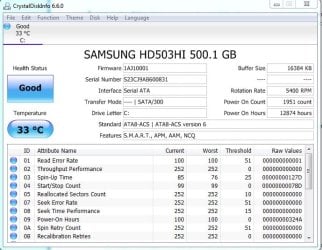
Any improvement? You should also just for precaution check things like your hdd health with /64153/CrystalDiskInfo6_6_0.zip??????? - CrystalDiskInfo - OSDN and run a disk cleanup and defrag to remove things like temp files and get your stuff in order.

http://www.sevenforums.com/tutorials/818-disk-cleanup-open-use.html
http://www.sevenforums.com/tutorials/11733-disk-defragmenter-open-use.html

HDD health seems to be okay. Doing the clean up and defragment at the moment.
 

Attachments

  • dskinfo.jpg
    dskinfo.jpg
    63.3 KB · Views: 16

My Computer My Computer

At a glance

Windows 7 Ultimate x64Intel Core i5 44608.00GB Single-Channel DDR3 @ 665MHz (9-9-9-24)3071MB NVIDIA GeForce GTX 580 (EVGA)
Computer type
PC/Desktop
Computer Manufacturer/Model Number
Custom build
OS
Windows 7 Ultimate x64
CPU
Intel Core i5 4460
Motherboard
ASUSTeK COMPUTER INC. B85M-K (SOCKET 1150)
Memory
8.00GB Single-Channel DDR3 @ 665MHz (9-9-9-24)
Graphics Card(s)
3071MB NVIDIA GeForce GTX 580 (EVGA)
Sound Card
Realtek High Definition Audio
Monitor(s) Displays
VA2431 Series (1920x1080@60Hz)
Screen Resolution
(1920x1080@60Hz
Hard Drives
465GB SAMSUNG HD503HI SCSI Disk Device (SATA)
PSU
TacensMARS GAMING MP700 700W
Case
Tracer X-Ray
Keyboard
Genesis RX55
Mouse
CM Storm Alcor
Antivirus
Microsoft Essentials
Browser
Google Chrome
Yeah looks good after those two things shutdown then on again (don't reboot).
 

My Computer My Computer

At a glance

10 Pro x64Ryzen 9 3900X64GB(4x16GB) DDR4EVGA 1080ti FTW3
Computer type
PC/Desktop
Computer Manufacturer/Model Number
Custom
OS
10 Pro x64
CPU
Ryzen 9 3900X
Motherboard
Asrock x370 Tachi
Memory
64GB(4x16GB) DDR4
Graphics Card(s)
EVGA 1080ti FTW3
Sound Card
ASUS Xonar Essence STX (V4 Bursons), ODAC rev B, NFB-11, O2
Monitor(s) Displays
3xASUS PB278Q/R, Optoma HD142X
Screen Resolution
3x1440p, 1080p
Hard Drives
512GB 850 EVO(OS, Programs)
4TB (Movies)
3TB (Downloads)
3TB (Programs)
1TB HDD (Games)
2x6TB R1 (videos)
PSU
AX760
Case
Fractal Define R5
Cooling
NH-D15S
Keyboard
Massdrop Ctrl with Box Navy's
Mouse
G903, Alioth XXL Mat
Internet Speed
280/40
Antivirus
MBAM, ESET
Browser
Canary 64 Bit
Other Info
I also own a Thinkpad P50 Xeon 4K, X220T, X1C5
Back
Top