PC Tries & Fails To Configure Windows Updates On Every Start Up

Quite a few offers like that are one year which is the reason for the comment.
 
Last edited:

My Computer My Computer

At a glance

Win 10 x64, Linux Lite, Win 7 x64, BlackArch,...
Computer type
PC/Desktop
Computer Manufacturer/Model Number
HP Desktop & Compaq Laptop
OS
Win 10 x64, Linux Lite, Win 7 x64, BlackArch, & Kali
Hard Drives
Samsung 850 Pro 256Gb,
Hitachi HDD 1Tb,
Crucial MX SSD 250Gb
Segate 3Tb USB 3.0 Ext. Backup HDD
Internet Speed
150Mbps dn, 20Mbps up
Antivirus
Avast Free, Malwarebytes Anti-Exploit & Anti-Ransomware
Browser
Firefox, Chrome, Opera, & VPN
Thanks torchwood - I will try your suggestions.
 

My Computer My Computer

At a glance

Windows 7 Home Premium 64 bit SP1Intel i3 5403GB DDR3SD
Computer type
PC/Desktop
Computer Manufacturer/Model Number
Acer Aspire Desktop M3910
OS
Windows 7 Home Premium 64 bit SP1
CPU
Intel i3 540
Memory
3GB DDR3SD
Monitor(s) Displays
LG Flatron L1960TR
Screen Resolution
1280x1024
Keyboard
Acer
Mouse
Genius
Antivirus
Avast (Free)
Browser
I E 11
Your windows update is corrupt, Repair Install/In Place Upgrade, reinstalls Windows, keeps all your personal info, pictures, etc.
The entire drive is saved as C:\Windows.old
I always make a backup to external media, either a HDD, SSD, or last resort (USB of sufficient size)
Don't recommend using Microsoft's Backup or Restore, they fail when you need them!
I use AOMEI backupper which is also available as a 1 year trial giveaway now AOMEI Pro with key for free. Russian site, clean, download clean, install clean. ;)
You need to have the Windows 7 activation key, 25-character, as you will be asked to re-enter it for activation, (it does not happen when you use Win10 to upgrade to it as it auto activates online)
If you have other Microsoft products installed that required you to enter a key, you have to have that key
I use Magical Jelly Bean for that purpose, if you use it, CD key is the Windows 7 25-character key, not product ID.

Watch this video Repair Install to Fix Windows 7 Without Reformatting by Britec
My help page
Repair Windows Without Reformatting
I have Win7 ISO if needed.

Bill


I'm going to give torchwood's suggestions a shot. But the way things are going, I'm expecting to try the process in the video that you linked to on Youtube. I have found the Windows repair disc that I made when I first turned on my pc 7 years ago.


I have a few questions;


1) I would prefer to back up onto some storage device. Without spending lots of money, which is the best to use? I'm thinking SSD? What size should I get?


2) When I back up, what am I backing up? Whole of computer? Or am I just backing up the files I added, photos, docs, videos, etc?


3) If only backing up the files I added, do I just click on the whole file, 'Pictures' for eg, copy then paste it onto the storage device/SSD? I haven't added much to my pc (see image below for used HDD space and spare capacity).


4) Is the 25 digit activation key on the white sticker on side of pc that has a couple of bar codes? If not, where do I look?


Thanks for you help so far. No doubt I will have a few more questions. I have some important work I need to do on my pc early this week so won't be attempting anything major that may affect it until later in the week. Also trying to keep things simple as I only have a basic idea about computers.
 

Attachments

  • HDD.jpg
    HDD.jpg
    6 KB · Views: 11

My Computer My Computer

At a glance

Windows 7 Home Premium 64 bit SP1Intel i3 5403GB DDR3SD
Computer type
PC/Desktop
Computer Manufacturer/Model Number
Acer Aspire Desktop M3910
OS
Windows 7 Home Premium 64 bit SP1
CPU
Intel i3 540
Memory
3GB DDR3SD
Monitor(s) Displays
LG Flatron L1960TR
Screen Resolution
1280x1024
Keyboard
Acer
Mouse
Genius
Antivirus
Avast (Free)
Browser
I E 11
Window Repair Disk is not a
Windows7 DVD or Windows7 ISO file.
Here are instruction from my OneDrive for
Repair Install Windows Without Reformatting
I have Win7 ISO if you need it. Important have your 25 character activation key, have any Microsoft product keys, i.e. Office, etc. When you get to the screen you want Upgrade.

Bill
 

My Computer My Computer

At a glance

Win 10 x64, Linux Lite, Win 7 x64, BlackArch,...
Computer type
PC/Desktop
Computer Manufacturer/Model Number
HP Desktop & Compaq Laptop
OS
Win 10 x64, Linux Lite, Win 7 x64, BlackArch, & Kali
Hard Drives
Samsung 850 Pro 256Gb,
Hitachi HDD 1Tb,
Crucial MX SSD 250Gb
Segate 3Tb USB 3.0 Ext. Backup HDD
Internet Speed
150Mbps dn, 20Mbps up
Antivirus
Avast Free, Malwarebytes Anti-Exploit & Anti-Ransomware
Browser
Firefox, Chrome, Opera, & VPN
To Snick, Paul Black and Torchwood

Apologies for my late reply. Trying to sort out a relative's estate at present. Hence delays to answers. Also reluctance to do too much that may mean I lose pc due to my clumsiness. Heavily reliant on it at present.

Anyway, I have tried Torchwoods suggestion to try KB947821 System Update Readiness Tool. Just wanted to check I did it right.

I downloaded it to desktop then double clicked on it. Asked me if want to install update - clicked yes. Went through initialization, then installing Hotfix for KB947821. After completed, I restarted pc. Installation took 30 mins.

Were all of the above steps correct? Because of the problems of installing updates, I changed the checking for updates schedule from once every day to every Saturday. Shall I change back to daily?

Will let everyone know if the above has helped. Will then be back with questions about trying Torchwood's command prompt questions if still problems. Want to try the simpler things before more drastic stuff. Thanks again.

P.S. Looks like someone else is having problems with same update Security monthly quality rollup kb4525235 failing to install
 

My Computer My Computer

At a glance

Windows 7 Home Premium 64 bit SP1Intel i3 5403GB DDR3SD
Computer type
PC/Desktop
Computer Manufacturer/Model Number
Acer Aspire Desktop M3910
OS
Windows 7 Home Premium 64 bit SP1
CPU
Intel i3 540
Memory
3GB DDR3SD
Monitor(s) Displays
LG Flatron L1960TR
Screen Resolution
1280x1024
Keyboard
Acer
Mouse
Genius
Antivirus
Avast (Free)
Browser
I E 11
After you run System Update Readiness Tool, need to upload the CBS folder
You will have to run the tool again for the temporary CheckSUR.log to be in the CBS folder
C:\Windows\Logs\
copy folder to desktop
In desktop cbs folder leave cbs.log and checksur.log, delete others, zip folder upload please.
Bill
 

My Computer My Computer

At a glance

Win 10 x64, Linux Lite, Win 7 x64, BlackArch,...
Computer type
PC/Desktop
Computer Manufacturer/Model Number
HP Desktop & Compaq Laptop
OS
Win 10 x64, Linux Lite, Win 7 x64, BlackArch, & Kali
Hard Drives
Samsung 850 Pro 256Gb,
Hitachi HDD 1Tb,
Crucial MX SSD 250Gb
Segate 3Tb USB 3.0 Ext. Backup HDD
Internet Speed
150Mbps dn, 20Mbps up
Antivirus
Avast Free, Malwarebytes Anti-Exploit & Anti-Ransomware
Browser
Firefox, Chrome, Opera, & VPN
Thanks, Bill. Will I have to do the above steps to make updates install?

After running the System Readiness Update tool and restarting pc yesterday, I tried to get the updates to install. No luck - same as before.

So, to follow your instructions in above post, I need to

1) run Update readiness tool again?
2) open C:\Windows\Logs\ in start menu?
3) click on CBS folder to open it - there are two CBS folders on list that appears??
4) copy CBS folder to desktop?
5) Open CBS folder that was copied to desktop, keep cbs.log and CheckSUR - delete everything else?
6) then upload zip folder to this forum - presumably for you to look at?

Apologies for basic questions, but I'm not that experienced with computers. Please confirm if I have understood what I have to do and let me know if I haven't understood it properly.
 

My Computer My Computer

At a glance

Windows 7 Home Premium 64 bit SP1Intel i3 5403GB DDR3SD
Computer type
PC/Desktop
Computer Manufacturer/Model Number
Acer Aspire Desktop M3910
OS
Windows 7 Home Premium 64 bit SP1
CPU
Intel i3 540
Memory
3GB DDR3SD
Monitor(s) Displays
LG Flatron L1960TR
Screen Resolution
1280x1024
Keyboard
Acer
Mouse
Genius
Antivirus
Avast (Free)
Browser
I E 11
Yes,
the checksur.log is temporary in the original location. C:\Windows\Logs\CBS
The tool fixes some issues, and reports what it can't.
Yes, logs tell what is happening or not with your computer.
cbs.log is large, CheckSUR.log usually not.
I usually try to automate processes such as this.
Windows Update Diagnostic - AutoSURT64 from footer does that with system update readiness tool, includes a batch file that runs surt and copies cbs folder to your desktop
you can get to the CBS folder
Computer
C:
Windows
Logs
CBS
or copy and paste
C:\Windows\Logs\
into searchbox after you click :orb:
 

My Computer My Computer

At a glance

Win 10 x64, Linux Lite, Win 7 x64, BlackArch,...
Computer type
PC/Desktop
Computer Manufacturer/Model Number
HP Desktop & Compaq Laptop
OS
Win 10 x64, Linux Lite, Win 7 x64, BlackArch, & Kali
Hard Drives
Samsung 850 Pro 256Gb,
Hitachi HDD 1Tb,
Crucial MX SSD 250Gb
Segate 3Tb USB 3.0 Ext. Backup HDD
Internet Speed
150Mbps dn, 20Mbps up
Antivirus
Avast Free, Malwarebytes Anti-Exploit & Anti-Ransomware
Browser
Firefox, Chrome, Opera, & VPN
Ok, thanks.

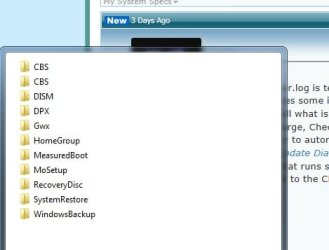
Couple more questions. I have only run the Update Readiness Tool once a few days ago - I haven't re-run it. When I put "C:\Windows\Logs" into the start menu, I get the list (see image below) with two CBS folders. Can I use these CBS folders (which one??) for the steps I outlined in my post #27 - ie. to keep cbs.log and CheckSUR, delete the others and upload the zip folder to this forum?

Or is it too late to use one of these CBS folder and I have to run the Update Readiness Tool again?

Apologies for my lack of understanding.
 

Attachments

  • Update problem.jpg
    Update problem.jpg
    15.9 KB · Views: 4

My Computer My Computer

At a glance

Windows 7 Home Premium 64 bit SP1Intel i3 5403GB DDR3SD
Computer type
PC/Desktop
Computer Manufacturer/Model Number
Acer Aspire Desktop M3910
OS
Windows 7 Home Premium 64 bit SP1
CPU
Intel i3 540
Memory
3GB DDR3SD
Monitor(s) Displays
LG Flatron L1960TR
Screen Resolution
1280x1024
Keyboard
Acer
Mouse
Genius
Antivirus
Avast (Free)
Browser
I E 11
woodbine, the SURT is not an update per se, it diagnoses win update issues, attempts repairs, reports results in the CBS Folder. The log created in that location is temporary. CheckSUR.log is temporary in C:\Windows\Logs\CBS. If it isn't moved in a short period of time, it disappears and you have to run the tool again. AutoSURT64 is a WinRAR executable I created with a batch script that places SURT and replacement files (when included) in C:\Windows\Temp\, runs SURT, then copies cbs folder to desktop. Automate processes for OPs is a good thing!

Video I included in my OneDrive on repair install
Repair Install to Fix Windows 7 Without Reformatting by Britec

FYI: your attachment link is broken!

Bill
 

My Computer My Computer

At a glance

Win 10 x64, Linux Lite, Win 7 x64, BlackArch,...
Computer type
PC/Desktop
Computer Manufacturer/Model Number
HP Desktop & Compaq Laptop
OS
Win 10 x64, Linux Lite, Win 7 x64, BlackArch, & Kali
Hard Drives
Samsung 850 Pro 256Gb,
Hitachi HDD 1Tb,
Crucial MX SSD 250Gb
Segate 3Tb USB 3.0 Ext. Backup HDD
Internet Speed
150Mbps dn, 20Mbps up
Antivirus
Avast Free, Malwarebytes Anti-Exploit & Anti-Ransomware
Browser
Firefox, Chrome, Opera, & VPN
Thanks again Bill. I think I'm getting a bit bogged down, especially with the technical terms. I have some time this weekend to try to tackle this and need to make a plan. Could I ask you to give direct answers to the following questions, please?

1) I'm guessing I should first try the Windows Update Diagnostic-AutoSURT64 in your link?
2) If I use Windows Update Diagnostic-AutoSURT64 in your link do I just run it, or download to desktop then run?
3) Before I run Windows Update Diagnostic-AutoSURT64, do I need to run the Update Readiness tool manually first, or will the W U D - AutoSURT64 automatically run it first for me?

If you could answer these questions first for me then I can get on and do it and report back. I'm thinking I do above steps first and if nothing is conclusive, do the repair install?

If I do need to do a repair install I would like to do it like in the Britec video you linked to as it looks sinple enough for even me to handle.
 

My Computer My Computer

At a glance

Windows 7 Home Premium 64 bit SP1Intel i3 5403GB DDR3SD
Computer type
PC/Desktop
Computer Manufacturer/Model Number
Acer Aspire Desktop M3910
OS
Windows 7 Home Premium 64 bit SP1
CPU
Intel i3 540
Memory
3GB DDR3SD
Monitor(s) Displays
LG Flatron L1960TR
Screen Resolution
1280x1024
Keyboard
Acer
Mouse
Genius
Antivirus
Avast (Free)
Browser
I E 11
Hi Snick

Are you still following this thread? If you get a minute, could you answer the above questions please?

Haven't given this much attention recently, as I had a minor family crisis at Christmas, but need to get on top of this now as the problem is still there.

Thanks.

Ian
 

My Computer My Computer

At a glance

Windows 7 Home Premium 64 bit SP1Intel i3 5403GB DDR3SD
Computer type
PC/Desktop
Computer Manufacturer/Model Number
Acer Aspire Desktop M3910
OS
Windows 7 Home Premium 64 bit SP1
CPU
Intel i3 540
Memory
3GB DDR3SD
Monitor(s) Displays
LG Flatron L1960TR
Screen Resolution
1280x1024
Keyboard
Acer
Mouse
Genius
Antivirus
Avast (Free)
Browser
I E 11
Back
Top