PC Tries & Fails To Configure Windows Updates On Every Start Up

woodbine

New member
Member
VIP
Local time
4:34 AM
Messages
178
Location
Bristol, UK
My Acer Aspire desktop pc is trying to configure Windows updates every time I turn it on. It goes through the same procedure and always fails. This has been going on for a week or two.


Below is what it says on the first screen after switching on through various other screens before pc allows me to enter my password and use the pc as normal. Takes a few minutes.


"Preparing to configure Windows"


"Configuring Windows updates. xx% complete. Do not turn off your computer."


"Shutting down"


(PC then restarts)


"Starting Windows"


(Then the pc repeats all of the above stages)


"Failure configuring Windows updates. Reverting changes. Do not turn off your computer."


Then it lets me enter my password and use the pc as normal.


Any advice about what is going on and what to do would be appreciated. I'm not a computer expert. Many thanks.
 

My Computer My Computer

At a glance

Windows 7 Home Premium 64 bit SP1Intel i3 5403GB DDR3SD
Computer type
PC/Desktop
Computer Manufacturer/Model Number
Acer Aspire Desktop M3910
OS
Windows 7 Home Premium 64 bit SP1
CPU
Intel i3 540
Memory
3GB DDR3SD
Monitor(s) Displays
LG Flatron L1960TR
Screen Resolution
1280x1024
Keyboard
Acer
Mouse
Genius
Antivirus
Avast (Free)
Browser
I E 11
Hi woodbine,

Some questions!

[1] Have you installed any new hardware, software or updates prior to this happening?
[2] Have you got any External HDD's attached at boot?
[3] Have you got any restore points prior to this happening that you could try?
[4] Have you tried running Startup Repair from the installation media [DVD/USB]?
[5] Have you tried running chkdsk - Check Disk?
[6] Have you tried running SFC - System File Checker?
[7] Download and run Malwarebytes [FREE] from here => Malwarebytes.

I hope this helps!
 

My Computer My Computer

At a glance

Win 7 HP SP1 64-bit Vista HB SP2 32-bit Linux...Intel(R) Pentium(R) CPU P6200 @ 2.13GHz4.00 GBIntel(R) Graphics Media Accelerator HD
Computer type
Laptop
Computer Manufacturer/Model Number
Fujitsu LIFEBOOK
OS
Win 7 HP SP1 64-bit Vista HB SP2 32-bit Linux Mint 18.3
CPU
Intel(R) Pentium(R) CPU P6200 @ 2.13GHz
Motherboard
FUJITSU FJNBB06
Memory
4.00 GB
Graphics Card(s)
Intel(R) Graphics Media Accelerator HD
Sound Card
[1] Realtek High Definition Audio [2] Intel(R) Display Audio
Screen Resolution
1366 x 768 x 32 bits (4294967296 colors) @ 59 Hz
Hard Drives
TOSHIBA MK5076GSX
Antivirus
AVG FREE
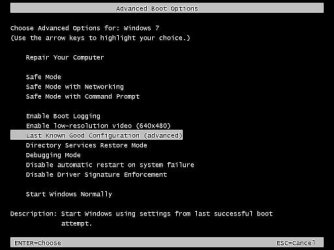
Start your Computer,
immediately begin pressing <F8> key on keyboard at approx 1 second intervals. Too fast or slow & it bypasses the screen you need. Why, because it does!

lkgc-windows-7-02-580713223df78cbc28c9ed88.jpg

Bill


My Computer My Computer

At a glance

Win 10 x64, Linux Lite, Win 7 x64, BlackArch,...
Computer type
PC/Desktop
Computer Manufacturer/Model Number
HP Desktop & Compaq Laptop
OS
Win 10 x64, Linux Lite, Win 7 x64, BlackArch, & Kali
Hard Drives
Samsung 850 Pro 256Gb,
Hitachi HDD 1Tb,
Crucial MX SSD 250Gb
Segate 3Tb USB 3.0 Ext. Backup HDD
Internet Speed
150Mbps dn, 20Mbps up
Antivirus
Avast Free, Malwarebytes Anti-Exploit & Anti-Ransomware
Browser
Firefox, Chrome, Opera, & VPN
Hi woodbine,

Some questions!

[1] Have you installed any new hardware, software or updates prior to this happening?
[2] Have you got any External HDD's attached at boot?
[3] Have you got any restore points prior to this happening that you could try?
[4] Have you tried running Startup Repair from the installation media [DVD/USB]?
[5] Have you tried running chkdsk - Check Disk?
[6] Have you tried running SFC - System File Checker?
[7] Download and run Malwarebytes [FREE] from here => Malwarebytes.

I hope this helps!


Hi Paul Black. Thanks for your reply.


1) No
2) No external hard drive.
3) to 7) Will have a look at these and report back.
 

My Computer My Computer

At a glance

Windows 7 Home Premium 64 bit SP1Intel i3 5403GB DDR3SD
Computer type
PC/Desktop
Computer Manufacturer/Model Number
Acer Aspire Desktop M3910
OS
Windows 7 Home Premium 64 bit SP1
CPU
Intel i3 540
Memory
3GB DDR3SD
Monitor(s) Displays
LG Flatron L1960TR
Screen Resolution
1280x1024
Keyboard
Acer
Mouse
Genius
Antivirus
Avast (Free)
Browser
I E 11
Start your Computer,
immediately begin pressing <F8> key on keyboard at approx 1 second intervals. Too fast or slow & it bypasses the screen you need. Why, because it does!

View attachment 410170

Bill


Hi Snick. Thanks for your reply.


The step that you have highlighted in your image says 'Advanced' at the end in brackets. If I select this step, will there be complex/advanced settings/functions that I need to carry out? Or is it a basic process of letting it run?
 

My Computer My Computer

At a glance

Windows 7 Home Premium 64 bit SP1Intel i3 5403GB DDR3SD
Computer type
PC/Desktop
Computer Manufacturer/Model Number
Acer Aspire Desktop M3910
OS
Windows 7 Home Premium 64 bit SP1
CPU
Intel i3 540
Memory
3GB DDR3SD
Monitor(s) Displays
LG Flatron L1960TR
Screen Resolution
1280x1024
Keyboard
Acer
Mouse
Genius
Antivirus
Avast (Free)
Browser
I E 11
Hi woodbine,

The step that you have highlighted in your image says 'Advanced' at the end in brackets. If I select this step, will there be complex/advanced settings/functions that I need to carry out? Or is it a basic process of letting it run?

Once you click the advanced option it will re-boot with what the OS hopefully knows was the Last Good Known Configuration!
 

My Computer My Computer

At a glance

Win 7 HP SP1 64-bit Vista HB SP2 32-bit Linux...Intel(R) Pentium(R) CPU P6200 @ 2.13GHz4.00 GBIntel(R) Graphics Media Accelerator HD
Computer type
Laptop
Computer Manufacturer/Model Number
Fujitsu LIFEBOOK
OS
Win 7 HP SP1 64-bit Vista HB SP2 32-bit Linux Mint 18.3
CPU
Intel(R) Pentium(R) CPU P6200 @ 2.13GHz
Motherboard
FUJITSU FJNBB06
Memory
4.00 GB
Graphics Card(s)
Intel(R) Graphics Media Accelerator HD
Sound Card
[1] Realtek High Definition Audio [2] Intel(R) Display Audio
Screen Resolution
1366 x 768 x 32 bits (4294967296 colors) @ 59 Hz
Hard Drives
TOSHIBA MK5076GSX
Antivirus
AVG FREE

My Computer My Computer

At a glance

Win 10 x64, Linux Lite, Win 7 x64, BlackArch,...
Computer type
PC/Desktop
Computer Manufacturer/Model Number
HP Desktop & Compaq Laptop
OS
Win 10 x64, Linux Lite, Win 7 x64, BlackArch, & Kali
Hard Drives
Samsung 850 Pro 256Gb,
Hitachi HDD 1Tb,
Crucial MX SSD 250Gb
Segate 3Tb USB 3.0 Ext. Backup HDD
Internet Speed
150Mbps dn, 20Mbps up
Antivirus
Avast Free, Malwarebytes Anti-Exploit & Anti-Ransomware
Browser
Firefox, Chrome, Opera, & VPN
Thanks again for your replies. I'll try the F8 method next time I switch on and let you know how I get on.
 

My Computer My Computer

At a glance

Windows 7 Home Premium 64 bit SP1Intel i3 5403GB DDR3SD
Computer type
PC/Desktop
Computer Manufacturer/Model Number
Acer Aspire Desktop M3910
OS
Windows 7 Home Premium 64 bit SP1
CPU
Intel i3 540
Memory
3GB DDR3SD
Monitor(s) Displays
LG Flatron L1960TR
Screen Resolution
1280x1024
Keyboard
Acer
Mouse
Genius
Antivirus
Avast (Free)
Browser
I E 11
I've tried both Snick's suggestion of F8/Last Known Good Configuration and restoring system back to 15th Nov, which was the earliest point I had. Unfortunately the problem is still the same. Maybe the restore point was just a little too late.

One thing I didn't mention before because I have only just noticed it is that every time I close down I get 'Installing 1 of 1 update' on the screen before pc turns off. I assume it manages to install this update properly. It's when I turn on that the computer it tries to configure, fails, then reverts. Not sure if this is relevant.

For now I will try a few of Paul Black's suggestions like Check disc or System File Checker. If anyone has any other suggestions or advice please let me know. Many thanks.

UPDATE>>>> Just tried System File Checker - no problems found. Check Disc scheduled for next start up.
 
Last edited:

My Computer My Computer

At a glance

Windows 7 Home Premium 64 bit SP1Intel i3 5403GB DDR3SD
Computer type
PC/Desktop
Computer Manufacturer/Model Number
Acer Aspire Desktop M3910
OS
Windows 7 Home Premium 64 bit SP1
CPU
Intel i3 540
Memory
3GB DDR3SD
Monitor(s) Displays
LG Flatron L1960TR
Screen Resolution
1280x1024
Keyboard
Acer
Mouse
Genius
Antivirus
Avast (Free)
Browser
I E 11
No, it does not install properly, that is why it reverts.
Try Paul's suggestions, as you are seeing, that is not the problem.
You have issues from the botched install that those tools will not correct.

Bill
 

My Computer My Computer

At a glance

Win 10 x64, Linux Lite, Win 7 x64, BlackArch,...
Computer type
PC/Desktop
Computer Manufacturer/Model Number
HP Desktop & Compaq Laptop
OS
Win 10 x64, Linux Lite, Win 7 x64, BlackArch, & Kali
Hard Drives
Samsung 850 Pro 256Gb,
Hitachi HDD 1Tb,
Crucial MX SSD 250Gb
Segate 3Tb USB 3.0 Ext. Backup HDD
Internet Speed
150Mbps dn, 20Mbps up
Antivirus
Avast Free, Malwarebytes Anti-Exploit & Anti-Ransomware
Browser
Firefox, Chrome, Opera, & VPN
Hi woodbine,

You have issues from the botched install that those tools will not correct.

I agree with Snick!

If those tools don't correct the problem [worth trying them first though to rule out those options], then I think a Repair Install will be needed!
 

My Computer My Computer

At a glance

Win 7 HP SP1 64-bit Vista HB SP2 32-bit Linux...Intel(R) Pentium(R) CPU P6200 @ 2.13GHz4.00 GBIntel(R) Graphics Media Accelerator HD
Computer type
Laptop
Computer Manufacturer/Model Number
Fujitsu LIFEBOOK
OS
Win 7 HP SP1 64-bit Vista HB SP2 32-bit Linux Mint 18.3
CPU
Intel(R) Pentium(R) CPU P6200 @ 2.13GHz
Motherboard
FUJITSU FJNBB06
Memory
4.00 GB
Graphics Card(s)
Intel(R) Graphics Media Accelerator HD
Sound Card
[1] Realtek High Definition Audio [2] Intel(R) Display Audio
Screen Resolution
1366 x 768 x 32 bits (4294967296 colors) @ 59 Hz
Hard Drives
TOSHIBA MK5076GSX
Antivirus
AVG FREE
Thanks again for your suggestions. Really appreciated. As you thought, the Check Disc didn't find anything.

Another thing I have noticed is something that crops up because I am leaving my pc on all the time due to start ups taking so long. I leave it in sleep when not used. The pc is in my bedroom and I find that it starts up on it's own in the early hours, tries again to configure the updates, fails and reverts. Don't know why it is switching itself out of sleep mode. Wonder if this is significant.

Before I go down the Repair Install road, I wonder if it is worth trying some steps on the Windows link below? Maybe installing updates in clean boot state, or using the Windows Update Troubleshooter?

https://support.microsoft.com/en-gb...ws-updates-reverting-changes-error-when-you-t

Also, this video describes exactly my problem. Would trying his remedy be worthwhile/safe?

YouTube
 

My Computer My Computer

At a glance

Windows 7 Home Premium 64 bit SP1Intel i3 5403GB DDR3SD
Computer type
PC/Desktop
Computer Manufacturer/Model Number
Acer Aspire Desktop M3910
OS
Windows 7 Home Premium 64 bit SP1
CPU
Intel i3 540
Memory
3GB DDR3SD
Monitor(s) Displays
LG Flatron L1960TR
Screen Resolution
1280x1024
Keyboard
Acer
Mouse
Genius
Antivirus
Avast (Free)
Browser
I E 11
Hi woodbine,

Also, this video describes exactly my problem. Would trying his remedy be worthwhile/safe? YouTube

Yes, that does work on occasions so it would be worth a try!
If things go wrong, you can always delete the newly created files and re-establish the .OLD.
It would be wise to create a System Restore Point FIRST!

I did have a batch script that performed what is included in the video but I can't find it at the moment!

I hope this helps!
 

My Computer My Computer

At a glance

Win 7 HP SP1 64-bit Vista HB SP2 32-bit Linux...Intel(R) Pentium(R) CPU P6200 @ 2.13GHz4.00 GBIntel(R) Graphics Media Accelerator HD
Computer type
Laptop
Computer Manufacturer/Model Number
Fujitsu LIFEBOOK
OS
Win 7 HP SP1 64-bit Vista HB SP2 32-bit Linux Mint 18.3
CPU
Intel(R) Pentium(R) CPU P6200 @ 2.13GHz
Motherboard
FUJITSU FJNBB06
Memory
4.00 GB
Graphics Card(s)
Intel(R) Graphics Media Accelerator HD
Sound Card
[1] Realtek High Definition Audio [2] Intel(R) Display Audio
Screen Resolution
1366 x 768 x 32 bits (4294967296 colors) @ 59 Hz
Hard Drives
TOSHIBA MK5076GSX
Antivirus
AVG FREE
Last edited:

My Computer My Computer

At a glance

Win 10 x64, Linux Lite, Win 7 x64, BlackArch,...
Computer type
PC/Desktop
Computer Manufacturer/Model Number
HP Desktop & Compaq Laptop
OS
Win 10 x64, Linux Lite, Win 7 x64, BlackArch, & Kali
Hard Drives
Samsung 850 Pro 256Gb,
Hitachi HDD 1Tb,
Crucial MX SSD 250Gb
Segate 3Tb USB 3.0 Ext. Backup HDD
Internet Speed
150Mbps dn, 20Mbps up
Antivirus
Avast Free, Malwarebytes Anti-Exploit & Anti-Ransomware
Browser
Firefox, Chrome, Opera, & VPN
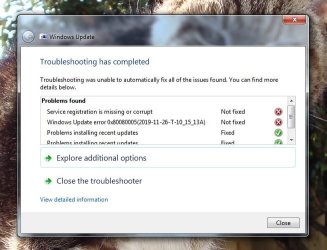
I tried the steps outlined in the video a couple of days ago, and so far no change or improvement. Also ran anti malware and only found the usual tracking cookies. I have just tried the Windows Update Troubleshooter. Too early to know if any improvement yet, as the log at the end said two items not fixed, but three fixed. I don't understand the significance of the results, so perhaps the experts can have a look at the image below.
 

Attachments

  • Win Update Troubleshooter 2.jpg
    Win Update Troubleshooter 2.jpg
    46.1 KB · Views: 9

My Computer My Computer

At a glance

Windows 7 Home Premium 64 bit SP1Intel i3 5403GB DDR3SD
Computer type
PC/Desktop
Computer Manufacturer/Model Number
Acer Aspire Desktop M3910
OS
Windows 7 Home Premium 64 bit SP1
CPU
Intel i3 540
Memory
3GB DDR3SD
Monitor(s) Displays
LG Flatron L1960TR
Screen Resolution
1280x1024
Keyboard
Acer
Mouse
Genius
Antivirus
Avast (Free)
Browser
I E 11
If I have to try any further remedies, eg. Startup Repair, is it recommended that I back up my files? If yes, what is the best way to do this? Would I need to get an external hard drive, or is there another way? Thanks for your help so far.
 

My Computer My Computer

At a glance

Windows 7 Home Premium 64 bit SP1Intel i3 5403GB DDR3SD
Computer type
PC/Desktop
Computer Manufacturer/Model Number
Acer Aspire Desktop M3910
OS
Windows 7 Home Premium 64 bit SP1
CPU
Intel i3 540
Memory
3GB DDR3SD
Monitor(s) Displays
LG Flatron L1960TR
Screen Resolution
1280x1024
Keyboard
Acer
Mouse
Genius
Antivirus
Avast (Free)
Browser
I E 11
Your windows update is corrupt, Repair Install/In Place Upgrade, reinstalls Windows, keeps all your personal info, pictures, etc.
The entire drive is saved as C:\Windows.old
I always make a backup to external media, either a HDD, SSD, or last resort (USB of sufficient size)
Don't recommend using Microsoft's Backup or Restore, they fail when you need them!
I use AOMEI backupper which is also available as a 1 year trial giveaway now AOMEI Pro with key for free. Russian site, clean, download clean, install clean. ;)
You need to have the Windows 7 activation key, 25-character, as you will be asked to re-enter it for activation, (it does not happen when you use Win10 to upgrade to it as it auto activates online)
If you have other Microsoft products installed that required you to enter a key, you have to have that key
I use Magical Jelly Bean for that purpose, if you use it, CD key is the Windows 7 25-character key, not product ID.

Watch this video Repair Install to Fix Windows 7 Without Reformatting by Britec
My help page
Repair Windows Without Reformatting
I have Win7 ISO if needed.

Bill
 

My Computer My Computer

At a glance

Win 10 x64, Linux Lite, Win 7 x64, BlackArch,...
Computer type
PC/Desktop
Computer Manufacturer/Model Number
HP Desktop & Compaq Laptop
OS
Win 10 x64, Linux Lite, Win 7 x64, BlackArch, & Kali
Hard Drives
Samsung 850 Pro 256Gb,
Hitachi HDD 1Tb,
Crucial MX SSD 250Gb
Segate 3Tb USB 3.0 Ext. Backup HDD
Internet Speed
150Mbps dn, 20Mbps up
Antivirus
Avast Free, Malwarebytes Anti-Exploit & Anti-Ransomware
Browser
Firefox, Chrome, Opera, & VPN
Thanks again for your reply, Snick. Looks like the only option. I'll digest the info in your post and come back to you with some questions about it if I may.
 

My Computer My Computer

At a glance

Windows 7 Home Premium 64 bit SP1Intel i3 5403GB DDR3SD
Computer type
PC/Desktop
Computer Manufacturer/Model Number
Acer Aspire Desktop M3910
OS
Windows 7 Home Premium 64 bit SP1
CPU
Intel i3 540
Memory
3GB DDR3SD
Monitor(s) Displays
LG Flatron L1960TR
Screen Resolution
1280x1024
Keyboard
Acer
Mouse
Genius
Antivirus
Avast (Free)
Browser
I E 11
Snick

It is permanent. where did you get the one year idea?
 

My Computers My Computers

  • At a glance

    7 X64i5 84002x8gb 3200mhz
    Computer type
    PC/Desktop
    OS
    7 X64
    CPU
    i5 8400
    Motherboard
    gigabyte b365m ds3h
    Memory
    2x8gb 3200mhz
    Hard Drives
    various
    PSU
    pure power 11 400w cm
    Case
    Coolermaster
    Cooling
    cryorig m9i
  • At a glance

    7x64g54008gb ddr4 2400
    Computer type
    PC/Desktop
    OS
    7x64
    CPU
    g5400
    Motherboard
    ga b365m ds3h
    Memory
    8gb ddr4 2400
    PSU
    xfx pro 450w
Hi

From the screenshot, the 2 not fixed items relate to back-end items, not the update itself.

try running KB947821 before the repair install- could take a while depending on what it finds

https://www.microsoft.com/en-us/download/details.aspx?id=20858

reboot and check, then this if that doesnt work

a. Click “Start”, type “cmd”in the Start search box.
b. Right-click “cmd” and select “Run as administrator”.
c. On the open Command Prompt window copy and paste the commands (all at once) and press Enter.
net stop wuauserv
net stop cryptSvc
net stop bits
net stop msiserver
ren C:\Windows\SoftwareDistribution SoftwareDistribution.old
ren C:\Windows\System32\catroot2 catroot2.old
net start wuauserv
net start cryptSvc
net start bits
net start msiserver
pause

(Exit the command prompt)


reboot manually check for updates


Roy
 

My Computer My Computer

At a glance

W7 home premium 32bit/W7HP 64bit/w10 tp insid...E5300 dual core3gbNvidia Geforce 7100 Nforce 630i
Computer type
PC/Desktop
Computer Manufacturer/Model Number
medionl/Aspire 6930G/acer x55a
OS
W7 home premium 32bit/W7HP 64bit/w10 tp insider ring
CPU
E5300 dual core
Motherboard
medion MS7366
Memory
3gb
Graphics Card(s)
Nvidia Geforce 7100 Nforce 630i
Monitor(s) Displays
avixc
Internet Speed
n (isp resticted to 72)
Antivirus
mse/pands
Browser
palemoon
Other Info
Belkin Fd7050 n USB using Railink RT2870 drivers, more upto date
Back
Top