PC will not idle

Kicksilver

New member
Member
Local time
9:13 PM
Messages
36
Location
Rio de Janeiro, Brazil
Hello lads,

I'm sorry if I'm not posting this in the right place, but I don't know where else this would fit.

Since I upgraded my PC, I realized that it won't detect idleness. I set my monitor to turn off after 1 minute, but that doesn't happen. The same applies to anything I set to turn off, or show away after X minutes.

Does anyone have a suggestion for me?

It's Win 7 Ultimate, 64-bit.

Thank you.
 

My Computer

OS
Windows 7
CPU
Phenom 2 X4 965 BE
Motherboard
MSI 880GMA E35
Memory
Kingston 4GB DDR3 1333mhz
Graphics Card(s)
Radeon HD 4250
Monitor(s) Displays
15" LCD
Screen Resolution
1024x768
Hard Drives
Seagate Barracuda 1TB
Cooling
3 80mmx80mm
Internet Speed
6mbps
Do you have antivirus software? Do you use any streaming or other special apps?
 

My Computer

Computer type
PC/Desktop
Computer Manufacturer/Model Number
Custom Built PC
OS
Windows 7 Ultimate 64 bit SP1
CPU
Intel(R) Core(TM) i5-2500K
Motherboard
Gigabyte Technology Co., Ltd. Z68X-UD3-B3
Memory
12GB Kingston Hyperx 1600MHz
Graphics Card(s)
Asus GTS 450
PSU
500W Coolink
Other Info
Genius G-Pen F610 (PenPad)
I do use Avast free antivirus.

No mate, actually I set my Win to start raw, only running the Avast.
 

My Computer

OS
Windows 7
CPU
Phenom 2 X4 965 BE
Motherboard
MSI 880GMA E35
Memory
Kingston 4GB DDR3 1333mhz
Graphics Card(s)
Radeon HD 4250
Monitor(s) Displays
15" LCD
Screen Resolution
1024x768
Hard Drives
Seagate Barracuda 1TB
Cooling
3 80mmx80mm
Internet Speed
6mbps

My Computer

Computer type
PC/Desktop
Computer Manufacturer/Model Number
Custom Built PC
OS
Windows 7 Ultimate 64 bit SP1
CPU
Intel(R) Core(TM) i5-2500K
Motherboard
Gigabyte Technology Co., Ltd. Z68X-UD3-B3
Memory
12GB Kingston Hyperx 1600MHz
Graphics Card(s)
Asus GTS 450
PSU
500W Coolink
Other Info
Genius G-Pen F610 (PenPad)
Here you are.

I had to divide in 2 screens, because my crappy resolution won't allow all the processes to fit in only one shot.

0mzPV.jpg


Xt3la.jpg
 

My Computer

OS
Windows 7
CPU
Phenom 2 X4 965 BE
Motherboard
MSI 880GMA E35
Memory
Kingston 4GB DDR3 1333mhz
Graphics Card(s)
Radeon HD 4250
Monitor(s) Displays
15" LCD
Screen Resolution
1024x768
Hard Drives
Seagate Barracuda 1TB
Cooling
3 80mmx80mm
Internet Speed
6mbps
U are running Crysis, but nothings seems to be to much active alongside with it...
So, what is the problem then?
 

My Computer

Computer type
PC/Desktop
Computer Manufacturer/Model Number
Custom Built PC
OS
Windows 7 Ultimate 64 bit SP1
CPU
Intel(R) Core(TM) i5-2500K
Motherboard
Gigabyte Technology Co., Ltd. Z68X-UD3-B3
Memory
12GB Kingston Hyperx 1600MHz
Graphics Card(s)
Asus GTS 450
PSU
500W Coolink
Other Info
Genius G-Pen F610 (PenPad)
I don't know man, otherwise I wouldn't have come here to ask. :p

And when I want it to turn off minutor/sleep, I close everything running, but still it won't go...

Maybe it's a BIOS setting?
 

My Computer

OS
Windows 7
CPU
Phenom 2 X4 965 BE
Motherboard
MSI 880GMA E35
Memory
Kingston 4GB DDR3 1333mhz
Graphics Card(s)
Radeon HD 4250
Monitor(s) Displays
15" LCD
Screen Resolution
1024x768
Hard Drives
Seagate Barracuda 1TB
Cooling
3 80mmx80mm
Internet Speed
6mbps

My Computer

Computer type
PC/Desktop
Computer Manufacturer/Model Number
Custom Built PC
OS
Windows 7 Ultimate 64 bit SP1
CPU
Intel(R) Core(TM) i5-2500K
Motherboard
Gigabyte Technology Co., Ltd. Z68X-UD3-B3
Memory
12GB Kingston Hyperx 1600MHz
Graphics Card(s)
Asus GTS 450
PSU
500W Coolink
Other Info
Genius G-Pen F610 (PenPad)
Done the sfc /verifyonly, found nothing wrong.

Yes, the BIOS settings are set to optimized, and yes the time counts correctly.

Still no luck.
 

My Computer

OS
Windows 7
CPU
Phenom 2 X4 965 BE
Motherboard
MSI 880GMA E35
Memory
Kingston 4GB DDR3 1333mhz
Graphics Card(s)
Radeon HD 4250
Monitor(s) Displays
15" LCD
Screen Resolution
1024x768
Hard Drives
Seagate Barracuda 1TB
Cooling
3 80mmx80mm
Internet Speed
6mbps
You might want to play around with the Power Plan settings. But before you make any changes, I'd suggest writing down or taking a screen shot of your current settings so you can remember what they are if things don't work out. I'd also suggest creating a new System Restore point or (preferably) a new system image if you have the capability.

http://www.sevenforums.com/tutorials/778-power-plan-settings-change.html

http://www.sevenforums.com/tutorials/697-system-restore-point-create.html

http://www.sevenforums.com/tutorials/700-system-restore.html
 

My Computer

Computer type
Laptop
Computer Manufacturer/Model Number
Sony Vaio VPCEB47GM Laptop
OS
Win 7 Pro 64-bit
CPU
Intel i5 2.4 Ghz
Memory
8GB DDR3
Graphics Card(s)
Intel HD 3000
Sound Card
IDT High Definition
Monitor(s) Displays
15.6 WGXA Anti-Glare LED
Screen Resolution
1280x800
Hard Drives
640Gb 7200rpm
Antivirus
MSE
Browser
Opera (primary) with IE9 backup
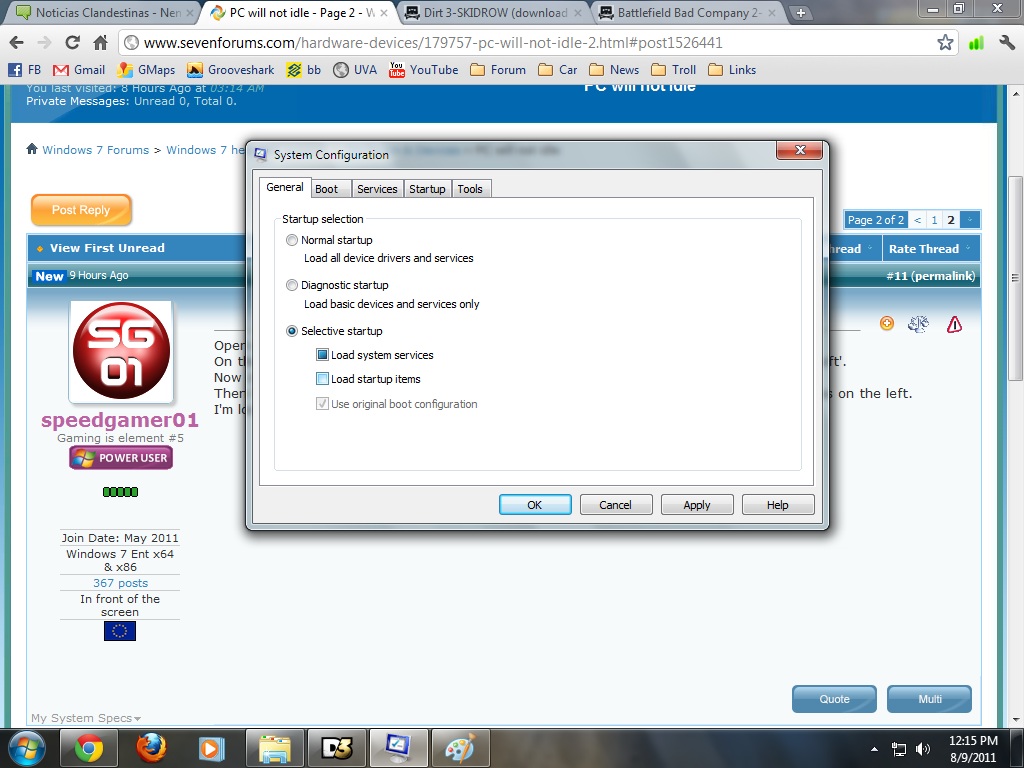
Open msconfig by typing it into the start menu search and hit enter.
On the 1st tab select 'origianl boot config', now go to services and uncheck 'hide all microsoft'.
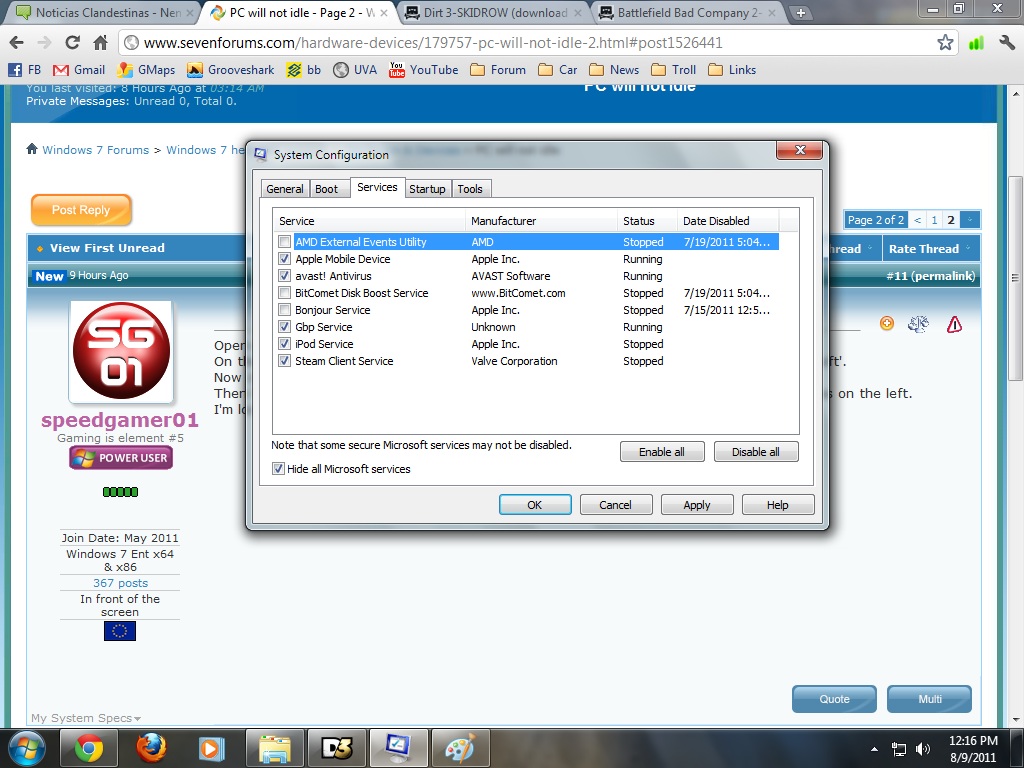
Now click enable all, then check that box again, and hit 'disable all'.
Then find your Avast components and enable them one by one by checking their checkboxes on the left.
I'm looking fwd to your results! :)
 

My Computer

Computer type
PC/Desktop
Computer Manufacturer/Model Number
Custom Built PC
OS
Windows 7 Ultimate 64 bit SP1
CPU
Intel(R) Core(TM) i5-2500K
Motherboard
Gigabyte Technology Co., Ltd. Z68X-UD3-B3
Memory
12GB Kingston Hyperx 1600MHz
Graphics Card(s)
Asus GTS 450
PSU
500W Coolink
Other Info
Genius G-Pen F610 (PenPad)
Here you are.

I don't think any of these services are causing it, since I had the exact same programs in my last HD and it worked fine.

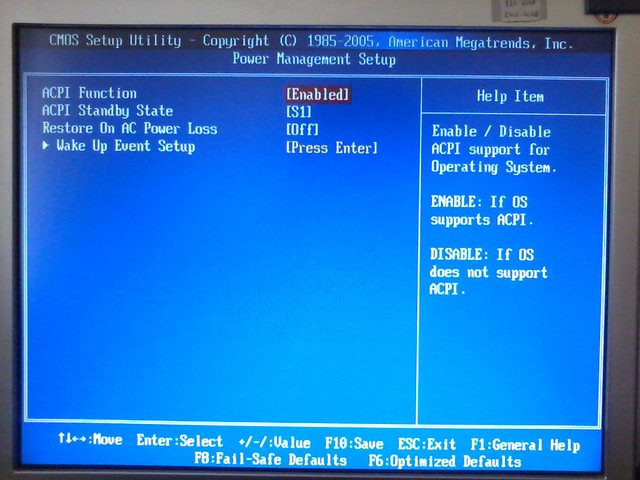
I'm starting to think it's a BIOS config. problem.

YcGIW.jpg


DFsRR.jpg


W7PQM.jpg


This is a picture of my BIOS "Power management" settings.

Ab1FTl.jpg
 

My Computer

OS
Windows 7
CPU
Phenom 2 X4 965 BE
Motherboard
MSI 880GMA E35
Memory
Kingston 4GB DDR3 1333mhz
Graphics Card(s)
Radeon HD 4250
Monitor(s) Displays
15" LCD
Screen Resolution
1024x768
Hard Drives
Seagate Barracuda 1TB
Cooling
3 80mmx80mm
Internet Speed
6mbps
What is Gbp service? Please give a shot to my suggestion.
 

My Computer

Computer type
PC/Desktop
Computer Manufacturer/Model Number
Custom Built PC
OS
Windows 7 Ultimate 64 bit SP1
CPU
Intel(R) Core(TM) i5-2500K
Motherboard
Gigabyte Technology Co., Ltd. Z68X-UD3-B3
Memory
12GB Kingston Hyperx 1600MHz
Graphics Card(s)
Asus GTS 450
PSU
500W Coolink
Other Info
Genius G-Pen F610 (PenPad)
I think it's some security system from my bank website. It's required for logging into my account.

Alright mate, I'll do it.
 

My Computer

OS
Windows 7
CPU
Phenom 2 X4 965 BE
Motherboard
MSI 880GMA E35
Memory
Kingston 4GB DDR3 1333mhz
Graphics Card(s)
Radeon HD 4250
Monitor(s) Displays
15" LCD
Screen Resolution
1024x768
Hard Drives
Seagate Barracuda 1TB
Cooling
3 80mmx80mm
Internet Speed
6mbps
Back
Top