
PC won't recognize SSD, won't boot, cant repair

tihane123

New member
Local time
3:45 PM
Messages
2
Hi forum!

I found this SSD from my shelf, an SSD I wrecked a few years ago. I tried to fix it back then but got to a dead end a bought a new one. As far as I know it has been in the same spot for 2 years so I havent broken it more over the last 2 years.

Here is where I'm at:

If I connect it to my PC along with my current working SSD, I won't get past the POST screen. Cannot enter bios either. If I press DEL it say "entering bios" but its lying and will stay there indefinitely.

If I connect only the broken SSD(and unconnect my working SSD), I can boot from USB windows and I can get to bios(note that it connects to bios ~30 sec after pressing DEL). However none of those recognize my SSD. Nothing in BOOT priority and cannot install windows since there are no drives to be installed on. When I click startup repair when installing windows, on the top(where it should say the driver letter) it just reads uknown drive.

Sometimes when I enter bios and leave bios, this screen pops up right after:
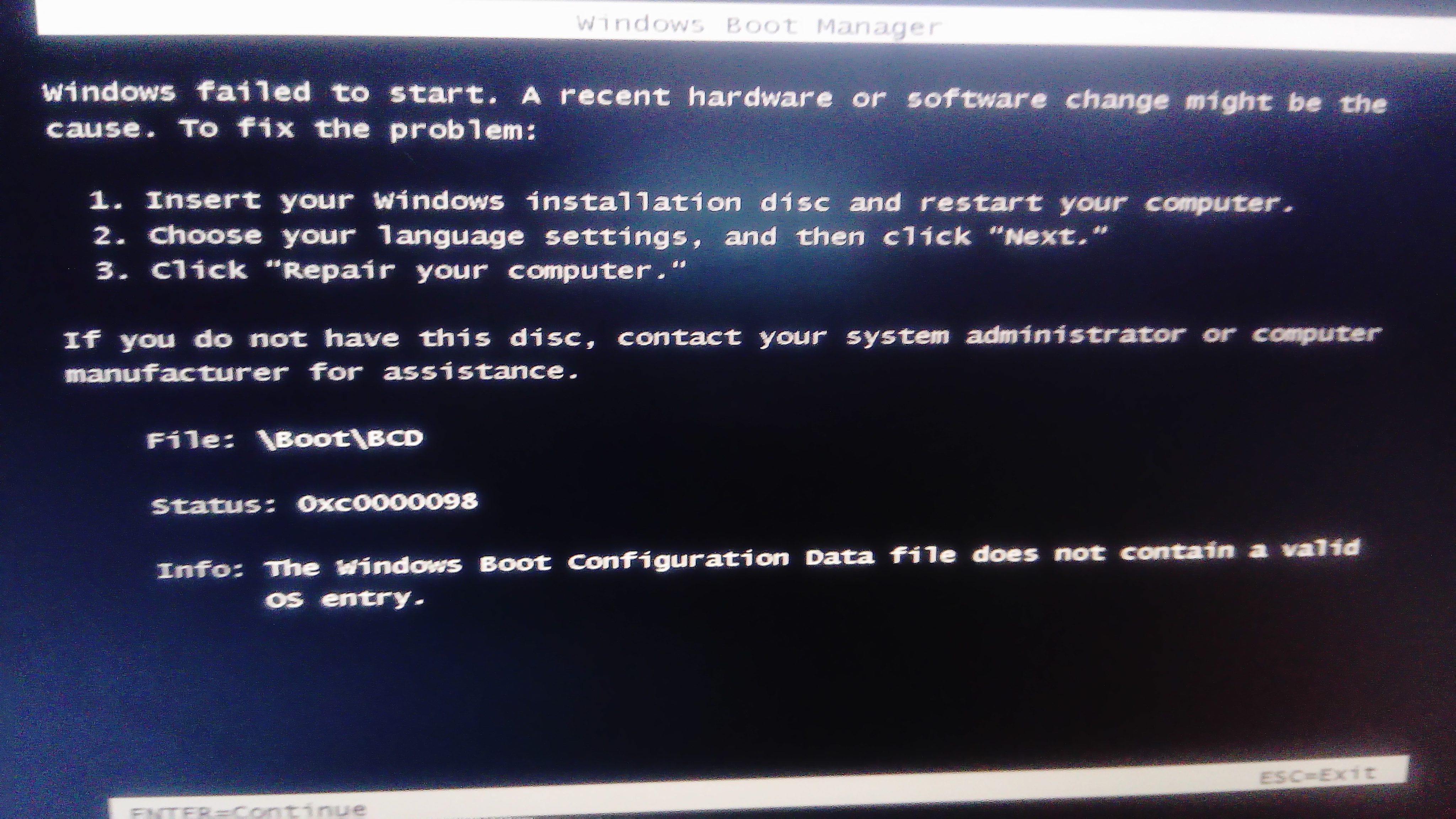
DSC_0302.JPG


Can anyone help me on what to do next or how to solve this issue?

I should also note that as far as I remember, the way I broke it is I wanted to delete some stuff from regedit, but messed up and deleted core files.

Thanks for any help!
 

My Computer My Computer

At a glance

win 7 x64
Computer type
PC/Desktop
OS
win 7 x64
What happens if you first boot into the Windows desktop, and then connect the SSD?

Don't worry its hot pluggable.

Maybe the disk signature is wrong, or no drive letter is assigned to it.
 

My Computer My Computer

At a glance

Windows 10 Pro x64Core2Quad Q9550 @2.83GHz (o/c @3.82GHz)8GB (4x2GB DDR2)ASUS ROG STRIX GTX1050 Ti O4G Gaming
Computer type
PC/Desktop
Computer Manufacturer/Model Number
Custom Build
OS
Windows 10 Pro x64
CPU
Core2Quad Q9550 @2.83GHz (o/c @3.82GHz)
Motherboard
ASUS P5K Premium WiFi
Memory
8GB (4x2GB DDR2)
Graphics Card(s)
ASUS ROG STRIX GTX1050 Ti O4G Gaming
Sound Card
Creative Soundblaster X-Fi Platinum
Monitor(s) Displays
ACER ED273WIDX 27"
Screen Resolution
1920 x 1080
Hard Drives
SAMSUNG SSD 840 Series 120GB
SAMSUNG 500GB SATA 7200 rpm
2xWD Velociraptor 150GB 10000 rpm
PSU
600W
Case
CoolerMaster Centurion
Cooling
Cooler Master V8
Keyboard
VPRO V700
Mouse
Logitech G602
Antivirus
Norton IS
Browser
Firefox x64
Tried to plug in both right now. Nothing happens. Should I plug one of them in before booting up?
 

My Computer My Computer

At a glance

win 7 x64
Computer type
PC/Desktop
OS
win 7 x64
Plug in the SSD you have your working system on.

After it boots into the Windows desktop, connect the old SSD.
 

My Computer My Computer

At a glance

Windows 10 Pro x64Core2Quad Q9550 @2.83GHz (o/c @3.82GHz)8GB (4x2GB DDR2)ASUS ROG STRIX GTX1050 Ti O4G Gaming
Computer type
PC/Desktop
Computer Manufacturer/Model Number
Custom Build
OS
Windows 10 Pro x64
CPU
Core2Quad Q9550 @2.83GHz (o/c @3.82GHz)
Motherboard
ASUS P5K Premium WiFi
Memory
8GB (4x2GB DDR2)
Graphics Card(s)
ASUS ROG STRIX GTX1050 Ti O4G Gaming
Sound Card
Creative Soundblaster X-Fi Platinum
Monitor(s) Displays
ACER ED273WIDX 27"
Screen Resolution
1920 x 1080
Hard Drives
SAMSUNG SSD 840 Series 120GB
SAMSUNG 500GB SATA 7200 rpm
2xWD Velociraptor 150GB 10000 rpm
PSU
600W
Case
CoolerMaster Centurion
Cooling
Cooler Master V8
Keyboard
VPRO V700
Mouse
Logitech G602
Antivirus
Norton IS
Browser
Firefox x64
If with only the suspicious SSD connected to the MB BIOS doesn't recognize it, the SSD is dead. Don't waste your time.
 

My Computers My Computers

  • At a glance

    Windows 7 HP 64i5 6600K - 800MHz to 4200MHz4+4G GSkill DDR4 3000IG - Intel 530
    Computer type
    PC/Desktop
    Computer Manufacturer/Model Number
    custom build
    OS
    Windows 7 HP 64
    CPU
    i5 6600K - 800MHz to 4200MHz
    Motherboard
    GA-Z170-HD3P
    Memory
    4+4G GSkill DDR4 3000
    Graphics Card(s)
    IG - Intel 530
    Monitor(s) Displays
    Samsung 226BW
    Screen Resolution
    1680x1050
    Hard Drives
    (1) -1 SM951 – 128GB M.2 AHCI PCIe SSD drive for Windows 7 and Lubuntu
    (2) -1 WD SATA 3 - 1T for Data
    (3) -1 WD SATA 3 - 1T for backup
    PSU
    Thermaltake 450W TR2 gold
    Keyboard
    Old and good Chicony mechanical keyboard
    Mouse
    Logitech mX performance - 9 buttons (had to disable some)
    Internet Speed
    500Mb/s
    Browser
    Firefox 64
    Other Info
    TinyWall firewall
  • At a glance

    Windows 7 Proi7-4500U 800MHz to 3.0GHz(4+4)G DDR3 1600IG intel 4400 + NVIDIA GeForce GT 745M
    Computer type
    Laptop
    System Manufacturer/Model Number
    Asus Q550LF
    OS
    Windows 7 Pro
    CPU
    i7-4500U 800MHz to 3.0GHz
    Motherboard
    Asus Q550LF
    Memory
    (4+4)G DDR3 1600
    Graphics Card(s)
    IG intel 4400 + NVIDIA GeForce GT 745M
    Sound Card
    Realtek
    Monitor(s) Displays
    LG Display LP156WF4-SPH1
    Screen Resolution
    1920 x 1080
    Hard Drives
    BX500 120G SSD for Windows and programs +
    1T HDD for data
    Internet Speed
    500 Mb/s
    Browser
    Firefox
    Other Info
    TinyWall firewall
When a piece of hardware acts flakey, I always testbed it on one of my machines using the ssmallest number of connected devices possible. In this case, I'd connect only the SSD, and an optical (CD, DVD or BlueRay) drive, and boot using a GPartEd live CD. This eliminates windows issues, win driver issues, all sorts of potential firmware issues with add on cards and/or "above board" GPU cards etc.

There's no telling what the last system configuration changes you made were just before the issue started because that was so long ago. Did you add a $13 2 port RAID card using an inexpensive chipset with tons of known issues? Did you change or add a second graphics card? Do you have a mixture of Intel ICHxx based and Marvel chipset based SATA controllers on the motherboard? (EG: Asus P8Z77-V LE motherboards used a particularly cantankerous combination of Intel and Marvel RAID enabled controllers. Add to that, the board offered in my example has 2 USB 3.0 ports provided by the Intel north/south bridge's native support, and 2 USB 3.0 ports via (a less expensive) ASMedia (Asus) onboard secondary USB 3.0 chipset with it's own set of drivers.)

If you have a VERY basic motherboard with Intel based SATA support, boot the system with nothing but memory, CD or DVD drive, your SSD drive, video keyboard and mouse installed/connected, booting from a GPartEd live CD. If you can not make any changes to the drive this way, you're not likely to see the drive work again under any circumstances.

Always eliminate ALL potential hardware/firmware/OS/and driver right off the bat. That's why having a basic, known good, no frills test-bed is invaluable in diagnosing hardware issues.
 

My Computer My Computer

At a glance

Windows 7 Ultimate x64 Complimentary & Window...2X Intel i5 3570K2X Samsung MV-3V4G3D/US 8GB KitsBuilt in
Computer Manufacturer/Model Number
Johnny Thunder times two.
OS
Windows 7 Ultimate x64 Complimentary & Windows 7 Professional x64 Upgrade
CPU
2X Intel i5 3570K
Motherboard
2X Asus P8Z77-V LE
Memory
2X Samsung MV-3V4G3D/US 8GB Kits
Graphics Card(s)
Built in
Sound Card
2X Onboard Realtek ALC892
Monitor(s) Displays
1X - Hanns-G HU-19CP & 1X - ASUS VS248H-P
Screen Resolution
1280X1024 & 1920X1080 Respectively
Hard Drives
2X Samsung 128GB 840 PROs - 2X Hitachi 2TB HDS722020ALA330s (partitioned Into 5 logical drives of varying in size) 8 other hard disks of varying size.
PSU
2X FSP Group Raider 750s
Case
1X Lian Li PC-A71 (Custom Powder Coated) 1X Lancool PC-K65
Cooling
A71-6X120mm | K65 2X140mm 1X120mm | Both Hyper 212 EVO
Keyboard
2X Microsoft Wired Keyboard 400
Mouse
2X Basic Micropsoft mouse. (Came with Keyboard)
Internet Speed
30-40 Mb/sec down - 1Mb/sec up
Other Info
Lots of optical drives. The Lian Li has 5 5-1/4 bays and the Lancool has 3. I also have 2 7 target VinPower Digital duplicators, so there's 16 more optical drives there. I'm always testing new hardware looking for the best writes on Taiyo Yuden and Falcon Technologies International. I make a whole lot of CDs. ;o)
Back
Top