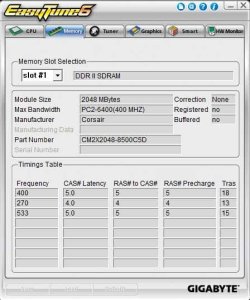
PC2-8500 Memory working at 6400??

marcosdipaolo

New member
Member
Local time
1:12 PM
Messages
45
Location
Buenos Aires
Unless someone convince me otherwise, i keep believeing the memory is working at 6400, not 8500
It's about a Gigabyte UD3(rev.1.0) latest bios version (F9) and a 2x2GB DDR2 sticks Corsair Dominator 1066Mhz PC2 8500.
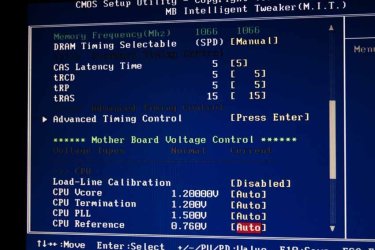
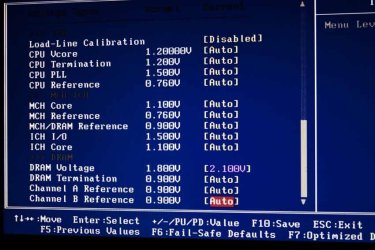
I tried several things including changing the settings from auto to manual configs either in the timing and the voltage.
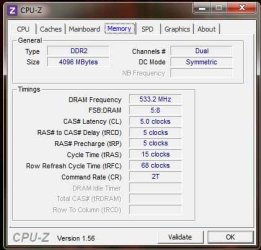
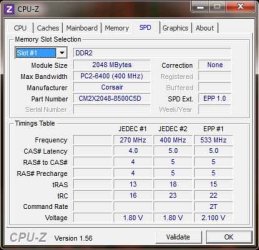
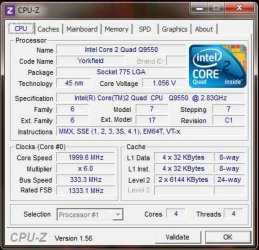
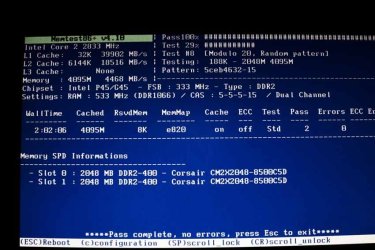
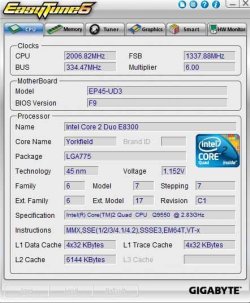
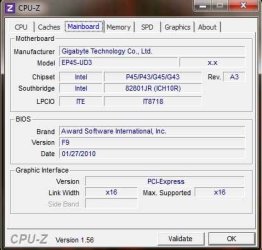
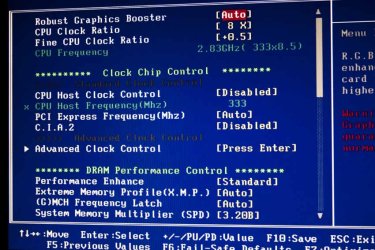
Here I attach several screenshots from Easytune6, CPU-Z and the bios.
Hope somebody gives me a hint??
I want to add that the bios as well as the memtest state that the memory runs at 533 Mhz (533x2=1066Mhz??) but that is supposed to mean PC2 8500, but either Easytune as CPU-Z states PC2 6400.
Voltage is at 2.1 at the moment, and the timing is set manually 5,5,5,15 Command Rate=2, not in auto as you see in the screenshots.
Is the memory working alright? I have some about 2 crashes a-day and i started checking the memory beside a possible mouse problem I have which I'll solve tomorrow when the new mouse arrives.
In the following answer i'll upload some more screenshots.
 

Attachments
  • BIOS1.jpg
    BIOS1.jpg
    100.6 KB · Views: 16
  • BIOS2.jpg
    BIOS2.jpg
    75.9 KB · Views: 15
  • BIOS3.jpg
    BIOS3.jpg
    81.5 KB · Views: 12
  • CPU_Z-Memory.jpg
    CPU_Z-Memory.jpg
    50.1 KB · Views: 15
  • CPU-Z-SPD-slot1.jpg
    CPU-Z-SPD-slot1.jpg
    57.9 KB · Views: 16

My Computer My Computer

Computer type
PC/Desktop
OS
Windows 7 Home Premium x64
CPU
Intel Core 2 Quad Q9550 2.83Ghz
Motherboard
Gigabyte UD3
Memory
6 GB, 2X 2GB Corsair Dominator Twin DDR2 AND 1X 2GB KINGSTON
Graphics Card(s)
Ati Radeon HD 5750 1 GB
Sound Card
onboard, or MOTU 896HD FIREWIRE INTERFACE
Monitor(s) Displays
1x Acer v193HQ 18'5 1366x768 and 1x Netsys 23'6 1920x1080
Hard Drives
2 x Seagate barracuda 1.5 TB, 7200 rpm
PSU
Corsair 650W
Case
Antec Three Hundred Ultimate Gaming Case
Internet Speed
6 Mbit/s
CPU-Z-CPU.jpg

memtest.jpg

et6_cpu.jpg

CPU-Z-Mainboard.jpg

et6_memory.jpg
 

My Computer My Computer

Computer type
PC/Desktop
OS
Windows 7 Home Premium x64
CPU
Intel Core 2 Quad Q9550 2.83Ghz
Motherboard
Gigabyte UD3
Memory
6 GB, 2X 2GB Corsair Dominator Twin DDR2 AND 1X 2GB KINGSTON
Graphics Card(s)
Ati Radeon HD 5750 1 GB
Sound Card
onboard, or MOTU 896HD FIREWIRE INTERFACE
Monitor(s) Displays
1x Acer v193HQ 18'5 1366x768 and 1x Netsys 23'6 1920x1080
Hard Drives
2 x Seagate barracuda 1.5 TB, 7200 rpm
PSU
Corsair 650W
Case
Antec Three Hundred Ultimate Gaming Case
Internet Speed
6 Mbit/s


Hi marco,

Your memory is actually running at it's max speed of 1066. If you look at the first image I copied, since the memory is dual channel, you take that number and multiply it by two and that's the speed the RAM is running at - in this case 1066.4

Also, looking at the second image gives you an idea of what the RAM is capable of at given settings - looking at the 3 sets of numbers, again, we see 533 - which is what your system is using, and when multiplied by 2 = 1066.

Memtest also confirms what I've stated..... Notice under settings.... RAM: 533 (DDR1066) Dual Channel. Again, since the RAM is dual channel, take 533 x 2 = 1066


By the way the PC8500 spec is 1066MHz RAM, so you RAM IS running at the correct speed.

Hope this answers your question.
 

My Computer My Computer

Computer type
PC/Desktop
Computer Manufacturer/Model Number
Custom built by me.
OS
Windows 10 Pro
CPU
Intel Core i7-4770K (3.5Ghz)
Motherboard
Gigabyte G1 Sniper 5 (F10 Bios)
Memory
32 gig Corsair Dominator Platinum (4x8Gig)
Graphics Card(s)
Sapphire Tri-X R9 Fury
Sound Card
Soundblaster ZXR
Monitor(s) Displays
NEC PA242W 24" LCD Monitor
Screen Resolution
1920 x 1200
Hard Drives
Primary - Samsung 850 Pro (512gig), Samsung 840 Pro (256gig), 2TB WD Caviar Black.
PSU
EVGA Supernova 1000 G2
Case
Cooler Master HAF X
Cooling
Corsair H100i with Corsair Air Series SP120 Quiet Fans
Keyboard
Logitech Wireless Wave
Mouse
Logitech Performance MX
Internet Speed
High Speed Cable
Antivirus
Norton Security
Browser
IE11
Other Info
Memory Timings - 1866MHz @ 9-9-9-27-1T @ 1.5 volts


Hi marco,

Your memory is actually running at it's max speed of 1066. If you look at the first image I copied, since the memory is dual channel, you take that number and multiply it by two and that's the speed the RAM is running at - in this case 1066.4

Also, looking at the second image gives you an idea of what the RAM is capable of at given settings - looking at the 3 sets of numbers, again, we see 533 - which is what your system is using, and when multiplied by 2 = 1066.

Memtest also confirms what I've stated..... Notice under settings.... RAM: 533 (DDR1066) Dual Channel. Again, since the RAM is dual channel, take 533 x 2 = 1066


By the way the PC8500 spec is 1066MHz RAM, so you RAM IS running at the correct speed.

Hope this answers your question.

thanks!!
Any reason why then in the second image you read PC2-6400 instead of PC2-8500???
 

My Computer My Computer

Computer type
PC/Desktop
OS
Windows 7 Home Premium x64
CPU
Intel Core 2 Quad Q9550 2.83Ghz
Motherboard
Gigabyte UD3
Memory
6 GB, 2X 2GB Corsair Dominator Twin DDR2 AND 1X 2GB KINGSTON
Graphics Card(s)
Ati Radeon HD 5750 1 GB
Sound Card
onboard, or MOTU 896HD FIREWIRE INTERFACE
Monitor(s) Displays
1x Acer v193HQ 18'5 1366x768 and 1x Netsys 23'6 1920x1080
Hard Drives
2 x Seagate barracuda 1.5 TB, 7200 rpm
PSU
Corsair 650W
Case
Antec Three Hundred Ultimate Gaming Case
Internet Speed
6 Mbit/s


Any reason why then in the second image you read PC2-6400 instead of PC2-8500???

It's kind of hard to explain as i'm not really sure why, but it's just the way CPU-Z reads the module. Since the standard for DDR2's "official" max bandwidth is 800MHz (400 x 2) that's what CPU-Z reads it at, even though it does recognize you have 1066MHz RAM.

Hope this clarifies things.
 

My Computer My Computer

Computer type
PC/Desktop
Computer Manufacturer/Model Number
Custom built by me.
OS
Windows 10 Pro
CPU
Intel Core i7-4770K (3.5Ghz)
Motherboard
Gigabyte G1 Sniper 5 (F10 Bios)
Memory
32 gig Corsair Dominator Platinum (4x8Gig)
Graphics Card(s)
Sapphire Tri-X R9 Fury
Sound Card
Soundblaster ZXR
Monitor(s) Displays
NEC PA242W 24" LCD Monitor
Screen Resolution
1920 x 1200
Hard Drives
Primary - Samsung 850 Pro (512gig), Samsung 840 Pro (256gig), 2TB WD Caviar Black.
PSU
EVGA Supernova 1000 G2
Case
Cooler Master HAF X
Cooling
Corsair H100i with Corsair Air Series SP120 Quiet Fans
Keyboard
Logitech Wireless Wave
Mouse
Logitech Performance MX
Internet Speed
High Speed Cable
Antivirus
Norton Security
Browser
IE11
Other Info
Memory Timings - 1866MHz @ 9-9-9-27-1T @ 1.5 volts
Back
Top