
PCI/Integrated Graphics Problem

Driver support for his mobo stopped with XP.... Aero desktop is just not going to happen on his system, unfortunately.

Doesn't mean we can't look to other manufacturers for a possible solution.

If there are no updated drivers from manufacturer, right click on the error device in device manager. Properties. Details tab. Change dropdown to hardware ids. Copy and paste results to here and off I shall look.

(Don't doubt TorrentG. If there's a will, there's a way! If there's no way, TorrentG tried lol.)
 

My Computer

Computer Manufacturer/Model Number
self built
OS
7600.20510 x86
CPU
P4 550 3.4 GHz HT running at 3.5 GHz
Motherboard
MSI PM8M3-V (MS-7211 v1.x) Micro-ATX mainboard
Memory
OCZ 2 GB(2x1GB) DDR400mHz running @ 414 mHz
Graphics Card(s)
HIS Radeon HD 3850 IceQ 3 Turbo HDMI Dual DL-DVI AGP
Sound Card
MOTU Traveler firewire studio interface 192 kHz 24 bit
Monitor(s) Displays
22" widescreen Acer X223W LCD, 17" Compaq P75 CRT
Screen Resolution
1680x1050 and 1280x1024
Hard Drives
SATA I x2 WD, 400 GB and 120 GB, SATA 2 WD Caviar Black 1 TB
PSU
350W generic
Case
Cybertronpc, it glows blue
Cooling
stock cpu fan, Ice-Q 3 gpu and system, many case fans
Keyboard
Logitch Classical Keyboard 200
Mouse
Logitech Mediaplay cordless
Internet Speed
1792/448 kbits/sec
Other Info
SATA II PCI fake RAID adapter, 1 GB Readyboost, original ATI Remote Wonder (even works with WMC perfectly), Logitech Rumblepad 2 game controller x2
(Don't doubt TorrentG. If there's a will, there's a way! If there's no way, TorrentG tried lol.)
Go getem tg
 

My Computer

Computer Manufacturer/Model Number
Self Built
OS
Windows 7 ultimate 64 bit / XP Home sp3
CPU
intel Core 2 Duo E8400 3.0ghz
Motherboard
Asus P5ND bios 1401
Memory
8 gigs 1066 OCZ Fata1ty
Graphics Card(s)
EVGA GTX 580 Call of Duty Black Ops Edition
Sound Card
Creative Soundblaster Audigy 2zs
Monitor(s) Displays
Asus 24in LCD's 2MS X2
Screen Resolution
1920x1080p @60Hz
Hard Drives
WD Caviar 500 Black/ WD Caviar 200 Blue
PSU
OCZ 700W GameXtreme
Case
NZXT Apollo
Cooling
Corsair H50 CPU/120mm x3 /60mm x2 /Corsair Dominator Ram
Keyboard
Logitech Bluetooth Wireless MX5000
Mouse
Logitech Bluetooth Wireless MX1000
Internet Speed
Download 19.83 Upload 0.97
Other Info
Logitech Z2300 Speakers/ Bose Noise Cancelling Headphones/Avermedia PCI-e Hybrid TV Bravo/Epson NX415 all in one/ 4 Port Powered USB Hub/ LG 10x Bluray Burner /TSST Corp DVDRW External
This is the model of his mobo ASUS P4R8L

Had me in circles.... I still have over 30 tabs open in another window dedicated to his mobo/chipset... my eyes hurt.
 

My Computer

Computer Manufacturer/Model Number
Home Built
OS
Windows 7 Ultimate x64 RTM
CPU
AMD Athlon II X2 240 @ 3.2Ghz
Motherboard
Gigabyte GA-MA785GMT-UD2H
Memory
6GB Mushkin DDR3 PC-1333
Graphics Card(s)
ATI Radeon HD 4200 IGP Hybrid CrossFireX w\ Sapphire HD3450
Sound Card
Onboard Realtek HD audio controller
Monitor(s) Displays
D-SUB: LG W2343T-PF 23" LCD HDMI: LG 32LH20 32" LCD
Screen Resolution
1920*1080
Hard Drives
WD Caviar Green 1TB SATA3
PSU
Cooler Master Elite Power 400W
Case
Cooler Master Elite 360
Cooling
AMD Stock :)
Keyboard
Crappy wirelss logitech
Mouse
crappy wireless logitech
Internet Speed
792k
There's nothing from Asus for any OS later than XP, and Windows Update says that I already have the latest driver for the problem PCI Bridge.

Here are the details from Device Manager for it, as requested:

PCI\VEN_10B5&DEV_8112&SUBSYS_00000000&REV_AA
PCI\VEN_10B5&DEV_8112&SUBSYS_00000000
PCI\VEN_10B5&DEV_8112&REV_AA
PCI\VEN_10B5&DEV_8112
PCI\VEN_10B5&DEV_8112&CC_060400
PCI\VEN_10B5&DEV_8112&CC_0604

A bit of research by myself shows this to be a PEX8112 PCI to PCI Express Bridge device from PLX Technologies. This is presumably a device on the HD2400, bridging the external PCI bus interface to the controller's native PCIe interface. The current driver in use is just C:\Windows\System32\Drivers\pci.sys.

Maybe we're getting somewhere here...
 

My Computer

Computer Manufacturer/Model Number
Asus Pundit-R
OS
Windows 7
CPU
Petium 4 'Northwood' 2.8 GHz
Motherboard
Asus
Memory
2 GB DDR-400
Graphics Card(s)
IGP9100 built in, Powercolor HD2400 Pro on PCI bus
Sound Card
Intergrated
Monitor(s) Displays
Samsung SM2032MW
I think it's part of the motherboard resources.

I can't locate a driver for it, but you would have the best chance by writing to them. Ask for a Vista driver if they have one or for a possible solution.

PLX Technology : PCIe Bridges : PEX 8112

All you need is a driver for this part: VEN_10B5&DEV_8112
I can mod the driver installer if need be to match yours.
You could even try the XP version from manufacturer's site using the device manager install method I outline throughout so many of my posts.

Also if manufacturer doesn't have bios update for you, search around the net for a modded one or perhaps non-modded but still newer than yours.
 

My Computer

Computer Manufacturer/Model Number
self built
OS
7600.20510 x86
CPU
P4 550 3.4 GHz HT running at 3.5 GHz
Motherboard
MSI PM8M3-V (MS-7211 v1.x) Micro-ATX mainboard
Memory
OCZ 2 GB(2x1GB) DDR400mHz running @ 414 mHz
Graphics Card(s)
HIS Radeon HD 3850 IceQ 3 Turbo HDMI Dual DL-DVI AGP
Sound Card
MOTU Traveler firewire studio interface 192 kHz 24 bit
Monitor(s) Displays
22" widescreen Acer X223W LCD, 17" Compaq P75 CRT
Screen Resolution
1680x1050 and 1280x1024
Hard Drives
SATA I x2 WD, 400 GB and 120 GB, SATA 2 WD Caviar Black 1 TB
PSU
350W generic
Case
Cybertronpc, it glows blue
Cooling
stock cpu fan, Ice-Q 3 gpu and system, many case fans
Keyboard
Logitch Classical Keyboard 200
Mouse
Logitech Mediaplay cordless
Internet Speed
1792/448 kbits/sec
Other Info
SATA II PCI fake RAID adapter, 1 GB Readyboost, original ATI Remote Wonder (even works with WMC perfectly), Logitech Rumblepad 2 game controller x2
OK, I've found a complete SDK that you can download from the PLX web site: PLX Technology : SDK Software Development Kit Download Page. It claims to support Vista and appears to contain a pre-compiled 32-bit plx8000.sys device driver that looks as if it might be worth trying out. However, the only .inf files provided seem only to be templates, and I can't use them to install it.

I'd appreciate it if someone who knows a bit more than I do could have a look at it and see if it really represents a possible way forwards.

Thanks,
Ian.
 

My Computer

Computer Manufacturer/Model Number
Asus Pundit-R
OS
Windows 7
CPU
Petium 4 'Northwood' 2.8 GHz
Motherboard
Asus
Memory
2 GB DDR-400
Graphics Card(s)
IGP9100 built in, Powercolor HD2400 Pro on PCI bus
Sound Card
Intergrated
Monitor(s) Displays
Samsung SM2032MW
Rar all the .infs and attach to a post. I'll look and see if there's anything that can be done with them.
 

My Computer

Computer Manufacturer/Model Number
self built
OS
7600.20510 x86
CPU
P4 550 3.4 GHz HT running at 3.5 GHz
Motherboard
MSI PM8M3-V (MS-7211 v1.x) Micro-ATX mainboard
Memory
OCZ 2 GB(2x1GB) DDR400mHz running @ 414 mHz
Graphics Card(s)
HIS Radeon HD 3850 IceQ 3 Turbo HDMI Dual DL-DVI AGP
Sound Card
MOTU Traveler firewire studio interface 192 kHz 24 bit
Monitor(s) Displays
22" widescreen Acer X223W LCD, 17" Compaq P75 CRT
Screen Resolution
1680x1050 and 1280x1024
Hard Drives
SATA I x2 WD, 400 GB and 120 GB, SATA 2 WD Caviar Black 1 TB
PSU
350W generic
Case
Cybertronpc, it glows blue
Cooling
stock cpu fan, Ice-Q 3 gpu and system, many case fans
Keyboard
Logitch Classical Keyboard 200
Mouse
Logitech Mediaplay cordless
Internet Speed
1792/448 kbits/sec
Other Info
SATA II PCI fake RAID adapter, 1 GB Readyboost, original ATI Remote Wonder (even works with WMC perfectly), Logitech Rumblepad 2 game controller x2
Here you are. Fingers crossed...
 

Attachments

My Computer

Computer Manufacturer/Model Number
Asus Pundit-R
OS
Windows 7
CPU
Petium 4 'Northwood' 2.8 GHz
Motherboard
Asus
Memory
2 GB DDR-400
Graphics Card(s)
IGP9100 built in, Powercolor HD2400 Pro on PCI bus
Sound Card
Intergrated
Monitor(s) Displays
Samsung SM2032MW
Unfortunately, I really don't think it's going to work judging by the change I had to make. It was a little similar, so possible though. You can try like this:

Download attachment, extract, and copy the .inf over the original. Then install using device manager by right clicking device. Update driver software. Browse. Let me pick. Have disk. Browse. Double click on PlxSdk.inf and then hit ok.
 

Attachments

My Computer

Computer Manufacturer/Model Number
self built
OS
7600.20510 x86
CPU
P4 550 3.4 GHz HT running at 3.5 GHz
Motherboard
MSI PM8M3-V (MS-7211 v1.x) Micro-ATX mainboard
Memory
OCZ 2 GB(2x1GB) DDR400mHz running @ 414 mHz
Graphics Card(s)
HIS Radeon HD 3850 IceQ 3 Turbo HDMI Dual DL-DVI AGP
Sound Card
MOTU Traveler firewire studio interface 192 kHz 24 bit
Monitor(s) Displays
22" widescreen Acer X223W LCD, 17" Compaq P75 CRT
Screen Resolution
1680x1050 and 1280x1024
Hard Drives
SATA I x2 WD, 400 GB and 120 GB, SATA 2 WD Caviar Black 1 TB
PSU
350W generic
Case
Cybertronpc, it glows blue
Cooling
stock cpu fan, Ice-Q 3 gpu and system, many case fans
Keyboard
Logitch Classical Keyboard 200
Mouse
Logitech Mediaplay cordless
Internet Speed
1792/448 kbits/sec
Other Info
SATA II PCI fake RAID adapter, 1 GB Readyboost, original ATI Remote Wonder (even works with WMC perfectly), Logitech Rumblepad 2 game controller x2
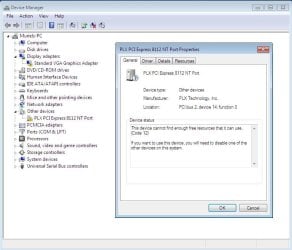
Well it did install - so thanks for that - but that's where the good news ends. I'm actually no further forwards - the device shows up in a different place but is still stuck with the Code 12 error.
 

Attachments

  • Capture.JPG
    Capture.JPG
    84.8 KB · Views: 248

My Computer

Computer Manufacturer/Model Number
Asus Pundit-R
OS
Windows 7
CPU
Petium 4 'Northwood' 2.8 GHz
Motherboard
Asus
Memory
2 GB DDR-400
Graphics Card(s)
IGP9100 built in, Powercolor HD2400 Pro on PCI bus
Sound Card
Intergrated
Monitor(s) Displays
Samsung SM2032MW
Disable all unused ports in the bios like parallel, serial, floppy etc...and we can see if resources are made available like that.
 

My Computer

Computer Manufacturer/Model Number
self built
OS
7600.20510 x86
CPU
P4 550 3.4 GHz HT running at 3.5 GHz
Motherboard
MSI PM8M3-V (MS-7211 v1.x) Micro-ATX mainboard
Memory
OCZ 2 GB(2x1GB) DDR400mHz running @ 414 mHz
Graphics Card(s)
HIS Radeon HD 3850 IceQ 3 Turbo HDMI Dual DL-DVI AGP
Sound Card
MOTU Traveler firewire studio interface 192 kHz 24 bit
Monitor(s) Displays
22" widescreen Acer X223W LCD, 17" Compaq P75 CRT
Screen Resolution
1680x1050 and 1280x1024
Hard Drives
SATA I x2 WD, 400 GB and 120 GB, SATA 2 WD Caviar Black 1 TB
PSU
350W generic
Case
Cybertronpc, it glows blue
Cooling
stock cpu fan, Ice-Q 3 gpu and system, many case fans
Keyboard
Logitch Classical Keyboard 200
Mouse
Logitech Mediaplay cordless
Internet Speed
1792/448 kbits/sec
Other Info
SATA II PCI fake RAID adapter, 1 GB Readyboost, original ATI Remote Wonder (even works with WMC perfectly), Logitech Rumblepad 2 game controller x2
I've tried all that, but nothing I can change in the BIOS makes any difference!

The one thing that does make a difference is setting the on-board graphics to be the primary adapter - then everything comes up cleanly, but of course there's no output from the PCI card. Setting the PCI card as the primary results in the reported errors, even with every non-essential device disabled in the BIOS.
 

My Computer

Computer Manufacturer/Model Number
Asus Pundit-R
OS
Windows 7
CPU
Petium 4 'Northwood' 2.8 GHz
Motherboard
Asus
Memory
2 GB DDR-400
Graphics Card(s)
IGP9100 built in, Powercolor HD2400 Pro on PCI bus
Sound Card
Intergrated
Monitor(s) Displays
Samsung SM2032MW
Going through the same problem outlined here, it's ridiculous! Why can't it just work with 7?!

My card is an Fx 5500, again real cheap, no point if I have a 360. getting the same code 12 error.

Exactly the same Mobo, have you had any luck since your last post?????
 

My Computer

OS
Windows 7
No, I just gave up in the end and made do with the integrated graphics and no Aero. Luckily I was able to RMA the PCI card for a full refund (thanks eBuyer!).
 

My Computer

Computer Manufacturer/Model Number
Asus Pundit-R
OS
Windows 7
CPU
Petium 4 'Northwood' 2.8 GHz
Motherboard
Asus
Memory
2 GB DDR-400
Graphics Card(s)
IGP9100 built in, Powercolor HD2400 Pro on PCI bus
Sound Card
Intergrated
Monitor(s) Displays
Samsung SM2032MW
pex8112

Any chance you still have that SDK kit? or the plx800.sys files? I would like to try that driver and tinker with the code 12.

I have a similar setup on an older pc. It ran fine in XP, but vista and 7 both have a code 10 with the default windows driver, if the PLX driver gets far enough to have code 12 I think I can tweak the resources to get it to run. I think I had to do this for XP and tell it a resource to use, but with a code 10 vista and 7 will not let me alter any settings.

I tried to register on the PLX technologies website to get the sdk and it says I need a work email address. I even traded a few emails hoping to get it another way.
 

My Computer

Computer Manufacturer/Model Number
home built
OS
windows 7 professional 32bit
CPU
e4300
Motherboard
asrock 775dual-vsta
Memory
(2) 1gb ddr2 667
Graphics Card(s)
8400gs pci
Sound Card
onboard
Monitor(s) Displays
17 inch crt
Hard Drives
80 gb WD sata1
PSU
enermax
Case
antec
Cooling
boxed cooler
Hi All,

I know that this is probably not the right thread for this and I do not want to hijack it, but I am having a problem with this motherboard P4R8L on the Asus Pundit-R, it is the same with both vista and win7 (I have tried to install both and the same problem comes up!).

The network drive does not show on the device manager and I am unable to install it. Tried to install the 3c920b driver via add legacy hardware but did not work, does anyone know the cure to this problem?

It also does not show the SD/MMC..etc Card reader either, but that is a secondary problem.

Anyone had this? any solution or possible steps for a solution

Thanks
 

My Computer

OS
Windows 7 Ultimate 32bit
Back
Top