Solved PCI simple communications controller problem

same problem I have asus k53sc and I installed all the drivers in asus website but the system or may be the motherboard still lacking with one driver. But I didn’t find any drivers yet?

Hi JS2011, 90% of the time the "simple PCI controller problem is caused by incomplete or faulty drivers for the network card ,often there is no Win7 drivers available so the driver needs to be installed in compatibility mode for either XP or Vista :)
 

My Computer

Computer type
PC/Desktop
Computer Manufacturer/Model Number
self build
OS
win 7 ultimate32bit, Win8.1pro wmc 32bit
CPU
amd phenom x4 9600
Motherboard
asus m2n32-sli deluxe
Memory
corsair twinxs 2x2gb
Graphics Card(s)
2x nvidia 1gb 8500gt
Sound Card
onboard
Monitor(s) Displays
23" PB Viseo 233d
Screen Resolution
1920x1080
Hard Drives
maxtor sata 500gb
maxtor sata 320gb
fujitsu sata200gb
PSU
oryxx tornado 750w
Case
thermaltake xaser lll
Cooling
artic freezer64 pro + 7 case fans
could you run me through how to replace the chipset drivers please
 

My Computer

Computer Manufacturer/Model Number
Dell studio xps 8100
OS
windows 7 professional 64 bit
CPU
Intel core i7 2.80 GHz
Memory
8.00 GB
Graphics Card(s)
Nvidia gtx260
could you run me through how to replace the chipset drivers please

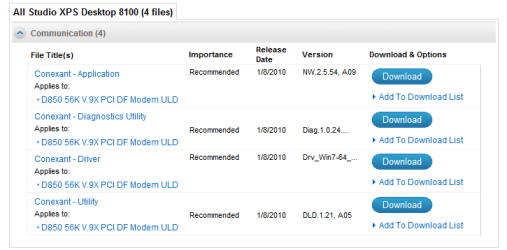
Andy download the driver here Drivers and Downloads Double click on the .exe file and it will automatically install the drivers for you .
You may have to restart your PC afterwards then reinstall the network drivers in the same way ;)
 

My Computer

Computer type
PC/Desktop
Computer Manufacturer/Model Number
self build
OS
win 7 ultimate32bit, Win8.1pro wmc 32bit
CPU
amd phenom x4 9600
Motherboard
asus m2n32-sli deluxe
Memory
corsair twinxs 2x2gb
Graphics Card(s)
2x nvidia 1gb 8500gt
Sound Card
onboard
Monitor(s) Displays
23" PB Viseo 233d
Screen Resolution
1920x1080
Hard Drives
maxtor sata 500gb
maxtor sata 320gb
fujitsu sata200gb
PSU
oryxx tornado 750w
Case
thermaltake xaser lll
Cooling
artic freezer64 pro + 7 case fans
The drivers seem to have been installed but i still cannot connect with my wireless connection and the PCI driver still has a yellow warning triangle in device manager
 

My Computer

Computer Manufacturer/Model Number
Dell studio xps 8100
OS
windows 7 professional 64 bit
CPU
Intel core i7 2.80 GHz
Memory
8.00 GB
Graphics Card(s)
Nvidia gtx260
The drivers seem to have been installed but i still cannot connect with my wireless connection and the PCI driver still has a yellow warning triangle in device manager

Right click on the yellow warning triangle and in the dropdown menu that appears select "update driver" this will search and hopefully find the updated driver for you ;)
 

My Computer

Computer type
PC/Desktop
Computer Manufacturer/Model Number
self build
OS
win 7 ultimate32bit, Win8.1pro wmc 32bit
CPU
amd phenom x4 9600
Motherboard
asus m2n32-sli deluxe
Memory
corsair twinxs 2x2gb
Graphics Card(s)
2x nvidia 1gb 8500gt
Sound Card
onboard
Monitor(s) Displays
23" PB Viseo 233d
Screen Resolution
1920x1080
Hard Drives
maxtor sata 500gb
maxtor sata 320gb
fujitsu sata200gb
PSU
oryxx tornado 750w
Case
thermaltake xaser lll
Cooling
artic freezer64 pro + 7 case fans
the response is no software could be found
 

My Computer

Computer Manufacturer/Model Number
Dell studio xps 8100
OS
windows 7 professional 64 bit
CPU
Intel core i7 2.80 GHz
Memory
8.00 GB
Graphics Card(s)
Nvidia gtx260
the response is no software could be found

I'm at a loss now Andy , I will put in a request for more help from one of our resident network specialists , please be patient someone will help you :)
 

My Computer

Computer type
PC/Desktop
Computer Manufacturer/Model Number
self build
OS
win 7 ultimate32bit, Win8.1pro wmc 32bit
CPU
amd phenom x4 9600
Motherboard
asus m2n32-sli deluxe
Memory
corsair twinxs 2x2gb
Graphics Card(s)
2x nvidia 1gb 8500gt
Sound Card
onboard
Monitor(s) Displays
23" PB Viseo 233d
Screen Resolution
1920x1080
Hard Drives
maxtor sata 500gb
maxtor sata 320gb
fujitsu sata200gb
PSU
oryxx tornado 750w
Case
thermaltake xaser lll
Cooling
artic freezer64 pro + 7 case fans
thank you very much for your help
 

My Computer

Computer Manufacturer/Model Number
Dell studio xps 8100
OS
windows 7 professional 64 bit
CPU
Intel core i7 2.80 GHz
Memory
8.00 GB
Graphics Card(s)
Nvidia gtx260
thank you very much for your help

You're very welcome Andy , I am very sorry I could not help you further , I have asked for more help so hopefully we will get you sorted soon :)
 

My Computer

Computer type
PC/Desktop
Computer Manufacturer/Model Number
self build
OS
win 7 ultimate32bit, Win8.1pro wmc 32bit
CPU
amd phenom x4 9600
Motherboard
asus m2n32-sli deluxe
Memory
corsair twinxs 2x2gb
Graphics Card(s)
2x nvidia 1gb 8500gt
Sound Card
onboard
Monitor(s) Displays
23" PB Viseo 233d
Screen Resolution
1920x1080
Hard Drives
maxtor sata 500gb
maxtor sata 320gb
fujitsu sata200gb
PSU
oryxx tornado 750w
Case
thermaltake xaser lll
Cooling
artic freezer64 pro + 7 case fans
For us to help efficiently could you please complete your system specs as specified in the 4th post here?
http://www.sevenforums.com/general-discussion/8-forum-rules.html

Also, if possible, could you goto Start, type msinfo32, choose it and save/export the result to a txt file that you upload in a next post? That would help a lot...
 

My Computer

Computer Manufacturer/Model Number
custom build
OS
Windows 7 64b Ultimate
CPU
I7-2600 3.40GHz - testing various OC levels..
Motherboard
ASUS Sabretooth
Memory
2x 4Gb DDR3/1333
Graphics Card(s)
GTX570 - testing OC levels
Sound Card
motherboard 7.1 DIG.
Monitor(s) Displays
2x Ilyama 24" E2409HDS-B1 2ms/DVI
Screen Resolution
1920 x 1080
Hard Drives
120 GB Intel Elmcrest SSD
1 TB SATAII 7200RPM/32MB
External 2TB USB3
PSU
Corsair Pro HX850W
Cooling
Coolermaster Hyper V8
Keyboard
Logitech G110
Mouse
Logitech G700
Internet Speed
25Mb
Other Info
CPU: 7,7 RAM: 7,7 GTX: 7,9 GTX 3D : 7,9 SSD 7,6
Overall 7,6 ...... now to speed up the SSD... ;)

Also use a Dell XPS M1710 on Vista 32b
Asus LT on Vista 32
3 older machines still doing fine on Linux/ubuntu but not used much anymore...
Andy, can you plug your PC into a wired connection so Windows Updates can scan it and provide the correct drivers needed via optional Windows Updates? Allow it several restarts to do this.

If the chipset didn't install then you need to click on the Device Manager driver tab for PCI card without driver and browse into the file where the chipset was unzipped, until it picks up the driver.

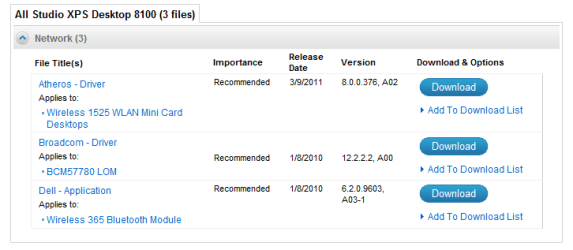
Once you put the Dell Service tag number into the Support Downloads webpage, does it show any PCI card drivers offered, since this may be an add-on card for the tag build? If not then it should be in the chipset.

If these methods fail, you 'll need to trace the exact hardware make/model of the PCI card and Wireless adapter using this tool, then google it to find the driver on the maker's SUpport Downloads webpage. Hardware Identification

If you want to post up the Dell Service tag number we can work on it from this end to see if the drivers are there for you.
 
Last edited:
Andy,

The cavalry is awaiting your System Specs.
 

My Computer

Computer Manufacturer/Model Number
Toshiba Satellite S875D-S7239 laptop
OS
MS Windows 7 Ultimate SP1 64-bit
CPU
AMD A10-4600M
Motherboard
AMD Pumori (Socket FT1)
Memory
6.00 GB Dual-Channel DDR3 @ 798MHz (11-11-12-28)
Graphics Card(s)
AMD Radeon HD 7660G
Sound Card
High Definition Audio Device
Monitor(s) Displays
Generic PnP Monitor (1600x900@60Hz)
Screen Resolution
1600x900@60Hz
Hard Drives
SSD 119GB Corsair CSSD-V128GB2 ATA Device
Keyboard
Standard PS/2 Keyboard
Mouse
HP Wireless Optical Mobile Mouse Model FHA-3410
Internet Speed
What the local pub, local coffee shop offers.
Other Info
Optical Drive:MATSHITA BD-CMB UJ160B ATA Device


Also have an Asus ha1002xp netbook with Win 7 Ultimate installed.
I have posted the system specs I could find out
 

My Computer

Computer Manufacturer/Model Number
Dell studio xps 8100
OS
windows 7 professional 64 bit
CPU
Intel core i7 2.80 GHz
Memory
8.00 GB
Graphics Card(s)
Nvidia gtx260
My service tag is 2SRBN4J
 

My Computer

Computer Manufacturer/Model Number
Dell studio xps 8100
OS
windows 7 professional 64 bit
CPU
Intel core i7 2.80 GHz
Memory
8.00 GB
Graphics Card(s)
Nvidia gtx260
Follow each step given thusfar and post back the results.

You have to do the work to get the fix here. The steps given are fully interactive so we expect detailed feedback to know what to advise next.
 
I can't connect with an Ethernet cable as the router is too far away, when I try to browse the files of the PCI it says no driver files are required or have been loaded for this device
 

My Computer

Computer Manufacturer/Model Number
Dell studio xps 8100
OS
windows 7 professional 64 bit
CPU
Intel core i7 2.80 GHz
Memory
8.00 GB
Graphics Card(s)
Nvidia gtx260
Which devices in Device manager are in error, with a yellow ! mark?

What's the name given for the network adapter with the missing driver, or trace the hardware ID using the tool I provided to see if it is Broadcomm or Atheros, then install the driver given by Dell. You may need to rightclick the .exe file to Run as Admin.
 
Download the necessary drivers from Dell, copy to a USB key or burn to a CD/DVD, then install. That or move the computer closer to the router or get a longer ethernet cable.
 

My Computer

Computer type
PC/Desktop
Computer Manufacturer/Model Number
Me
OS
Win 7 Ultimate x64
CPU
FX-8350 @ 4.6 GHz so far
Motherboard
Asus M5A97 EVO
Memory
ADATA XPG V1 Series Black 8GB DDR3 1600
Graphics Card(s)
Sapphire R9 270x Dual-X
Sound Card
Xonar DGX w/ Corsair Vengence 1300
Monitor(s) Displays
Acer S232HL Abid
Screen Resolution
1920x1080
Hard Drives
120 GB OCZ Vertex 3
500 GB Seagate 7200.12
PSU
Antec Earthwatts 650W Green
Case
Antec Three Hundred
Cooling
Cooler Master 212 EVO
Keyboard
Logitech G510
Mouse
Logitech G500s
Internet Speed
35000/3000
The only device with a yellow triangle is the PCI simple communications controller, the network adapter is shown to be fine but I still cannot connect wirelessly
 

My Computer

Computer Manufacturer/Model Number
Dell studio xps 8100
OS
windows 7 professional 64 bit
CPU
Intel core i7 2.80 GHz
Memory
8.00 GB
Graphics Card(s)
Nvidia gtx260
Back
Top