PDF disappears after download

scandalxk

New member
Local time
9:31 AM
Messages
22
Hi All.

Downloaded PDF files simply disappear after they are downloaded. Here's how:

I visited a website and identified a .PDF file I needed to download. I displayed it in my browser in PDF Complete. I clicked the disk icon to download the file, and selected a local folder in my Library - Documents location. The file was apparently downloaded.

I identified another .PDF file to download and repeated the process. When I downloaded the second file, I could see that the first file was already in my local folder.

I repeated the process for several more files.

When I went to the folder in Windows Explorer, the files were not there. I have searched my system and they do not appear to be present. If I go back to the website and try to download another file, I can see the list of .PDF files I previously downloaded, clearly visible in the correct local folder. If I right-click on one of the previous files in the download window, and select Properties, it tells me about the file including its size (up to 750KB) indicating that these are the actual files and not simply shortcuts to the website.

Where are my files? Why can I not see them in Explorer or open them on my local system?

All help gratefully received. Thanks.

scandalxk
 

My Computer My Computer

OS
Windows 7
Hi Scandalxk.Welcome to SevenForums:)

That's a rather strange situation.I have just tried it and it worked perfectly for me.

When you are at this stage:

I identified another .PDF file to download and repeated the process. When I downloaded the second file, I could see that the first file was already in my local folder.
, try cutting/copying the .pdf and pasting it elsewhere and see if you can access it then.

Hope this helps.


.
 

My Computer My Computer

Computer Manufacturer/Model Number
Samsung R60 Plus
OS
Operating System Microsoft Windows 7 Ultimate Build 7600
CPU
Mobile DualCore Intel Core 2 Duo T5550, 1833 MHz (1
Motherboard
ATI Radeon Xpress 1100/1250
Memory
2GB (DDR2-667 DDR2 SDRAM)
Graphics Card(s)
ATI Radeon Xpress 1200 Series (256 MB)
Sound Card
Realtek ALC262 @ ATI SB600 - High Definition
Monitor(s) Displays
Samsung LTN154X3-L01 [15.4" LCD]
Screen Resolution
1280x800
PSU
na
Case
na
Cooling
na
Keyboard
na
Thanks V3xar, but no can do. I tried cutting and pasting and received a message saying "Could not find the item. This item is no longer located in <desktop>. Verify the item's location and try again".

(By the way, when I saved this particular .PDF to the desktop the "save" window also showed some other icons - homegroup, libraries, network, computer, and my current user name. But if I minimise all programs and look at my desktop it is actually completely blank except for the recycle bin. I like to keep it tidy! So where are the other items and, of course, my .PDFs?)

Thanks,

scandalxk
 

My Computer My Computer

OS
Windows 7
Instead of saving the .pdf to your desktop, try and save it to your documents file.

pdf.JPG

Make sure that that it is being saved as a *.pdf file then click on libraries and then documents.

This should save the file to your "My Documents" folder.:)


.
 

My Computer My Computer

Computer Manufacturer/Model Number
Samsung R60 Plus
OS
Operating System Microsoft Windows 7 Ultimate Build 7600
CPU
Mobile DualCore Intel Core 2 Duo T5550, 1833 MHz (1
Motherboard
ATI Radeon Xpress 1100/1250
Memory
2GB (DDR2-667 DDR2 SDRAM)
Graphics Card(s)
ATI Radeon Xpress 1200 Series (256 MB)
Sound Card
Realtek ALC262 @ ATI SB600 - High Definition
Monitor(s) Displays
Samsung LTN154X3-L01 [15.4" LCD]
Screen Resolution
1280x800
PSU
na
Case
na
Cooling
na
Keyboard
na
Thanks again. No joy again! It doesn't seem to matter whether I try to save into the documents folder, or a subfolder of it, or the desktop. And I am certainly specifying .PDF.

Could it be a permissions problem? But then shouldn't Windows ask for verification? And if it is not actually downloading anything, how come they appear in the "Save as..." box - but not in Explorer? Anyway, I'm the only user on this computer and I am the administrator...
 

My Computer My Computer

OS
Windows 7
In addition to the above posts, I have an information. If in case you are using any download accelerators, sometimes they may download only a part of the file to your computer which will be in few KB's of size. If so, try disabling your accelerator and download the files :)
 

My Computer My Computer

Computer Manufacturer/Model Number
Dell Inspiron N5010
OS
Windows 7 Ultimate x64 SP1
CPU
Intel Core i3
Memory
4 GB DDR3
Screen Resolution
1366 X 768
Hard Drives
Seagate 500 GB
Internet Speed
4 MBPS
Thanks very much, Venths. I've checked under Tools - Internet Options - Programs - Manage add-ons and it appears that all accelerators are already disabled.

Next?
 

My Computer My Computer

OS
Windows 7
Do you have any problems downloading any other type of files? (ie. a picture..jpg/jpeg)

Can you save those to your folders?


.
 

My Computer My Computer

Computer Manufacturer/Model Number
Samsung R60 Plus
OS
Operating System Microsoft Windows 7 Ultimate Build 7600
CPU
Mobile DualCore Intel Core 2 Duo T5550, 1833 MHz (1
Motherboard
ATI Radeon Xpress 1100/1250
Memory
2GB (DDR2-667 DDR2 SDRAM)
Graphics Card(s)
ATI Radeon Xpress 1200 Series (256 MB)
Sound Card
Realtek ALC262 @ ATI SB600 - High Definition
Monitor(s) Displays
Samsung LTN154X3-L01 [15.4" LCD]
Screen Resolution
1280x800
PSU
na
Case
na
Cooling
na
Keyboard
na
Can you post the screen shot of the file with extension ?

If possible, post the screen shot of the download dialog box confirmation screen {i.e., which will have the save and cancel option when you click to download the file)
 

My Computer My Computer

Computer Manufacturer/Model Number
Dell Inspiron N5010
OS
Windows 7 Ultimate x64 SP1
CPU
Intel Core i3
Memory
4 GB DDR3
Screen Resolution
1366 X 768
Hard Drives
Seagate 500 GB
Internet Speed
4 MBPS
Do you have any problems downloading any other type of files? (ie. a picture..jpg/jpeg)

Can you save those to your folders?


.

V3xar, I can download JPEGs. I just did so, and the file appeared in my local folder in the normal way.

Furthermore, I can easily download the .PDFs which are causing the problems onto my older work PC which is running Windows XP and using Adobe PDF Reader. Could my problems with the current machine be to do with PDF Complete?
 

My Computer My Computer

OS
Windows 7
What browser are you using?
 

My Computer My Computer

Computer Manufacturer/Model Number
Samsung R60 Plus
OS
Operating System Microsoft Windows 7 Ultimate Build 7600
CPU
Mobile DualCore Intel Core 2 Duo T5550, 1833 MHz (1
Motherboard
ATI Radeon Xpress 1100/1250
Memory
2GB (DDR2-667 DDR2 SDRAM)
Graphics Card(s)
ATI Radeon Xpress 1200 Series (256 MB)
Sound Card
Realtek ALC262 @ ATI SB600 - High Definition
Monitor(s) Displays
Samsung LTN154X3-L01 [15.4" LCD]
Screen Resolution
1280x800
PSU
na
Case
na
Cooling
na
Keyboard
na
Can you post the screen shot of the file with extension ?

If possible, post the screen shot of the download dialog box confirmation screen {i.e., which will have the save and cancel option when you click to download the file)

Er, sorry, Venths, how do I post a picture?:confused:
 

My Computer My Computer

OS
Windows 7

My Computer My Computer

OS
ME/XP/Vista/Win7
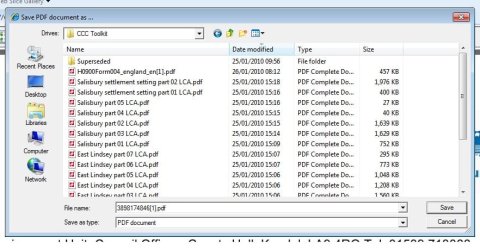
Here's the screenshot:

Screenshot.jpg

Note all the PDFs in the list!

Thanks,

scandalxk
 

My Computer My Computer

OS
Windows 7
PROBLEM SOLVED: Uninstalled PDF Complete

Dear All,

Thank you all very much for your input. I appear to have solved the problem: I uninstalled PDF Complete and then downloaded and installed Adobe Reader 9. Everything is now working as it should: I can download .PDF files onto my system and see them in the right place in Windows Explorer.

There is still no sign of the files which PDF Complete claimed to have downloaded!

Well, that was a morning wasted, wasn't it? Thanks again, everyone.

scandalxk
 

My Computer My Computer

OS
Windows 7
I am glad you got it sorted out.:)

.
 

My Computer My Computer

Computer Manufacturer/Model Number
Samsung R60 Plus
OS
Operating System Microsoft Windows 7 Ultimate Build 7600
CPU
Mobile DualCore Intel Core 2 Duo T5550, 1833 MHz (1
Motherboard
ATI Radeon Xpress 1100/1250
Memory
2GB (DDR2-667 DDR2 SDRAM)
Graphics Card(s)
ATI Radeon Xpress 1200 Series (256 MB)
Sound Card
Realtek ALC262 @ ATI SB600 - High Definition
Monitor(s) Displays
Samsung LTN154X3-L01 [15.4" LCD]
Screen Resolution
1280x800
PSU
na
Case
na
Cooling
na
Keyboard
na
Dear Scandal,

Nothing is wasted here. We have learnt some new thnigs through this issue :)

Glad to hear that your issue is resolved !

♠ Cheers ♠
 

My Computer My Computer

Computer Manufacturer/Model Number
Dell Inspiron N5010
OS
Windows 7 Ultimate x64 SP1
CPU
Intel Core i3
Memory
4 GB DDR3
Screen Resolution
1366 X 768
Hard Drives
Seagate 500 GB
Internet Speed
4 MBPS
Back
Top