
PDF Error

Status
Not open for further replies.

bobland

Not a Power User
Power User
Local time
11:05 PM
Messages
247
Location
Boise
We are getting an error in PDF documents. The doc in question is a legal deposition so I can't show an entire page. The error shows up randomly on random pages. The sender does not use W7 but can read the doc with no errors.

The format is 4 depo pages on each Reader page. Page 15 is completely blank. The attachment shows the error that appears randomly.

Not being a PDF wiz, I don't have a clue what's causing it nor does the sender. Here are some of the attributes from properties.

Application: Esquire View version 1.63.3895.31745
PDF Producer: iTextSharp 4.1.6 by 1T3XT
PDF Version: 1.4 (Acrobat 5.x)

We're using Adobe Reader 9 and Evince Document Viewer 2.30.3.

(BTW - snippet is super cool!)

Any ideas?

Thanks,
Burt
 

Attachments
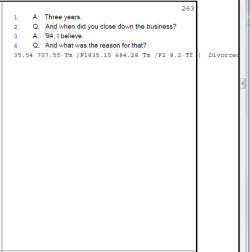
  • Adobe error snip.png
    Adobe error snip.png
    8.7 KB · Views: 23

My Computer

Computer type
PC/Desktop
Computer Manufacturer/Model Number
Crafted by Hand
OS
Windows 7 Professional SP1 64 bit Retail
CPU
Intel i7-4790K
Motherboard
ASRock Z97 Extreme6
Memory
2 x 4GB G.Skill RipJaws 13800
Graphics Card(s)
MSI GTX 970 Gaming
Sound Card
Focusrite Scarlett 2i2
Monitor(s) Displays
BenQ 3200
Screen Resolution
1440p
Hard Drives
Corsair 250GB SSD
WD RED 2 TB SATA
WD 500GB Green SATA
WD 1TB Black SATA x2
PSU
Corsair CMPSU 750TX
Case
Cooler Master 932 HAF
Cooling
Noctua NH-D14
Keyboard
Roccat Ryos MK
Mouse
Roccat Kone XTD
Internet Speed
20 Mb - CenturyLink
Antivirus
Security Essentials
Browser
FireFox Latest
Other Info
Moving to Windows 10
I want to try and make sure I can figure out where this error is actually happening.

If possible, can you describe for me the process in which these depositions flow including at what point does it become a PDF, what software converts it to a PDF, how you receive it, and what you typically open with? I want the workflow :D
 

My Computer

OS
Windows 7 Ultimate 64-bit
CPU
AMD Phenom II X6 1090T 3.2GHZ
Motherboard
MSI 890FXA-GD70
Memory
G.SKILL RipJaw 3x2GB DDR3-1066
Graphics Card(s)
2x HIS Radeon HD 6850 1 GB
Sound Card
VIA 8-channel
Monitor(s) Displays
2x 20 inch Acer LCDs, 1x 32" Sony LCD TV
Screen Resolution
4480x900
Hard Drives
1x Crucial 64GB SSD
3x 1TB HDDs (WD, Seagate, Hitatchi)
1x 500GB Seagate External
PSU
Kingwin 1000W Modular
Case
Coolermaster HAF 932
Cooling
1x 120mm, 3x 200mm, CoolerMaster Hyper 212+
Keyboard
Microsoft Wireless Keyboard 1000
Mouse
Microsoft Wiresless Mouse 5000
Internet Speed
20mbps
Other Info
Samsung BD-ROM/DVD-RW
Have you tried it in Foxit Reader ??
 

My Computer

Computer Manufacturer/Model Number
Dell Optiplex
OS
Windows 7 Professional 64 bit
Memory
4096

My Computer

OS
Windows 7 Ultimate 64-bit
CPU
AMD Phenom II X6 1090T 3.2GHZ
Motherboard
MSI 890FXA-GD70
Memory
G.SKILL RipJaw 3x2GB DDR3-1066
Graphics Card(s)
2x HIS Radeon HD 6850 1 GB
Sound Card
VIA 8-channel
Monitor(s) Displays
2x 20 inch Acer LCDs, 1x 32" Sony LCD TV
Screen Resolution
4480x900
Hard Drives
1x Crucial 64GB SSD
3x 1TB HDDs (WD, Seagate, Hitatchi)
1x 500GB Seagate External
PSU
Kingwin 1000W Modular
Case
Coolermaster HAF 932
Cooling
1x 120mm, 3x 200mm, CoolerMaster Hyper 212+
Keyboard
Microsoft Wireless Keyboard 1000
Mouse
Microsoft Wiresless Mouse 5000
Internet Speed
20mbps
Other Info
Samsung BD-ROM/DVD-RW
Here's another approach, one that might help you. Have you considered trying to convert the PDF doc to a Word doc, to see if you can get all of the text that way? There are a number of file converters -- some that work off-line, and some that can be done on-line. I'll give you a few links of each. I've tried several, and they all work pretty well. The main difference for me is that I need a PDF to Word converter that creates an editable Word doc --- but that doesn't sound like it's an issue that you're concerned with. Good luck with these!

OFF-LINE - PDF to WORD CONVERTERS

1-2-3 FileConvert - Free PDF to Word Converter I've tried this PDF to Word doc file converter and not only does it work well, but the resulting Word doc is editable.

Here are a few others that are supposed to be editable:
AXPDF PDF to Word Converter.
PDFedit - Browse /pdfedit at SourceForge.net
PDF To Word Converter Version 3.0 (as of Jan 2011)


ON-LINE PDF to WORD EDITORS
Zamzar This one is a very popular online file conversion site. It converts a PDF to Word, HTML, ODT, PCX, PNG, PS, RTF, and TXT. This free service allows you to convert files up to 100MB.

PDFonline. Images are merged to background, but cannot edit them separately.

PDF Converter You can convert user password protected PDF files to JPG and PNG. However, there is an interval of 30 minutes between each submission.

Koolwire, You can choose the destination file format

Show Pdf Online PDF to HTML converter that allows you to type the URL address of a PDF file to view it in your browser in HTML format.

Document Converter eXPress Convert files to PDF or image (BMP,TIFF,JPEG,GIF,PNG) free online. It allows you to set the resolution and quality of the output file.

Online PDF Converter allows you to convert your PDF file to text or image (JPEG, PNG, GIF, TIFF) free. The file size should not exceed 100Kb.

Convert PDF to Word works quickly to convert your PDF files and let you download the Word document. However, if you create the PDF file by scanning in documents via a scanner, it will not work.
 

My Computer

Computer Manufacturer/Model Number
HP Pavillion dv5t (generation 1)
OS
Vista 64 bit and 32 bit (SP2)
CPU
Intel(R) Core(TM)2 Duo Processor T9400 (2.53 GHz
Memory
4GB DDR2 System Memory (2 Dimm)
Graphics Card(s)
512 MB NVIDIA GeForce 9600M GT
Monitor(s) Displays
15.4" diagonal WSXGA+ High-Definition HP BrightView Widescre
Screen Resolution
1680 x 1050
Hard Drives
320GB 5400RPM SATA Hard Drive with HP ProtectSmart Hard Drive Protection
Keyboard
Built-in HP
Mouse
Built in - Synaptics TouchPad V6.5 on PS/2 Port
Internet Speed
Max
Other Info
~ Intel Next-Gen Wireless-N Mini-card w/Bluetooth ~ Blu-Ray ROM DVD+/-R/RW ~ Integ. HDTV Hybrid Tuner ~ 12 Cell Battery ~ MS Office (Home Premium) 2007 ~
Tried a few of the recommended programs. All showed new errors so I'm thinking that the document has some control characters that cause it to fart in Windows 7. The files come from a lawyer's secretary then to my wife's partner who forwards them to my wife. The partner says she does not see any errors so I'll have to find out what version of Windows she uses.

Thanks for the help and suggestions,
Burt
 

My Computer

Computer type
PC/Desktop
Computer Manufacturer/Model Number
Crafted by Hand
OS
Windows 7 Professional SP1 64 bit Retail
CPU
Intel i7-4790K
Motherboard
ASRock Z97 Extreme6
Memory
2 x 4GB G.Skill RipJaws 13800
Graphics Card(s)
MSI GTX 970 Gaming
Sound Card
Focusrite Scarlett 2i2
Monitor(s) Displays
BenQ 3200
Screen Resolution
1440p
Hard Drives
Corsair 250GB SSD
WD RED 2 TB SATA
WD 500GB Green SATA
WD 1TB Black SATA x2
PSU
Corsair CMPSU 750TX
Case
Cooler Master 932 HAF
Cooling
Noctua NH-D14
Keyboard
Roccat Ryos MK
Mouse
Roccat Kone XTD
Internet Speed
20 Mb - CenturyLink
Antivirus
Security Essentials
Browser
FireFox Latest
Other Info
Moving to Windows 10
PDF-XChange is a nice looking program but still gives the error. I spoke with the partner. She is using a 2002 version of XP. I've had no luck with the compatibility mode with anything yet but will give it a try just for grins.
 

My Computer

Computer type
PC/Desktop
Computer Manufacturer/Model Number
Crafted by Hand
OS
Windows 7 Professional SP1 64 bit Retail
CPU
Intel i7-4790K
Motherboard
ASRock Z97 Extreme6
Memory
2 x 4GB G.Skill RipJaws 13800
Graphics Card(s)
MSI GTX 970 Gaming
Sound Card
Focusrite Scarlett 2i2
Monitor(s) Displays
BenQ 3200
Screen Resolution
1440p
Hard Drives
Corsair 250GB SSD
WD RED 2 TB SATA
WD 500GB Green SATA
WD 1TB Black SATA x2
PSU
Corsair CMPSU 750TX
Case
Cooler Master 932 HAF
Cooling
Noctua NH-D14
Keyboard
Roccat Ryos MK
Mouse
Roccat Kone XTD
Internet Speed
20 Mb - CenturyLink
Antivirus
Security Essentials
Browser
FireFox Latest
Other Info
Moving to Windows 10
Status
Not open for further replies.
Back
Top