
PDF Tutorial: Creating a Static IP Address

Prof Kerfuffle

Windows 7 user
Guru
Local time
7:07 AM
Messages
489
Location
4th planet from the sun
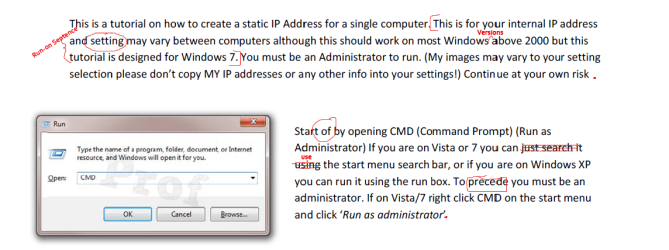
Hi, I wanted some people to pull out any mistakes I may of made in this PDF. It may be anything please point it out. I am not asking for why I haven't made a proper tutorial on this forum. Thanks :) (only supportive comments thanks)

The password is 'prof' no quotes

Images are low res
 

Attachments

Last edited:

My Computer

Computer type
PC/Desktop
Computer Manufacturer/Model Number
GIGABYTE Rig (Custom)
OS
Windows 7 Professional (x64/SP1) /Linux Mint 16
CPU
Intel i5-3570k 3.40 GHz @ 4.6 GHz
Motherboard
GIGABYTE Z77X-D3H
Memory
8GB (2133MHz) DDR3
Graphics Card(s)
Asus GTX560 Ti (Nvidia)
Monitor(s) Displays
HP 23", Acer 19" and a Dell 17"
Screen Resolution
1080p, 1440x900 and 1280x1024
Hard Drives
Sandisk Extreme 120GB (SSD), WD 2TB green and 4 other HDDs
PSU
Antec 620w High Current Gamer
Case
Corsair Obsidian 600D
Cooling
CPU - Antec KÜHLER H₂O 920
Keyboard
Steelseries 6Gv2
Mouse
Roccat LUA
Internet Speed
4 - 6mb/s
Antivirus
ESET NOD32
Browser
Chrome/Firefox
Other Info
Intel Gigabit CT (PCIE NIC) and Thinkpad T61p,
If I understand it correctly, you describe how to create a static private IP address (192.168.x.x). So far so good, but why would anybody wish for a static private address?
 

My Computer

OS
Windows 7 Home Premium 32bit
If I understand it correctly, you describe how to create a static private IP address (192.168.x.x). So far so good, but why would anybody wish for a static private address?

So you can forward ports and there internal IP addresses
 

My Computer

Computer type
PC/Desktop
Computer Manufacturer/Model Number
GIGABYTE Rig (Custom)
OS
Windows 7 Professional (x64/SP1) /Linux Mint 16
CPU
Intel i5-3570k 3.40 GHz @ 4.6 GHz
Motherboard
GIGABYTE Z77X-D3H
Memory
8GB (2133MHz) DDR3
Graphics Card(s)
Asus GTX560 Ti (Nvidia)
Monitor(s) Displays
HP 23", Acer 19" and a Dell 17"
Screen Resolution
1080p, 1440x900 and 1280x1024
Hard Drives
Sandisk Extreme 120GB (SSD), WD 2TB green and 4 other HDDs
PSU
Antec 620w High Current Gamer
Case
Corsair Obsidian 600D
Cooling
CPU - Antec KÜHLER H₂O 920
Keyboard
Steelseries 6Gv2
Mouse
Roccat LUA
Internet Speed
4 - 6mb/s
Antivirus
ESET NOD32
Browser
Chrome/Firefox
Other Info
Intel Gigabit CT (PCIE NIC) and Thinkpad T61p,
Oh well, may be there are some folks who need that.
In this case I strongly suggest you make it clear at the very beginning that it's private addresses you're talking about. And delete all the stuff about IPs being allocated by the ISP: private one aren't.
 

My Computer

OS
Windows 7 Home Premium 32bit
Oh well, may be there are some folks who need that.
In this case I strongly suggest you make it clear at the very beginning that it's private addresses you're talking about. And delete all the stuff about IPs being allocated by the ISP: private one aren't.

Ok thanks I will change it to private
 

My Computer

Computer type
PC/Desktop
Computer Manufacturer/Model Number
GIGABYTE Rig (Custom)
OS
Windows 7 Professional (x64/SP1) /Linux Mint 16
CPU
Intel i5-3570k 3.40 GHz @ 4.6 GHz
Motherboard
GIGABYTE Z77X-D3H
Memory
8GB (2133MHz) DDR3
Graphics Card(s)
Asus GTX560 Ti (Nvidia)
Monitor(s) Displays
HP 23", Acer 19" and a Dell 17"
Screen Resolution
1080p, 1440x900 and 1280x1024
Hard Drives
Sandisk Extreme 120GB (SSD), WD 2TB green and 4 other HDDs
PSU
Antec 620w High Current Gamer
Case
Corsair Obsidian 600D
Cooling
CPU - Antec KÜHLER H₂O 920
Keyboard
Steelseries 6Gv2
Mouse
Roccat LUA
Internet Speed
4 - 6mb/s
Antivirus
ESET NOD32
Browser
Chrome/Firefox
Other Info
Intel Gigabit CT (PCIE NIC) and Thinkpad T61p,
With some routers you can tie a static private address to the MAC address. No, I'm not going to write a tutorial how to do it, check the router manual :-)
 

My Computer

OS
Windows 7 Home Premium 32bit
With some routers you can tie a static private address to the MAC address. No, I'm not going to write a tutorial how to do it, check the router manual :-)

ok but this is how to do it manually and as you previously stated private on Windows
 

My Computer

Computer type
PC/Desktop
Computer Manufacturer/Model Number
GIGABYTE Rig (Custom)
OS
Windows 7 Professional (x64/SP1) /Linux Mint 16
CPU
Intel i5-3570k 3.40 GHz @ 4.6 GHz
Motherboard
GIGABYTE Z77X-D3H
Memory
8GB (2133MHz) DDR3
Graphics Card(s)
Asus GTX560 Ti (Nvidia)
Monitor(s) Displays
HP 23", Acer 19" and a Dell 17"
Screen Resolution
1080p, 1440x900 and 1280x1024
Hard Drives
Sandisk Extreme 120GB (SSD), WD 2TB green and 4 other HDDs
PSU
Antec 620w High Current Gamer
Case
Corsair Obsidian 600D
Cooling
CPU - Antec KÜHLER H₂O 920
Keyboard
Steelseries 6Gv2
Mouse
Roccat LUA
Internet Speed
4 - 6mb/s
Antivirus
ESET NOD32
Browser
Chrome/Firefox
Other Info
Intel Gigabit CT (PCIE NIC) and Thinkpad T61p,
I would run through it and look for grammatical errors if this is going to be used professionally (just skimming, I found a few)


Other than that the guide looks well made and easy to follow! :)
 

Attachments

  • guide.png
    guide.png
    63.5 KB · Views: 179

My Computer

Computer Manufacturer/Model Number
Custom Built
OS
Windows 7 Ultimate
CPU
AMD Athlon II X2 245 2.90Ghz
Motherboard
Some Gigabyte one, dont remember model
Memory
3.00 GB
Graphics Card(s)
8800GTS 512MB
Sound Card
Sound Blaster X-Fi Titanium Fatal1ty
Monitor(s) Displays
Dual 22" widescreen
Hard Drives
250GB internal, 500GB internal
PSU
CORSAIR CMPSU-850TX 850W Power Supply
Case
Thermalkake Tsunami Dream
Cooling
Thermaltake Golden Orb II
Keyboard
Saitek Eclipse 2
Mouse
Logitech MX518
I would run through it and look for grammatical errors if this is going to be used professionally (just skimming, I found a few)


Other than that the guide looks well made and easy to follow! :)

Thanks :)

I cant spot them myself
(To precede is acceptable but it doesn't read well)
 

My Computer

Computer type
PC/Desktop
Computer Manufacturer/Model Number
GIGABYTE Rig (Custom)
OS
Windows 7 Professional (x64/SP1) /Linux Mint 16
CPU
Intel i5-3570k 3.40 GHz @ 4.6 GHz
Motherboard
GIGABYTE Z77X-D3H
Memory
8GB (2133MHz) DDR3
Graphics Card(s)
Asus GTX560 Ti (Nvidia)
Monitor(s) Displays
HP 23", Acer 19" and a Dell 17"
Screen Resolution
1080p, 1440x900 and 1280x1024
Hard Drives
Sandisk Extreme 120GB (SSD), WD 2TB green and 4 other HDDs
PSU
Antec 620w High Current Gamer
Case
Corsair Obsidian 600D
Cooling
CPU - Antec KÜHLER H₂O 920
Keyboard
Steelseries 6Gv2
Mouse
Roccat LUA
Internet Speed
4 - 6mb/s
Antivirus
ESET NOD32
Browser
Chrome/Firefox
Other Info
Intel Gigabit CT (PCIE NIC) and Thinkpad T61p,
Back
Top