
Weatherlite
New member
- Local time
- 8:00 PM
- Messages
- 3
I apologize in advance...this is probably going to be a weird on. Also, some might suggest I go to the manufacturer of my 3rd party hardware. I have, and they are stumped, but also feel that it's an issue with the computer based off the symptoms I will soon explain.
I run a dispatch center, and at each station we have four computers running a total of seven screens. Computer A has one screen, B has four, C has one, D has one. Last year we added a BlackBox Freedom II KVM which allows us to operate on all seven screens with a single mouse and keyboard seamlessly...basically it acts just like a single computer. As the mouse travels along the screen, the KVM "counts" the number of pixels so it knows when it hits the edge of the screen and must change from computer A to computer B. It does require telling the KVM what our setup physically looks like, as well as the monitor resolution, so it can track properly. I have played around and added monitors, removed them, duplicated a couple, and it all worked flawlessly. Until now. Previously, I would add a monitor in landscape mode and would get zero problems. In fact, I just added a 50" TV to station 3 as a room display map and had no issues. However, I tried adding in a different 50" TV to station 2, but in portrait mode, and everything goes to hell.
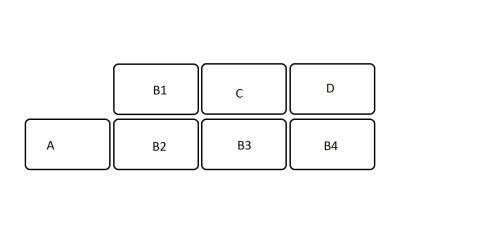
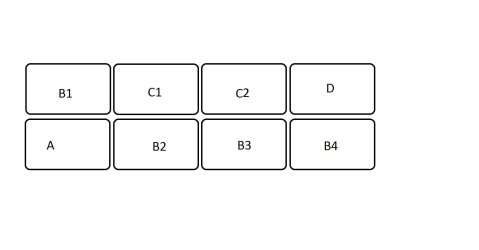
Our monitors are set up with four across the bottom, and three across the top set to far right. For our purposes here, ignore the bottom four screens. The top three, from left to right, are computer B, C, and D. All are identical monitors and all are set to 1920 x 1080 in landscape. If I add a second monitor to C, set to landscape, and set to 1920 x 1080, and align both windows and the KVM to show the monitor as being beside the original monitor, things work fine. Move the mouse from the lower left of monitor D1 over to monitor C2 and it appears in the lower right, as it should. Movement between all of the monitors happens properly. However, if I change monitor C2 to portrait, or even if I keep it in landscape but change its location vertically at all (in Windows and in KVM....both must match) suddenly the system somehow changes the perceived resolution of monitor C1.
A little difficult to follow, so I'll try to clarify. Basic setup is BCD. If I add a monitor to C it becomes B C1 C2 D and works fine. If I keep that monitor attached but change configuration so it's now B C1 D, and C2 is anywhere other than directly beside C1, it's like the computer thinks C1 now has a resolution of 1920 x 540. As an explanation, when I move from the lower left corner of D onto C1, it appears in the lower right corner of C1, as it should. But, if I move up 2 inches on D and move to the left, the mouse appears 4 inches up on C1. At the halfway point up D the mouse appears in the very top right of C1. Even mouse speed is affected when moving vertically. I know the 1920 part of the resolution is unaffected because mouse speed is the same and mouse movement up and down between monitors is fine as well.
What I see on the screen, how icons are arranged, etc remains unchanged. The computer even says it's still at 1920 x 1080. It's sure not acting like it, though. If I turn off monitor C2, everything returns to normal and transitions between B/D and C is just fine. Ideas? And I included a couple configuration pics to help make sense of what I tried to describe. Thanks in advance!
I run a dispatch center, and at each station we have four computers running a total of seven screens. Computer A has one screen, B has four, C has one, D has one. Last year we added a BlackBox Freedom II KVM which allows us to operate on all seven screens with a single mouse and keyboard seamlessly...basically it acts just like a single computer. As the mouse travels along the screen, the KVM "counts" the number of pixels so it knows when it hits the edge of the screen and must change from computer A to computer B. It does require telling the KVM what our setup physically looks like, as well as the monitor resolution, so it can track properly. I have played around and added monitors, removed them, duplicated a couple, and it all worked flawlessly. Until now. Previously, I would add a monitor in landscape mode and would get zero problems. In fact, I just added a 50" TV to station 3 as a room display map and had no issues. However, I tried adding in a different 50" TV to station 2, but in portrait mode, and everything goes to hell.
Our monitors are set up with four across the bottom, and three across the top set to far right. For our purposes here, ignore the bottom four screens. The top three, from left to right, are computer B, C, and D. All are identical monitors and all are set to 1920 x 1080 in landscape. If I add a second monitor to C, set to landscape, and set to 1920 x 1080, and align both windows and the KVM to show the monitor as being beside the original monitor, things work fine. Move the mouse from the lower left of monitor D1 over to monitor C2 and it appears in the lower right, as it should. Movement between all of the monitors happens properly. However, if I change monitor C2 to portrait, or even if I keep it in landscape but change its location vertically at all (in Windows and in KVM....both must match) suddenly the system somehow changes the perceived resolution of monitor C1.
A little difficult to follow, so I'll try to clarify. Basic setup is BCD. If I add a monitor to C it becomes B C1 C2 D and works fine. If I keep that monitor attached but change configuration so it's now B C1 D, and C2 is anywhere other than directly beside C1, it's like the computer thinks C1 now has a resolution of 1920 x 540. As an explanation, when I move from the lower left corner of D onto C1, it appears in the lower right corner of C1, as it should. But, if I move up 2 inches on D and move to the left, the mouse appears 4 inches up on C1. At the halfway point up D the mouse appears in the very top right of C1. Even mouse speed is affected when moving vertically. I know the 1920 part of the resolution is unaffected because mouse speed is the same and mouse movement up and down between monitors is fine as well.
What I see on the screen, how icons are arranged, etc remains unchanged. The computer even says it's still at 1920 x 1080. It's sure not acting like it, though. If I turn off monitor C2, everything returns to normal and transitions between B/D and C is just fine. Ideas? And I included a couple configuration pics to help make sense of what I tried to describe. Thanks in advance!
Attachments

My Computer
At a glance
Windows 7 Pro
- Computer type
- PC/Desktop
- Computer Manufacturer/Model Number
- Dell
- OS
- Windows 7 Pro


