Periodic black screens, persists for 3-5 seconds at a time

KHoang

New member
Local time
11:26 AM
Messages
6
Hi, I was wondering if I could get some help with this:

I just built a new computer and it's been running decently up until I tried playing some video games on it. When running games (e.g., World of Warcraft), my screen freezes up for one second, followed by a black screen for a few more seconds. After that, the gameplay resumes, but I'm sitting there wondering what just happened. The sound is still intact the entire time.

Sometimes it occurs frequently, and sometimes I can play for an hour or more at a time without any black screens. I've been trying to figure out what has been triggering it (i.e., exploring new territory in-game, etc.), but haven't found anything conclusive.

I have a feeling it has to do with my video card (NVIDIA GeForce GTX 460 v2), but I'm not sure.

I checked for overheating problems with CoreTemp, but found that the temperature was stable during gameplay. Specifically, right after the crashes I would check the temperature and see that it was average and unwavering.

Hope to hear from you soon, thanks!
 

My Computer My Computer

At a glance

Windows 7 Ultimate x64AMD Phentom(tm) II X4 945 Processor8 GBNVIDIA GeForce GTX 460 v2
Computer Manufacturer/Model Number
AuthenticAMD
OS
Windows 7 Ultimate x64
CPU
AMD Phentom(tm) II X4 945 Processor
Motherboard
Gigabyte Technology Co., Ltd. GA-78LMT-S2P
Memory
8 GB
Graphics Card(s)
NVIDIA GeForce GTX 460 v2
Sound Card
NVIDIA High Definition Audio
Monitor(s) Displays
ASUS VS238
Screen Resolution
1920 x 1080
Hard Drives
WDC WD5000AUDX-14WNHY0 ATA Device

My Computer My Computer

At a glance

Windows 7 Ultimate 64 bitIntel Core I3 21208 GBXFX R 7750
Computer Manufacturer/Model Number
Generic PC
OS
Windows 7 Ultimate 64 bit
CPU
Intel Core I3 2120
Motherboard
ASUS P8-Z68 VPro/Gen3
Memory
8 GB
Graphics Card(s)
XFX R 7750
Sound Card
None
Monitor(s) Displays
2 Displays: 24'' LG Flatron E2340 and Polyview V293 CMC AD
Screen Resolution
1920X1080 and 1280 X 1024
Hard Drives
OCZ Agility 2 SATA II 120 GB 3.5' as C: drive
2 X Western Digital 500 GB 7400rpm mirrored as F: drive
PSU
600 W
Case
Corsair
Keyboard
Logitech LX710
Mouse
Logitech LX710
Hi cjf,

That was one of the first things I did; I uninstalled my video driver and installed the one from NVIDIA website like you suggested. However, the same problem persists. Any suggestions?
 

My Computer My Computer

At a glance

Windows 7 Ultimate x64AMD Phentom(tm) II X4 945 Processor8 GBNVIDIA GeForce GTX 460 v2
Computer Manufacturer/Model Number
AuthenticAMD
OS
Windows 7 Ultimate x64
CPU
AMD Phentom(tm) II X4 945 Processor
Motherboard
Gigabyte Technology Co., Ltd. GA-78LMT-S2P
Memory
8 GB
Graphics Card(s)
NVIDIA GeForce GTX 460 v2
Sound Card
NVIDIA High Definition Audio
Monitor(s) Displays
ASUS VS238
Screen Resolution
1920 x 1080
Hard Drives
WDC WD5000AUDX-14WNHY0 ATA Device
You need to stress test the video card. But as it is a new build, ask the vendor to test the GPU for you.
 

My Computer My Computer

At a glance

Microsoft Windows 10 Pro Insider Preview 64-bitIntel(R) Core(TM) i3-4130 CPU @ 3.40GHzCorsair Vengence 4GB x2 (8.00GB Dual-Channel ...2047MB GeForce GTS 450 (ZOTAC International)
Computer type
PC/Desktop
Computer Manufacturer/Model Number
Self Assembled
OS
Microsoft Windows 10 Pro Insider Preview 64-bit
CPU
Intel(R) Core(TM) i3-4130 CPU @ 3.40GHz
Motherboard
Gigabyte Technology Co., Ltd. B85M-D3H
Memory
Corsair Vengence 4GB x2 (8.00GB Dual-Channel DDR3 @ 798MHz)
Graphics Card(s)
2047MB GeForce GTS 450 (ZOTAC International)
Sound Card
Onboard (Realtek High Definition Audio)
Monitor(s) Displays
LG Flatron E2040T
Screen Resolution
1600x900
Hard Drives
Western Digital 1 TB
Seagate 500 GB
PSU
Corsair VS550
Case
Cooler Master K380
Cooling
Cooler Master Seidon 120V Plus
Keyboard
Logitech MK260r
Mouse
Logitech MK260r
Internet Speed
PMPL Broadband
Antivirus
Windows Defender + MBAM
Browser
Firefox
Other Info
Dell Studio 15" Laptop
I did a stress test using FurMark, and everything checked out fine. No black screens or anything. Now what?
 

My Computer My Computer

At a glance

Windows 7 Ultimate x64AMD Phentom(tm) II X4 945 Processor8 GBNVIDIA GeForce GTX 460 v2
Computer Manufacturer/Model Number
AuthenticAMD
OS
Windows 7 Ultimate x64
CPU
AMD Phentom(tm) II X4 945 Processor
Motherboard
Gigabyte Technology Co., Ltd. GA-78LMT-S2P
Memory
8 GB
Graphics Card(s)
NVIDIA GeForce GTX 460 v2
Sound Card
NVIDIA High Definition Audio
Monitor(s) Displays
ASUS VS238
Screen Resolution
1920 x 1080
Hard Drives
WDC WD5000AUDX-14WNHY0 ATA Device
I did a stress test using FurMark, and everything checked out fine. No black screens or anything. Now what?

Apply the latest version of nVidia display driver.
You may download it directly, from our forum link http://www.sevenforums.com/graphic-cards/602-latest-nvidia-forceware-video-drivers-windows-7-a.html; or you may opt for the Option 2 of Drivers- Download NVIDIA Drivers for “Automatically find drivers for my NVIDIA products” (it requires java installed).

nvidiadisplaydriver_zps0ba1be3b.jpg


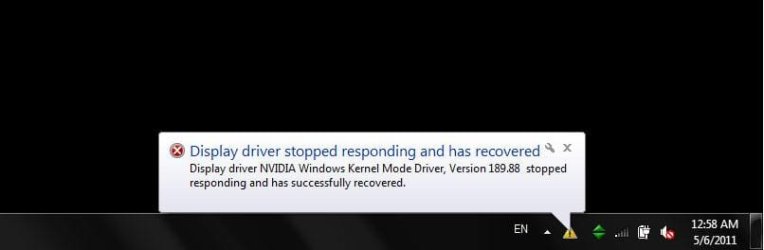
BTW, are you getting any popup notification from the system trey during the black screen?
 

My Computer My Computer

At a glance

Microsoft Windows 10 Pro Insider Preview 64-bitIntel(R) Core(TM) i3-4130 CPU @ 3.40GHzCorsair Vengence 4GB x2 (8.00GB Dual-Channel ...2047MB GeForce GTS 450 (ZOTAC International)
Computer type
PC/Desktop
Computer Manufacturer/Model Number
Self Assembled
OS
Microsoft Windows 10 Pro Insider Preview 64-bit
CPU
Intel(R) Core(TM) i3-4130 CPU @ 3.40GHz
Motherboard
Gigabyte Technology Co., Ltd. B85M-D3H
Memory
Corsair Vengence 4GB x2 (8.00GB Dual-Channel DDR3 @ 798MHz)
Graphics Card(s)
2047MB GeForce GTS 450 (ZOTAC International)
Sound Card
Onboard (Realtek High Definition Audio)
Monitor(s) Displays
LG Flatron E2040T
Screen Resolution
1600x900
Hard Drives
Western Digital 1 TB
Seagate 500 GB
PSU
Corsair VS550
Case
Cooler Master K380
Cooling
Cooler Master Seidon 120V Plus
Keyboard
Logitech MK260r
Mouse
Logitech MK260r
Internet Speed
PMPL Broadband
Antivirus
Windows Defender + MBAM
Browser
Firefox
Other Info
Dell Studio 15" Laptop
I've done a clean install of the NVIDIA driver, but I still get the same problem.

Also, there hasn't ever been a popup notification, whether by window or from the system tray.
 

My Computer My Computer

At a glance

Windows 7 Ultimate x64AMD Phentom(tm) II X4 945 Processor8 GBNVIDIA GeForce GTX 460 v2
Computer Manufacturer/Model Number
AuthenticAMD
OS
Windows 7 Ultimate x64
CPU
AMD Phentom(tm) II X4 945 Processor
Motherboard
Gigabyte Technology Co., Ltd. GA-78LMT-S2P
Memory
8 GB
Graphics Card(s)
NVIDIA GeForce GTX 460 v2
Sound Card
NVIDIA High Definition Audio
Monitor(s) Displays
ASUS VS238
Screen Resolution
1920 x 1080
Hard Drives
WDC WD5000AUDX-14WNHY0 ATA Device
I've done a clean install of the NVIDIA driver, but I still get the same problem.

Also, there hasn't ever been a popup notification, whether by window or from the system tray.

So it is happening with different driver versions. Test with another one that is known to be stable. Also you should use the onboard graphics to see if the same thing happening with it, too.

If display troubles even with the suggested driver and on problem with the onboard graphics, better you RMA the GPU.
 

My Computer My Computer

At a glance

Microsoft Windows 10 Pro Insider Preview 64-bitIntel(R) Core(TM) i3-4130 CPU @ 3.40GHzCorsair Vengence 4GB x2 (8.00GB Dual-Channel ...2047MB GeForce GTS 450 (ZOTAC International)
Computer type
PC/Desktop
Computer Manufacturer/Model Number
Self Assembled
OS
Microsoft Windows 10 Pro Insider Preview 64-bit
CPU
Intel(R) Core(TM) i3-4130 CPU @ 3.40GHz
Motherboard
Gigabyte Technology Co., Ltd. B85M-D3H
Memory
Corsair Vengence 4GB x2 (8.00GB Dual-Channel DDR3 @ 798MHz)
Graphics Card(s)
2047MB GeForce GTS 450 (ZOTAC International)
Sound Card
Onboard (Realtek High Definition Audio)
Monitor(s) Displays
LG Flatron E2040T
Screen Resolution
1600x900
Hard Drives
Western Digital 1 TB
Seagate 500 GB
PSU
Corsair VS550
Case
Cooler Master K380
Cooling
Cooler Master Seidon 120V Plus
Keyboard
Logitech MK260r
Mouse
Logitech MK260r
Internet Speed
PMPL Broadband
Antivirus
Windows Defender + MBAM
Browser
Firefox
Other Info
Dell Studio 15" Laptop
Hi Arc,

I did as you said and installed the 306.23 driver, and now I'm getting crashes even more. But this time, I get to see the popup notification in the system tray that says the driver has crashed, and recovered. Gameplay continues, but of course the crashes happen much more frequently.

Advice?
 

My Computer My Computer

At a glance

Windows 7 Ultimate x64AMD Phentom(tm) II X4 945 Processor8 GBNVIDIA GeForce GTX 460 v2
Computer Manufacturer/Model Number
AuthenticAMD
OS
Windows 7 Ultimate x64
CPU
AMD Phentom(tm) II X4 945 Processor
Motherboard
Gigabyte Technology Co., Ltd. GA-78LMT-S2P
Memory
8 GB
Graphics Card(s)
NVIDIA GeForce GTX 460 v2
Sound Card
NVIDIA High Definition Audio
Monitor(s) Displays
ASUS VS238
Screen Resolution
1920 x 1080
Hard Drives
WDC WD5000AUDX-14WNHY0 ATA Device
306.23 is the most stable nvidia version released lately. It never crashed itself. Just a few hours ago, it solved an extensive graphics crash here .

It made the real cause dig out ..... something like this I guess?
HT075224-Display driver stopped responding and has recovered.jpg

That is what I asked you earlier, the popup notification. It is not a BSOD. It is a faulty hardware, a failing GPU. If possible, use the warranty and get it replace. And, this failure is that random that it will not be caught by the stress test.

I personally experienced such a GPU failure, and being guided by my partner, I abandoned that faulty GPU ........ Issues stopped to occur.
 

My Computer My Computer

At a glance

Microsoft Windows 10 Pro Insider Preview 64-bitIntel(R) Core(TM) i3-4130 CPU @ 3.40GHzCorsair Vengence 4GB x2 (8.00GB Dual-Channel ...2047MB GeForce GTS 450 (ZOTAC International)
Computer type
PC/Desktop
Computer Manufacturer/Model Number
Self Assembled
OS
Microsoft Windows 10 Pro Insider Preview 64-bit
CPU
Intel(R) Core(TM) i3-4130 CPU @ 3.40GHz
Motherboard
Gigabyte Technology Co., Ltd. B85M-D3H
Memory
Corsair Vengence 4GB x2 (8.00GB Dual-Channel DDR3 @ 798MHz)
Graphics Card(s)
2047MB GeForce GTS 450 (ZOTAC International)
Sound Card
Onboard (Realtek High Definition Audio)
Monitor(s) Displays
LG Flatron E2040T
Screen Resolution
1600x900
Hard Drives
Western Digital 1 TB
Seagate 500 GB
PSU
Corsair VS550
Case
Cooler Master K380
Cooling
Cooler Master Seidon 120V Plus
Keyboard
Logitech MK260r
Mouse
Logitech MK260r
Internet Speed
PMPL Broadband
Antivirus
Windows Defender + MBAM
Browser
Firefox
Other Info
Dell Studio 15" Laptop
Hi,

Just wanted to update you guys on the status. I've been running for two days now without ANY black screens at all. Currently, I am on the latest NVIDIA driver, 314.07, where I previously had black screens.

But now, I haven't experienced any and I'm just waiting for the apocalypse. Not sure what happened there.

My theory is that because I upgraded from 306.23 (a stable version) to the current, that had something to do with it? I dunno, just grasping at straws here.
 

My Computer My Computer

At a glance

Windows 7 Ultimate x64AMD Phentom(tm) II X4 945 Processor8 GBNVIDIA GeForce GTX 460 v2
Computer Manufacturer/Model Number
AuthenticAMD
OS
Windows 7 Ultimate x64
CPU
AMD Phentom(tm) II X4 945 Processor
Motherboard
Gigabyte Technology Co., Ltd. GA-78LMT-S2P
Memory
8 GB
Graphics Card(s)
NVIDIA GeForce GTX 460 v2
Sound Card
NVIDIA High Definition Audio
Monitor(s) Displays
ASUS VS238
Screen Resolution
1920 x 1080
Hard Drives
WDC WD5000AUDX-14WNHY0 ATA Device
Hi,

Just wanted to update you guys on the status. I've been running for two days now without ANY black screens at all. Currently, I am on the latest NVIDIA driver, 314.07, where I previously had black screens.

But now, I haven't experienced any and I'm just waiting for the apocalypse. Not sure what happened there.

My theory is that because I upgraded from 306.23 (a stable version) to the current, that had something to do with it? I dunno, just grasping at straws here.
Whatever, it is good. I wish the black screens will not be back to you. :)
 

My Computer My Computer

At a glance

Microsoft Windows 10 Pro Insider Preview 64-bitIntel(R) Core(TM) i3-4130 CPU @ 3.40GHzCorsair Vengence 4GB x2 (8.00GB Dual-Channel ...2047MB GeForce GTS 450 (ZOTAC International)
Computer type
PC/Desktop
Computer Manufacturer/Model Number
Self Assembled
OS
Microsoft Windows 10 Pro Insider Preview 64-bit
CPU
Intel(R) Core(TM) i3-4130 CPU @ 3.40GHz
Motherboard
Gigabyte Technology Co., Ltd. B85M-D3H
Memory
Corsair Vengence 4GB x2 (8.00GB Dual-Channel DDR3 @ 798MHz)
Graphics Card(s)
2047MB GeForce GTS 450 (ZOTAC International)
Sound Card
Onboard (Realtek High Definition Audio)
Monitor(s) Displays
LG Flatron E2040T
Screen Resolution
1600x900
Hard Drives
Western Digital 1 TB
Seagate 500 GB
PSU
Corsair VS550
Case
Cooler Master K380
Cooling
Cooler Master Seidon 120V Plus
Keyboard
Logitech MK260r
Mouse
Logitech MK260r
Internet Speed
PMPL Broadband
Antivirus
Windows Defender + MBAM
Browser
Firefox
Other Info
Dell Studio 15" Laptop
Back
Top