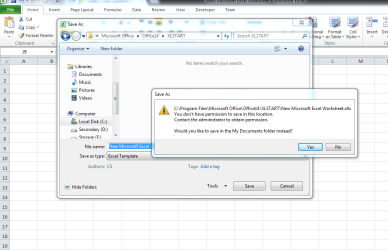
I'm doing this method for creating a custom template to be used as default workbook:
First I create a new workbook and modify it based on my own likes. Then I save it (Save as) as Excel Template in below path and then press the Save button. But got this message. I'm admin of the PC but I don't know how to get rid of this message.
If you browse to that folder are you able to write to it, try creating a text file in there or even save that template to your desktop and try to copy/paste the template into that directory.
Regards,
Jamie
My Computer
At a glance
Windows 8.1 Pro x64Intel Core i5-2500K @ 3.30GHz - S11558GB Corsair DDR3 XMS3, PC3-12800NVIDIA GeForce GTX 650
@ Kurdman. It seems that you are trying to save the template to Microsoft Office, Office 14, XLSTART on your C drive. You should save all your Excel Spreadsheets & Workbooks to a folder in your Documents Library.
I have a folder in my Documents Library for my normal workbooks & a separate folder for my Excel Templates so I can find them easily when needed.
Set up a folder in your Documents Library with a name that suits you for your Templates & save the template to that folder.
My Computer
At a glance
Windows 7 Home Premium 64 bit sp1Intel i5 3570 3.4Ghz Ivy Bridge SKT 1155 quad...G-Skill Rip Jaws 16Gb (8x2) DDR3 -1600 PC3 12...Gigabyte NVIDIA GT610 1Gb DDR3 810/1200 PCI-E...