Permission Error

I did try rejoin homegroup. Same thing. And check out also the home group settings. Nothing happens
 

My Computer

Computer type
Laptop
Computer Manufacturer/Model Number
Asus
OS
Windows 7 x64
CPU
Intel (R) Core TM i7 CPU @ 2.7ghz
Motherboard
ASUS
Memory
8.00 gb
Graphics Card(s)
Built in
Antivirus
Kaspersky
Browser
Google Chrome
Answer #18 please
 

My Computer

Computer type
Laptop
Computer Manufacturer/Model Number
ACER ASPIRE 5742G
OS
Microsoft Windows 7 Home Premium 64-bits 7601 Multiprocessor Free Service Pack 1
CPU
Intel(R) Core(TM) i3 CPU M 370 @ 2.40GHz
Motherboard
Acer Aspire 5742G
Memory
4,00 GB
Graphics Card(s)
ATI Mobility Radeon HD 5400 Series
Sound Card
(1) AMD High Definition Audio Device (2) Realtek High Defi
Screen Resolution
1366 x 768 x 32 bits (4294967296 colors) @ 60 Hz
Hard Drives
WDC WD5000BEVT-22ZAT0
Yes they can access everything. Its my laptop who cant communicate with others.
 

My Computer

Computer type
Laptop
Computer Manufacturer/Model Number
Asus
OS
Windows 7 x64
CPU
Intel (R) Core TM i7 CPU @ 2.7ghz
Motherboard
ASUS
Memory
8.00 gb
Graphics Card(s)
Built in
Antivirus
Kaspersky
Browser
Google Chrome
Strange anyone else can access "shared folders" located on "problem laptop". Are you sure?
 

My Computer

Computer type
Laptop
Computer Manufacturer/Model Number
ACER ASPIRE 5742G
OS
Microsoft Windows 7 Home Premium 64-bits 7601 Multiprocessor Free Service Pack 1
CPU
Intel(R) Core(TM) i3 CPU M 370 @ 2.40GHz
Motherboard
Acer Aspire 5742G
Memory
4,00 GB
Graphics Card(s)
ATI Mobility Radeon HD 5400 Series
Sound Card
(1) AMD High Definition Audio Device (2) Realtek High Defi
Screen Resolution
1366 x 768 x 32 bits (4294967296 colors) @ 60 Hz
Hard Drives
WDC WD5000BEVT-22ZAT0
Method 1: Let’s run the Homegroup troubleshooter and check if that helps. Refer the following link to run the troubleshooter.
‘Open the HomeGroup troubleshooter’
http://windows.microsoft.com/en-US/windows7/Open-the-HomeGroup-troubleshooter
Method 2: Change Workgroup settings:
Step 1: Please make sure these machines are in the same workgroup:
a) To change workgroup settings, please refer to the following steps:
b) Click the Start Button, right click on Computer in the right pane and choose Properties.
c) In the Computer name, domain, and workgroup settings section of the System window, clicks Change settings.
d) On the Computer Name tab of the System Properties dialog box, click Change.
e) In the Computer Name/Domain Changes dialog box, type the name of the workgroup being used by the other computers on your network in Workgroup, and then click OK.
If the issue persists, please refer to step 2:
Step 2: Advanced Share Permission
a) In Windows 7, right-click the shared folder and then click Properties.
b) Click the Sharing tab, click Advanced Sharing. Check Share this folder box.
c) Click Permissions button, Click Add.
d) High light the account which you want to share this folder to (Account name which will access the folder), then check the Allow box for Full control.
e) If the account name is not list, please click Add button. Type Everyone and click OK.
f) Click everyone in the user list, and check the Allow box for Full Control in the "Permissions for Everyone" pane and click Apply, click OK.
Method 3: Disable antivirus software installed on the computer and then try access the files and check if the issue persists.
‘Disable antivirus software’
http://windows.microsoft.com/en-US/windows7/Disable-antivirus-software
Warning: Antivirus software can help protect your computer against viruses and other security threats. In most cases, you shouldn't disable your antivirus software. If you have to temporarily disable it to install other software, you should re-enable it as soon as you're done. If you're connected to the Internet or a network while your antivirus software is disabled, your computer is vulnerable to attacks.

 

My Computer

Computer type
Laptop
Computer Manufacturer/Model Number
ACER ASPIRE 5742G
OS
Microsoft Windows 7 Home Premium 64-bits 7601 Multiprocessor Free Service Pack 1
CPU
Intel(R) Core(TM) i3 CPU M 370 @ 2.40GHz
Motherboard
Acer Aspire 5742G
Memory
4,00 GB
Graphics Card(s)
ATI Mobility Radeon HD 5400 Series
Sound Card
(1) AMD High Definition Audio Device (2) Realtek High Defi
Screen Resolution
1366 x 768 x 32 bits (4294967296 colors) @ 60 Hz
Hard Drives
WDC WD5000BEVT-22ZAT0
I tried the trouble shooter and as well disable the anti virus and firewall. Same results
 

My Computer

Computer type
Laptop
Computer Manufacturer/Model Number
Asus
OS
Windows 7 x64
CPU
Intel (R) Core TM i7 CPU @ 2.7ghz
Motherboard
ASUS
Memory
8.00 gb
Graphics Card(s)
Built in
Antivirus
Kaspersky
Browser
Google Chrome
Does "problem laptop" see its own shared folders?
 

My Computer

Computer type
Laptop
Computer Manufacturer/Model Number
ACER ASPIRE 5742G
OS
Microsoft Windows 7 Home Premium 64-bits 7601 Multiprocessor Free Service Pack 1
CPU
Intel(R) Core(TM) i3 CPU M 370 @ 2.40GHz
Motherboard
Acer Aspire 5742G
Memory
4,00 GB
Graphics Card(s)
ATI Mobility Radeon HD 5400 Series
Sound Card
(1) AMD High Definition Audio Device (2) Realtek High Defi
Screen Resolution
1366 x 768 x 32 bits (4294967296 colors) @ 60 Hz
Hard Drives
WDC WD5000BEVT-22ZAT0
I have seen the "advanced sharing options" get reset before. Or perhaps Windows no longer thinks it's on your home network or that it's a public network. Goto the "Network and Sharing Center" and see if the network is identified as a "home" network. Then check out the "advanced sharing options" and see if "network discovery" is turned on. Other than that, could be a firewall issue. I recommend checking out the "event log" and see if there are any network related errors.
 

My Computer

Computer type
Laptop
Computer Manufacturer/Model Number
ACER ASPIRE 5742G
OS
Microsoft Windows 7 Home Premium 64-bits 7601 Multiprocessor Free Service Pack 1
CPU
Intel(R) Core(TM) i3 CPU M 370 @ 2.40GHz
Motherboard
Acer Aspire 5742G
Memory
4,00 GB
Graphics Card(s)
ATI Mobility Radeon HD 5400 Series
Sound Card
(1) AMD High Definition Audio Device (2) Realtek High Defi
Screen Resolution
1366 x 768 x 32 bits (4294967296 colors) @ 60 Hz
Hard Drives
WDC WD5000BEVT-22ZAT0
It is stated as a home network. How do reset advanced sharing options? Network discovery is turned on. How can i check the event log?
 

My Computer

Computer type
Laptop
Computer Manufacturer/Model Number
Asus
OS
Windows 7 x64
CPU
Intel (R) Core TM i7 CPU @ 2.7ghz
Motherboard
ASUS
Memory
8.00 gb
Graphics Card(s)
Built in
Antivirus
Kaspersky
Browser
Google Chrome

My Computer

Computer type
Laptop
Computer Manufacturer/Model Number
ACER ASPIRE 5742G
OS
Microsoft Windows 7 Home Premium 64-bits 7601 Multiprocessor Free Service Pack 1
CPU
Intel(R) Core(TM) i3 CPU M 370 @ 2.40GHz
Motherboard
Acer Aspire 5742G
Memory
4,00 GB
Graphics Card(s)
ATI Mobility Radeon HD 5400 Series
Sound Card
(1) AMD High Definition Audio Device (2) Realtek High Defi
Screen Resolution
1366 x 768 x 32 bits (4294967296 colors) @ 60 Hz
Hard Drives
WDC WD5000BEVT-22ZAT0
ok hold on,
 

My Computer

Computer type
Laptop
Computer Manufacturer/Model Number
Asus
OS
Windows 7 x64
CPU
Intel (R) Core TM i7 CPU @ 2.7ghz
Motherboard
ASUS
Memory
8.00 gb
Graphics Card(s)
Built in
Antivirus
Kaspersky
Browser
Google Chrome

My Computer

Computer type
Laptop
Computer Manufacturer/Model Number
ACER ASPIRE 5742G
OS
Microsoft Windows 7 Home Premium 64-bits 7601 Multiprocessor Free Service Pack 1
CPU
Intel(R) Core(TM) i3 CPU M 370 @ 2.40GHz
Motherboard
Acer Aspire 5742G
Memory
4,00 GB
Graphics Card(s)
ATI Mobility Radeon HD 5400 Series
Sound Card
(1) AMD High Definition Audio Device (2) Realtek High Defi
Screen Resolution
1366 x 768 x 32 bits (4294967296 colors) @ 60 Hz
Hard Drives
WDC WD5000BEVT-22ZAT0
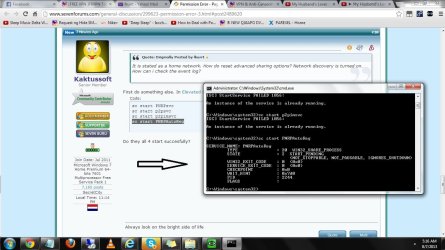
The first three commands resulted , it says another instance is already running.

The last command resulted.
 

Attachments

  • 123.jpg
    123.jpg
    116.3 KB · Views: 3

My Computer

Computer type
Laptop
Computer Manufacturer/Model Number
Asus
OS
Windows 7 x64
CPU
Intel (R) Core TM i7 CPU @ 2.7ghz
Motherboard
ASUS
Memory
8.00 gb
Graphics Card(s)
Built in
Antivirus
Kaspersky
Browser
Google Chrome
Yes start of PNRP is manual.
 

My Computer

Computer type
Laptop
Computer Manufacturer/Model Number
Asus
OS
Windows 7 x64
CPU
Intel (R) Core TM i7 CPU @ 2.7ghz
Motherboard
ASUS
Memory
8.00 gb
Graphics Card(s)
Built in
Antivirus
Kaspersky
Browser
Google Chrome
The first three commands resulted , it says another instance is already running.

The last command resulted.
start the last one again. Does it also say "another instance is already running"?

In services.msc you can select them as well and start them.
Also start this

Code:
sc start HomeGroupProvider
sc start HomeGroupListener
Are they succesfully running? Check services.msc. Also start type "manual"?
 

My Computer

Computer type
Laptop
Computer Manufacturer/Model Number
ACER ASPIRE 5742G
OS
Microsoft Windows 7 Home Premium 64-bits 7601 Multiprocessor Free Service Pack 1
CPU
Intel(R) Core(TM) i3 CPU M 370 @ 2.40GHz
Motherboard
Acer Aspire 5742G
Memory
4,00 GB
Graphics Card(s)
ATI Mobility Radeon HD 5400 Series
Sound Card
(1) AMD High Definition Audio Device (2) Realtek High Defi
Screen Resolution
1366 x 768 x 32 bits (4294967296 colors) @ 60 Hz
Hard Drives
WDC WD5000BEVT-22ZAT0
Yes it says the another instance is already running. And the home group provider and listener are set to autimatic (delayed start)
 

My Computer

Computer type
Laptop
Computer Manufacturer/Model Number
Asus
OS
Windows 7 x64
CPU
Intel (R) Core TM i7 CPU @ 2.7ghz
Motherboard
ASUS
Memory
8.00 gb
Graphics Card(s)
Built in
Antivirus
Kaspersky
Browser
Google Chrome
Yes it says the another instance is already running. And the home group provider and listener are set to autimatic (delayed start)
But can you start homegroup provider and listener?
 

My Computer

Computer type
Laptop
Computer Manufacturer/Model Number
ACER ASPIRE 5742G
OS
Microsoft Windows 7 Home Premium 64-bits 7601 Multiprocessor Free Service Pack 1
CPU
Intel(R) Core(TM) i3 CPU M 370 @ 2.40GHz
Motherboard
Acer Aspire 5742G
Memory
4,00 GB
Graphics Card(s)
ATI Mobility Radeon HD 5400 Series
Sound Card
(1) AMD High Definition Audio Device (2) Realtek High Defi
Screen Resolution
1366 x 768 x 32 bits (4294967296 colors) @ 60 Hz
Hard Drives
WDC WD5000BEVT-22ZAT0
Yes I turned them on thru msc.services
 

My Computer

Computer type
Laptop
Computer Manufacturer/Model Number
Asus
OS
Windows 7 x64
CPU
Intel (R) Core TM i7 CPU @ 2.7ghz
Motherboard
ASUS
Memory
8.00 gb
Graphics Card(s)
Built in
Antivirus
Kaspersky
Browser
Google Chrome
Now all of the four commands say that another instance is already running.
 

My Computer

Computer type
Laptop
Computer Manufacturer/Model Number
Asus
OS
Windows 7 x64
CPU
Intel (R) Core TM i7 CPU @ 2.7ghz
Motherboard
ASUS
Memory
8.00 gb
Graphics Card(s)
Built in
Antivirus
Kaspersky
Browser
Google Chrome
Yes I turned them on thru msc.services
You told me they had startup type="automatic (delayed start)"
They were already started?

Do you have windows firewall turned on or a 3rd party firewall?
Check eventlog for related errors!
 

My Computer

Computer type
Laptop
Computer Manufacturer/Model Number
ACER ASPIRE 5742G
OS
Microsoft Windows 7 Home Premium 64-bits 7601 Multiprocessor Free Service Pack 1
CPU
Intel(R) Core(TM) i3 CPU M 370 @ 2.40GHz
Motherboard
Acer Aspire 5742G
Memory
4,00 GB
Graphics Card(s)
ATI Mobility Radeon HD 5400 Series
Sound Card
(1) AMD High Definition Audio Device (2) Realtek High Defi
Screen Resolution
1366 x 768 x 32 bits (4294967296 colors) @ 60 Hz
Hard Drives
WDC WD5000BEVT-22ZAT0
Back
Top