Permission issues

Kornmod

New member
Member
Local time
1:49 AM
Messages
14
Location
Copenhagen, Denmark
I have they usually permission issues with windows 7. I sometimes get this error message: "Windows cannot access the specified device, path, or file. You may not have the appropriate permission to access the item."
So fare there are 3 files I can't open: 2 .exe files and 1 .pst file on 2 different hdd's (non of them my system hdd)

* I'm running Win7 Pro 32-bit (build 7600), which I installed 2 days ago on a newly formatted hdd.
* I have only installed a few neccesary apps like anti-virus, office etc.
* I'm logged in as Admin, and Admin, system and everyone has "full control"
* I never had this problem when I ran Win7 RC whith the same apps.
* I've tried the "take ownership"-thingy.
* I've tried to choose the "run as admin".
* I have no problems running these files when windows is in safe mode, which make me think it isn't a "real" permission issue but some kind of background service or app that is blocking the files.
* I've tried to disable my anti-virus app (AVG) in msconfig (under "services" and "startup") and then reboot (of course).

I think that's all that I've tried.
Hope you guys will be able to help 'cos it's a really pain in the backside.
 

My Computer

OS
Windows 7
I have they usually permission issues with windows 7. I sometimes get this error message: "Windows cannot access the specified device, path, or file. You may not have the appropriate permission to access the item."
So fare there are 3 files I can't open: 2 .exe files and 1 .pst file on 2 different hdd's (non of them my system hdd)

* I'm running Win7 Pro 32-bit (build 7600), which I installed 2 days ago on a newly formatted hdd.
* I have only installed a few neccesary apps like anti-virus, office etc.
* I'm logged in as Admin, and Admin, system and everyone has "full control"
* I never had this problem when I ran Win7 RC whith the same apps.
* I've tried the "take ownership"-thingy.
* I've tried to choose the "run as admin".
* I have no problems running these files when windows is in safe mode, which make me think it isn't a "real" permission issue but some kind of background service or app that is blocking the files.
* I've tried to disable my anti-virus app (AVG) in msconfig (under "services" and "startup") and then reboot (of course).

I think that's all that I've tried.
Hope you guys will be able to help 'cos it's a really pain in the backside.

Hi KM and welcome

Really nice first post. To be honest, since they work in safe mode I suspect you are right it isnt perms it is more likely avg. Even disabled it can (and does) cause grief. Only sure way to find out is to remove it. If it isnt theproblem you can always add it back.


Ken J+
 

My Computer

Computer Manufacturer/Model Number
HP Pavillion dv-7 1005 Tx
OS
Win 8 Release candidate 8400
CPU
[email protected]
Memory
4 gigs
Graphics Card(s)
Nvidia 9600M
Sound Card
HD built-in
Monitor(s) Displays
17" Wxga
Screen Resolution
1440x900
Cooling
none
Internet Speed
45Mb down 5Mb up
Hi ZigZag

Thanks for you quick reply.
Tried uninstalling AVG and it worked.

Now to a new question:
Can anybody recommend another anti-virus app??
 

My Computer

OS
Windows 7
For info then I reinstalled AVG and worked out the problem.

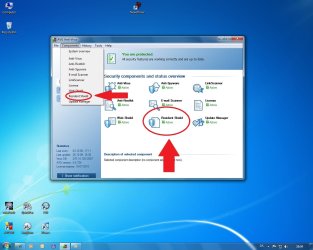
The component in AVG that causes the grief is called "Resident Shield" (which check every file that you access). You can choose "Resident Shield" from either the overview screen or via the "Compenents" dropbox.

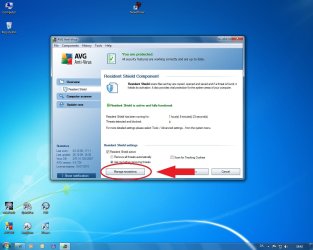
Once in the "Resident Shield" screen click the "Manage Exceptions"-button, which will take you to a page where you can exclude files and/or folders from being checked by "Resident Shield".

See screenshots below for clarification.


.
 

Attachments

  • AVG 1.jpg
    AVG 1.jpg
    96.7 KB · Views: 57
  • AVG 2.jpg
    AVG 2.jpg
    97.7 KB · Views: 29

My Computer

OS
Windows 7
Currently I think MSE ( http://www.microsoft.com/Security_Essentials/ ) is the best free security program you can have. Some people also recommend Avira, but I have never tried it whilst I run MSE on 3 systems with excellent results.
 

My Computer

Computer Manufacturer/Model Number
HP, Dell, Gateway, Toshiba - 4 laptops and 2 desktops
OS
Vista, Windows7, Mint Mate, Zorin, Windows 8
CPU
from 1.6GHz Duo to i7
Monitor(s) Displays
2x HP w2207
Hard Drives
5x HDD, 7x SSD, 12x Externals
Keyboard
with trackball - no mices
Mouse
Trackball mice
Internet Speed
DSL 6000
Currently I think MSE ( http://www.microsoft.com/Security_Essentials/ ) is the best free security program you can have. Some people also recommend Avira, but I have never tried it whilst I run MSE on 3 systems with excellent results.

I second MSE, just wanted to get my vote in before the rush starts to push Avira.

It is subjective, of course, but what puts MSE in the lead is that it was specifically made with Windows in mind.
 

My Computer

Computer type
PC/Desktop
Computer Manufacturer/Model Number
Dell XPS 420
OS
Windows 10, Home Clean Install
CPU
Intel Core2 processsor Q8200(2.33Ghz 1333FSB) Quad Core Tech
Motherboard
Dell
Memory
6 gb
Graphics Card(s)
ATI Radeon 256MB HD3650
Sound Card
Intergrated 7.1 Channel Audio
Monitor(s) Displays
Dell SP2009W 20"
Hard Drives
640 GB Serial ATA Hard drive
Cooling
Fan
Keyboard
Dell USB Keyboard
Mouse
Dell Premium Optical USB
Internet Speed
DSL 2.85
Not available in your country or region

You appear to be in a country or region where Microsoft Security Essentials is not available. Thank you for your interest in Microsoft Security Essentials.

Baaahh. Humbug!!


Thanks for your replies, guys.
For now I will continue to use AVG until my product key expires. Hopefully by then MSE will be available up here in the cold north.
 

My Computer

OS
Windows 7
Not available in your country or region

You appear to be in a country or region where Microsoft Security Essentials is not available. Thank you for your interest in Microsoft Security Essentials.

Baaahh. Humbug!!


Thanks for your replies, guys.
For now I will continue to use AVG until my product key expires. Hopefully by then MSE will be available up here in the cold north.


I would think twice before using AVG - too many problems. Anything else is better, in my humble opinion.
 

My Computer

Computer Manufacturer/Model Number
HP, Dell, Gateway, Toshiba - 4 laptops and 2 desktops
OS
Vista, Windows7, Mint Mate, Zorin, Windows 8
CPU
from 1.6GHz Duo to i7
Monitor(s) Displays
2x HP w2207
Hard Drives
5x HDD, 7x SSD, 12x Externals
Keyboard
with trackball - no mices
Mouse
Trackball mice
Internet Speed
DSL 6000
Never had any problems with AVG until yesterday. My product key runs out next summer so I won't bother replacing AVG until then. Hopefully MSE will be available here in DK by then.
 

My Computer

OS
Windows 7
Never had any problems with AVG until yesterday. My product key runs out next summer so I won't bother replacing AVG until then. Hopefully MSE will be available here in DK by then.


How come MSE is not availyble in DK ?? Is that another issue with the EU.
 

My Computer

Computer Manufacturer/Model Number
HP, Dell, Gateway, Toshiba - 4 laptops and 2 desktops
OS
Vista, Windows7, Mint Mate, Zorin, Windows 8
CPU
from 1.6GHz Duo to i7
Monitor(s) Displays
2x HP w2207
Hard Drives
5x HDD, 7x SSD, 12x Externals
Keyboard
with trackball - no mices
Mouse
Trackball mice
Internet Speed
DSL 6000
Well, my bad. It IS available in DK. I'm using IE8 and found out I needed to add another language (English) in the options menu. Stupid considering that I use an English version of Win7. Perhaps I should change to another browser as well. Perhaps give Chrome a try.
 

My Computer

OS
Windows 7
Well, my bad. It IS available in DK. I'm using IE8 and found out I needed to add another language (English) in the options menu. Stupid considering that I use an English version of Win7. Perhaps I should change to another browser as well. Perhaps give Chrome a try.


Chrome is nice - so is Opera that I use a lot.
 

My Computer

Computer Manufacturer/Model Number
HP, Dell, Gateway, Toshiba - 4 laptops and 2 desktops
OS
Vista, Windows7, Mint Mate, Zorin, Windows 8
CPU
from 1.6GHz Duo to i7
Monitor(s) Displays
2x HP w2207
Hard Drives
5x HDD, 7x SSD, 12x Externals
Keyboard
with trackball - no mices
Mouse
Trackball mice
Internet Speed
DSL 6000
Back
Top