Solved Permission problems with multiple partitions

msalton1

New member
Member
VIP
Local time
12:13 PM
Messages
325
I recently built a system and used the HDDs from the system I'm replacing. There seem to be some permission issues. I've given myself full control in the Properties/Security, but am still having trouble.


Amongst other issues, MediaMonkey won't rip CDs. It creates the temporary wav files to my User\appdata\temp folder (on a drive other than C:\), but won't compete the conversion to mp3. The first indication it gives is that it can't delete the temp files.


Motherboard: Asus TUF Z370-Plus gaming
Windows 7 Ult x64
CPU i5-8600K
HDDS WD 2 TB 7600


Obviously the issue is moving them to the new machine. I've added myself to all the partitions (nine partitions in all. The C:\drive is a separate SDD.


CCleaner seems to have no problem deleting files in the temp dirs.


Any ideas?
 

My Computer

Computer type
PC/Desktop
Computer Manufacturer/Model Number
custom
OS
windows 7 Pro 64 Bit
CPU
i5 4670K
Motherboard
Asus Max Hero 1150 socket
Memory
16GB DDR3@933mhz
Graphics Card(s)
Radeon R9 390 8192mb
Monitor(s) Displays
Dell U2415 x3
Screen Resolution
1920 (5760) x 1200 x3
Hard Drives
System: Kingston 128GB SSD

Installing to Samsung 860 EVO 500GB
WD Black 2 TB & 1 TB
PSU
Corsair CX750M
Cooling
Hyper 312
Internet Speed
50mbps
All folders will be owned by the old user and some may inherit from other folders cleaner will be running as system so can delete files. The quick way is to use free software to convert the drive to fat32 which doesn't have any permission.
 

My Computer

Computer type
PC/Desktop
OS
win 8 32 bit
All folders will be owned by the old user and some may inherit from other folders cleaner will be running as system so can delete files. The quick way is to use free software to convert the drive to fat32 which doesn't have any permission.


Thanks for your response, samuria. Unfortunately, FAT32 has limitations that will be problematic for my use. My username and password are the same as previously, although that username doesn't seem to be on all volumes now except where I added it. The problems I'm experiencing don't effect all usage and operations. Is there a procedure I can apply on an as needed basis?


In the example of the mp3 ripping from audio CD, how could I change permissions to allow MediaMonkey to do its thing?


My "Music" folder is not the "My Music" folder, it's a folder called 'Albums' on its own partition. I took ownership of the folder (but not the drive, which is owned by one of the 'alphabet soup' accounts...S-1-5-21-18...etc). I am in the user list with full control.


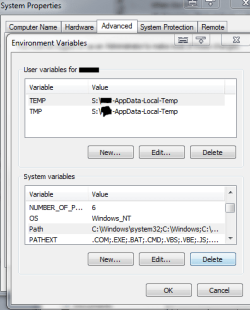
I have Temp files paths directed to their own partition (S:\) as well (as I had it in previous machine). The "owner" of the (temp files) partition is machine name\Adminstrators. There are no 'alphabet soup' owners on this partition, but there is for the folder username-AppData-Local-Temp. The user names in the Security tab are mine, System and Everyone, all with Full Control.


The 'alphabet soup' name is the owner


'Everyone' is a user with Full Control in both cases. I added it as an attempt to allow access.


My username is an admin acct.


The problem with MediaMonkey ripping the file is that after it rips the track to a .wav file in
S:\(username)-AppData-Local-Temp, it doesn't have access to the file. The error message is as pictured. Below that is the Environmental Variables Properties sheet. What I've just noticed about that is that there is no 'Path' entry in the User Variables section (there is on the old system).


Another thing that strikes me as odd is that MediaMonkey can write the .wav file to the Temp dir, but it can't delete it (not sure why it needs to delete the temp .wav before it converts it to mp3 and writes it to the music drive)


Path.PNG


MM Issues.PNG


Last edited:

My Computer

Computer type
PC/Desktop
Computer Manufacturer/Model Number
custom
OS
windows 7 Pro 64 Bit
CPU
i5 4670K
Motherboard
Asus Max Hero 1150 socket
Memory
16GB DDR3@933mhz
Graphics Card(s)
Radeon R9 390 8192mb
Monitor(s) Displays
Dell U2415 x3
Screen Resolution
1920 (5760) x 1200 x3
Hard Drives
System: Kingston 128GB SSD

Installing to Samsung 860 EVO 500GB
WD Black 2 TB & 1 TB
PSU
Corsair CX750M
Cooling
Hyper 312
Internet Speed
50mbps

My Computers

System One System Two

  • Computer type
    PC/Desktop
    Computer Manufacturer/Model Number
    custom build
    OS
    Windows 7 HP 64
    CPU
    i5 6600K - 800MHz to 4200MHz
    Motherboard
    GA-Z170-HD3P
    Memory
    4+4G GSkill DDR4 3000
    Graphics Card(s)
    IG - Intel 530
    Monitor(s) Displays
    Samsung 226BW
    Screen Resolution
    1680x1050
    Hard Drives
    (1) -1 SM951 – 128GB M.2 AHCI PCIe SSD drive for Windows 7 and Lubuntu
    (2) -1 WD SATA 3 - 1T for Data
    (3) -1 WD SATA 3 - 1T for backup
    PSU
    Thermaltake 450W TR2 gold
    Keyboard
    Old and good Chicony mechanical keyboard
    Mouse
    Logitech mX performance - 9 buttons (had to disable some)
    Internet Speed
    500Mb/s
    Browser
    Firefox 64
    Other Info
    TinyWall firewall
  • Computer type
    Laptop
    System Manufacturer/Model Number
    Asus Q550LF
    OS
    Windows 7 Pro
    CPU
    i7-4500U 800MHz to 3.0GHz
    Motherboard
    Asus Q550LF
    Memory
    (4+4)G DDR3 1600
    Graphics Card(s)
    IG intel 4400 + NVIDIA GeForce GT 745M
    Sound Card
    Realtek
    Monitor(s) Displays
    LG Display LP156WF4-SPH1
    Screen Resolution
    1920 x 1080
    Hard Drives
    BX500 120G SSD for Windows and programs +
    1T HDD for data
    Internet Speed
    500 Mb/s
    Browser
    Firefox
    Other Info
    TinyWall firewall
Window's only sees users as a SID so the name being the same has no effect as the sid isn't the same. You need to check if permission is inherits from folders above. You can convert to fat32 without loosing data to remove all permission then convert back to NTFS very simply
 

My Computer

Computer type
PC/Desktop
OS
win 8 32 bit


Hi Mega, I've used that in some instances (not having non-stop trouble), and have also manually changed permissions and ownership when needed. The temp folder is owned by an alphabet user. Is there an issue if I make myself the owner of a system temp dir (S:\(username)-AppData-Local-Temp,)? Also, are permissions stored on the system drive? IOW, if I back up before changing permissions, will restoring an image of the C:\ drive restore the permissions?
 
Last edited:

My Computer

Computer type
PC/Desktop
Computer Manufacturer/Model Number
custom
OS
windows 7 Pro 64 Bit
CPU
i5 4670K
Motherboard
Asus Max Hero 1150 socket
Memory
16GB DDR3@933mhz
Graphics Card(s)
Radeon R9 390 8192mb
Monitor(s) Displays
Dell U2415 x3
Screen Resolution
1920 (5760) x 1200 x3
Hard Drives
System: Kingston 128GB SSD

Installing to Samsung 860 EVO 500GB
WD Black 2 TB & 1 TB
PSU
Corsair CX750M
Cooling
Hyper 312
Internet Speed
50mbps
Window's only sees users as a SID so the name being the same has no effect as the sid isn't the same. You need to check if permission is inherits from folders above. You can convert to fat32 without loosing data to remove all permission then convert back to NTFS very simply


What software goes to FAT32 and back without data loss?
 

My Computer

Computer type
PC/Desktop
Computer Manufacturer/Model Number
custom
OS
windows 7 Pro 64 Bit
CPU
i5 4670K
Motherboard
Asus Max Hero 1150 socket
Memory
16GB DDR3@933mhz
Graphics Card(s)
Radeon R9 390 8192mb
Monitor(s) Displays
Dell U2415 x3
Screen Resolution
1920 (5760) x 1200 x3
Hard Drives
System: Kingston 128GB SSD

Installing to Samsung 860 EVO 500GB
WD Black 2 TB & 1 TB
PSU
Corsair CX750M
Cooling
Hyper 312
Internet Speed
50mbps
Window's only sees users as a SID so the name being the same has no effect as the sid isn't the same. You need to check if permission is inherits from folders above. You can convert to fat32 without loosing data to remove all permission then convert back to NTFS very simply


Problem solved. Although I was leary of changing ownership of a system temp directory, I changed the owner from alphabet user to administrators on this machine. All is well now. Thanks for your inputs. I also discovered that PW Pro purports to convert NTFS & FAT32 back and forth without data loss.


Again, thanks to both y'all!
 

My Computer

Computer type
PC/Desktop
Computer Manufacturer/Model Number
custom
OS
windows 7 Pro 64 Bit
CPU
i5 4670K
Motherboard
Asus Max Hero 1150 socket
Memory
16GB DDR3@933mhz
Graphics Card(s)
Radeon R9 390 8192mb
Monitor(s) Displays
Dell U2415 x3
Screen Resolution
1920 (5760) x 1200 x3
Hard Drives
System: Kingston 128GB SSD

Installing to Samsung 860 EVO 500GB
WD Black 2 TB & 1 TB
PSU
Corsair CX750M
Cooling
Hyper 312
Internet Speed
50mbps
I also discovered that PW Pro purports to convert NTFS & FAT32 back and forth without data loss.


Be aware that Fat32 has a size limit of 4GB for individual files. You may have problems converting to Fat32 if there are files larger than that on an NTFS partition.
 

My Computers

System One System Two

  • Computer type
    Laptop
    Computer Manufacturer/Model Number
    Toshiba satellite C650D
    OS
    Windows 7 Home Premium x64
    CPU
    AMD V120
    Memory
    4GB
    Internet Speed
    150 Mbps
    Antivirus
    MSE
    Browser
    IE11, Edge, Firefox
    Other Info
    I also have W7 Pro on my System Two, and several W7 Hyper-V VMs. My other machines run Windows 10/11. Their specs are in my Ten Forums & Eleven Forum profiles.
  • Computer type
    Laptop
    System Manufacturer/Model Number
    Lenovo Thinkpad T430
    OS
    Windows 7 Pro x64
    CPU
    Intel i5-3320M
    Memory
    8 GB
    Hard Drives
    250GB Samsung SSD 860 EVO
    Other Info
    Antivirus: MSE
Be aware that Fat32 has a size limit of 4GB for individual files. You may have problems converting to Fat32 if there are files larger than that on an NTFS partition.


Thanks. One of the reasons I use NTFS. The Temp partition really isn't an issue, since there are no files that exceed the file size limit (and if there were, they're only temp files that can be deleted before hand). My other partitions do exceed the limit, though. Fortunately, in this case, changing ownership resolved the issue.
 

My Computer

Computer type
PC/Desktop
Computer Manufacturer/Model Number
custom
OS
windows 7 Pro 64 Bit
CPU
i5 4670K
Motherboard
Asus Max Hero 1150 socket
Memory
16GB DDR3@933mhz
Graphics Card(s)
Radeon R9 390 8192mb
Monitor(s) Displays
Dell U2415 x3
Screen Resolution
1920 (5760) x 1200 x3
Hard Drives
System: Kingston 128GB SSD

Installing to Samsung 860 EVO 500GB
WD Black 2 TB & 1 TB
PSU
Corsair CX750M
Cooling
Hyper 312
Internet Speed
50mbps
All folders will be owned by the old user and some may inherit from other folders cleaner will be running as system so can delete files. The quick way is to use free software to convert the drive to fat32 which doesn't have any permission.


I'm still having a bit of trouble with one of my partitions, so thought I'd give this a shot. So I fired up PW Pro, but it returns an error stating that there are encrypted files on the partition. I didn't remember encrypting any, but it turns out that some files that were sent to me were encrypted. I tried copying the files to another drive, but am unable, and also unable to open the files.


How can I decrypt these files? There are approximately 30 or 40 files of various format.


I've tried Properties\General|Advanced, unchecked the 'Encrypt Contents to Secure Data' checkbox, then backed my way out with OK, then apply. The resulting dialog tells me I need to provide admin permission, but access is still denied. I'm logged in as admin and under General|Advanced\details my username is shown under "users who can access this file".
 

My Computer

Computer type
PC/Desktop
Computer Manufacturer/Model Number
custom
OS
windows 7 Pro 64 Bit
CPU
i5 4670K
Motherboard
Asus Max Hero 1150 socket
Memory
16GB DDR3@933mhz
Graphics Card(s)
Radeon R9 390 8192mb
Monitor(s) Displays
Dell U2415 x3
Screen Resolution
1920 (5760) x 1200 x3
Hard Drives
System: Kingston 128GB SSD

Installing to Samsung 860 EVO 500GB
WD Black 2 TB & 1 TB
PSU
Corsair CX750M
Cooling
Hyper 312
Internet Speed
50mbps
Back
Top