JavaScript is disabled. For a better experience, please enable JavaScript in your browser before proceeding.
You are using an out of date browser. It may not display this or other websites correctly.
You should upgrade or use an
alternative browser .
Permissions are not working - Can't run any programs?
Permissions completely altered by Install-Admin, but can't run apps?
After running exe files and installing software from this guys website http://peterhirschberg.com/mysoftware.html my permissions do not work or have been completely changed. Whenever I try and run any application I am prompted that I do not have the correct permissions. The same happens whenever I try and delete a file and now startup programs like antivirus and firewall no longer will run on boot. I re-started in safe-mode, uninstalled the game, deleted all his other files and after re-booting I still have the same problem. How were all my permissions changed if I am the admin still? hijackthis will not run so I am unable to provide a log file. Any suggestions? Thanks!
Last edited: Jan 22, 2012
HEEDLESS REPRESSION
Power User
Which installers did you run from this site?
Computer Manufacturer/Model Number Dell OS Windows 7 Ultimate 64bit CPU i3 Memory 4Gb Graphics Card(s) Intel(R) HD Graphics Hard Drives 350G built-in, 1T Seagate External, 2T Buffalo External Case I prefer upper, but I will settle for lower Internet Speed Yes, I would like some please... Other Info Ham & Eggs - A days work for a chicken, but a lifetime of commitment for a pig.
New member
Member
VIP
Thread Starter
LEDhead and ran many of the exe files
R.I.P.
Guru
Gold Member
VIP
Computer type PC/Desktop Computer Manufacturer/Model Number Skylake Special #666 OS Windows 10 Pro x64 CPU Intel Core i7 6700K Motherboard Asus Sabertooth Z170 Mark 1 Memory GSkill TridentZ RGB 16GB 3600 16-16-16-36 Graphics Card(s) EVGA GTX 980 Ti SC x2 Sound Card Realtek High Definition Monitor(s) Displays AOC G2460PG Screen Resolution 1920 x 1080 144Hz Hard Drives Samsung 860 Pro 256GB, Seagate Barracuda 4TB x2 PSU EVGA 1000 P2, EVGA White Custom Braided Cables Case Corsair Vengeance C70 Gunmetal Black Cooling Corsair H100i v2, Corsair ML120 x2, Thermal Grizzly Kryonaut Keyboard Logitech G910 Orion Spectrum Mouse Logitech G700s Internet Speed Verizon Fios Quantum Gateway 75/75 Antivirus Windows Defender, Malwarebytes Free 3.8.3 Browser Chrome Other Info Corsair SP120 x4, LG Blu-ray Drive, Durabrand HT-395 100 Watt Dolby Digital Amp, Corsair H2100 Wireless 7.1 Headset
New member
Member
VIP
Thread Starter
Would like that to be my last option!
HEEDLESS REPRESSION
Power User
Probably your only option...
Computer Manufacturer/Model Number Dell OS Windows 7 Ultimate 64bit CPU i3 Memory 4Gb Graphics Card(s) Intel(R) HD Graphics Hard Drives 350G built-in, 1T Seagate External, 2T Buffalo External Case I prefer upper, but I will settle for lower Internet Speed Yes, I would like some please... Other Info Ham & Eggs - A days work for a chicken, but a lifetime of commitment for a pig.
R.I.P.
Guru
Gold Member
VIP
Would like that to be my last option!
Your last option would be a reinstall.
Computer type PC/Desktop Computer Manufacturer/Model Number Skylake Special #666 OS Windows 10 Pro x64 CPU Intel Core i7 6700K Motherboard Asus Sabertooth Z170 Mark 1 Memory GSkill TridentZ RGB 16GB 3600 16-16-16-36 Graphics Card(s) EVGA GTX 980 Ti SC x2 Sound Card Realtek High Definition Monitor(s) Displays AOC G2460PG Screen Resolution 1920 x 1080 144Hz Hard Drives Samsung 860 Pro 256GB, Seagate Barracuda 4TB x2 PSU EVGA 1000 P2, EVGA White Custom Braided Cables Case Corsair Vengeance C70 Gunmetal Black Cooling Corsair H100i v2, Corsair ML120 x2, Thermal Grizzly Kryonaut Keyboard Logitech G910 Orion Spectrum Mouse Logitech G700s Internet Speed Verizon Fios Quantum Gateway 75/75 Antivirus Windows Defender, Malwarebytes Free 3.8.3 Browser Chrome Other Info Corsair SP120 x4, LG Blu-ray Drive, Durabrand HT-395 100 Watt Dolby Digital Amp, Corsair H2100 Wireless 7.1 Headset
New member
Member
VIP
Thread Starter
Restore does not have much of a change available...don't see the LEDhead app listed.
R.I.P.
Guru
Gold Member
VIP
Did you create a system image in the past ?
Computer type PC/Desktop Computer Manufacturer/Model Number Skylake Special #666 OS Windows 10 Pro x64 CPU Intel Core i7 6700K Motherboard Asus Sabertooth Z170 Mark 1 Memory GSkill TridentZ RGB 16GB 3600 16-16-16-36 Graphics Card(s) EVGA GTX 980 Ti SC x2 Sound Card Realtek High Definition Monitor(s) Displays AOC G2460PG Screen Resolution 1920 x 1080 144Hz Hard Drives Samsung 860 Pro 256GB, Seagate Barracuda 4TB x2 PSU EVGA 1000 P2, EVGA White Custom Braided Cables Case Corsair Vengeance C70 Gunmetal Black Cooling Corsair H100i v2, Corsair ML120 x2, Thermal Grizzly Kryonaut Keyboard Logitech G910 Orion Spectrum Mouse Logitech G700s Internet Speed Verizon Fios Quantum Gateway 75/75 Antivirus Windows Defender, Malwarebytes Free 3.8.3 Browser Chrome Other Info Corsair SP120 x4, LG Blu-ray Drive, Durabrand HT-395 100 Watt Dolby Digital Amp, Corsair H2100 Wireless 7.1 Headset
New member
Member
VIP
Thread Starter
Yup, but it's slightly old. I can deal with using it, but I was hoping that getting permissions back to where they originally were would not be all that difficult. What would cause this to happen?
R.I.P.
Guru
Gold Member
VIP
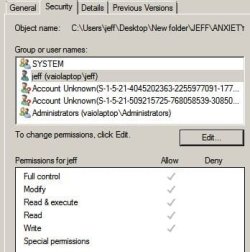
I`m sure it has something to do with that software you downloaded. Are all permissions checked in the properties of your user account ?
Computer type PC/Desktop Computer Manufacturer/Model Number Skylake Special #666 OS Windows 10 Pro x64 CPU Intel Core i7 6700K Motherboard Asus Sabertooth Z170 Mark 1 Memory GSkill TridentZ RGB 16GB 3600 16-16-16-36 Graphics Card(s) EVGA GTX 980 Ti SC x2 Sound Card Realtek High Definition Monitor(s) Displays AOC G2460PG Screen Resolution 1920 x 1080 144Hz Hard Drives Samsung 860 Pro 256GB, Seagate Barracuda 4TB x2 PSU EVGA 1000 P2, EVGA White Custom Braided Cables Case Corsair Vengeance C70 Gunmetal Black Cooling Corsair H100i v2, Corsair ML120 x2, Thermal Grizzly Kryonaut Keyboard Logitech G910 Orion Spectrum Mouse Logitech G700s Internet Speed Verizon Fios Quantum Gateway 75/75 Antivirus Windows Defender, Malwarebytes Free 3.8.3 Browser Chrome Other Info Corsair SP120 x4, LG Blu-ray Drive, Durabrand HT-395 100 Watt Dolby Digital Amp, Corsair H2100 Wireless 7.1 Headset
New member
Member
VIP
Thread Starter
Looks like it, But I am listed as "system" when I thought I was "jeff" and what are the other two??
Capture.JPG
27 KB
· Views: 1
R.I.P.
Guru
Gold Member
VIP
How many accounts are showing in user accounts ?
Computer type PC/Desktop Computer Manufacturer/Model Number Skylake Special #666 OS Windows 10 Pro x64 CPU Intel Core i7 6700K Motherboard Asus Sabertooth Z170 Mark 1 Memory GSkill TridentZ RGB 16GB 3600 16-16-16-36 Graphics Card(s) EVGA GTX 980 Ti SC x2 Sound Card Realtek High Definition Monitor(s) Displays AOC G2460PG Screen Resolution 1920 x 1080 144Hz Hard Drives Samsung 860 Pro 256GB, Seagate Barracuda 4TB x2 PSU EVGA 1000 P2, EVGA White Custom Braided Cables Case Corsair Vengeance C70 Gunmetal Black Cooling Corsair H100i v2, Corsair ML120 x2, Thermal Grizzly Kryonaut Keyboard Logitech G910 Orion Spectrum Mouse Logitech G700s Internet Speed Verizon Fios Quantum Gateway 75/75 Antivirus Windows Defender, Malwarebytes Free 3.8.3 Browser Chrome Other Info Corsair SP120 x4, LG Blu-ray Drive, Durabrand HT-395 100 Watt Dolby Digital Amp, Corsair H2100 Wireless 7.1 Headset
New member
Member
VIP
Thread Starter
Just admin and guest(off)
R.I.P.
Guru
Gold Member
VIP
Don`t know what those accounts are, but I`m sure they don`t belong.
Computer type PC/Desktop Computer Manufacturer/Model Number Skylake Special #666 OS Windows 10 Pro x64 CPU Intel Core i7 6700K Motherboard Asus Sabertooth Z170 Mark 1 Memory GSkill TridentZ RGB 16GB 3600 16-16-16-36 Graphics Card(s) EVGA GTX 980 Ti SC x2 Sound Card Realtek High Definition Monitor(s) Displays AOC G2460PG Screen Resolution 1920 x 1080 144Hz Hard Drives Samsung 860 Pro 256GB, Seagate Barracuda 4TB x2 PSU EVGA 1000 P2, EVGA White Custom Braided Cables Case Corsair Vengeance C70 Gunmetal Black Cooling Corsair H100i v2, Corsair ML120 x2, Thermal Grizzly Kryonaut Keyboard Logitech G910 Orion Spectrum Mouse Logitech G700s Internet Speed Verizon Fios Quantum Gateway 75/75 Antivirus Windows Defender, Malwarebytes Free 3.8.3 Browser Chrome Other Info Corsair SP120 x4, LG Blu-ray Drive, Durabrand HT-395 100 Watt Dolby Digital Amp, Corsair H2100 Wireless 7.1 Headset
New member
Member
VIP
Thread Starter
How does one get rid of them?
R.I.P.
Guru
Gold Member
VIP
I would try a sytem restore b4 you mess with them.
Sorry but I have to crash
I`ll check your post in the morning.
Computer type PC/Desktop Computer Manufacturer/Model Number Skylake Special #666 OS Windows 10 Pro x64 CPU Intel Core i7 6700K Motherboard Asus Sabertooth Z170 Mark 1 Memory GSkill TridentZ RGB 16GB 3600 16-16-16-36 Graphics Card(s) EVGA GTX 980 Ti SC x2 Sound Card Realtek High Definition Monitor(s) Displays AOC G2460PG Screen Resolution 1920 x 1080 144Hz Hard Drives Samsung 860 Pro 256GB, Seagate Barracuda 4TB x2 PSU EVGA 1000 P2, EVGA White Custom Braided Cables Case Corsair Vengeance C70 Gunmetal Black Cooling Corsair H100i v2, Corsair ML120 x2, Thermal Grizzly Kryonaut Keyboard Logitech G910 Orion Spectrum Mouse Logitech G700s Internet Speed Verizon Fios Quantum Gateway 75/75 Antivirus Windows Defender, Malwarebytes Free 3.8.3 Browser Chrome Other Info Corsair SP120 x4, LG Blu-ray Drive, Durabrand HT-395 100 Watt Dolby Digital Amp, Corsair H2100 Wireless 7.1 Headset



 I`ll check your post in the morning.