Permissions Nightmare

Serexx

New member
Local time
4:29 PM
Messages
8
Greetings - I jumped from XP to W7 and am having real problems getting my system setup because I keep running into permissions problems when trying to install programs.

Latest example: I downloaded RIA Services 1.0 to use with VS 2010 and Silverlight and, despite the fact that I am the only user on the machine, and should therefore be an Administrator and have set "User Control : Behaviour of the Elevation Prompt for Administrators in Admin Approval Mode" to "Elevate Without Prompting" any attempt to install RiaServices.msi is met with a prompt the I need to obtain permission form an Administrator to install the program.

I have also Disabled "User Account Control: Detect Installations and prompt for Elevation" with no apparent effect.

I have also downloaded and installed the 'Take Ownership' Registry patch and used that to no effect.

I would greatly appreciate some help with this, beyond being referred to the overwhelming abundance of tutorials - the truth is I just have not go the cycles to absorb all of that info at the moment - I just need to get this thing installed and running....
 

My Computer

OS
Windows 7
Hello Serexx, welcome to Seven Forums!


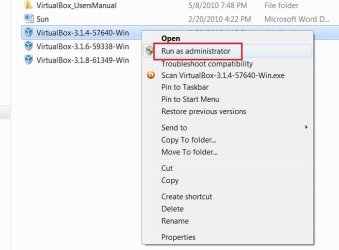
Have a go at running the installer in "Run as Admin ..." right click the installer and select run as, have a look at the snip below; click the image to enlarge; be sure to post back so we know if it'll work for you.

RAA.JPG
 

My Computer

Computer Manufacturer/Model Number
* BFK Customs *
OS
W 7 64-bit Ultimate
CPU
Intel Q9550 Yorkfield
Motherboard
ASUS P5Q Pro
Memory
8GB Dominator 8500C5D
Graphics Card(s)
ATI : XFX 5870
Sound Card
Realtek HD Audio 7-1
Monitor(s) Displays
1x 47" LCD HDMI & 3x 26" LCD HDMI
Screen Resolution
1920x1080P & 1920x1200
Hard Drives
1x 80GB Intel X25-M G2 SSD : 1x 500GB & 1x 640GB WD Caviar Black(s)
PSU
Corsair 620HX
Case
Cooler Master RC-690
Cooling
Tuniq Tower 120, 2x 140mm and 3x 120mm case fans
Keyboard
Microsoft 500
Mouse
Razer Diamondback 3G
Internet Speed
14 Mb/s
Other Info
1x Koutech 3Gb/s SATA HDD Hot Swap Rack
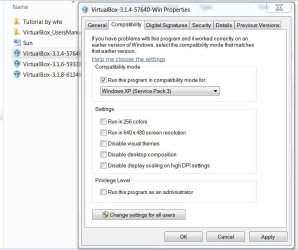
If that doesn't work try installing it in compatiliblity mode with XP, right click the installer and select properties at the bottom of the context menu, then select the "Compatibility" button like in this snip below.

Comp.JPG
 

My Computer

Computer Manufacturer/Model Number
* BFK Customs *
OS
W 7 64-bit Ultimate
CPU
Intel Q9550 Yorkfield
Motherboard
ASUS P5Q Pro
Memory
8GB Dominator 8500C5D
Graphics Card(s)
ATI : XFX 5870
Sound Card
Realtek HD Audio 7-1
Monitor(s) Displays
1x 47" LCD HDMI & 3x 26" LCD HDMI
Screen Resolution
1920x1080P & 1920x1200
Hard Drives
1x 80GB Intel X25-M G2 SSD : 1x 500GB & 1x 640GB WD Caviar Black(s)
PSU
Corsair 620HX
Case
Cooler Master RC-690
Cooling
Tuniq Tower 120, 2x 140mm and 3x 120mm case fans
Keyboard
Microsoft 500
Mouse
Razer Diamondback 3G
Internet Speed
14 Mb/s
Other Info
1x Koutech 3Gb/s SATA HDD Hot Swap Rack
Thanks for both of those -

On the first one - on my system the context (right-click) menu doesn't show "run as" or "Install as" options, there is only "install"

I also tried compaitbility mode "Run this program in compatibility mode for : Previous Version of Windows" (the only option available).. same result - it tells me I must be administrator

Sorry, back to the drawing board....
 

My Computer

OS
Windows 7
You are not the system administrator?
 

My Computer

Computer Manufacturer/Model Number
* BFK Customs *
OS
W 7 64-bit Ultimate
CPU
Intel Q9550 Yorkfield
Motherboard
ASUS P5Q Pro
Memory
8GB Dominator 8500C5D
Graphics Card(s)
ATI : XFX 5870
Sound Card
Realtek HD Audio 7-1
Monitor(s) Displays
1x 47" LCD HDMI & 3x 26" LCD HDMI
Screen Resolution
1920x1080P & 1920x1200
Hard Drives
1x 80GB Intel X25-M G2 SSD : 1x 500GB & 1x 640GB WD Caviar Black(s)
PSU
Corsair 620HX
Case
Cooler Master RC-690
Cooling
Tuniq Tower 120, 2x 140mm and 3x 120mm case fans
Keyboard
Microsoft 500
Mouse
Razer Diamondback 3G
Internet Speed
14 Mb/s
Other Info
1x Koutech 3Gb/s SATA HDD Hot Swap Rack
Serexx, please take a moment to fill out your system specs, please make sure you include the version of Windows 7 you are using (Windows 7 Starter, Home, Professional, Ultimate etc.).

How much tweaking have you done to this system before posting here? If you have done some major changes we may not be able to help you. Once some permissions have been changed or ownership has been taken without full understanding what and how it will impact the system can cause a lot of issues and make it very hard to repair. These changes can give you problems now or will give you many in the future.
 

My Computer

Computer type
PC/Desktop
Computer Manufacturer/Model Number
Dell OP7010
OS
Windows 7 Enterprise (x64); Windows Server 2008 R2 (x64)
Memory
16GB
Monitor(s) Displays
4 Dell 24" LCD
Screen Resolution
1280x1024
Keyboard
Dell
Mouse
Dell Optical
Internet Speed
40meg
thanks - for now I hit the 'aw heck' switch and turned UAC off. With a restart that allowed me to run this particular msi.

Having said that I would like to have UAC back on at some point, so if we can walk through this I would be grateful... here is all the info I have at this point - I have only had the machine for a couple of weeks and have not fiddled much beyond app-based settings.


Windows 7 Pro 64 Bit (OEM From Dell). It is on a two-station Workgroup. In relation to Perms/Ownership I have taken the following steps:

1. Manually "took ownership" of the parent folder and the .msi file itself. That didnt work so

2. downloaded and installed the Microsoft "TakeOwnership" patch (provides 'take ownership' option in r-click menu). Executed on same two objects. No luck so,

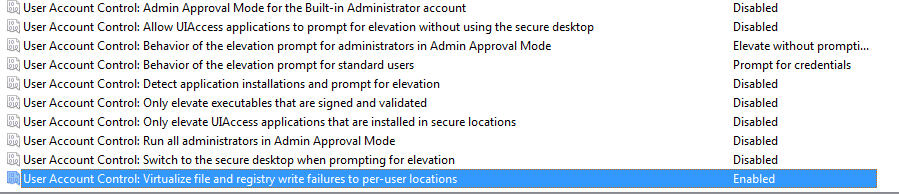
3. In local security policy, local policy, security options, user Acclount Control Settings are as shown on the attached screenshot (let me know if it didnt upload).

4. tried your suggestions (thanks)

5. as mentioned turned UAC Off (slider to the bottom) and rebooted

Hope that helps you help me ;-)

PS - the Administrator account itself is disabled - I may have turned that off when it first arrived, not sure.
 

Attachments

  • UserAccountControlSettings.png
    UserAccountControlSettings.png
    7.6 KB · Views: 10

My Computer

OS
Windows 7

My Computer

Computer Manufacturer/Model Number
* BFK Customs *
OS
W 7 64-bit Ultimate
CPU
Intel Q9550 Yorkfield
Motherboard
ASUS P5Q Pro
Memory
8GB Dominator 8500C5D
Graphics Card(s)
ATI : XFX 5870
Sound Card
Realtek HD Audio 7-1
Monitor(s) Displays
1x 47" LCD HDMI & 3x 26" LCD HDMI
Screen Resolution
1920x1080P & 1920x1200
Hard Drives
1x 80GB Intel X25-M G2 SSD : 1x 500GB & 1x 640GB WD Caviar Black(s)
PSU
Corsair 620HX
Case
Cooler Master RC-690
Cooling
Tuniq Tower 120, 2x 140mm and 3x 120mm case fans
Keyboard
Microsoft 500
Mouse
Razer Diamondback 3G
Internet Speed
14 Mb/s
Other Info
1x Koutech 3Gb/s SATA HDD Hot Swap Rack
PS - two items

just noticed the 'my specs' button on the forums page - here is the output from that:
OS Windows 7 Enterprise (x64)
Memory 8GB
Monitor(s) Displays 2 Dell 19" LCD
Screen Resolution 1280x1024

Keyboard Dell
Mouse Dell Optical
Internet Speed 40meg


2. I also just noticed your question as to whether I was not the Sys Admin - I am the only user on the system so I made the ASSumption that I would be in the Administrators Group but maybe not ....
 

My Computer

OS
Windows 7

My Computer

Computer Manufacturer/Model Number
* BFK Customs *
OS
W 7 64-bit Ultimate
CPU
Intel Q9550 Yorkfield
Motherboard
ASUS P5Q Pro
Memory
8GB Dominator 8500C5D
Graphics Card(s)
ATI : XFX 5870
Sound Card
Realtek HD Audio 7-1
Monitor(s) Displays
1x 47" LCD HDMI & 3x 26" LCD HDMI
Screen Resolution
1920x1080P & 1920x1200
Hard Drives
1x 80GB Intel X25-M G2 SSD : 1x 500GB & 1x 640GB WD Caviar Black(s)
PSU
Corsair 620HX
Case
Cooler Master RC-690
Cooling
Tuniq Tower 120, 2x 140mm and 3x 120mm case fans
Keyboard
Microsoft 500
Mouse
Razer Diamondback 3G
Internet Speed
14 Mb/s
Other Info
1x Koutech 3Gb/s SATA HDD Hot Swap Rack
Hmm, looks like I am Administrator according to the User Account panel... sorry for allt hge sub-posts, I am doing this in between other tasks
 

My Computer

OS
Windows 7
wow, I am not used to such quick responses, I keep missing your posts hehe...

I have some stuff to get done today and tomorrow but when that heat is over I will come back and read the tutorial - if I still I have probs I will post again

Thanks!
 

My Computer

OS
Windows 7
You're welcome, yes, do post back to keep us informed, we'll be here!
 

My Computer

Computer Manufacturer/Model Number
* BFK Customs *
OS
W 7 64-bit Ultimate
CPU
Intel Q9550 Yorkfield
Motherboard
ASUS P5Q Pro
Memory
8GB Dominator 8500C5D
Graphics Card(s)
ATI : XFX 5870
Sound Card
Realtek HD Audio 7-1
Monitor(s) Displays
1x 47" LCD HDMI & 3x 26" LCD HDMI
Screen Resolution
1920x1080P & 1920x1200
Hard Drives
1x 80GB Intel X25-M G2 SSD : 1x 500GB & 1x 640GB WD Caviar Black(s)
PSU
Corsair 620HX
Case
Cooler Master RC-690
Cooling
Tuniq Tower 120, 2x 140mm and 3x 120mm case fans
Keyboard
Microsoft 500
Mouse
Razer Diamondback 3G
Internet Speed
14 Mb/s
Other Info
1x Koutech 3Gb/s SATA HDD Hot Swap Rack
With UAC enabled you might try this with a .MSI file:

  • Open a CMD prompt in Elevated Mode
  • drag the MSI install file into the CMD prompt
  • hit enter
If that doesn't do it add the /a switch to the command line.

MSI files do not have a right click option to run as Administrator

Hope this helps
 

My Computer

Computer type
PC/Desktop
Computer Manufacturer/Model Number
Custom
OS
Windows 7 Ultimate x64
CPU
AMD A10-7850 Quad Core 3.7 GHz
Motherboard
MSI MS-7900
Memory
16 GB
Graphics Card(s)
MSI Radeon R7 250 OC Crossfired with A10 AMD Radeon R7
Monitor(s) Displays
Samsung SyncMaster XL2370HD, ViewSonic VA1912wb
Screen Resolution
1920*1080, 1440*900
Hard Drives
128 GB SSD
512 GB SSD
500 GB HDD
PSU
Corsair CX500
Case
Rosewill THOR V2 BLACK
Keyboard
Logitech G15
Mouse
CMSTORM MS2K
Internet Speed
ATT U-Verse
Antivirus
Microsoft Security Essentials, MalwareBytes
Browser
Firefox (lastest stable) with NoScript
Other Info
Just a humdrum little system.
Back
Top