Solved Permissions on a home media network setup

richgit

New member
Local time
6:30 PM
Messages
4
Hi all, 1st post here!

I've got a home media network setup driven by an HP microserver running win 7 pro 64 and sharing via SMB / windows standard sharing connected via ethernet to my router. It runs no GUI but I can do for administrative purposes.

My main PC (win 7 64) is connected to the same network where I control the copy of new media to the microserver and edit / reorder from time to time.

Other family members access files via laptops / raspberry pi's running raspbmc.

My issue is that to allow access to everyone and maintain my editing capabilities I've had to grant permissions to all sharing folders as 'full control' to 'everyone'. This isn't ideal from a security perspective and ideally want to allow full control to my PC and read only for everyone else.

I have looked everywhere in permissions under new user, group, location and cant see how I add an individual PC within the network, all options seem to relate to users or groups physically on the microserver.

Help!
 

My Computer My Computer

At a glance

Windows 7 Professional 64 bit
Computer type
PC/Desktop
OS
Windows 7 Professional 64 bit
Anyone?
 

My Computer My Computer

At a glance

Windows 7 Professional 64 bit
Computer type
PC/Desktop
OS
Windows 7 Professional 64 bit
Hi all, 1st post here!

I've got a home media network setup driven by an HP microserver running win 7 pro 64 and sharing via SMB / windows standard sharing connected via ethernet to my router. It runs no GUI but I can do for administrative purposes.

My main PC (win 7 64) is connected to the same network where I control the copy of new media to the microserver and edit / reorder from time to time.

Other family members access files via laptops / raspberry pi's running raspbmc.

My issue is that to allow access to everyone and maintain my editing capabilities I've had to grant permissions to all sharing folders as 'full control' to 'everyone'. This isn't ideal from a security perspective and ideally want to allow full control to my PC and read only for everyone else.

I have looked everywhere in permissions under new user, group, location and cant see how I add an individual PC within the network, all options seem to relate to users or groups physically on the microserver.

Help!

There is a way to do what you want but you need to set up a Homegroup on the server machine. Per machine basis this is the only way.

I don't know about your network set up with the raspberry pi's etc. but if they are running Windows then this will work.

If there is some special network arrangement then I won't be able to work around that. This is all what's possible with Windows default sharing and it's very simple. If you don't like Homegroups that's fine, don't bother reading this and never have any type of network security at all. :geek:

Hardly anyone is aware of how useful the Homegroup really is and it's not just for sharing Library's which is what most believe.

Homegroups were created so you can create a Domain within a Workgroup for network security. Otherwise anyone joining a workgroup would have full access to all shared folders, unless you either change the Workgroup name or create a Homegroup which is even more secure because of the extra password required to join the Homegroup.

For this to work you would only add machines to the Homegroup if they require full access. The machines that require partial or only read access are left out of the Homegroup but are still in the common Workgroup.

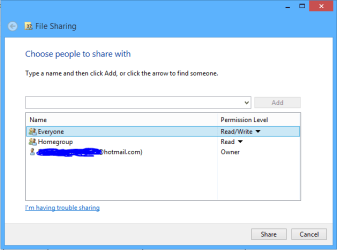
At that point you can use the special Homegroup sharing options to add read only access for Everyone to the Library folders as required. Just right click a Library folder, choose "Share With" then choose "Specific People" then you just need to click the Drop Down menu and hit the Add button, Add Everyone to the Share with list, the Everyone share relates to machines in the Workgroup, adding read access for the Everyone group will give read access to all machines in the Workgroup.

You can also add full access for other Homegroup machines if required.
 

Attachments

  • share with Everyone.PNG
    share with Everyone.PNG
    6.7 KB · Views: 4
Last edited:

My Computer My Computer

At a glance

Windows 7 Ult, Windows 8.1 Pro,Q9650-4.275GHz, E8600 4.5GHz, E6750-3.8GHzG.Skill PC2 9600 1200Mhz 5 5 5 15 2TGTX480
Computer type
PC/Desktop
Computer Manufacturer/Model Number
Home built
OS
Windows 7 Ult, Windows 8.1 Pro,
CPU
Q9650-4.275GHz, E8600 4.5GHz, E6750-3.8GHz
Motherboard
Evga 780i FTW
Memory
G.Skill PC2 9600 1200Mhz 5 5 5 15 2T
Graphics Card(s)
GTX480
Sound Card
Asus Xonar D2
Monitor(s) Displays
HannsG
Screen Resolution
1680X1050
Hard Drives
GSkill Phoenix Pro 120GB SSD
PSU
ThermalTake Toughpower 1000Watt modular
Case
ThermalTake XaserV
Cooling
Xigmatek S1283
Keyboard
Logitech G15
Mouse
Logitech G9
Internet Speed
T1
Ah sorted! Thanks chev65.

Added 'HomeGroup' into the permissions, and read/write and then changed 'everyone' to read only. Now I can edit from the main pc and get all other users to read only.
 

My Computer My Computer

At a glance

Windows 7 Professional 64 bit
Computer type
PC/Desktop
OS
Windows 7 Professional 64 bit
Ah sorted! Thanks chev65.

Added 'HomeGroup' into the permissions, and read/write and then changed 'everyone' to read only. Now I can edit from the main pc and get all other users to read only.

You got it rich, nice work on figuring out my rather over worded explanation as it's really very simple once you get it.

Most people don't realize how useful a Homegroup can be for network security. ;)
 

My Computer My Computer

At a glance

Windows 7 Ult, Windows 8.1 Pro,Q9650-4.275GHz, E8600 4.5GHz, E6750-3.8GHzG.Skill PC2 9600 1200Mhz 5 5 5 15 2TGTX480
Computer type
PC/Desktop
Computer Manufacturer/Model Number
Home built
OS
Windows 7 Ult, Windows 8.1 Pro,
CPU
Q9650-4.275GHz, E8600 4.5GHz, E6750-3.8GHz
Motherboard
Evga 780i FTW
Memory
G.Skill PC2 9600 1200Mhz 5 5 5 15 2T
Graphics Card(s)
GTX480
Sound Card
Asus Xonar D2
Monitor(s) Displays
HannsG
Screen Resolution
1680X1050
Hard Drives
GSkill Phoenix Pro 120GB SSD
PSU
ThermalTake Toughpower 1000Watt modular
Case
ThermalTake XaserV
Cooling
Xigmatek S1283
Keyboard
Logitech G15
Mouse
Logitech G9
Internet Speed
T1
I initially set one up but for some reason it was interfering with my network share to the raspberry pi's (the raspberry pi's are a lightweight front end running Raspbmc (XBMC) for all my media) so I disabled it. For some reason it's all working now so happy days!
 

My Computer My Computer

At a glance

Windows 7 Professional 64 bit
Computer type
PC/Desktop
OS
Windows 7 Professional 64 bit
Back
Top