Permissions on a home network

markaz

New member
Power User
VIP
Local time
6:36 AM
Messages
168
Location
Peoria, AZ
Just purchased a laptop with Win 7 Home Premium 64-bit. I also have a PC with Vista Home Premium.
I set up a home network primarily so that I can access files on the Vista machine wirelessly from my laptop. The Vista machine is hard wired to the router and the laptop utilizes a wireless card. After checking many forums and websites the only way that I have been able to access folders designated for share was to create User accounts (with corresponding passwords) identical to the User accounts for the machine trying to access files and folders. Example, on the Win 7 machine my User name is Mark and is password enabled. I had to set up a user on the Vista machine with the username Mark and the same password. I did the same on the Win 7 machine by creating a User account and password that matches the Vista machine.
This seems ridiculous to me. Shouldn't I be able to set Everyone in the permissions with full control to access files and folders in the network? I did that but kept getting the message that access was denied because of improper permissions. I'd like to remove the extra user accounts from both machines so if someone has a suggestion I would be greatly appreciative.

Thank you in advance.

-Mark
 

My Computer

Computer type
PC/Desktop
Computer Manufacturer/Model Number
Custom
OS
Windows 7 Home Premium x64
CPU
AMD A6-6400K APU
Motherboard
Gigabyte F2A88XM-D3H
Memory
8.0GB DDR3-1600
Graphics Card(s)
Radeon Onboard Graphics
Sound Card
Realtek High Def
Monitor(s) Displays
Acer K242HQL
Screen Resolution
1920x1080
Hard Drives
Samsung 850 EVO SSD 250GB
PSU
Corsair 430W
Case
Silverstone PS-08
Cooling
Enermax fans (120mm-intake, 80mm-exhaust)
Keyboard
Logitech K360
Mouse
Logitech M305 Cordless Optical
Internet Speed
Download 60.19Mbps Upload 6.71Mbps
Antivirus
AVG
Browser
Iron Version 51.0.2700.0 (64-bit)
i'm not sure if this is what you are after, but try:

control panel >> network and sharing center >> change advanced sharing settings >> home or work >> turn off password protected sharing.

i've noticed this setting has a habit of resetting itself sometimes, so make sure it's still off if you notice a problem.

anyone should be able to access shared folders now.
 

My Computer

Computer Manufacturer/Model Number
mickey megabyte 1234
OS
ultimate 64 sp1
CPU
i5 2500K [email protected]
Motherboard
MSI P67A-GD53
Memory
8 gigs GSkill Ripjaws 1600
Graphics Card(s)
amd hd6950
Sound Card
creative x-fi gamer
Monitor(s) Displays
samsung 24"
Screen Resolution
1920x1080
Hard Drives
ocz vertex 2e 60 gig, samsung f3 1tb, buffalo 2tb ext
PSU
antec 550
Case
antec three hundred
Cooling
i'm a cooling fan
Keyboard
saitek eclipse ii
Mouse
logitech g3
Internet Speed
about 4 Mbps
Other Info
i love win7
deleted the user accounts, made sure passwords disabled and gave permissions to everyone. The Win 7 machine is still denied access to the Vista folders.
 

My Computer

Computer type
PC/Desktop
Computer Manufacturer/Model Number
Custom
OS
Windows 7 Home Premium x64
CPU
AMD A6-6400K APU
Motherboard
Gigabyte F2A88XM-D3H
Memory
8.0GB DDR3-1600
Graphics Card(s)
Radeon Onboard Graphics
Sound Card
Realtek High Def
Monitor(s) Displays
Acer K242HQL
Screen Resolution
1920x1080
Hard Drives
Samsung 850 EVO SSD 250GB
PSU
Corsair 430W
Case
Silverstone PS-08
Cooling
Enermax fans (120mm-intake, 80mm-exhaust)
Keyboard
Logitech K360
Mouse
Logitech M305 Cordless Optical
Internet Speed
Download 60.19Mbps Upload 6.71Mbps
Antivirus
AVG
Browser
Iron Version 51.0.2700.0 (64-bit)
ah sorry - i musunderstood your post, and the tip i gave you was to enable the vista machine to read your 7 folders.

you will have to do a similar thing on your vista machine to allow the 7 pc to read it. i have next-to-no experience with vista, so i cannot help you any further.

i'll see if i can get any more help for you.
 

My Computer

Computer Manufacturer/Model Number
mickey megabyte 1234
OS
ultimate 64 sp1
CPU
i5 2500K [email protected]
Motherboard
MSI P67A-GD53
Memory
8 gigs GSkill Ripjaws 1600
Graphics Card(s)
amd hd6950
Sound Card
creative x-fi gamer
Monitor(s) Displays
samsung 24"
Screen Resolution
1920x1080
Hard Drives
ocz vertex 2e 60 gig, samsung f3 1tb, buffalo 2tb ext
PSU
antec 550
Case
antec three hundred
Cooling
i'm a cooling fan
Keyboard
saitek eclipse ii
Mouse
logitech g3
Internet Speed
about 4 Mbps
Other Info
i love win7
Hi

Mickey Megabyte has given the correct solution - you will need to enable sharing also on your Vista PC. If you need further clarification, have a look at this link

Hope this helps and regards
 

My Computer

Computer Manufacturer/Model Number
Custom
OS
Win7 HP (x64)/Win7 Ultimate (x64)
CPU
Core i7 920
Motherboard
Intel X58
Memory
6 x 2GB Corsair XMS3
Graphics Card(s)
CF HD4890
Sound Card
Asus Xonar
Monitor(s) Displays
Dell 2408WFP
Screen Resolution
1920 x 1200
Hard Drives
2 x 150GB WDC Velociraptors (Raid 0)
1 x 1TB Seagate
1 x 1.5TB Seagate
PSU
Corsair HX1000W
Case
Antec 1200
Keyboard
Razer Lycosa/N52te
Mouse
Razer Lachesis
I agree. Mickey's solution is absoutely correct, but that's the problem. I ensured that password was disabled on both machines and that Everyone had full control permission ON BOTH MACHINES, but it fails to allow Win 7 access to the Vista folders. I will check out the link.
Thanks to both for your efforts.
-Mark
 

My Computer

Computer type
PC/Desktop
Computer Manufacturer/Model Number
Custom
OS
Windows 7 Home Premium x64
CPU
AMD A6-6400K APU
Motherboard
Gigabyte F2A88XM-D3H
Memory
8.0GB DDR3-1600
Graphics Card(s)
Radeon Onboard Graphics
Sound Card
Realtek High Def
Monitor(s) Displays
Acer K242HQL
Screen Resolution
1920x1080
Hard Drives
Samsung 850 EVO SSD 250GB
PSU
Corsair 430W
Case
Silverstone PS-08
Cooling
Enermax fans (120mm-intake, 80mm-exhaust)
Keyboard
Logitech K360
Mouse
Logitech M305 Cordless Optical
Internet Speed
Download 60.19Mbps Upload 6.71Mbps
Antivirus
AVG
Browser
Iron Version 51.0.2700.0 (64-bit)
If sharing issues still persist, then the next possible option would be to create appropriate directories and/or move files that you wish to share between the two to the "Public" user on each OS Regards
 

My Computer

Computer Manufacturer/Model Number
Custom
OS
Win7 HP (x64)/Win7 Ultimate (x64)
CPU
Core i7 920
Motherboard
Intel X58
Memory
6 x 2GB Corsair XMS3
Graphics Card(s)
CF HD4890
Sound Card
Asus Xonar
Monitor(s) Displays
Dell 2408WFP
Screen Resolution
1920 x 1200
Hard Drives
2 x 150GB WDC Velociraptors (Raid 0)
1 x 1TB Seagate
1 x 1.5TB Seagate
PSU
Corsair HX1000W
Case
Antec 1200
Keyboard
Razer Lycosa/N52te
Mouse
Razer Lachesis
If sharing issues still persist, then the next possible option would be to create appropriate directories and/or move files that you wish to share between the two to the "Public" user on each OS Regards

Never thought of that! I'll try the more conventional method first, then try this if unsuccessful.

Thanks so much. Nice having a ray of hope for an otherwise confusing situation.

-Mark
 

My Computer

Computer type
PC/Desktop
Computer Manufacturer/Model Number
Custom
OS
Windows 7 Home Premium x64
CPU
AMD A6-6400K APU
Motherboard
Gigabyte F2A88XM-D3H
Memory
8.0GB DDR3-1600
Graphics Card(s)
Radeon Onboard Graphics
Sound Card
Realtek High Def
Monitor(s) Displays
Acer K242HQL
Screen Resolution
1920x1080
Hard Drives
Samsung 850 EVO SSD 250GB
PSU
Corsair 430W
Case
Silverstone PS-08
Cooling
Enermax fans (120mm-intake, 80mm-exhaust)
Keyboard
Logitech K360
Mouse
Logitech M305 Cordless Optical
Internet Speed
Download 60.19Mbps Upload 6.71Mbps
Antivirus
AVG
Browser
Iron Version 51.0.2700.0 (64-bit)
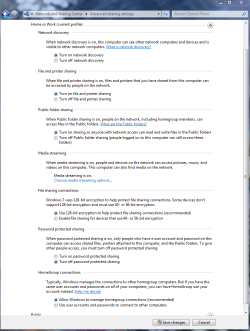
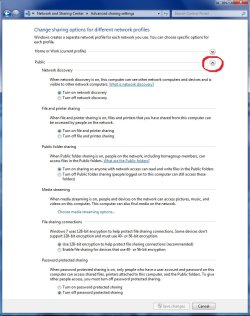
What throws people off is that there are two advanced sharing windows, one for public shares and another for Home-Work sharing. You need to enable sharing on both windows.
 

Attachments

  • Home or work homegroup enable.PNG
    Home or work homegroup enable.PNG
    45 KB · Views: 112
  • public sharing enabled all found.jpg
    public sharing enabled all found.jpg
    91.5 KB · Views: 125

My Computer

Computer type
PC/Desktop
Computer Manufacturer/Model Number
Home built
OS
Windows 7 Ult, Windows 8.1 Pro,
CPU
Q9650-4.275GHz, E8600 4.5GHz, E6750-3.8GHz
Motherboard
Evga 780i FTW
Memory
G.Skill PC2 9600 1200Mhz 5 5 5 15 2T
Graphics Card(s)
GTX480
Sound Card
Asus Xonar D2
Monitor(s) Displays
HannsG
Screen Resolution
1680X1050
Hard Drives
GSkill Phoenix Pro 120GB SSD
PSU
ThermalTake Toughpower 1000Watt modular
Case
ThermalTake XaserV
Cooling
Xigmatek S1283
Keyboard
Logitech G15
Mouse
Logitech G9
Internet Speed
T1
Wait, did the OP change usernames?

Alright, let me check a few things.
1) You are connected to the same network (I know it's a duh thing, but I ask anyways...)
2) You have the network set as a Home Network, not public
3) Open up an explorer window (on both PCs) and click on the Network section. Can you tell us what is there or post a screenie?
4) Make sure that sharing is enabled on the computers and that password sharing is off

What might be confusing is that there are pubic folders and normal folders. You can't usually set up the vista machine to share its home user folders, you will need to either map a network drive (my choice) or use the public folders.

~Lordbob
 

My Computer

Computer Manufacturer/Model Number
Hera
OS
Windows 7 Ultimate x64, Mint 9
CPU
Intel i5-2500k
Motherboard
ASUS P8P67 Pro
Memory
2x 4Gb Corsair VENGEANCE DDR3-1600
Graphics Card(s)
NVidia GeForce N260GTX Twin Frozr
Sound Card
Realtek HD OnBoard Audio
Monitor(s) Displays
ASUS 24" Monitor
Screen Resolution
1920x1080
Hard Drives
G.SKILL Phoenix Series 60GB SATA II MLC Internal Solid State Drive (SSD)
SAMSUNG Spinpoint F3R 1TB 7200 RPM 32MB Cache SATA II
PSU
Cooler Master Real Power Pro 750W
Case
Cooler Master Haf 932
Cooling
Fans
Keyboard
Razer Tarantula
Mouse
Razer Lachesis
Internet Speed
not fast enough
LordBob-
I have to admit ignorance here, what is OP?
I deleted the User accounts that I established on each machine (see my original post) to basically start from scratch.
In answer to your questions:
1) Yes. Both are connected to SissyFire (name of my home network)
2) Both are set to Home (or private) network
3) Here's some screenies labeled with the computer each capture was taken from. Why in the world when I mapped the network on each I came up with those results is beyond me. The last pic is my last attempt to access the Vista computer. I'm sure you' be able to tell anyway, but MARKVISTA=Vista and MARKASUS=Windows 7.
capture6v.jpg

captureqs.jpg

capture2vn.jpg

capture5v.jpg

capture4bn.jpg

capture22d.jpg
 

My Computer

Computer type
PC/Desktop
Computer Manufacturer/Model Number
Custom
OS
Windows 7 Home Premium x64
CPU
AMD A6-6400K APU
Motherboard
Gigabyte F2A88XM-D3H
Memory
8.0GB DDR3-1600
Graphics Card(s)
Radeon Onboard Graphics
Sound Card
Realtek High Def
Monitor(s) Displays
Acer K242HQL
Screen Resolution
1920x1080
Hard Drives
Samsung 850 EVO SSD 250GB
PSU
Corsair 430W
Case
Silverstone PS-08
Cooling
Enermax fans (120mm-intake, 80mm-exhaust)
Keyboard
Logitech K360
Mouse
Logitech M305 Cordless Optical
Internet Speed
Download 60.19Mbps Upload 6.71Mbps
Antivirus
AVG
Browser
Iron Version 51.0.2700.0 (64-bit)
OP = original poster.

Alright, so it appears that you cannot connect to the other computer from either computer?

It looks like it is not registering on the same network for whatever reason. Can you hook them both up wired and see if anything changes?

~Lordbob
 

My Computer

Computer Manufacturer/Model Number
Hera
OS
Windows 7 Ultimate x64, Mint 9
CPU
Intel i5-2500k
Motherboard
ASUS P8P67 Pro
Memory
2x 4Gb Corsair VENGEANCE DDR3-1600
Graphics Card(s)
NVidia GeForce N260GTX Twin Frozr
Sound Card
Realtek HD OnBoard Audio
Monitor(s) Displays
ASUS 24" Monitor
Screen Resolution
1920x1080
Hard Drives
G.SKILL Phoenix Series 60GB SATA II MLC Internal Solid State Drive (SSD)
SAMSUNG Spinpoint F3R 1TB 7200 RPM 32MB Cache SATA II
PSU
Cooler Master Real Power Pro 750W
Case
Cooler Master Haf 932
Cooling
Fans
Keyboard
Razer Tarantula
Mouse
Razer Lachesis
Internet Speed
not fast enough
Could you check if the time/date on both PC's are synchronised? Regards
 

My Computer

Computer Manufacturer/Model Number
Custom
OS
Win7 HP (x64)/Win7 Ultimate (x64)
CPU
Core i7 920
Motherboard
Intel X58
Memory
6 x 2GB Corsair XMS3
Graphics Card(s)
CF HD4890
Sound Card
Asus Xonar
Monitor(s) Displays
Dell 2408WFP
Screen Resolution
1920 x 1200
Hard Drives
2 x 150GB WDC Velociraptors (Raid 0)
1 x 1TB Seagate
1 x 1.5TB Seagate
PSU
Corsair HX1000W
Case
Antec 1200
Keyboard
Razer Lycosa/N52te
Mouse
Razer Lachesis
Problem solved.


I will need someone to explain why the problem was solved, but here’s what I did. Lordbob asked me to post a screenshot of both computers with Explorer open to see what was showing. I opened Explorer in each (but didn’t make a screenie!) and what showed were markedly different. On the Vista machine MARKVISTA showed the following shares: hard drive, Users, Public, Documents, Pictures and a private folder with personal information. The Windows 7 machine showed the following: hard drive and Users only.


I decided to start from scratch by deleting Users accounts other than the Adm, of course, and remove any shares other than the ones shown in the link provided by Lomai. I deleted all except the hard drives, Users and in the Vista machine, the Public folder. Made sure that password protection was off for both the Vista and Windows 7 machines. I restarted both and voila! Connection and full access to both computers.


For whatever reason the additional shared folders in Vista (even though the proper permissions were granted) were preventing access to the Vista computer. The only thing I can think of is that the additional folders were redundant because they could be accessed in the Users folder. So why this would prevent access to the Vista machine, I don’t know, but if someone could provide an explanation, that would be appreciated.


I want to thank everyone for their help, especially Lordbob and Lomai.


Lordbob – You’re right about the username change. I need to delete the 127markaz account as it was set up with the new laptop while away from home because I’d forgotten I had an account in Sevenforum.com. I thought that account was only in VistaForums (Vistax64.com).
 

My Computer

Computer type
PC/Desktop
Computer Manufacturer/Model Number
Custom
OS
Windows 7 Home Premium x64
CPU
AMD A6-6400K APU
Motherboard
Gigabyte F2A88XM-D3H
Memory
8.0GB DDR3-1600
Graphics Card(s)
Radeon Onboard Graphics
Sound Card
Realtek High Def
Monitor(s) Displays
Acer K242HQL
Screen Resolution
1920x1080
Hard Drives
Samsung 850 EVO SSD 250GB
PSU
Corsair 430W
Case
Silverstone PS-08
Cooling
Enermax fans (120mm-intake, 80mm-exhaust)
Keyboard
Logitech K360
Mouse
Logitech M305 Cordless Optical
Internet Speed
Download 60.19Mbps Upload 6.71Mbps
Antivirus
AVG
Browser
Iron Version 51.0.2700.0 (64-bit)
Not entirely sure why that was a problem, but I am glad that fixed it. Probably had an issue with Permissions and sharing, which resetting cleared up.

~Lordbob
 

My Computer

Computer Manufacturer/Model Number
Hera
OS
Windows 7 Ultimate x64, Mint 9
CPU
Intel i5-2500k
Motherboard
ASUS P8P67 Pro
Memory
2x 4Gb Corsair VENGEANCE DDR3-1600
Graphics Card(s)
NVidia GeForce N260GTX Twin Frozr
Sound Card
Realtek HD OnBoard Audio
Monitor(s) Displays
ASUS 24" Monitor
Screen Resolution
1920x1080
Hard Drives
G.SKILL Phoenix Series 60GB SATA II MLC Internal Solid State Drive (SSD)
SAMSUNG Spinpoint F3R 1TB 7200 RPM 32MB Cache SATA II
PSU
Cooler Master Real Power Pro 750W
Case
Cooler Master Haf 932
Cooling
Fans
Keyboard
Razer Tarantula
Mouse
Razer Lachesis
Internet Speed
not fast enough
Thanks for posting your solution.

Regards
 

My Computer

Computer Manufacturer/Model Number
Custom
OS
Win7 HP (x64)/Win7 Ultimate (x64)
CPU
Core i7 920
Motherboard
Intel X58
Memory
6 x 2GB Corsair XMS3
Graphics Card(s)
CF HD4890
Sound Card
Asus Xonar
Monitor(s) Displays
Dell 2408WFP
Screen Resolution
1920 x 1200
Hard Drives
2 x 150GB WDC Velociraptors (Raid 0)
1 x 1TB Seagate
1 x 1.5TB Seagate
PSU
Corsair HX1000W
Case
Antec 1200
Keyboard
Razer Lycosa/N52te
Mouse
Razer Lachesis
Don't you just long for the basics?
Being an old school NT MCSE where my fundamentals were taught ~ I unfortunately always try to reduce to the basic principles of security.
The wizards and 'help' screens are either too confusing or redundant.
Anyway ~ for me anyway ~ translating to the basic principles get the networking done.
Not much specific help on the current problem but it is how I generally handle it.
 

My Computer

OS
Windows 7 Pro 64
Back
Top