Permissions

huffman

New member
Pro User
Local time
2:34 PM
Messages
715
When I use PaintShop Pro to edit an image, I get the following caution when I try to save it.

permission.jpg

I have taken ownership of all the files for my images but I don't understand how to get permission for files and directories.

At any rate it will not save when I edit an image.

How do I go about getting permission in this case?
 

My Computer

OS
Windows 7 Pro
CPU
Intel(R) Pentium(R) Duel CPU E2200 2.20 Ghz
Motherboard
GA-G41M-ES2L
Memory
4 gb 2.96 Usable
Graphics Card(s)
Onboard
Sound Card
Onboard
Hard Drives
2 - 1TB WD Sata Drives
Hi huffman, Generally that error means that the file you are trying to edit is not in a folder you have permission to write to. Does this happen on all images?

Few things to try:
1.Right Click the image you want to edit>Properties>permissions>everyone>full access>allow
2.download this:http://www.sevenforums.com/tutorials/1911-take-ownership-shortcut.html take ownership of the file, then do the above steps.
3.Run PSP as Administrator (NOT recommended)
 

My Computer

Computer type
PC/Desktop
Computer Manufacturer/Model Number
Medion Erazer (note to self: insert model number) - with custom additions
OS
Windows 10 Pro x64
CPU
Intel Core i5 7400 @ 3.00GHz
Motherboard
OEM supllied with PC
Memory
8GB 2133Mhz DDR4 (OEM supplied)
Graphics Card(s)
Gygabyte Windforce GTX 1050Ti (Factory Overclocked)
Sound Card
Realtek
Monitor(s) Displays
Acer Al1980 + HKC
Screen Resolution
1360*768(HKC) / 1280*1024(Acer)
Hard Drives
1TB Toshiba
1TB WD Caviar Green
120GB Samsung Evo 840
PSU
OEM supplied (no power rating on case)
Case
OEM Supplied
Cooling
Stock
Keyboard
Logitech Wireless
Mouse
Logitect Wireless
Internet Speed
40Mb/s Down 10Mb/s Up
Antivirus
Defender
Browser
Firefox
Thanks for the response severedsolo.

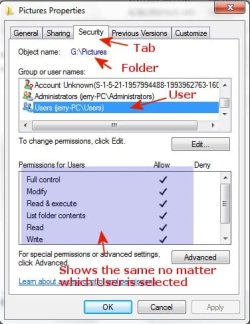
I had already taken ownership of the folder G/Pictures. From the below image this is what I had done:

permissions.jpg

First let me say within the folder G/Pictures, there are 41 subfolders of images collected or the last 15 years. Some are from photoes I have taken and others are images from the internet. I have no idea exactly how many images there actually are (thousands to say the least).

I had set the permissions for every category of user to maximum permission within G/Pictures. I had thought that would give me permissions for all the subfolders and images. I guess that is NOT true.

After reading your response I went back and gave the maximum permission for the particular folder I was using at the time. That seems to have done the trick. I can now edit and save any image within that folder.

I also think that the version of PSP I am using is part of the problem. It is an older version of PSP that is not really compatible with Win 7 although it seems work fine. I can NOT run it as the Administrator even if I wanted.

To sum it up, I may have to give permission to each of the folders within G/Pictures if I want to edit them. At least for the time being what I want to do is working.

Thank you again.
 

My Computer

OS
Windows 7 Pro
CPU
Intel(R) Pentium(R) Duel CPU E2200 2.20 Ghz
Motherboard
GA-G41M-ES2L
Memory
4 gb 2.96 Usable
Graphics Card(s)
Onboard
Sound Card
Onboard
Hard Drives
2 - 1TB WD Sata Drives
Your welcome :) Incidentally, somewhere in the permissions (under advanced probably) there should be a button that says "apply to all subfolders"

If PSP is not really compatible with Win 7, is XP Mode not an option for you?
 

My Computer

Computer type
PC/Desktop
Computer Manufacturer/Model Number
Medion Erazer (note to self: insert model number) - with custom additions
OS
Windows 10 Pro x64
CPU
Intel Core i5 7400 @ 3.00GHz
Motherboard
OEM supllied with PC
Memory
8GB 2133Mhz DDR4 (OEM supplied)
Graphics Card(s)
Gygabyte Windforce GTX 1050Ti (Factory Overclocked)
Sound Card
Realtek
Monitor(s) Displays
Acer Al1980 + HKC
Screen Resolution
1360*768(HKC) / 1280*1024(Acer)
Hard Drives
1TB Toshiba
1TB WD Caviar Green
120GB Samsung Evo 840
PSU
OEM supplied (no power rating on case)
Case
OEM Supplied
Cooling
Stock
Keyboard
Logitech Wireless
Mouse
Logitect Wireless
Internet Speed
40Mb/s Down 10Mb/s Up
Antivirus
Defender
Browser
Firefox
there should be a button that says "apply to all subfolders"


Thanks again I will keep that in mind.
 

My Computer

OS
Windows 7 Pro
CPU
Intel(R) Pentium(R) Duel CPU E2200 2.20 Ghz
Motherboard
GA-G41M-ES2L
Memory
4 gb 2.96 Usable
Graphics Card(s)
Onboard
Sound Card
Onboard
Hard Drives
2 - 1TB WD Sata Drives
Older versions of PSP will have problems with Win 7, I found that, so I upgraded to PaintShopPro X2.

Works perfect.

Theres an X3 out now.
 

My Computer

Computer Manufacturer/Model Number
Home build.
OS
Vista Ultimate 32 bit, Win 7 Pro 32 bit, Win 7 Pro 64 bit
CPU
Intel i5 CPU 750 @ 2.67 GHZ, OC 3.7 GHZ
Motherboard
Asus P7P55D
Memory
4 Gig
Graphics Card(s)
Nvidia GeForce GTS450
Monitor(s) Displays
Acer 24"
Screen Resolution
1440 x 900
Hard Drives
1000 GIG
1000 GIG
PSU
650
Case
Antec Nine Hundred Two
Internet Speed
14 MB (APPROX)
Back
Top