Solved Persistent double entry in Explorer's Open With rightclick menu

ToughDiamond

New member
Member
VIP
Local time
10:33 PM
Messages
125
When I rightclick a .txt file in Explorer and go to Open With, there are 2 entries for NotePad. I've tried deleting the registry key in here:


Computer/HKEY_CURRENT_USER\Software\Microsoft\Windows\CurrentVersion\Explorer\FileExts\,txt\OpenWithList


but it made no difference. Anybody know how to fix this? Frankly I'm baffled as to why removing it from the registry had no effect.
 

My Computer

Computer type
Laptop
Computer Manufacturer/Model Number
HP Probook
OS
Win 7 Pro 32-bit

My Computer

Computer type
PC/Desktop
Computer Manufacturer/Model Number
Self built custom
OS
64-bit Windows 11 Pro for Workstations
CPU
Intel i7-8700K OC'd to 5 GHz
Motherboard
ASUS ROG Maximus XI Formula Z390
Memory
64 GB (4x16GB) G.SKILL TridentZ RGB DDR4 3600 MHz
Graphics Card(s)
ASUS ROG-STRIX-GTX1080TI-O11G-GAMING
Sound Card
Integrated
Monitor(s) Displays
2 x Samsung Odyssey G7 27"
Screen Resolution
2560x1440
Hard Drives
1TB Samsung 990 PRO M.2,
4TB Samsung 990 PRO PRO M.2,
TerraMaster F8 SSD Plus NAS
PSU
Seasonic Prime Titanium 850W
Case
Thermaltake Core P3
Cooling
Corsair Hydro H115i
Keyboard
Logitech wireless K800
Mouse
Logitech MX Master 4
Internet Speed
2 Gb/s Download and 100 Mb/s Upload
Antivirus
Malwarebyte Anti-Malware Premium
Browser
Google Chrome
Other Info
Logitech Z625 speaker system,
Logitech BRIO 4K Pro webcam,
HP Color LaserJet Pro MFP M477fdn,
APC SMART-UPS RT 1000 XL - SURT1000XLI,
Galaxy S23 Plus phone
Thanks, Brink. I tried that, and sure enough it removed one of the double entries from the .txt menu. But the trouble is, it also removed the NotePad entry from the menu of all other filetypes, such as .doc, .rtf, .m3u etc. (unlike the .txt case, these weren't double entries before). The program OpenWithView doesn't allow the user to disable menu items for a specific filetype, it's all-or-nothing.

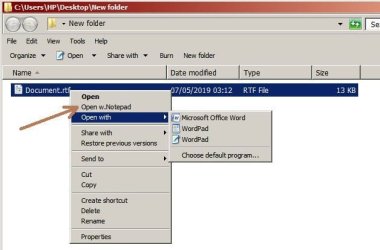
So to get the functionality back for those other filetypes, I've used another free program called Default Programs Editor to add an entry for NotePad to the main rightclick menu (not the Open With list - Default Programs Editor doesn't seem to know that exists). See picture. Not a perfect solution, but I guess functionally it'll work.
 

Attachments

  • RightClick.jpg
    RightClick.jpg
    38.6 KB · Views: 16

My Computer

Computer type
Laptop
Computer Manufacturer/Model Number
HP Probook
OS
Win 7 Pro 32-bit

My Computer

Computer type
PC/Desktop
Computer Manufacturer/Model Number
Self built custom
OS
64-bit Windows 11 Pro for Workstations
CPU
Intel i7-8700K OC'd to 5 GHz
Motherboard
ASUS ROG Maximus XI Formula Z390
Memory
64 GB (4x16GB) G.SKILL TridentZ RGB DDR4 3600 MHz
Graphics Card(s)
ASUS ROG-STRIX-GTX1080TI-O11G-GAMING
Sound Card
Integrated
Monitor(s) Displays
2 x Samsung Odyssey G7 27"
Screen Resolution
2560x1440
Hard Drives
1TB Samsung 990 PRO M.2,
4TB Samsung 990 PRO PRO M.2,
TerraMaster F8 SSD Plus NAS
PSU
Seasonic Prime Titanium 850W
Case
Thermaltake Core P3
Cooling
Corsair Hydro H115i
Keyboard
Logitech wireless K800
Mouse
Logitech MX Master 4
Internet Speed
2 Gb/s Download and 100 Mb/s Upload
Antivirus
Malwarebyte Anti-Malware Premium
Browser
Google Chrome
Other Info
Logitech Z625 speaker system,
Logitech BRIO 4K Pro webcam,
HP Color LaserJet Pro MFP M477fdn,
APC SMART-UPS RT 1000 XL - SURT1000XLI,
Galaxy S23 Plus phone
I tried that - Open With > Choose Default Program > Browse. It opened in NotePad at the time, but didn't add it to the list. :( It won't appear in the Recommended Programs / Other Programs lists either.
 

My Computer

Computer type
Laptop
Computer Manufacturer/Model Number
HP Probook
OS
Win 7 Pro 32-bit
That is odd.
 

My Computer

Computer type
PC/Desktop
Computer Manufacturer/Model Number
Self built custom
OS
64-bit Windows 11 Pro for Workstations
CPU
Intel i7-8700K OC'd to 5 GHz
Motherboard
ASUS ROG Maximus XI Formula Z390
Memory
64 GB (4x16GB) G.SKILL TridentZ RGB DDR4 3600 MHz
Graphics Card(s)
ASUS ROG-STRIX-GTX1080TI-O11G-GAMING
Sound Card
Integrated
Monitor(s) Displays
2 x Samsung Odyssey G7 27"
Screen Resolution
2560x1440
Hard Drives
1TB Samsung 990 PRO M.2,
4TB Samsung 990 PRO PRO M.2,
TerraMaster F8 SSD Plus NAS
PSU
Seasonic Prime Titanium 850W
Case
Thermaltake Core P3
Cooling
Corsair Hydro H115i
Keyboard
Logitech wireless K800
Mouse
Logitech MX Master 4
Internet Speed
2 Gb/s Download and 100 Mb/s Upload
Antivirus
Malwarebyte Anti-Malware Premium
Browser
Google Chrome
Other Info
Logitech Z625 speaker system,
Logitech BRIO 4K Pro webcam,
HP Color LaserJet Pro MFP M477fdn,
APC SMART-UPS RT 1000 XL - SURT1000XLI,
Galaxy S23 Plus phone
Odd, yes. I guess it could be something to do with my removal of that registry key, but a) I foolishly didn't create a backup, so can't easily put it back, and b) I'm sure I remember seeing the Choose Default Program option behave like that once before, long before I ever messed with the registry. I can't remember the outcome, or which particular filetype was causing the trouble.
 

My Computer

Computer type
Laptop
Computer Manufacturer/Model Number
HP Probook
OS
Win 7 Pro 32-bit
Interesting - I thought I'd try re-enabling NotePad in OpenWithView. The result is that NotePad now appears again in the OpenWith menu, and the pesky double entry in the menu for .txt files hasn't returned. Time will tell whether all is good for all filetypes, but it's looking good so far.


There's a few things I don't understand:
1. Why did NotePad have a double entry in the first place?

2. Why didn't deleting the registry key have any noticeable effect?
3. Why did disabling NotePad in OpenWithView not simply remove NotePad from the OpenWith menu for all filetypes?
4. Why did the author of OpenWithView make it a global thing rather than allowing the user to specify the filetype they wanted to alter? Surely most users would want to disable an app for just one filetype, not all of them?

5. Why didn't the NotePad double entry not come back after re-enabling NotePad in OpenWithView?


Not that I'm complaining - at least everything seems to be working again. Wouldn't be the first time there was something about Windows I haven't understood. :D
 

My Computer

Computer type
Laptop
Computer Manufacturer/Model Number
HP Probook
OS
Win 7 Pro 32-bit
Q1-3) It may have been added by some program?

Q4) That would make a good feature.

Q5) Clearing the item may have cleared and reset it, so adding it back only restored the default item.
 

My Computer

Computer type
PC/Desktop
Computer Manufacturer/Model Number
Self built custom
OS
64-bit Windows 11 Pro for Workstations
CPU
Intel i7-8700K OC'd to 5 GHz
Motherboard
ASUS ROG Maximus XI Formula Z390
Memory
64 GB (4x16GB) G.SKILL TridentZ RGB DDR4 3600 MHz
Graphics Card(s)
ASUS ROG-STRIX-GTX1080TI-O11G-GAMING
Sound Card
Integrated
Monitor(s) Displays
2 x Samsung Odyssey G7 27"
Screen Resolution
2560x1440
Hard Drives
1TB Samsung 990 PRO M.2,
4TB Samsung 990 PRO PRO M.2,
TerraMaster F8 SSD Plus NAS
PSU
Seasonic Prime Titanium 850W
Case
Thermaltake Core P3
Cooling
Corsair Hydro H115i
Keyboard
Logitech wireless K800
Mouse
Logitech MX Master 4
Internet Speed
2 Gb/s Download and 100 Mb/s Upload
Antivirus
Malwarebyte Anti-Malware Premium
Browser
Google Chrome
Other Info
Logitech Z625 speaker system,
Logitech BRIO 4K Pro webcam,
HP Color LaserJet Pro MFP M477fdn,
APC SMART-UPS RT 1000 XL - SURT1000XLI,
Galaxy S23 Plus phone
The only thing I've used that's known to alter the filetypes is DefaultProgramsEditor, which doesn't let me alter the OpenWith menu. Can't rule out mischief by some program or other quietly changing it, though I can't think what.


Yes what I didn't realise about OpenWithView is that re-enabling an app after disabling it is probably an important step when using it.
 

My Computer

Computer type
Laptop
Computer Manufacturer/Model Number
HP Probook
OS
Win 7 Pro 32-bit
A further observation - I eventually restored my computer to a system image made before the Open With problem had been solved, so I had to do the fix again. Result was that it didn't initially work. Same problem as before - when I disabled NotePad with OpenWithView, one of the 2 entries for .txt files was removed but there was no NotePad entry at all for other apps that I like to open with NotePad, and subsequent re-enabling just reverted to the double entry problem. I rebooted after each operations just to be sure. . Then, mysteriously, after going round in such circles 2 or 3 times, everything suddenly went right again :-o I've created a new system image so I don't have to go through that process again.
 

My Computer

Computer type
Laptop
Computer Manufacturer/Model Number
HP Probook
OS
Win 7 Pro 32-bit
Very odd, but smart thinking.
 

My Computer

Computer type
PC/Desktop
Computer Manufacturer/Model Number
Self built custom
OS
64-bit Windows 11 Pro for Workstations
CPU
Intel i7-8700K OC'd to 5 GHz
Motherboard
ASUS ROG Maximus XI Formula Z390
Memory
64 GB (4x16GB) G.SKILL TridentZ RGB DDR4 3600 MHz
Graphics Card(s)
ASUS ROG-STRIX-GTX1080TI-O11G-GAMING
Sound Card
Integrated
Monitor(s) Displays
2 x Samsung Odyssey G7 27"
Screen Resolution
2560x1440
Hard Drives
1TB Samsung 990 PRO M.2,
4TB Samsung 990 PRO PRO M.2,
TerraMaster F8 SSD Plus NAS
PSU
Seasonic Prime Titanium 850W
Case
Thermaltake Core P3
Cooling
Corsair Hydro H115i
Keyboard
Logitech wireless K800
Mouse
Logitech MX Master 4
Internet Speed
2 Gb/s Download and 100 Mb/s Upload
Antivirus
Malwarebyte Anti-Malware Premium
Browser
Google Chrome
Other Info
Logitech Z625 speaker system,
Logitech BRIO 4K Pro webcam,
HP Color LaserJet Pro MFP M477fdn,
APC SMART-UPS RT 1000 XL - SURT1000XLI,
Galaxy S23 Plus phone
Back
Top