Solved Persistent group update failures

markg2

New member
Member
VIP
Local time
9:24 AM
Messages
477
Win7 Professional 64

Received the machine several days ago. After ~the 3rd series of updates a group of ~20 updates failed. On subsequent updates the system would locate and attempt to install and fail the same update group.

Subsequently, when soft or hard booting the machine seems to install updates (even if I haven't requested), once approximating the login screen the machine reboots, reverts all the updates and comes back to the login screen.

When this first occured I checked the first several updates using the MS onboard update error determinator. However, the errors for those several were not a member of the MS list so I stopped checking.

I suspect this problem isn't with the individual updates but with the OS record keeping for this stuff?

I'm posting a screen shot of the update history. I haven't checked the listing yet but I'm fairly certain there are redundancies for boot dates since, as previously mentioned, updates now try and install/revert each boot?

Mark
 

My Computer

Computer type
PC/Desktop
OS
Windows 7 & Windows 10

My Computer

Computer type
Laptop
Computer Manufacturer/Model Number
Asus K52F or Lenovo B51-80
OS
Win 7 x64 Home Premium (and x86 VirtualBox VM)/Win10
CPU
i3 370M/i7 6500U
Motherboard
Asus/Lenovo
Memory
8GB - finally :)/8GB
Graphics Card(s)
it's an i3, dude!/dual Intel&nVidia
Sound Card
onboard
Monitor(s) Displays
15.6" built-in
Screen Resolution
1366x768/1920x1080
Hard Drives
750GB Seagate internal
Sundry external drives attached to other computers on the local network
1TB SSD on the Lenovo
PSU
n/a
Internet Speed
as much as I can get - usually on a dongle/phone, so <1MB/s
Antivirus
MSE/Defender
Browser
IE11/12/Edge/Chrome/FF(if I must)
1. Ran Fix iT--2 'fixed', all failed on install/boot

2. Ran Fix iT a second time--3 'fixed', all failed on install/boot

I'm actually writing not about the above but the next step--SURT. At the risk of appearing a complete dunce... the instructions are clear: download (either run or save and I tried both) and install. Then the instructions say to leave it run and leave it alone and if it appears to hang...hang in there etc.

So after I install the file--which has the installing appearance of any OS update (system update readiness tool Hotfix KB947821-V25) that's the last I see of anything on the screen. How can something appear to hang if there's zero visible on the screen?

Mark
 

My Computer

Computer type
PC/Desktop
OS
Windows 7 & Windows 10
There is no 'fixit' in the intructions - please follow them!
 

My Computer

Computer type
Laptop
Computer Manufacturer/Model Number
Asus K52F or Lenovo B51-80
OS
Win 7 x64 Home Premium (and x86 VirtualBox VM)/Win10
CPU
i3 370M/i7 6500U
Motherboard
Asus/Lenovo
Memory
8GB - finally :)/8GB
Graphics Card(s)
it's an i3, dude!/dual Intel&nVidia
Sound Card
onboard
Monitor(s) Displays
15.6" built-in
Screen Resolution
1366x768/1920x1080
Hard Drives
750GB Seagate internal
Sundry external drives attached to other computers on the local network
1TB SSD on the Lenovo
PSU
n/a
Internet Speed
as much as I can get - usually on a dongle/phone, so <1MB/s
Antivirus
MSE/Defender
Browser
IE11/12/Edge/Chrome/FF(if I must)
I beg your pardon. The 1st message, the one atop the linked page states (by you): miko - please start a new thread of your own in teh main foum, and post details of your problem there, together with your CBS.data.

http://windows.microsoft.com/is-IS/w...2f-or-c80003fa may help

AFTER I tried that link I moved down the page, continuing to follow instructions (the page to which you linked). The results of which, or lack of, I stated in my previous reply. For whatever reason, there's no image-dialogue box-program-or otherwise object to watch or see after following the instructions to download and install for the SURT application. Post install, the desktop is bereft of anything but blue and icons.
 

My Computer

Computer type
PC/Desktop
OS
Windows 7 & Windows 10
PLEASE follow the instructions in the lead post - not the responses to follow-ups
 

My Computer

Computer type
Laptop
Computer Manufacturer/Model Number
Asus K52F or Lenovo B51-80
OS
Win 7 x64 Home Premium (and x86 VirtualBox VM)/Win10
CPU
i3 370M/i7 6500U
Motherboard
Asus/Lenovo
Memory
8GB - finally :)/8GB
Graphics Card(s)
it's an i3, dude!/dual Intel&nVidia
Sound Card
onboard
Monitor(s) Displays
15.6" built-in
Screen Resolution
1366x768/1920x1080
Hard Drives
750GB Seagate internal
Sundry external drives attached to other computers on the local network
1TB SSD on the Lenovo
PSU
n/a
Internet Speed
as much as I can get - usually on a dongle/phone, so <1MB/s
Antivirus
MSE/Defender
Browser
IE11/12/Edge/Chrome/FF(if I must)
Look--this IS the instruction: "
1. System Update Readiness Tool (SURT)


  1. Under the For Windows 7, Windows Vista, and Windows Server 2008 header, click on Method 2 to view the instructions relevant for your computer.

    System Update Readiness Tool fixes Windows Update errors in Windows 8, Windows 7, Windows Vista, Windows Server 2008 R2, and Windows Server 2008

  2. Download the appropriate version of the SURT and save the file to your Desktop.
  3. Double-click on the file to install it.
  4. Leave it to run uninterrupted. It may appear to freeze or hang, but this is perfectly normal. If it still hasn't finished after a few hours, then notify us in your post.


I've now stated 3 times what (doesn't) happen when I run the download.


So you can either answer this specific question/problem that I've repeatedly asked and we can move forward or we can both find something else more constructive to do with our time.
 

My Computer

Computer type
PC/Desktop
OS
Windows 7 & Windows 10
If you cannot follow the instructions, or provide proper data, there is very little that we can do for you in this forum.

You have NOT stated exactly what happens when you attempt to run teh CheckSUR tool
You have NOT posted any of the requested data
You have NOT told us anything beyond the minimal dat in yuor first post - instead you seem to have wandered off into a world of your own.
 

My Computer

Computer type
Laptop
Computer Manufacturer/Model Number
Asus K52F or Lenovo B51-80
OS
Win 7 x64 Home Premium (and x86 VirtualBox VM)/Win10
CPU
i3 370M/i7 6500U
Motherboard
Asus/Lenovo
Memory
8GB - finally :)/8GB
Graphics Card(s)
it's an i3, dude!/dual Intel&nVidia
Sound Card
onboard
Monitor(s) Displays
15.6" built-in
Screen Resolution
1366x768/1920x1080
Hard Drives
750GB Seagate internal
Sundry external drives attached to other computers on the local network
1TB SSD on the Lenovo
PSU
n/a
Internet Speed
as much as I can get - usually on a dongle/phone, so <1MB/s
Antivirus
MSE/Defender
Browser
IE11/12/Edge/Chrome/FF(if I must)
Let me be clear on something--- is the following not the 1st instruction on the linked page to provide the necessary data for analysis of the problem?:

1. System Update Readiness Tool (SURT)


  1. Under the For Windows 7, Windows Vista, and Windows Server 2008 header, click on Method 2 to view the instructions relevant for your computer.

    System Update Readiness Tool fixes Windows Update errors in Windows 8, Windows 7, Windows Vista, Windows Server 2008 R2, and Windows Server 2008

  2. Download the appropriate version of the SURT and save the file to your Desktop.
  3. Double-click on the file to install it.
  4. Leave it to run uninterrupted. It may appear to freeze or hang, but this is perfectly normal. If it still hasn't finished after a few hours, then notify us in your post.
 

My Computer

Computer type
PC/Desktop
OS
Windows 7 & Windows 10
What update error do you get?
 

My Computer

Computer type
PC/Desktop
Computer Manufacturer/Model Number
Home Built Desktop By DataTech
OS
Windows 7 Ultimate X64 SP1
CPU
Intel i5-2550K, Differing ~4.4-4.8GHz No built in GPU
Motherboard
ASUS P8Z68-V PRO/GEN3
Memory
16GB G.Skill Sniper 1866MHz @ 2133MHz 2x8GB
Graphics Card(s)
ASUS GTX650TIB-DC2OC-2GD5, (650TI Boost)
Sound Card
Onboard Realtek 5-1
Monitor(s) Displays
Samsung P2570HD
Screen Resolution
1920x1080
Hard Drives
Samsung 840 Pro 256GB SSD for OS, 500GB Seagate Constellation (Enterprise drive) for Data
PSU
Corsair HX650W
Case
Inwin Dragon Rider
Cooling
Hyper 212 EVO w/two Noctua fans, push-pull, @1300 RPM
Keyboard
E-Z Eyes, bright yellow keys with large characters
Mouse
steelseries SENSEI Laser Pro Gaming
Internet Speed
48-51Mbs Mbs down, 11 Mbs up Xfinity Cable
Antivirus
Norton Internet Security 2013
Browser
IE 10, Opera, Pale Moon if needed
Other Info
4 case fans, LG BluRay-RE, ASUS DVD-RW, Mr. Fusion power supply, 1.21 gigawatts.
Hi markg2 their is a step #5 that will post logs and information that is necessary. Sometime printing out the instructions makes it easier to follow along when you are doing these things.
---------------------------
http://www.sevenforums.com/windows-...4840-windows-update-posting-instructions.html

5. Start a New Thread

Please do not post in another thread saying that you require assistance, it makes things very confusing. If you have a problem that you would like help with, please start a new thread of your own!

Your post should include the error codes from step #3 and the CBS.zip file created in step #4. Here's how to attach it to your post:

Screenshots and Files - Upload and Post in Seven Forums
----------------------------
Notice the darker part of the instruction. The error codes and logs are needed so you can get help.
 

My Computer

Computer type
PC/Desktop
Computer Manufacturer/Model Number
Home made Desktop
OS
Windows 10 Pro. 64/ version 1709 Windows 7 Pro/64
CPU
Intel i7-6800K @ 4.3
Motherboard
ASUS X-99 Deluxe II
Memory
Corsair Platinum 16 gig @2400
Graphics Card(s)
EVGA GTX 1070 OC
Monitor(s) Displays
Asus 27" LED LCD/VE278Q
Screen Resolution
1920-1080 or 1280-720 HDMI
Hard Drives
INTEL SSD 730-240 Gb Sata 3.0/
PSU
EVGA Platium 1200W
Case
Phanteks Luxe Tempered Glass 8 fans/ one radiator
Cooling
XSPC/ Water Cooled CPU
Keyboard
Das 4 Professional
Mouse
Logitech M705/MX Anywhere 2-S
Internet Speed
100 mbits
Antivirus
Microsoft Security Essentials/ Malwarebytes Premium 3.0/ SAS
Browser
I.E. 11 default/Firefox/ ISP Time Warner Cable/Spectrum
Other Info
LG BluRay Burner/
Sound system-KLipsch-THX/
Icy Dock ssd Hot Swap bays.
markg2: are you syaing that SURT will not install (it is an update). I had to read post #3 a few times, buit I think that's what you're trying to tell members who are trying to help you solve the issue.

I know, it's frustrating with the world just having ended and all that... but clear communication is the key to quick resolution. Even then, it might take some time.

Everyone wants the issue solved, so take your time, go step-by step and if something doesn't work-post that, and only that. Try to use terms that coincide with the instructions you are following - all part of communicating the results.

But I think we need to look at Windows Update failing in general, including SURT. If I'm misread your post, then I've wasted some pxels. C'est la vie!

Bill
.
 

My Computer

Computer type
Laptop
Computer Manufacturer/Model Number
HP Pavilion dv6-6c10us
OS
x64 (6.3.9600) Win8.1 Pro & soon dual boot x64 (6.1.7601) Win7_SP1 HomePrem
CPU
AMD A6-3420M APU with Radeon(tm) HD Graphics
Motherboard
Hewlett-Packard 1805
Memory
6.00 GB
Graphics Card(s)
AMD Radeon(TM) HD 6520G
Sound Card
(1) AMD High Definition Audio Device (2) IDT High Definiti
Monitor(s) Displays
HP W2072a 20" LCD (1600 x 900) @ 60 Hz
Screen Resolution
1366 x 768 x 32 bits (4294967296 colors) @ 60 Hz
Hard Drives
ST640LM0 00 HM641JI SATA Disk Device
Keyboard
Logitech k520 wireless KB
Mouse
Logitech m320 wireless mouse (bundled with KB)
Internet Speed
15/5 | 54 MB Wireless 'n'
Antivirus
Realtime: Defender or Avast | On-demand: Malwarebytes, ESET
Browser
IE 11 on Win8, IE 10 on win 7
Other Info
Media: [Gimp, Audacity, VLC] || Comm: [WEmail 2012, Skype] || Productivity: [OpenOffice,| Textpad] || Utils: [Sysinternals, cCleaner, Speccy, Defraggler]
Layback--I understand there are instructions 1-5 and that 5 is a request for the recap logs and information from steps 1-4. PLEASE look through my prior posts explaining that I simply cannot get off step 1. It's not a matter of printing out the steps nor getting confused between the steps. I simply cannot get step 1 to do what the step 1 instructions infer should result from SURT execution. All my posts are consistent in explaining how I'm following the instructions of step 1 and my associated problem.

If we could just get past why I'm not 'seeing' the onscreen result of 'running' SURT maybe we could get on with this thing and I could move to step 2.

Britton30--Did you check my initial post?
 

My Computer

Computer type
PC/Desktop
OS
Windows 7 & Windows 10
Bill--thank you--I do believe you understand.

I thought I was clear but apparently not as clear.

1. "Download the appropriate version of the SURT and save the file to your Desktop."

I downloaded the file to my default directory \downloads\

2. "Double-click on the file to install it."

I did this and the install screen appeared just as any update installing screen would appear vs. an executable file installing. [edit] The update install screen indicated it successfully completed and I clicked (I believe) 'Done' at the lower right corner. The screen then closed.

3. "Leave it to run uninterrupted. It may appear to freeze or hang, but this is perfectly normal."

This is where I've consistently said NOTHING happens. The desktop is blank. There is no visible application 'to leave uninterrupted'. I can't get to step 5 if I can't get past step 1.

Clear?
 
Last edited:

My Computer

Computer type
PC/Desktop
OS
Windows 7 & Windows 10
Check Windows Task Manager and see if SURT is running while you are doing step #1.
 

My Computer

Computer type
PC/Desktop
Computer Manufacturer/Model Number
Home made Desktop
OS
Windows 10 Pro. 64/ version 1709 Windows 7 Pro/64
CPU
Intel i7-6800K @ 4.3
Motherboard
ASUS X-99 Deluxe II
Memory
Corsair Platinum 16 gig @2400
Graphics Card(s)
EVGA GTX 1070 OC
Monitor(s) Displays
Asus 27" LED LCD/VE278Q
Screen Resolution
1920-1080 or 1280-720 HDMI
Hard Drives
INTEL SSD 730-240 Gb Sata 3.0/
PSU
EVGA Platium 1200W
Case
Phanteks Luxe Tempered Glass 8 fans/ one radiator
Cooling
XSPC/ Water Cooled CPU
Keyboard
Das 4 Professional
Mouse
Logitech M705/MX Anywhere 2-S
Internet Speed
100 mbits
Antivirus
Microsoft Security Essentials/ Malwarebytes Premium 3.0/ SAS
Browser
I.E. 11 default/Firefox/ ISP Time Warner Cable/Spectrum
Other Info
LG BluRay Burner/
Sound system-KLipsch-THX/
Icy Dock ssd Hot Swap bays.
I redid Step 1 w/Task Manager open.

Double click Windows6.1-KB947821-v25-x64.msu Task Manager shows Windows Update Standalone Installer running

Answer Yes to install, Task Manager shows Download and Install Updates running

Upon completing of the preceding there is but one choice: click the Close button at the lower right of the installing screen.

At no time did SURT appear as an application in Task Manager.
 

My Computer

Computer type
PC/Desktop
OS
Windows 7 & Windows 10
Britton30--Did you check my initial post?
Yes I did, but I don't see the error number(s), only a list of failed updates. Wasn't there a "Windows failed to install some updates" window afterwards with error number and a link to get help with these errors?
Ahh, I see you meant the "MS onboard update error determinator"?

A few weeks ago I had updates fail and I ended up installing them manually. That is I did a search for KBxxxxxxx, found and downloaded them and installed that way.
 

My Computer

Computer type
PC/Desktop
Computer Manufacturer/Model Number
Home Built Desktop By DataTech
OS
Windows 7 Ultimate X64 SP1
CPU
Intel i5-2550K, Differing ~4.4-4.8GHz No built in GPU
Motherboard
ASUS P8Z68-V PRO/GEN3
Memory
16GB G.Skill Sniper 1866MHz @ 2133MHz 2x8GB
Graphics Card(s)
ASUS GTX650TIB-DC2OC-2GD5, (650TI Boost)
Sound Card
Onboard Realtek 5-1
Monitor(s) Displays
Samsung P2570HD
Screen Resolution
1920x1080
Hard Drives
Samsung 840 Pro 256GB SSD for OS, 500GB Seagate Constellation (Enterprise drive) for Data
PSU
Corsair HX650W
Case
Inwin Dragon Rider
Cooling
Hyper 212 EVO w/two Noctua fans, push-pull, @1300 RPM
Keyboard
E-Z Eyes, bright yellow keys with large characters
Mouse
steelseries SENSEI Laser Pro Gaming
Internet Speed
48-51Mbs Mbs down, 11 Mbs up Xfinity Cable
Antivirus
Norton Internet Security 2013
Browser
IE 10, Opera, Pale Moon if needed
Other Info
4 case fans, LG BluRay-RE, ASUS DVD-RW, Mr. Fusion power supply, 1.21 gigawatts.
Britton30 good point. If I ever got past Step 1 and get SURT running in order to get to Step 3 I would then try and explain why I cannot conform to that Step either.

NO, I do not get the Step 3 image in the tutorial that shows error numbers associated with the updates that failed in the update completion box.

As I had explained in (I think) the first post, I have to go to the update history to see the listing. That's why I posted that list--it's the only indicator of failing updates.

I'll hang around a while longer and absent a suggestion to resolve the non running SURT problem or a work around, I'll most likely revert the machine to the as shipped image and start over.
 

My Computer

Computer type
PC/Desktop
OS
Windows 7 & Windows 10
P1020742.jpg


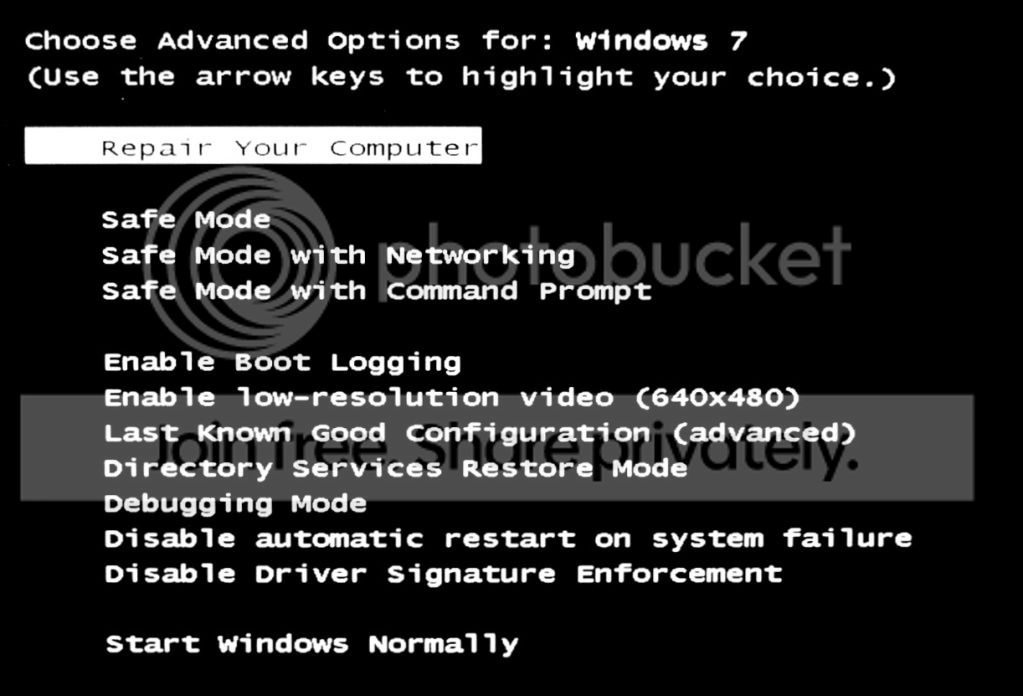
Try pressing F8 during reboot to get this screen and select Last known good configuration (advanced), it's a shot in the dark at this point.

Another shot is this: http://www.sevenforums.com/tutorials/1538-sfc-scannow-command-system-file-checker.html#post14392
 

My Computer

Computer type
PC/Desktop
Computer Manufacturer/Model Number
Home Built Desktop By DataTech
OS
Windows 7 Ultimate X64 SP1
CPU
Intel i5-2550K, Differing ~4.4-4.8GHz No built in GPU
Motherboard
ASUS P8Z68-V PRO/GEN3
Memory
16GB G.Skill Sniper 1866MHz @ 2133MHz 2x8GB
Graphics Card(s)
ASUS GTX650TIB-DC2OC-2GD5, (650TI Boost)
Sound Card
Onboard Realtek 5-1
Monitor(s) Displays
Samsung P2570HD
Screen Resolution
1920x1080
Hard Drives
Samsung 840 Pro 256GB SSD for OS, 500GB Seagate Constellation (Enterprise drive) for Data
PSU
Corsair HX650W
Case
Inwin Dragon Rider
Cooling
Hyper 212 EVO w/two Noctua fans, push-pull, @1300 RPM
Keyboard
E-Z Eyes, bright yellow keys with large characters
Mouse
steelseries SENSEI Laser Pro Gaming
Internet Speed
48-51Mbs Mbs down, 11 Mbs up Xfinity Cable
Antivirus
Norton Internet Security 2013
Browser
IE 10, Opera, Pale Moon if needed
Other Info
4 case fans, LG BluRay-RE, ASUS DVD-RW, Mr. Fusion power supply, 1.21 gigawatts.
After executing Last Known, the machine no longer automatically attempts to finish installing the 20 updates on shutdown, doesn't attempt to complete update install process on start-up and since the machine didn't do the prior, the machine doesn't then revert the updates on an automatic second boot.

I ran the scannow and it showed no integrity problems.

I loaded the update window and it shows 21 important updates. I'm sure that those are the 20 updates that have not been installing and 1 remaining update that would previously show while the 20 were 'in process'.

I'm not at all convinced the root problem is fixed--just that I've stopped this automatic, continual attempt by the OS to install the updates once the update is commenced.

Questions:

1. At this point, should I re-attempt the SURT install?

2. Isn't there a way to reinstall all the OS files absent change to installed data and application files?

3. Is there a way to provoke a gross uninstall of all updates?

I do have 5 system restore points since setup initiation on the 7th so that would be my move if none of the preceding works.


Mark
 

My Computer

Computer type
PC/Desktop
OS
Windows 7 & Windows 10
Back
Top