Pesky Pop-Up Failed Program Install/Uninstall Screens On Windows 7

malletKATman

New member
Member
Local time
7:03 PM
Messages
51
I have pesky detritus remaining from a failed app install and a different app failed uninstall that plague me at system startup and at other times periodically on my Windows 7 SP1 PRO 64-Bit system. I’ve searched around online to find out what I would have to manually delete in folders and/or the Registry to get rid of this junk whose efficacy has long disappeared. Any suggestions as to what I should do?

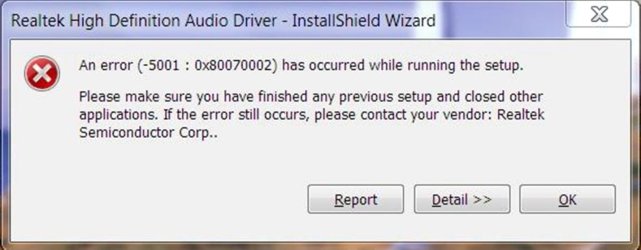
The first picture is for a Realtek Hi-Def Audio driver that was long ago replaced, but still this ancient installation failure crops up at every system startup.

(see attachment Picture 1)

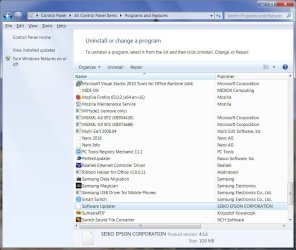
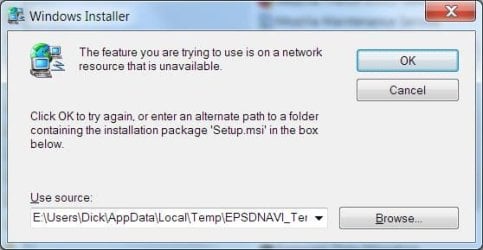
The second problem is for a SEIKO EPSON available app update checker that I no longer use, whose SEIKO-written Uninstall run fails because it’s Setup.msi file went missing, probably when the first Uninstall attempt failed.

1551632608470-png.44528
see attachment Picture 2

After clicking on “Uninstall”:

1551632647077-png.44529
see attachment Picture 3

Of course the E:\Users\Dick\AppData\Local\Temp\EPSOSNAV_Ter… folder has long ago disappeared. I cannot get any help from SEIKO EPSON. A periodic pop-up screen now occurs telling me I must update this product before I can use it. Instead I’d just like to kill enough of it that its periodic "Update" pop-up screen never appears again. I can get rid of its C:\Program Files and C:\Program Files (x86) content on my own.
 

Attachments
  • Picture 1.jpg
    Picture 1.jpg
    62.3 KB · Views: 1
  • Picture 2.jpg
    Picture 2.jpg
    101.4 KB · Views: 2
  • Picture 3.jpg
    Picture 3.jpg
    22.8 KB · Views: 47
Last edited:

My Computer My Computer

At a glance

Windows 7 PRO SP-1 64-BitAMD PHENOM II X6 1090T 6 Core16BG DDR3 DRAM
Computer type
PC/Desktop
Computer Manufacturer/Model Number
custom build
OS
Windows 7 PRO SP-1 64-Bit
CPU
AMD PHENOM II X6 1090T 6 Core
Motherboard
ASUS M4A88TD-M
Memory
16BG DDR3 DRAM
Hard Drives
Samsung 860 QVO V-NAND SSD 1TB SSD
SATA 3.5 1TB Winchester
Antivirus
WEBROOT SecureAnywhere
Browser
Firefox 65.0.1 (64-bit)
Hello-

Run msconfig.exe. Are any of these products listed in Services and/or Startup tabs?

Sometimes, if you can't uninstall something because a uninstaller is not available, just reinstall it and then try the uninstall.

You could also run regedit.exe and search for the problem software and delete it there. There may be multiple places to delete it because the installers and products are given class IDs.
 

My Computer My Computer

At a glance

Windows 7 Pro SP1 64 bit8 GB
Computer type
Laptop
Computer Manufacturer/Model Number
Dell M6500 Precision Work Station
OS
Windows 7 Pro SP1 64 bit
Memory
8 GB
Screen Resolution
1920x
Internet Speed
30 Mbps
Antivirus
Norton Security
Browser
IE 11
Thanks again, wither 2. I'm actually working this problem on Sysnative with John Griffiths, no less. He has advised me not to make changes for this problem while softwaremaniac is actively pursuing my Windows Update problems. Piggy of me to co-opt resources on both forum sites to see which would answer first. I think I better stay with just one expert at the wheel, but I appreciate all your efforts on my behalf to date. You can follow the Sysnative thread on Pesky Pop-Up Failed Program Install/Uninstall Screens On Windows 7 | Sysnative Forums if you wish.
 

My Computer My Computer

At a glance

Windows 7 PRO SP-1 64-BitAMD PHENOM II X6 1090T 6 Core16BG DDR3 DRAM
Computer type
PC/Desktop
Computer Manufacturer/Model Number
custom build
OS
Windows 7 PRO SP-1 64-Bit
CPU
AMD PHENOM II X6 1090T 6 Core
Motherboard
ASUS M4A88TD-M
Memory
16BG DDR3 DRAM
Hard Drives
Samsung 860 QVO V-NAND SSD 1TB SSD
SATA 3.5 1TB Winchester
Antivirus
WEBROOT SecureAnywhere
Browser
Firefox 65.0.1 (64-bit)
Okay but I wouldn't think these pop-ups would be related to your other problem.

Maybe you would let us know here how you got them to stop after working with Sysnative.
 

My Computer My Computer

At a glance

Windows 7 Pro SP1 64 bit8 GB
Computer type
Laptop
Computer Manufacturer/Model Number
Dell M6500 Precision Work Station
OS
Windows 7 Pro SP1 64 bit
Memory
8 GB
Screen Resolution
1920x
Internet Speed
30 Mbps
Antivirus
Norton Security
Browser
IE 11
Okay but I wouldn't think these pop-ups would be related to your other problem.

Maybe you would let us know here how you got them to stop after working with Sysnative.

Indeed I will post the solution, or lack therein, on this thread when I close it.

To date the suggestions have been to use the latest Auroruns Sysinternals program written by Mark Russinovich. It identified some auto-started processes that have missing files, most likely caused by the faulty cleanup after the failed Realtek Audio driver install and the failed Seiko Software Updater uninstall. The entries could not be deleted because the unstoppable Task Scheduler Service has a lock on the files, but they could be – and were – disabled. That did not help – the Installer pop-ups continue.

Changes to the system for this problem are on hiatus until the much more important Windows Update problems I have are cleared up.
 

My Computer My Computer

At a glance

Windows 7 PRO SP-1 64-BitAMD PHENOM II X6 1090T 6 Core16BG DDR3 DRAM
Computer type
PC/Desktop
Computer Manufacturer/Model Number
custom build
OS
Windows 7 PRO SP-1 64-Bit
CPU
AMD PHENOM II X6 1090T 6 Core
Motherboard
ASUS M4A88TD-M
Memory
16BG DDR3 DRAM
Hard Drives
Samsung 860 QVO V-NAND SSD 1TB SSD
SATA 3.5 1TB Winchester
Antivirus
WEBROOT SecureAnywhere
Browser
Firefox 65.0.1 (64-bit)
Hello-

Run msconfig.exe. Are any of these products listed in Services and/or Startup tabs?

Sometimes, if you can't uninstall something because a uninstaller is not available, just reinstall it and then try the uninstall.

You could also run regedit.exe and search for the problem software and delete it there. There may be multiple places to delete it because the installers and products are given class IDs.

This is where CCleaner comes in handy! Minus the lack of a regedit seeker (alternative to Windows' natively provided one).
 

My Computer My Computer

At a glance

Windows 7 Lite: Professional 64-bitIntel amd644GB DDR3
Computer type
Laptop
OS
Windows 7 Lite: Professional 64-bit
CPU
Intel amd64
Memory
4GB DDR3
Screen Resolution
1366 x 768
Hard Drives
5400 RPM
Browser
Google Chrome
Other Info
Computer programmer enthusiast and hobbyist
This is where CCleaner comes in handy! Minus the lack of a regedit seeker (alternative to Windows' natively provided one).

Thanks for the info. Registry seeking and cleaning is being actively pursued by people working this problem on the Sysnative forum using other tools. (It was probably bad form of me to submit this problem to more than one forum at a time.)

However, there a lot of opinion that registry cleaners are inherently dangerous. I'm not familiar with CCleaner, and anyway I can't be modifying my registry right now while other techs are handing me apps and scripts to analyze and modify it.
 

My Computer My Computer

At a glance

Windows 7 PRO SP-1 64-BitAMD PHENOM II X6 1090T 6 Core16BG DDR3 DRAM
Computer type
PC/Desktop
Computer Manufacturer/Model Number
custom build
OS
Windows 7 PRO SP-1 64-Bit
CPU
AMD PHENOM II X6 1090T 6 Core
Motherboard
ASUS M4A88TD-M
Memory
16BG DDR3 DRAM
Hard Drives
Samsung 860 QVO V-NAND SSD 1TB SSD
SATA 3.5 1TB Winchester
Antivirus
WEBROOT SecureAnywhere
Browser
Firefox 65.0.1 (64-bit)
Okay but I wouldn't think these pop-ups would be related to your other problem.

Maybe you would let us know here how you got them to stop after working with Sysnative.

I have closed my thread for these problems on Sysnative and now ask that this thread here be closed also.

The problems were ameliorated, but not solved, on Sysnative with a combination of Syninternals Autoruns and a product I had never heard of: Revo Uninstaller Pro. This gem shows you the Programs and Features list. If you select items for uninstallation, first it creates a Restore Point (essentially a backup of the Registry), runs the registered uninstalls for each item, and then does its own scan in the Registry and files in the normal executable storage area: %windev%\Program Files, %windev%\Program Files (x86) and %windev%\Program Data for detritus left over from a failed or sloppily written uninstall. Running that for Software Updater removed it from the Programs and Features list and stopped the repeated pop-ups from that failed uninstall. Nice Product.

I also found another great product in the process: Altap Salamander. This is a superb collection of all the things you can do with drives, folders and files, and some other functions like examining the Registry, and compacting and archiving files and folders, in one compact dual folder display. It puts Windows Explorer to shame.

No progress was made with the failed RealTek Audio driver install loop. Eventually the thread stopped making progress and devolved into tangential topics such as a “spirited” debate about the merits – or lack thereof – of Java and JavaScript. It was time to close.
 

My Computer My Computer

At a glance

Windows 7 PRO SP-1 64-BitAMD PHENOM II X6 1090T 6 Core16BG DDR3 DRAM
Computer type
PC/Desktop
Computer Manufacturer/Model Number
custom build
OS
Windows 7 PRO SP-1 64-Bit
CPU
AMD PHENOM II X6 1090T 6 Core
Motherboard
ASUS M4A88TD-M
Memory
16BG DDR3 DRAM
Hard Drives
Samsung 860 QVO V-NAND SSD 1TB SSD
SATA 3.5 1TB Winchester
Antivirus
WEBROOT SecureAnywhere
Browser
Firefox 65.0.1 (64-bit)
I didn't go back through this thread but, the other day I was getting fed up with a uninstall program I had run in the last few days because it was launching every time I started up. Didn't show up when I ran either the task manager or msconfig.exe and looked at startup and services. Where I found it was in Task Scheduler (Local) and disabled/deleted it. Problem solved. Perhaps you might look there also.

Now, I have a real thorny problem with a dual boot situation (Vista) which no one has taken on in the Vista forum. I'll figure that one out.
 

My Computer My Computer

At a glance

Windows 7 Pro SP1 64 bit8 GB
Computer type
Laptop
Computer Manufacturer/Model Number
Dell M6500 Precision Work Station
OS
Windows 7 Pro SP1 64 bit
Memory
8 GB
Screen Resolution
1920x
Internet Speed
30 Mbps
Antivirus
Norton Security
Browser
IE 11
I didn't go back through this thread but, the other day I was getting fed up with a uninstall program I had run in the last few days because it was launching every time I started up. Didn't show up when I ran either the task manager or msconfig.exe and looked at startup and services. Where I found it was in Task Scheduler (Local) and disabled/deleted it. Problem solved. Perhaps you might look there also.

Now, I have a real thorny problem with a dual boot situation (Vista) which no one has taken on in the Vista forum. I'll figure that one out.

OK, how do I find Task Scheduler (Local)?
 

My Computer My Computer

At a glance

Windows 7 PRO SP-1 64-BitAMD PHENOM II X6 1090T 6 Core16BG DDR3 DRAM
Computer type
PC/Desktop
Computer Manufacturer/Model Number
custom build
OS
Windows 7 PRO SP-1 64-Bit
CPU
AMD PHENOM II X6 1090T 6 Core
Motherboard
ASUS M4A88TD-M
Memory
16BG DDR3 DRAM
Hard Drives
Samsung 860 QVO V-NAND SSD 1TB SSD
SATA 3.5 1TB Winchester
Antivirus
WEBROOT SecureAnywhere
Browser
Firefox 65.0.1 (64-bit)
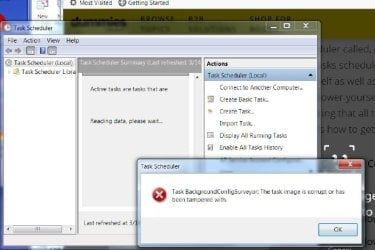
Belay that, I found it. But when I tried to run it, I got this screen.Task Scheduler.jpg
 

My Computer My Computer

At a glance

Windows 7 PRO SP-1 64-BitAMD PHENOM II X6 1090T 6 Core16BG DDR3 DRAM
Computer type
PC/Desktop
Computer Manufacturer/Model Number
custom build
OS
Windows 7 PRO SP-1 64-Bit
CPU
AMD PHENOM II X6 1090T 6 Core
Motherboard
ASUS M4A88TD-M
Memory
16BG DDR3 DRAM
Hard Drives
Samsung 860 QVO V-NAND SSD 1TB SSD
SATA 3.5 1TB Winchester
Antivirus
WEBROOT SecureAnywhere
Browser
Firefox 65.0.1 (64-bit)
i would just click on OK for the message. Then, click on the Task Scheduler Library. There will be a list of items which are scheduled although some might say "0" tasks.
 

My Computer My Computer

At a glance

Windows 7 Pro SP1 64 bit8 GB
Computer type
Laptop
Computer Manufacturer/Model Number
Dell M6500 Precision Work Station
OS
Windows 7 Pro SP1 64 bit
Memory
8 GB
Screen Resolution
1920x
Internet Speed
30 Mbps
Antivirus
Norton Security
Browser
IE 11
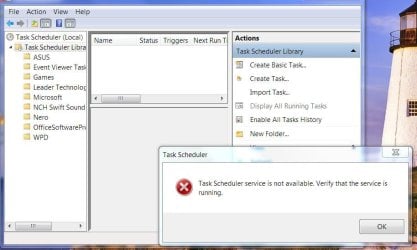
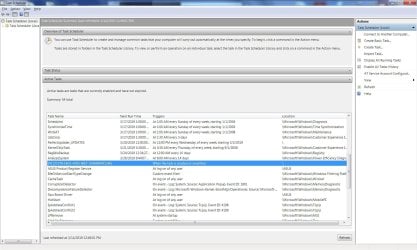
Nope. When I tried that, a different pop-up occurred without a task list, to wit:
Task Scheduler Library.jpg

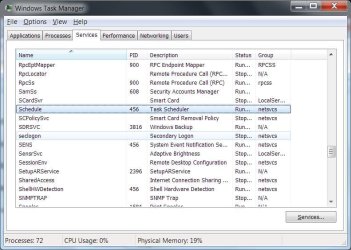
"Scheduler" shows in the Task Manager list of Services as running, to wit:
Services List.jpg

Whiskey, Tango, Foxtrot?!
 
Last edited:

My Computer My Computer

At a glance

Windows 7 PRO SP-1 64-BitAMD PHENOM II X6 1090T 6 Core16BG DDR3 DRAM
Computer type
PC/Desktop
Computer Manufacturer/Model Number
custom build
OS
Windows 7 PRO SP-1 64-Bit
CPU
AMD PHENOM II X6 1090T 6 Core
Motherboard
ASUS M4A88TD-M
Memory
16BG DDR3 DRAM
Hard Drives
Samsung 860 QVO V-NAND SSD 1TB SSD
SATA 3.5 1TB Winchester
Antivirus
WEBROOT SecureAnywhere
Browser
Firefox 65.0.1 (64-bit)
Can you access the folders in the library if you close the message?

Not sure you would want the NCH............... task running.
 

My Computer My Computer

At a glance

Windows 7 Pro SP1 64 bit8 GB
Computer type
Laptop
Computer Manufacturer/Model Number
Dell M6500 Precision Work Station
OS
Windows 7 Pro SP1 64 bit
Memory
8 GB
Screen Resolution
1920x
Internet Speed
30 Mbps
Antivirus
Norton Security
Browser
IE 11
Can you access the folders in the library if you close the message?

Not sure you would want the NCH............... task running.

I managed to get a list. There's only one suspicious entry to me.
Task List.jpg

What is the NCH task? I don't see it in the Task Manager Services or Processes list.

Thanks.
 

My Computer My Computer

At a glance

Windows 7 PRO SP-1 64-BitAMD PHENOM II X6 1090T 6 Core16BG DDR3 DRAM
Computer type
PC/Desktop
Computer Manufacturer/Model Number
custom build
OS
Windows 7 PRO SP-1 64-Bit
CPU
AMD PHENOM II X6 1090T 6 Core
Motherboard
ASUS M4A88TD-M
Memory
16BG DDR3 DRAM
Hard Drives
Samsung 860 QVO V-NAND SSD 1TB SSD
SATA 3.5 1TB Winchester
Antivirus
WEBROOT SecureAnywhere
Browser
Firefox 65.0.1 (64-bit)
Ho

NCH is your switch sound converter program, shows in screenshot2 last item.

have a question did the Realtek pop-up appear first boot thursday

another tool

http://www.bleepingcomputer.com/download/farbar-recovery-scan-tool/

run it and post both logs
NOTE
We will only be using this for Information purposes only - until your finished with Softwaremaniac

Roy
 

My Computer My Computer

At a glance

W7 home premium 32bit/W7HP 64bit/w10 tp insid...E5300 dual core3gbNvidia Geforce 7100 Nforce 630i
Computer type
PC/Desktop
Computer Manufacturer/Model Number
medionl/Aspire 6930G/acer x55a
OS
W7 home premium 32bit/W7HP 64bit/w10 tp insider ring
CPU
E5300 dual core
Motherboard
medion MS7366
Memory
3gb
Graphics Card(s)
Nvidia Geforce 7100 Nforce 630i
Monitor(s) Displays
avixc
Internet Speed
n (isp resticted to 72)
Antivirus
mse/pands
Browser
palemoon
Other Info
Belkin Fd7050 n USB using Railink RT2870 drivers, more upto date
Ho

have a question did the Realtek pop-up appear first boot thursday
Yes, and every day before that after the failed driver install well over a year ago. As I wrote before, perhaps on another forum, that particular version of the Realtek audio driver was superseded by a later version that did install correctly.

another tool

http://www.bleepingcomputer.com/download/farbar-recovery-scan-tool/

run it and post both logs
NOTE
We will only be using this for Information purposes only - until your finished with Softwaremaniac

Roy
I'll try it, but it will have to wait for another day. Way too much on my plate right now. Thanks, Roy.
 

My Computer My Computer

At a glance

Windows 7 PRO SP-1 64-BitAMD PHENOM II X6 1090T 6 Core16BG DDR3 DRAM
Computer type
PC/Desktop
Computer Manufacturer/Model Number
custom build
OS
Windows 7 PRO SP-1 64-Bit
CPU
AMD PHENOM II X6 1090T 6 Core
Motherboard
ASUS M4A88TD-M
Memory
16BG DDR3 DRAM
Hard Drives
Samsung 860 QVO V-NAND SSD 1TB SSD
SATA 3.5 1TB Winchester
Antivirus
WEBROOT SecureAnywhere
Browser
Firefox 65.0.1 (64-bit)
OK, I now know what's at "...bleepingcomputer..."; it's the Farber Recovery Scan Tool. S/Maniac used that extensively at the beginning of his [FONT=&quot]analysis[/FONT]. I have the tool as well as ZIP files of all his runs, which were sometimes Fix runs followed by SURT runs, and sometimes scans for specific W.U. package names in the registry. I can send you the first Fix/SURT CheckSUR.log run right now, if this forum will accept the size.
Oh good, it just did,
 

My Computer My Computer

At a glance

Windows 7 PRO SP-1 64-BitAMD PHENOM II X6 1090T 6 Core16BG DDR3 DRAM
Computer type
PC/Desktop
Computer Manufacturer/Model Number
custom build
OS
Windows 7 PRO SP-1 64-Bit
CPU
AMD PHENOM II X6 1090T 6 Core
Motherboard
ASUS M4A88TD-M
Memory
16BG DDR3 DRAM
Hard Drives
Samsung 860 QVO V-NAND SSD 1TB SSD
SATA 3.5 1TB Winchester
Antivirus
WEBROOT SecureAnywhere
Browser
Firefox 65.0.1 (64-bit)
Hi

Im intereseted in the reports that will be produced from the SCAN option, SWM used it to insert changes to the registry
Use the default values.

Roy
 

My Computer My Computer

At a glance

W7 home premium 32bit/W7HP 64bit/w10 tp insid...E5300 dual core3gbNvidia Geforce 7100 Nforce 630i
Computer type
PC/Desktop
Computer Manufacturer/Model Number
medionl/Aspire 6930G/acer x55a
OS
W7 home premium 32bit/W7HP 64bit/w10 tp insider ring
CPU
E5300 dual core
Motherboard
medion MS7366
Memory
3gb
Graphics Card(s)
Nvidia Geforce 7100 Nforce 630i
Monitor(s) Displays
avixc
Internet Speed
n (isp resticted to 72)
Antivirus
mse/pands
Browser
palemoon
Other Info
Belkin Fd7050 n USB using Railink RT2870 drivers, more upto date
Hi

Im intereseted in the reports that will be produced from the SCAN option, SWM used it to insert changes to the registry
Use the default values.

Roy
For now all I can do is connect you to the entire thread of this problem on Sysnative: Windows 7 PRO SP1 64-Bit Multiple Windows Update Failures from Dec 2018 On | Sysnative Forums. All the runs of all the tools with inputs and outputs are there in ZIPs you can download.
Do you want a “naked” scan run with nothing to search for? Do you need the components “preloaded” the way S/M asked me to do?
 

My Computer My Computer

At a glance

Windows 7 PRO SP-1 64-BitAMD PHENOM II X6 1090T 6 Core16BG DDR3 DRAM
Computer type
PC/Desktop
Computer Manufacturer/Model Number
custom build
OS
Windows 7 PRO SP-1 64-Bit
CPU
AMD PHENOM II X6 1090T 6 Core
Motherboard
ASUS M4A88TD-M
Memory
16BG DDR3 DRAM
Hard Drives
Samsung 860 QVO V-NAND SSD 1TB SSD
SATA 3.5 1TB Winchester
Antivirus
WEBROOT SecureAnywhere
Browser
Firefox 65.0.1 (64-bit)
Back
Top