Solved Pesky recurring window at start-up

dwdraw2

New member
Local time
6:18 PM
Messages
31
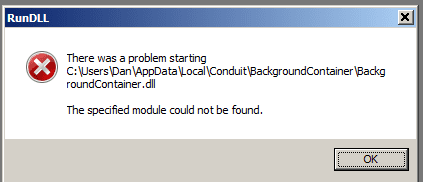
Recently I deleted some malware from my browser. "Conduit" was one of the malwares on IE. After going into the folders and deleting them, I have been getting a window that appears on the screen on start-up. Where do I go in the folders to stop this pop-up? Attached is a copy of the pop-up.:shock:
 

Attachments

  • Capture.PNG
    Capture.PNG
    4.3 KB · Views: 44

My Computer My Computer

Computer type
Laptop
Computer Manufacturer/Model Number
Dell
OS
Windows 7 Home, 64 bit
CPU
i7 quad core, 64 Bit
Memory
6 GB
Antivirus
Avast
Browser
IE
You obviously deleted a Windows file, and i think i could find a fix for you...
Dude next time dont delete anything, that you dont know, alright ?
:D
 

My Computer My Computer

Computer type
Laptop
Computer Manufacturer/Model Number
Asus
OS
Windows 7 Ultimate x86
CPU
Intel Core 2 Duo T6600 @ 2.20GHz
Memory
4Gb
Graphics Card(s)
GeForce GT 220M
Monitor(s) Displays
1
Screen Resolution
1366x768
Keyboard
ASUS
Internet Speed
100 Mbs
Browser
Mozilla Firefox
"Conduit" is not a Windows file. I consider it to be a 'browser hijacker'.

Download AdwCleaner by Xplode and save to your Desktop.
  • Double click on AdwCleaner.exe to run the tool.
    Vista/Windows 7/8 users right-click and select Run As Administrator.
  • Click on the Scan button.
  • AdwCleaner will begin...be patient as the scan may take some time to complete.
  • After the scan has finished, click on the Report button...a logfile (AdwCleaner[R0].txt) will open in Notepad for review.
  • The contents of the log file may be confusing. Unless you see a program name that you know should not be removed, don't worry about it. If you see an entry you want to keep, let me know about it.
  • Copy and paste the contents of that logfile in your next reply.
  • A copy of all logfiles are saved in the C:\AdwCleaner folder which was created when running the tool.

Using AdwCleaner v3: Scan & Clean:
Double click on AdwCleaner.exe to run the tool again.
  • Click on the Scan button.
  • AdwCleaner will begin to scan your computer like it did before.
  • After the scan has finished...
  • This time, click on the Clean button.
  • Press OK when asked to close all programs and follow the onscreen prompts.
  • Press OK again to allow AdwCleaner to restart the computer and complete the removal process.
  • After rebooting, a logfile report (AdwCleaner[S0].txt) will open automatically.
  • Copy and paste the contents of that logfile in your next reply.
  • A copy of that logfile will also be saved in the C:\AdwCleaner folder.
 

My Computer My Computer

Computer type
PC/Desktop
Computer Manufacturer/Model Number
Bruce ... somewhere in his 40's
OS
Windows 7 Ultimate 32bit SP1
CPU
Intel(R) Core(TM)2 Quad CPU @ 2.40GHz, 2400 MHz
Motherboard
INTEL/D975XBX2
Memory
4 GB
Graphics Card(s)
ATI Radeon HD 2600 Pro
Monitor(s) Displays
Samsung SyncMaster 914v
Screen Resolution
1280 x 1024
Hard Drives
2/500GB each ... ST3500630AS ATA Device.
One is not connected
PSU
Rocketfish 700 W
Case
G.Skill Gigabyte Chassis
Keyboard
Standard PS/2 Keyboard
Mouse
Microsoft PS/2 Mouse
Internet Speed
DSL
Antivirus
Avira Internet Security
Browser
IE 11
Other Info
ATI HDMI Audio
Thanks Jacee for the reply.

I got the scans done and will send them to you in the next reply to you. But first, I thought I would give you a small history on this problem.

Yesterday, I replied to an update for my flash player. I clicked yes and it took me to what looked like Adobe's site for their flash player-I then clicked on update. After about two minutes, a reply came back saying that the download did not take. I then suspected something was wrong with this update then ran my Malwarebytes Pro and it boxed in 134 "PUP's", ouch! That left me with about 4 out of the total 138 that it downloaded-I discovered 2 more when I ran Adware. The two that were left were "MixiDJ," and "Conduit," a toolbar that attached itself to both of my browsers (Chrome and IE). I removed Chrome off the computer, reducing MixiDJ just to IE. I thought that I would put Chrome back on later.

In IE, I discovered "Conduit" hiding in MixiDJ, both being a browser hijacker-like you said. MixiDJ was tough, it wouldn't let me in the folder, so I renamed it, Malwarebytes boxed it, and deleted it. That left me with "Conduit." I had to chase a half-dozen folders down stuffed with "Conduit." The last one was tough-but adware finally nabbed it.

I'll send you that folder later-but next I will send you the two you requested.

Thanks for your time.

dwdraw2

 
Last edited:

My Computer My Computer

Computer type
Laptop
Computer Manufacturer/Model Number
Dell
OS
Windows 7 Home, 64 bit
CPU
i7 quad core, 64 Bit
Memory
6 GB
Antivirus
Avast
Browser
IE
Jacee, here are the two Adware scans-attached.
 

Attachments

My Computer My Computer

Computer type
Laptop
Computer Manufacturer/Model Number
Dell
OS
Windows 7 Home, 64 bit
CPU
i7 quad core, 64 Bit
Memory
6 GB
Antivirus
Avast
Browser
IE
Looking forward to seeing your next post with the results :)
 

My Computer My Computer

Computer type
PC/Desktop
Computer Manufacturer/Model Number
Bruce ... somewhere in his 40's
OS
Windows 7 Ultimate 32bit SP1
CPU
Intel(R) Core(TM)2 Quad CPU @ 2.40GHz, 2400 MHz
Motherboard
INTEL/D975XBX2
Memory
4 GB
Graphics Card(s)
ATI Radeon HD 2600 Pro
Monitor(s) Displays
Samsung SyncMaster 914v
Screen Resolution
1280 x 1024
Hard Drives
2/500GB each ... ST3500630AS ATA Device.
One is not connected
PSU
Rocketfish 700 W
Case
G.Skill Gigabyte Chassis
Keyboard
Standard PS/2 Keyboard
Mouse
Microsoft PS/2 Mouse
Internet Speed
DSL
Antivirus
Avira Internet Security
Browser
IE 11
Other Info
ATI HDMI Audio
Hello Jacee,

I sent the two logs already, you'll find them just under my first post to you on site. Go ahead and take a peak and let me know what you think. It seems that "Conduit" is gone unless that pop-up is the cause of it.

Thanks for your time.

dwdraw2

Ps, Here is the log from Adware on the 18th.
 

Attachments

My Computer My Computer

Computer type
Laptop
Computer Manufacturer/Model Number
Dell
OS
Windows 7 Home, 64 bit
CPU
i7 quad core, 64 Bit
Memory
6 GB
Antivirus
Avast
Browser
IE
Please download TFC by Old Timer TFC - Temp File Cleaner by OldTimer - Geeks to Go Forums and save it to your desktop.
Save any unsaved work. TFC will close ALL open programs including your browser!
Double-click on TFC.exe to run it. If you are using Vista/Windows 7 right-click on the file and choose Run As Administrator.
Click the Start button to begin the cleaning process and let it run uninterrupted to completion.
Important! If TFC prompts you to reboot, please do so immediately. If not prompted, manually reboot the machine anyway to ensure a complete clean.

Flush the DNS cache and restore MS's Hosts file. Copy and paste these lines in Note pad.

@Echo on
pushd\windows\system32\drivers\etc
attrib -h -s -r hosts
echo 127.0.0.1 localhost>HOSTS
attrib +r +h +s hosts
popd
ipconfig /release
ipconfig /renew
ipconfig /flushdns
netsh winsock reset all
netsh int ip reset all
shutdown -r -t 1
del %0


Save as flush.bat to your desktop.
Double click on the flush.bat file to run it.Vista and Windows 7... right click the .bat file and choose to run as Administrator. Your computer will reboot itself.

You should be good to go, but let me know.
 

My Computer My Computer

Computer type
PC/Desktop
Computer Manufacturer/Model Number
Bruce ... somewhere in his 40's
OS
Windows 7 Ultimate 32bit SP1
CPU
Intel(R) Core(TM)2 Quad CPU @ 2.40GHz, 2400 MHz
Motherboard
INTEL/D975XBX2
Memory
4 GB
Graphics Card(s)
ATI Radeon HD 2600 Pro
Monitor(s) Displays
Samsung SyncMaster 914v
Screen Resolution
1280 x 1024
Hard Drives
2/500GB each ... ST3500630AS ATA Device.
One is not connected
PSU
Rocketfish 700 W
Case
G.Skill Gigabyte Chassis
Keyboard
Standard PS/2 Keyboard
Mouse
Microsoft PS/2 Mouse
Internet Speed
DSL
Antivirus
Avira Internet Security
Browser
IE 11
Other Info
ATI HDMI Audio
Hi Jacee,

Well, tried it but the window still pops up. We gave it a good shot. If you come up with another solution, let me know-I'm willing to try.

I have CCleaner Pro and have used the file fix and system cleaning, but nothing has changed. Other than the pop-up, the system works like a clock-no trouble with anything else.

While checking the web out, I came across another file cleaner that is equal to or just a little better than CCleaner Pro. It has multiple settings and different degrees of hard drive wipes. The cleaner is free but they ask for a donation. I used it already and it is fantastic. I'll give you the name: PrivaZer

Maybe its something you can use down the road. It has both a basic and advanced setting. Easy to use.

Thanks for your time and help. If you have anymore ideas let me know.

dwdraw2
 

My Computer My Computer

Computer type
Laptop
Computer Manufacturer/Model Number
Dell
OS
Windows 7 Home, 64 bit
CPU
i7 quad core, 64 Bit
Memory
6 GB
Antivirus
Avast
Browser
IE
Is the 'pop-up' gone?
 

My Computer My Computer

Computer type
PC/Desktop
Computer Manufacturer/Model Number
Bruce ... somewhere in his 40's
OS
Windows 7 Ultimate 32bit SP1
CPU
Intel(R) Core(TM)2 Quad CPU @ 2.40GHz, 2400 MHz
Motherboard
INTEL/D975XBX2
Memory
4 GB
Graphics Card(s)
ATI Radeon HD 2600 Pro
Monitor(s) Displays
Samsung SyncMaster 914v
Screen Resolution
1280 x 1024
Hard Drives
2/500GB each ... ST3500630AS ATA Device.
One is not connected
PSU
Rocketfish 700 W
Case
G.Skill Gigabyte Chassis
Keyboard
Standard PS/2 Keyboard
Mouse
Microsoft PS/2 Mouse
Internet Speed
DSL
Antivirus
Avira Internet Security
Browser
IE 11
Other Info
ATI HDMI Audio
Hi Jacee,

Well, tried it but the window still pops up. We gave it a good shot. If you come up with another solution, let me know-I'm willing to try.

I have CCleaner Pro and have used the file fix and system cleaning, but nothing has changed. Other than the pop-up, the system works like a clock-no trouble with anything else.

While checking the web out, I came across another file cleaner that is equal to or just a little better than CCleaner Pro. It has multiple settings and different degrees of hard drive wipes. The cleaner is free but they ask for a donation. I used it already and it is fantastic. I'll give you the name: PrivaZer

Maybe its something you can use down the road. It has both a basic and advanced setting. Easy to use.

Thanks for your time and help. If you have anymore ideas let me know.

dwdraw2
 

My Computer My Computer

Computer type
Laptop
Computer Manufacturer/Model Number
Dell
OS
Windows 7 Home, 64 bit
CPU
i7 quad core, 64 Bit
Memory
6 GB
Antivirus
Avast
Browser
IE
Boot into safe mode, then navigate to C:\Users\Dan\AppData\Local\Conduit\
and delete that folder ... reboot. If it popped-up again, then download DDS from one of these links:
DDS.com

DDS.pif
  • Disable any script blocking protection
  • Double click the dds icon to run the tool.
  • When done, DDS will open two (2) logs:
    1. DDS.txt
    2. Attach.txt <--- will be minimized in the task tray
  • Save both reports to your desktop.
Include the contents of both logs in your next post.
The scan will instruct you to post Attach.txt as an attachment.
 

My Computer My Computer

Computer type
PC/Desktop
Computer Manufacturer/Model Number
Bruce ... somewhere in his 40's
OS
Windows 7 Ultimate 32bit SP1
CPU
Intel(R) Core(TM)2 Quad CPU @ 2.40GHz, 2400 MHz
Motherboard
INTEL/D975XBX2
Memory
4 GB
Graphics Card(s)
ATI Radeon HD 2600 Pro
Monitor(s) Displays
Samsung SyncMaster 914v
Screen Resolution
1280 x 1024
Hard Drives
2/500GB each ... ST3500630AS ATA Device.
One is not connected
PSU
Rocketfish 700 W
Case
G.Skill Gigabyte Chassis
Keyboard
Standard PS/2 Keyboard
Mouse
Microsoft PS/2 Mouse
Internet Speed
DSL
Antivirus
Avira Internet Security
Browser
IE 11
Other Info
ATI HDMI Audio
Hi Jacee,

Thanks for your reply.

Early this morning, I stumbled into resolving the "pesky window pop-ups." What I did was opened CCleaner Pro, went to tools, opened and then opened the program start-ups. I found two "Conduit" pop-ups. I disabled them, closed out of CCleaner Pro, then I tested several programs; I then rebooted Windows. No pop-ups were showing-gone...yes, finally, they were gone. I then reopened CCleaner Pro, went back into the start-up programs, then deleted the two "Conduit" pop-ups. Finished. PC is back to normal.

Thanks for your help and time. I really appreciate it.

Have a nice day.:)

dwdraw2
 

My Computer My Computer

Computer type
Laptop
Computer Manufacturer/Model Number
Dell
OS
Windows 7 Home, 64 bit
CPU
i7 quad core, 64 Bit
Memory
6 GB
Antivirus
Avast
Browser
IE
Thanks for letting me know! :cool:
 

My Computer My Computer

Computer type
PC/Desktop
Computer Manufacturer/Model Number
Bruce ... somewhere in his 40's
OS
Windows 7 Ultimate 32bit SP1
CPU
Intel(R) Core(TM)2 Quad CPU @ 2.40GHz, 2400 MHz
Motherboard
INTEL/D975XBX2
Memory
4 GB
Graphics Card(s)
ATI Radeon HD 2600 Pro
Monitor(s) Displays
Samsung SyncMaster 914v
Screen Resolution
1280 x 1024
Hard Drives
2/500GB each ... ST3500630AS ATA Device.
One is not connected
PSU
Rocketfish 700 W
Case
G.Skill Gigabyte Chassis
Keyboard
Standard PS/2 Keyboard
Mouse
Microsoft PS/2 Mouse
Internet Speed
DSL
Antivirus
Avira Internet Security
Browser
IE 11
Other Info
ATI HDMI Audio
Back
Top