PFM Fonts are not visible

rajanpandit

New member
Local time
9:25 AM
Messages
11
I a pc with following configuration
Processor : Intel Corei5 2500k 3.3 mhz
MotherBoard : Gigabyte GAZ68AP-D3 Rev 1
Ram : Corsair 8GB
Graphic Card : Zotec Nvidia GTS 450 1 GB
Cabinet : Cooler Master
OS : Windows 7 Ultimate 64bit
My problem is that..
in my office I am using Corel X3 on 32Bit windows 7 Ultimate... Everything is OK
and on another pc, Corel X3 on 64bit windows 7 Ultimate... also OK
my all fonts are visible... even pfm fonts also... in corel...
But at home when I open my corel file, pfm font are not displaying... whole frame is blank..
same file in office pcs' working perfectly but at home pc it is not...
another pc has Intel i7 Processor (first generation) with 8gb ram and intel mother board with windows 7 ultimate 64 bit... so pfm fonts are visible in corel but not in my home pc...
I have use same dvd to install windows at home and in office... so where is the problem...
please help... it is not a matter of corel.. I think it is matter of windows... please help....
 

Attachments

My Computer My Computer

OS
Windows 7 Ultimate - 32bit
These are obviously outside fonts, and are not part of a standard Windows install. So you had to install them yourself. How did you do that install on your home machine?

I just installed your provided fonts on my own machine, and they installed perfectly and are fully functional in MS Word 2007 (I don't have WP X3). They also show up just fine using Typograf.

The PFB/PFM files you provided are fine. The way I install these Type 1 fonts is to open the folder containing them in Explorer, and then "sort" on the Type column heading, so that all the PFB files are first and the PFM files are second. Then I select all the PFM files (click on the first, hold SHIFT down, and then click on the last, to light them all up). Then I right-click on the selected group and select "install" from the popup menu. Always works perfectly, as Windows apparently accesses the PFB files automatically even though I'm doing an "install" having selected only the PFM files.

So, sorry to say it, but like with your other machines where the fonts work perfectly, installing them on my own machine also shows them to be working perfectly. You must have not installed them correctly on your home machine.
 

My Computer My Computer

Computer type
PC/Desktop
Computer Manufacturer/Model Number
Home-built, two systems (1) and (2)
OS
Windows 7 Pro x64 (1), Win7 Pro X64 (2)
CPU
i5-3350p 3.1Ghz/6MB-cache (1); E8400 3.0Ghz/6MB-cache (2)
Motherboard
ASUS P8Z77-V Pro (1); ASUS P5Q3 (2)
Memory
8GB PC3-12800 DDR3 (1); 4GB PC3-10600 DDR3 (2)
Graphics Card(s)
ATI HD7750 (1), (see TV cards); ATI R7 250 (2)
Sound Card
Realtek ALC892 HD Audio (1); Realtek ALC1200 HD Audio (2)
Monitor(s) Displays
Eizo HD2441W LCD, Eizo S2433W (1); Eizo 24" S2433W (2)
Screen Resolution
1920x1200, 1920x1200 (1); 1920x1200 (2)
Hard Drives
(1) 1TB SATA-II (7200RPM), 2x2TB SATA-III (7200RPM), 250GB SATA-III (10000RPM) for OS; 2x2TB external USB 3.0

(2) 320GB SATA-II (7200RPM), 750GB SATA-II (7200RPM), 150GB SATA-II (10000RPM) for OS; 2TB external USB 3.0
PSU
Nesteq ECS-6001 600W (1); Nesteq ECS-5001 500W (2)
Case
Acousti-Case 360 (1) and (2)
Cooling
Noctua NH-U12P SE2 for CPU, 2x120mm case fans (1) and (2)
Keyboard
IBM PS/2 (1) and (2)
Mouse
Logitech MX Revolution wireless (1); Microsoft wired (2)
Internet Speed
100mbps down / 10mbps up
Antivirus
Microsoft Security Essentials; Malwarebyte Anti-Malware Pro
Browser
Firefox
Other Info
Ceton InfiniTV 4-tuner cablecard-enabled TV card as well as Hauppauge HVR-2250 OTA/ATSC 2-tuner TV card in (1), running under Win7 WMC
I am also using the same method.... these fonts also working for me in Ms-Word, notepad.. but not in CorelDraw X3... I have only issue with Corel not with others... please reply....
 

My Computer My Computer

OS
Windows 7 Ultimate - 32bit
I am also using the same method.... these fonts also working for me in Ms-Word, notepad.. but not in CorelDraw X3... I have only issue with Corel not with others... please reply....
I have a friend's machine I have remote access to where I installed Corel WordPerfect X3, along with MS Word, etc.. Win7 Pro x64.

I will try installing your fonts on that machine later today and see what happens, and whether your fonts are available to Corel WP X3 on that machine.
 

My Computer My Computer

Computer type
PC/Desktop
Computer Manufacturer/Model Number
Home-built, two systems (1) and (2)
OS
Windows 7 Pro x64 (1), Win7 Pro X64 (2)
CPU
i5-3350p 3.1Ghz/6MB-cache (1); E8400 3.0Ghz/6MB-cache (2)
Motherboard
ASUS P8Z77-V Pro (1); ASUS P5Q3 (2)
Memory
8GB PC3-12800 DDR3 (1); 4GB PC3-10600 DDR3 (2)
Graphics Card(s)
ATI HD7750 (1), (see TV cards); ATI R7 250 (2)
Sound Card
Realtek ALC892 HD Audio (1); Realtek ALC1200 HD Audio (2)
Monitor(s) Displays
Eizo HD2441W LCD, Eizo S2433W (1); Eizo 24" S2433W (2)
Screen Resolution
1920x1200, 1920x1200 (1); 1920x1200 (2)
Hard Drives
(1) 1TB SATA-II (7200RPM), 2x2TB SATA-III (7200RPM), 250GB SATA-III (10000RPM) for OS; 2x2TB external USB 3.0

(2) 320GB SATA-II (7200RPM), 750GB SATA-II (7200RPM), 150GB SATA-II (10000RPM) for OS; 2TB external USB 3.0
PSU
Nesteq ECS-6001 600W (1); Nesteq ECS-5001 500W (2)
Case
Acousti-Case 360 (1) and (2)
Cooling
Noctua NH-U12P SE2 for CPU, 2x120mm case fans (1) and (2)
Keyboard
IBM PS/2 (1) and (2)
Mouse
Logitech MX Revolution wireless (1); Microsoft wired (2)
Internet Speed
100mbps down / 10mbps up
Antivirus
Microsoft Security Essentials; Malwarebyte Anti-Malware Pro
Browser
Firefox
Other Info
Ceton InfiniTV 4-tuner cablecard-enabled TV card as well as Hauppauge HVR-2250 OTA/ATSC 2-tuner TV card in (1), running under Win7 WMC
Be careful when saying Corel or Corel X3 to correctly identify the program in question, the computer has several programs that have an X3 version.

The .pfm Fonts appear fine on my computer, just had to be Unzipped into a Folder, went into C:\Users\Berton\Documents\pfmfonts. I could have specified something different. They can be Installed from that Folder using right-click and Install then they become available to programs. And that particular set appeared as symbols in my WordPerfect X3 and Windows Notepad, not letters.
 

My Computer My Computer

Computer type
PC/Desktop
Computer Manufacturer/Model Number
Customs, Dell, Gateway, HP, Toshiba, Acer, ASUS
OS
Windows 7 Ultimate 64-bit, Windows 8.1 64-bit, Mac OS X 10.10, Linux Mint 17, Windows 10 Pro TP
Keyboard
Microsoft
Mouse
Microsoft
Just ran a test of your Satluj font set on that machine which has WPX3 (13.0.0.565) installed.

Seems to work perfectly. Don't know what else to say.

sHDbKL.jpg
 

My Computer My Computer

Computer type
PC/Desktop
Computer Manufacturer/Model Number
Home-built, two systems (1) and (2)
OS
Windows 7 Pro x64 (1), Win7 Pro X64 (2)
CPU
i5-3350p 3.1Ghz/6MB-cache (1); E8400 3.0Ghz/6MB-cache (2)
Motherboard
ASUS P8Z77-V Pro (1); ASUS P5Q3 (2)
Memory
8GB PC3-12800 DDR3 (1); 4GB PC3-10600 DDR3 (2)
Graphics Card(s)
ATI HD7750 (1), (see TV cards); ATI R7 250 (2)
Sound Card
Realtek ALC892 HD Audio (1); Realtek ALC1200 HD Audio (2)
Monitor(s) Displays
Eizo HD2441W LCD, Eizo S2433W (1); Eizo 24" S2433W (2)
Screen Resolution
1920x1200, 1920x1200 (1); 1920x1200 (2)
Hard Drives
(1) 1TB SATA-II (7200RPM), 2x2TB SATA-III (7200RPM), 250GB SATA-III (10000RPM) for OS; 2x2TB external USB 3.0

(2) 320GB SATA-II (7200RPM), 750GB SATA-II (7200RPM), 150GB SATA-II (10000RPM) for OS; 2TB external USB 3.0
PSU
Nesteq ECS-6001 600W (1); Nesteq ECS-5001 500W (2)
Case
Acousti-Case 360 (1) and (2)
Cooling
Noctua NH-U12P SE2 for CPU, 2x120mm case fans (1) and (2)
Keyboard
IBM PS/2 (1) and (2)
Mouse
Logitech MX Revolution wireless (1); Microsoft wired (2)
Internet Speed
100mbps down / 10mbps up
Antivirus
Microsoft Security Essentials; Malwarebyte Anti-Malware Pro
Browser
Firefox
Other Info
Ceton InfiniTV 4-tuner cablecard-enabled TV card as well as Hauppauge HVR-2250 OTA/ATSC 2-tuner TV card in (1), running under Win7 WMC
Doing some searching online, I found a document describing the release notes for CorelDRAW Graphics Suite X3 Service Pack 2.

There was a mention of the following regarding text: "Type 1 fonts can now be used in CorelDRAW and PHOTO-PAINT on a 64-bit operating system"


This would suggest to me that there was a problem with earlier releases of CorelDRAW X3 prior to Service Pack 2, which did NOT support Type1 fonts on a 64-bit Windows.

Do you have SP2 installed on your home machine?? Could that be the problem?

On my own WPX3 test machine (Win7 Pro x64) I show the following maintenance files applied to the original X3 installation:

yOgh6z.jpg
 

My Computer My Computer

Computer type
PC/Desktop
Computer Manufacturer/Model Number
Home-built, two systems (1) and (2)
OS
Windows 7 Pro x64 (1), Win7 Pro X64 (2)
CPU
i5-3350p 3.1Ghz/6MB-cache (1); E8400 3.0Ghz/6MB-cache (2)
Motherboard
ASUS P8Z77-V Pro (1); ASUS P5Q3 (2)
Memory
8GB PC3-12800 DDR3 (1); 4GB PC3-10600 DDR3 (2)
Graphics Card(s)
ATI HD7750 (1), (see TV cards); ATI R7 250 (2)
Sound Card
Realtek ALC892 HD Audio (1); Realtek ALC1200 HD Audio (2)
Monitor(s) Displays
Eizo HD2441W LCD, Eizo S2433W (1); Eizo 24" S2433W (2)
Screen Resolution
1920x1200, 1920x1200 (1); 1920x1200 (2)
Hard Drives
(1) 1TB SATA-II (7200RPM), 2x2TB SATA-III (7200RPM), 250GB SATA-III (10000RPM) for OS; 2x2TB external USB 3.0

(2) 320GB SATA-II (7200RPM), 750GB SATA-II (7200RPM), 150GB SATA-II (10000RPM) for OS; 2TB external USB 3.0
PSU
Nesteq ECS-6001 600W (1); Nesteq ECS-5001 500W (2)
Case
Acousti-Case 360 (1) and (2)
Cooling
Noctua NH-U12P SE2 for CPU, 2x120mm case fans (1) and (2)
Keyboard
IBM PS/2 (1) and (2)
Mouse
Logitech MX Revolution wireless (1); Microsoft wired (2)
Internet Speed
100mbps down / 10mbps up
Antivirus
Microsoft Security Essentials; Malwarebyte Anti-Malware Pro
Browser
Firefox
Other Info
Ceton InfiniTV 4-tuner cablecard-enabled TV card as well as Hauppauge HVR-2250 OTA/ATSC 2-tuner TV card in (1), running under Win7 WMC

My Computer My Computer

Computer type
PC/Desktop
Computer Manufacturer/Model Number
Customs, Dell, Gateway, HP, Toshiba, Acer, ASUS
OS
Windows 7 Ultimate 64-bit, Windows 8.1 64-bit, Mac OS X 10.10, Linux Mint 17, Windows 10 Pro TP
Keyboard
Microsoft
Mouse
Microsoft
I have SP1 on my WordPerfect X3 [version 13.0.0.565]
That's the same version I show in the ABOUT on my version. Don't know why your system shows that version for what you say is SP1, whereas my system shows the same version for what I'm sure must be SP2.

While I installed WPX3 on that machine some years ago and can't really remember exactly what I did, the fact that I have all those maintenance update files strongly suggests I applied them at the time. So even though the ABOUT doesn't mention whether it's SP1 or SP2 reflected by 13.0.0.565, I would guess it's SP2.

Also, we're talking about the Corel WordPerfect product and SP1 vs. SP2, rather than the CorelDRAW Suite product. I would guess both products were maintained pretty much in parallel, but the article I found is definitely referring to SP2 (for CorelDRAW) fixing the previously problematic support for Type 1 fonts on x64 systems. Chances are strong that the SP2 for the WPX3 product is essentially the WP-only fixes for CorelDRAW, so it would seem necessary to have applied SP2 (to either product) in order to get Type 1 font support on x64 systems.

So maybe you really have SP2 installed on your WPX3, rather than SP1 as you think. There has to be some explanation for why your version shows 13.0.0.565 like mine, and I would bet the farm that I applied SP2 (since I have it in my maintenance folder).

Anyway, in my opinion it is very likely that either SP1 or SP2 (most likely this one, given the release notes) must be applied to the retail installation CD, in order to get Type 1 font support into WPX3. That seems clear.


just checked for Updates and it said there were none available.
SP2 was the last maintenance I retrieved, so I wouldn't be surprised that there are no more available if you're already at SP2... which is kind of what I think you really are (again, 13.0.0.565). I don't know what that "SP2 hot patch" file was that I also have, but I would think it must have gone on after the main SP2 went on.


I'm sure X3 is no longer an officially supported product.

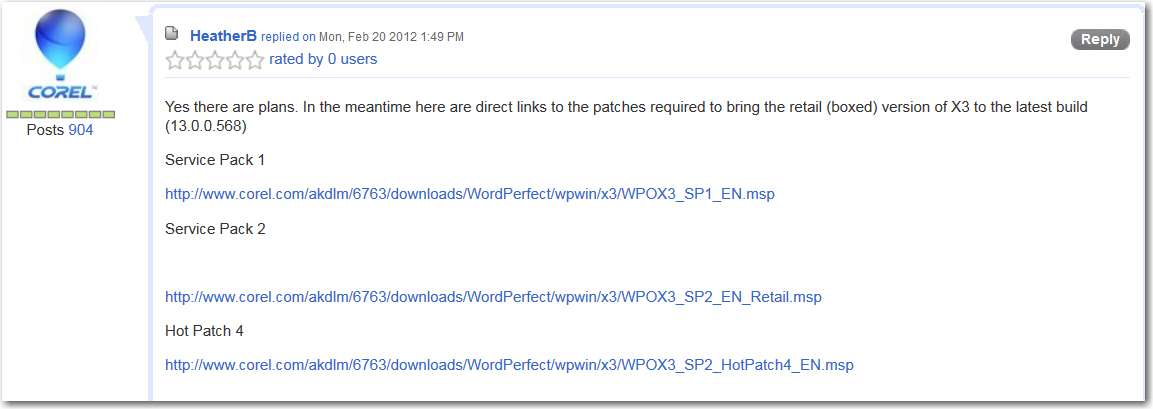
Some research (into Corel Office forum) provides the following FTP links for the three maintenance files for WPX3 (which might not work for CorelDRAW Suite). Note that apparently the very latest level of the product is 13.0.0.568, according to Corel on that Office forum:

Service Pack 1
http://www.corel.com/akdlm/6763/downloads/WordPerfect/wpwin/x3/WPOX3_SP1_EN.msp


Service Pack 2
http://www.corel.com/akdlm/6763/downloads/WordPerfect/wpwin/x3/WPOX3_SP2_EN_Retail.msp


Hot Patch 4
http://www.corel.com/akdlm/6763/downloads/WordPerfect/wpwin/x3/WPOX3_SP2_HotPatch4_EN.msp


4IrGfu.jpg
 

My Computer My Computer

Computer type
PC/Desktop
Computer Manufacturer/Model Number
Home-built, two systems (1) and (2)
OS
Windows 7 Pro x64 (1), Win7 Pro X64 (2)
CPU
i5-3350p 3.1Ghz/6MB-cache (1); E8400 3.0Ghz/6MB-cache (2)
Motherboard
ASUS P8Z77-V Pro (1); ASUS P5Q3 (2)
Memory
8GB PC3-12800 DDR3 (1); 4GB PC3-10600 DDR3 (2)
Graphics Card(s)
ATI HD7750 (1), (see TV cards); ATI R7 250 (2)
Sound Card
Realtek ALC892 HD Audio (1); Realtek ALC1200 HD Audio (2)
Monitor(s) Displays
Eizo HD2441W LCD, Eizo S2433W (1); Eizo 24" S2433W (2)
Screen Resolution
1920x1200, 1920x1200 (1); 1920x1200 (2)
Hard Drives
(1) 1TB SATA-II (7200RPM), 2x2TB SATA-III (7200RPM), 250GB SATA-III (10000RPM) for OS; 2x2TB external USB 3.0

(2) 320GB SATA-II (7200RPM), 750GB SATA-II (7200RPM), 150GB SATA-II (10000RPM) for OS; 2TB external USB 3.0
PSU
Nesteq ECS-6001 600W (1); Nesteq ECS-5001 500W (2)
Case
Acousti-Case 360 (1) and (2)
Cooling
Noctua NH-U12P SE2 for CPU, 2x120mm case fans (1) and (2)
Keyboard
IBM PS/2 (1) and (2)
Mouse
Logitech MX Revolution wireless (1); Microsoft wired (2)
Internet Speed
100mbps down / 10mbps up
Antivirus
Microsoft Security Essentials; Malwarebyte Anti-Malware Pro
Browser
Firefox
Other Info
Ceton InfiniTV 4-tuner cablecard-enabled TV card as well as Hauppauge HVR-2250 OTA/ATSC 2-tuner TV card in (1), running under Win7 WMC
That's the same version I show in the ABOUT on my version. Don't know why your system shows that version for what you say is SP1, whereas my system shows the same version for what I'm sure must be SP2.
My version of WordPerfect X3 is an OEM and the file name for SP2 says it's for the Retail version, haven't found similar for OEM.
WPOX3_SP2_EN_Retail.msp
 

My Computer My Computer

Computer type
PC/Desktop
Computer Manufacturer/Model Number
Customs, Dell, Gateway, HP, Toshiba, Acer, ASUS
OS
Windows 7 Ultimate 64-bit, Windows 8.1 64-bit, Mac OS X 10.10, Linux Mint 17, Windows 10 Pro TP
Keyboard
Microsoft
Mouse
Microsoft
Back
Top