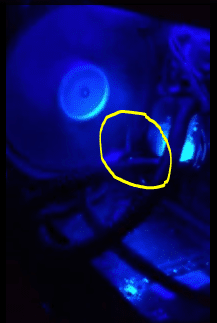
Phantom 410 case clicking.

irbullet

BulletsModz
Member
VIP
Local time
3:36 PM
Messages
202
Last edited by a moderator:

My Computer

Computer type
PC/Desktop
Computer Manufacturer/Model Number
Custom
OS
Windows 7 Ultimate x64
CPU
Intel i7 3770K 4.5GHz
Motherboard
MSI Z77A-GD65
Memory
8GB DDR3
Graphics Card(s)
MSI Twin Frozr 7950 (x2) crossfire
Monitor(s) Displays
AOC I2421VWH, LG 27EA63, ASUS VE247H
Screen Resolution
1920x1080 1920x1080 1920x1080
Hard Drives
Intel 330 60GB SSD, Western Digital 1TB, Seagate 1TB
PSU
Rosewill Capstone 750w
Case
Phantom 410
Cooling
IBP-Z001 for CPU and case fans
Keyboard
CM Storm Quickfire Pro
Mouse
Razer Naga 2012
Internet Speed
50 Mbps down, 20 Mbps upload
Antivirus
Microsoft Security Essentials
Browser
Google Chrome
Is it rubbing against anything?
 

My Computer

Computer Manufacturer/Model Number
Advent
OS
Dual-boot: Windows 7 HP 32-bit SP1 & Windows XP Pro 32-bit SP2.
CPU
AMD Phenom X4 9550 2.8Ghz
Motherboard
FOXCONN A6VMX (Socket 940)
Memory
4.0GB RAM
Graphics Card(s)
256MB On-board ATI Radeon X1200 Series
Sound Card
UnKnown
Monitor(s) Displays
19" TFT Mointor
Screen Resolution
1400 by 900
Hard Drives
500GB Western Digital WDC
Keyboard
HP Keyboard
Internet Speed
Dial-up via Mobile phone (Three)
Other Info
80GB External Hard-drive.

Also I have an old Windows XP Laptop for backup/occasional use etc.

My Computer

Computer type
PC/Desktop
Computer Manufacturer/Model Number
Custom
OS
Windows 7 Ultimate x64
CPU
Intel i7 3770K 4.5GHz
Motherboard
MSI Z77A-GD65
Memory
8GB DDR3
Graphics Card(s)
MSI Twin Frozr 7950 (x2) crossfire
Monitor(s) Displays
AOC I2421VWH, LG 27EA63, ASUS VE247H
Screen Resolution
1920x1080 1920x1080 1920x1080
Hard Drives
Intel 330 60GB SSD, Western Digital 1TB, Seagate 1TB
PSU
Rosewill Capstone 750w
Case
Phantom 410
Cooling
IBP-Z001 for CPU and case fans
Keyboard
CM Storm Quickfire Pro
Mouse
Razer Naga 2012
Internet Speed
50 Mbps down, 20 Mbps upload
Antivirus
Microsoft Security Essentials
Browser
Google Chrome
Any help? :( very urgent as I can't use it with the clicking
 

My Computer

Computer type
PC/Desktop
Computer Manufacturer/Model Number
Custom
OS
Windows 7 Ultimate x64
CPU
Intel i7 3770K 4.5GHz
Motherboard
MSI Z77A-GD65
Memory
8GB DDR3
Graphics Card(s)
MSI Twin Frozr 7950 (x2) crossfire
Monitor(s) Displays
AOC I2421VWH, LG 27EA63, ASUS VE247H
Screen Resolution
1920x1080 1920x1080 1920x1080
Hard Drives
Intel 330 60GB SSD, Western Digital 1TB, Seagate 1TB
PSU
Rosewill Capstone 750w
Case
Phantom 410
Cooling
IBP-Z001 for CPU and case fans
Keyboard
CM Storm Quickfire Pro
Mouse
Razer Naga 2012
Internet Speed
50 Mbps down, 20 Mbps upload
Antivirus
Microsoft Security Essentials
Browser
Google Chrome
I think it might need replacing.
 

My Computer

Computer Manufacturer/Model Number
Advent
OS
Dual-boot: Windows 7 HP 32-bit SP1 & Windows XP Pro 32-bit SP2.
CPU
AMD Phenom X4 9550 2.8Ghz
Motherboard
FOXCONN A6VMX (Socket 940)
Memory
4.0GB RAM
Graphics Card(s)
256MB On-board ATI Radeon X1200 Series
Sound Card
UnKnown
Monitor(s) Displays
19" TFT Mointor
Screen Resolution
1400 by 900
Hard Drives
500GB Western Digital WDC
Keyboard
HP Keyboard
Internet Speed
Dial-up via Mobile phone (Three)
Other Info
80GB External Hard-drive.

Also I have an old Windows XP Laptop for backup/occasional use etc.
It does sound as though something is rubbing against the blades. Unfortunately, the video is too jerky to see. Can you post another video, this time keeping the following image. Better lighting will also help. I think that there could be something in the area I circled.

Capture.PNG
 

My Computer

Computer type
PC/Desktop
Computer Manufacturer/Model Number
Dwarf Dwf/11/2012 r09/2013
OS
Windows 8.1 Pro RTM x64
CPU
Intel Core-i5-3570K 4-core @ 3.4GHz (Ivy Bridge) (OC 4.4GHz)
Motherboard
ASRock Z77 Extreme4-M
Memory
4 x 4GB DDR3-1600 Corsair Vengeance CMZ8GX3M2A1600C9B (16GB)
Graphics Card(s)
MSI GeForce GTX770 Gaming OC 2GB
Sound Card
Realtek High Definition on board solution (ALC 898)
Monitor(s) Displays
ViewSonic VA1912w Widescreen (VGA)
Screen Resolution
1440x900
Hard Drives
OCZ Agility 3 SSD 120GB SATA III x2 (RAID 0)
Samsung HD501LJ 500GB SATA II x2
Hitachi HDS721010CLA332 1TB SATA II
Iomega 1.5TB Ext USB 2.0
WD 2.0TB Ext USB 3.0
PSU
XFX Pro Series 850W Semi-Modular
Case
Gigabyte IF233
Cooling
1 x 120mm Front Inlet 1 x 120mm Rear Exhaust
Keyboard
Microsoft Comfort Curve Keyboard 3000 (USB)
Mouse
Microsoft Comfort Mouse 3000 for Business (USB)
Internet Speed
NetGear DG834Gv3 ADSL Modem/Router (Ethernet) ~4.0 Mb/s (O2)
Antivirus
Avast! 8.0.1497
Browser
IE 11
Other Info
Optical Drive: HL-DT-ST BD-RE BH10LS30 SATA Bluray
Lexmark S305 Printer/Scanner/Copier (USB)
WEI Score: 8.1/8.1/8.5/8.5/8.25
Asus Eee PC 1011PX Netbook (Windows 7 x86 Starter)
It's common for a wire or cable to get bumped into the path of the fan, so check that as well. Also, just for laughs, you could unplug the fan and see if the clicking noise disappears. If not, then it's coming from somewhere else.
 

My Computer

OS
Windows 7 Ultimate x64 SP1
CPU
Intel Core i7-2600
Motherboard
Gigabyte GA-P67A-UD3P-B3
Memory
12 GB Patriot Extreme DDR3-1333
Graphics Card(s)
Nvidia GTX 470
Monitor(s) Displays
Dell UltraSharp 2209WA
Hard Drives
OCZ Agility3 240 GB, WD5001AALS, WD7501AALS
PSU
OCZ ModStream 700W
Case
CoolerMaster HAF 912 Advanced
Cooling
CoolerMaster Hyper 212 Plus
It does sound as though something is rubbing against the blades. Unfortunately, the video is too jerky to see. Can you post another video, this time keeping the following image. Better lighting will also help. I think that there could be something in the area I circled.

View attachment 235953

Thanks dude. But it's not from that fan. I can spin that one fine and it makes no noise. The top fan does though. I took that video before school and it was prett bad quality.
And how would I unhook it?
(Phantom 410 case stock fans)
 

My Computer

Computer type
PC/Desktop
Computer Manufacturer/Model Number
Custom
OS
Windows 7 Ultimate x64
CPU
Intel i7 3770K 4.5GHz
Motherboard
MSI Z77A-GD65
Memory
8GB DDR3
Graphics Card(s)
MSI Twin Frozr 7950 (x2) crossfire
Monitor(s) Displays
AOC I2421VWH, LG 27EA63, ASUS VE247H
Screen Resolution
1920x1080 1920x1080 1920x1080
Hard Drives
Intel 330 60GB SSD, Western Digital 1TB, Seagate 1TB
PSU
Rosewill Capstone 750w
Case
Phantom 410
Cooling
IBP-Z001 for CPU and case fans
Keyboard
CM Storm Quickfire Pro
Mouse
Razer Naga 2012
Internet Speed
50 Mbps down, 20 Mbps upload
Antivirus
Microsoft Security Essentials
Browser
Google Chrome
The fan has to be getting power from somewhere. A quick look inside the case around the fan should show you the wires.
 

My Computer

OS
Windows 7 Ultimate x64 SP1
CPU
Intel Core i7-2600
Motherboard
Gigabyte GA-P67A-UD3P-B3
Memory
12 GB Patriot Extreme DDR3-1333
Graphics Card(s)
Nvidia GTX 470
Monitor(s) Displays
Dell UltraSharp 2209WA
Hard Drives
OCZ Agility3 240 GB, WD5001AALS, WD7501AALS
PSU
OCZ ModStream 700W
Case
CoolerMaster HAF 912 Advanced
Cooling
CoolerMaster Hyper 212 Plus
The fan has to be getting power from somewhere. A quick look inside the case around the fan should show you the wires.

it seems to have magically stopped o.O
I got home from school and it wasn't doing it anymore
I left it on all day to see what would happen and when I went in my room there wasn't clicking from the computer.
Dust? idk it is a new computer. It does have a little dust inside tho. Should I be worried?
 

My Computer

Computer type
PC/Desktop
Computer Manufacturer/Model Number
Custom
OS
Windows 7 Ultimate x64
CPU
Intel i7 3770K 4.5GHz
Motherboard
MSI Z77A-GD65
Memory
8GB DDR3
Graphics Card(s)
MSI Twin Frozr 7950 (x2) crossfire
Monitor(s) Displays
AOC I2421VWH, LG 27EA63, ASUS VE247H
Screen Resolution
1920x1080 1920x1080 1920x1080
Hard Drives
Intel 330 60GB SSD, Western Digital 1TB, Seagate 1TB
PSU
Rosewill Capstone 750w
Case
Phantom 410
Cooling
IBP-Z001 for CPU and case fans
Keyboard
CM Storm Quickfire Pro
Mouse
Razer Naga 2012
Internet Speed
50 Mbps down, 20 Mbps upload
Antivirus
Microsoft Security Essentials
Browser
Google Chrome
Should I be worried? If so I would like to know so I can look further into it.
 

My Computer

Computer type
PC/Desktop
Computer Manufacturer/Model Number
Custom
OS
Windows 7 Ultimate x64
CPU
Intel i7 3770K 4.5GHz
Motherboard
MSI Z77A-GD65
Memory
8GB DDR3
Graphics Card(s)
MSI Twin Frozr 7950 (x2) crossfire
Monitor(s) Displays
AOC I2421VWH, LG 27EA63, ASUS VE247H
Screen Resolution
1920x1080 1920x1080 1920x1080
Hard Drives
Intel 330 60GB SSD, Western Digital 1TB, Seagate 1TB
PSU
Rosewill Capstone 750w
Case
Phantom 410
Cooling
IBP-Z001 for CPU and case fans
Keyboard
CM Storm Quickfire Pro
Mouse
Razer Naga 2012
Internet Speed
50 Mbps down, 20 Mbps upload
Antivirus
Microsoft Security Essentials
Browser
Google Chrome
The clicking was from the fan blade clipping something but likely it was a little bur or maybe a piece of the case pressed down just into the path. What happens then is the fan wears this piece of it's self down and then the noise goes away. Sometime the tightness of the fan can be un-even or over tighened but often it's a wire or just a piece of the case.
 

My Computer

Computer type
PC/Desktop
Computer Manufacturer/Model Number
A blend of brains, brawn and dumb luck.
OS
Windows 7 Ultimate 64
CPU
i7 3770k OC'd 4.6 @ 1.17v, also FX 8120 & i5 miniITX
Motherboard
MSI P67A-GD80 b3
Memory
32 gb G.Skill Sniper DDR3 10-12-12-31 @ 2133
Graphics Card(s)
XFX Radeon 7870 2GB DDR5
Sound Card
Sound Blaster Z Series Card
Monitor(s) Displays
(2) LG LED 23" 1920 x 1080 2ms Monitors via mini d-port
Screen Resolution
1680 X 1050 p
Hard Drives
Samsung 256 gb 830 SSD sata III
(1) 1 tb WD Black
(2) 1 tb Hitachi deskmates/sata II
(2) 1 tb WD green/sata II
(2) 3 tb Seagate Barracuda
(1) 120 gb OCZ Vertex SS
(1) Drobo 5N w/5 Seagate 3tb
PSU
EVGA modular 1000G2 80% gold rating & APC 1200 RS
Case
CoolerMaster Storm Styker
Cooling
7 case fans 140mm & 120mm, NZXT Kraken X60
Keyboard
(2) Logitech Illuminated Keyboards (1) usb (1) wireless
Mouse
Logitech G700 & T-BC21 - nano nx for the laptop
Internet Speed
Basic 120mbps down
Antivirus
Trend Micro Titanium Max Security & Malwarebytes Premium
Browser
Chrome and IE 10
Other Info
5 Noctua case fans + 3 Noctua in p/p on NZXT cooler
Integrated hot swap drive bays for 2.5" Drives
(2) Lite-on dvd/cd/Blu Ray optical 22X
Integrated fan controller and led on/off
HP Officejet Pro 8630 all-n-one
Hot-swappable 3.5" hard drive bay
Netgear Nighthawk router
Asus USB 3 & sata 6 PCIe card
Vantec IDE to sata adptr./Ultra sata adptr
Lenovo L420 i5 lappy with m sata
Drobo 5N advanced NAS
The clicking was from the fan blade clipping something but likely it was a little bur or maybe a piece of the case pressed down just into the path. What happens then is the fan wears this piece of it's self down and then the noise goes away. Sometime the tightness of the fan can be un-even or over tighened but often it's a wire or just a piece of the case.

I've had it happen a few times, but I've also had it happen when it's not tightened enough and the fan rattles against the case. You can try pushing the fan up against the case carefully to see if that's the problem as well.
 

My Computer

Computer type
PC/Desktop
Computer Manufacturer/Model Number
Custom Built
OS
MS Windows 7 Professional 64-bit SP1
CPU
Intel(R) Core(TM) i5-2400 CPU @ 3.10GHz
Motherboard
Asus P8Z77-V LK
Memory
G.SKILL Ares 8GB (2x4GB)
Graphics Card(s)
EVGA nVidia GeForce GTX 760 Superclocked
Sound Card
Realtek High Definition Audio
Monitor(s) Displays
ASUS VN247 24" 1ms
Screen Resolution
1920x1080
Hard Drives
Mushkin Chronos 120GB SSD (OS), 1TB Seagate HDD (Data)
PSU
XFX Pro Series 850w P1-850B-BEFX
Case
Corsair Obsidian 750D
Cooling
Corsair H100i (cpu) and case fans
Keyboard
Corsair Vengeance K70
Mouse
Corsair Vengeance M60
Internet Speed
1.14 MB/s (9.6 mbps)
Browser
Google Chrome
My current case as much as I like it had the same issue and the thin metal cut out for a 240mm rad as well as a trick slide out filter. Once a fan is placed on the top as a exhaust fan the clicking noise began. Bending the metal was vary easy and cured the issue. Then lastly is the quality of the fan blades them selves if the fan has a lot of movement then it can cause this as well, another great reason to ditch cheap fans and by quality.
 

My Computer

Computer type
PC/Desktop
Computer Manufacturer/Model Number
A blend of brains, brawn and dumb luck.
OS
Windows 7 Ultimate 64
CPU
i7 3770k OC'd 4.6 @ 1.17v, also FX 8120 & i5 miniITX
Motherboard
MSI P67A-GD80 b3
Memory
32 gb G.Skill Sniper DDR3 10-12-12-31 @ 2133
Graphics Card(s)
XFX Radeon 7870 2GB DDR5
Sound Card
Sound Blaster Z Series Card
Monitor(s) Displays
(2) LG LED 23" 1920 x 1080 2ms Monitors via mini d-port
Screen Resolution
1680 X 1050 p
Hard Drives
Samsung 256 gb 830 SSD sata III
(1) 1 tb WD Black
(2) 1 tb Hitachi deskmates/sata II
(2) 1 tb WD green/sata II
(2) 3 tb Seagate Barracuda
(1) 120 gb OCZ Vertex SS
(1) Drobo 5N w/5 Seagate 3tb
PSU
EVGA modular 1000G2 80% gold rating & APC 1200 RS
Case
CoolerMaster Storm Styker
Cooling
7 case fans 140mm & 120mm, NZXT Kraken X60
Keyboard
(2) Logitech Illuminated Keyboards (1) usb (1) wireless
Mouse
Logitech G700 & T-BC21 - nano nx for the laptop
Internet Speed
Basic 120mbps down
Antivirus
Trend Micro Titanium Max Security & Malwarebytes Premium
Browser
Chrome and IE 10
Other Info
5 Noctua case fans + 3 Noctua in p/p on NZXT cooler
Integrated hot swap drive bays for 2.5" Drives
(2) Lite-on dvd/cd/Blu Ray optical 22X
Integrated fan controller and led on/off
HP Officejet Pro 8630 all-n-one
Hot-swappable 3.5" hard drive bay
Netgear Nighthawk router
Asus USB 3 & sata 6 PCIe card
Vantec IDE to sata adptr./Ultra sata adptr
Lenovo L420 i5 lappy with m sata
Drobo 5N advanced NAS
My current case as much as I like it had the same issue and the thin metal cut out for a 240mm rad as well as a trick slide out filter. Once a fan is placed on the top as a exhaust fan the clicking noise began. Bending the metal was vary easy and cured the issue. Then lastly is the quality of the fan blades them selves if the fan has a lot of movement then it can cause this as well, another great reason to ditch cheap fans and by quality.

Still doesn't answer my question that I just asked.
Should I be worried or not? It seems to have stopped I'd suppose.
 

My Computer

Computer type
PC/Desktop
Computer Manufacturer/Model Number
Custom
OS
Windows 7 Ultimate x64
CPU
Intel i7 3770K 4.5GHz
Motherboard
MSI Z77A-GD65
Memory
8GB DDR3
Graphics Card(s)
MSI Twin Frozr 7950 (x2) crossfire
Monitor(s) Displays
AOC I2421VWH, LG 27EA63, ASUS VE247H
Screen Resolution
1920x1080 1920x1080 1920x1080
Hard Drives
Intel 330 60GB SSD, Western Digital 1TB, Seagate 1TB
PSU
Rosewill Capstone 750w
Case
Phantom 410
Cooling
IBP-Z001 for CPU and case fans
Keyboard
CM Storm Quickfire Pro
Mouse
Razer Naga 2012
Internet Speed
50 Mbps down, 20 Mbps upload
Antivirus
Microsoft Security Essentials
Browser
Google Chrome
I wouldn't be worried about it, unless it was the fan on my processor. Since it's a case fan, I wouldn't worry, unless it comes back. Then I'd figure out what was causing it, and either move a cable out of the way or replace it.
 

My Computer

OS
Windows 7 Ultimate x64 SP1
CPU
Intel Core i7-2600
Motherboard
Gigabyte GA-P67A-UD3P-B3
Memory
12 GB Patriot Extreme DDR3-1333
Graphics Card(s)
Nvidia GTX 470
Monitor(s) Displays
Dell UltraSharp 2209WA
Hard Drives
OCZ Agility3 240 GB, WD5001AALS, WD7501AALS
PSU
OCZ ModStream 700W
Case
CoolerMaster HAF 912 Advanced
Cooling
CoolerMaster Hyper 212 Plus
I would check to make sure all fans are spinning and doing their jobs and if it comes back then one by one check till you know for sure which is the culprit then replace it or tweek it with adjustments to wires, the case or the fan its self.
 

My Computer

Computer type
PC/Desktop
Computer Manufacturer/Model Number
A blend of brains, brawn and dumb luck.
OS
Windows 7 Ultimate 64
CPU
i7 3770k OC'd 4.6 @ 1.17v, also FX 8120 & i5 miniITX
Motherboard
MSI P67A-GD80 b3
Memory
32 gb G.Skill Sniper DDR3 10-12-12-31 @ 2133
Graphics Card(s)
XFX Radeon 7870 2GB DDR5
Sound Card
Sound Blaster Z Series Card
Monitor(s) Displays
(2) LG LED 23" 1920 x 1080 2ms Monitors via mini d-port
Screen Resolution
1680 X 1050 p
Hard Drives
Samsung 256 gb 830 SSD sata III
(1) 1 tb WD Black
(2) 1 tb Hitachi deskmates/sata II
(2) 1 tb WD green/sata II
(2) 3 tb Seagate Barracuda
(1) 120 gb OCZ Vertex SS
(1) Drobo 5N w/5 Seagate 3tb
PSU
EVGA modular 1000G2 80% gold rating & APC 1200 RS
Case
CoolerMaster Storm Styker
Cooling
7 case fans 140mm & 120mm, NZXT Kraken X60
Keyboard
(2) Logitech Illuminated Keyboards (1) usb (1) wireless
Mouse
Logitech G700 & T-BC21 - nano nx for the laptop
Internet Speed
Basic 120mbps down
Antivirus
Trend Micro Titanium Max Security & Malwarebytes Premium
Browser
Chrome and IE 10
Other Info
5 Noctua case fans + 3 Noctua in p/p on NZXT cooler
Integrated hot swap drive bays for 2.5" Drives
(2) Lite-on dvd/cd/Blu Ray optical 22X
Integrated fan controller and led on/off
HP Officejet Pro 8630 all-n-one
Hot-swappable 3.5" hard drive bay
Netgear Nighthawk router
Asus USB 3 & sata 6 PCIe card
Vantec IDE to sata adptr./Ultra sata adptr
Lenovo L420 i5 lappy with m sata
Drobo 5N advanced NAS
I would check to make sure all fans are spinning and doing their jobs and if it comes back then one by one check till you know for sure which is the culprit then replace it or tweek it with adjustments to wires, the case or the fan its self.

Ok so I figured out it is the top fan doing it. when i press on it while its spinning and when it stops the noise stops. When I let go the sound comes back.
I left it off all day and when i got back home from school it was doing it after I turned it back on..
It was fine this morning and now its doing it this afternoon after I got home from school when I turned it on.
 

My Computer

Computer type
PC/Desktop
Computer Manufacturer/Model Number
Custom
OS
Windows 7 Ultimate x64
CPU
Intel i7 3770K 4.5GHz
Motherboard
MSI Z77A-GD65
Memory
8GB DDR3
Graphics Card(s)
MSI Twin Frozr 7950 (x2) crossfire
Monitor(s) Displays
AOC I2421VWH, LG 27EA63, ASUS VE247H
Screen Resolution
1920x1080 1920x1080 1920x1080
Hard Drives
Intel 330 60GB SSD, Western Digital 1TB, Seagate 1TB
PSU
Rosewill Capstone 750w
Case
Phantom 410
Cooling
IBP-Z001 for CPU and case fans
Keyboard
CM Storm Quickfire Pro
Mouse
Razer Naga 2012
Internet Speed
50 Mbps down, 20 Mbps upload
Antivirus
Microsoft Security Essentials
Browser
Google Chrome
I would check to make sure all fans are spinning and doing their jobs and if it comes back then one by one check till you know for sure which is the culprit then replace it or tweek it with adjustments to wires, the case or the fan its self.

Ok so I figured out it is the top fan doing it. when i press on it while its spinning and when it stops the noise stops. When I let go the sound comes back.
I left it off all day and when i got back home from school it was doing it after I turned it back on..
It was fine this morning and now its doing it this afternoon after I got home from school when I turned it on.

See if you can take it off of the case, but leave it plugged in. Does it still make that noise after you do that? If not, then it's something getting caught or it's rattling against the case.
 

My Computer

Computer type
PC/Desktop
Computer Manufacturer/Model Number
Custom Built
OS
MS Windows 7 Professional 64-bit SP1
CPU
Intel(R) Core(TM) i5-2400 CPU @ 3.10GHz
Motherboard
Asus P8Z77-V LK
Memory
G.SKILL Ares 8GB (2x4GB)
Graphics Card(s)
EVGA nVidia GeForce GTX 760 Superclocked
Sound Card
Realtek High Definition Audio
Monitor(s) Displays
ASUS VN247 24" 1ms
Screen Resolution
1920x1080
Hard Drives
Mushkin Chronos 120GB SSD (OS), 1TB Seagate HDD (Data)
PSU
XFX Pro Series 850w P1-850B-BEFX
Case
Corsair Obsidian 750D
Cooling
Corsair H100i (cpu) and case fans
Keyboard
Corsair Vengeance K70
Mouse
Corsair Vengeance M60
Internet Speed
1.14 MB/s (9.6 mbps)
Browser
Google Chrome
I like to take a heavy duty paperclip and weave it through the punched fan holes with the rig off and then pull the metal up just a little all around where the fan blade circles, likely in transit or handling the top has been pushed down, this is what I've found to be the case more times then not !
 

My Computer

Computer type
PC/Desktop
Computer Manufacturer/Model Number
A blend of brains, brawn and dumb luck.
OS
Windows 7 Ultimate 64
CPU
i7 3770k OC'd 4.6 @ 1.17v, also FX 8120 & i5 miniITX
Motherboard
MSI P67A-GD80 b3
Memory
32 gb G.Skill Sniper DDR3 10-12-12-31 @ 2133
Graphics Card(s)
XFX Radeon 7870 2GB DDR5
Sound Card
Sound Blaster Z Series Card
Monitor(s) Displays
(2) LG LED 23" 1920 x 1080 2ms Monitors via mini d-port
Screen Resolution
1680 X 1050 p
Hard Drives
Samsung 256 gb 830 SSD sata III
(1) 1 tb WD Black
(2) 1 tb Hitachi deskmates/sata II
(2) 1 tb WD green/sata II
(2) 3 tb Seagate Barracuda
(1) 120 gb OCZ Vertex SS
(1) Drobo 5N w/5 Seagate 3tb
PSU
EVGA modular 1000G2 80% gold rating & APC 1200 RS
Case
CoolerMaster Storm Styker
Cooling
7 case fans 140mm & 120mm, NZXT Kraken X60
Keyboard
(2) Logitech Illuminated Keyboards (1) usb (1) wireless
Mouse
Logitech G700 & T-BC21 - nano nx for the laptop
Internet Speed
Basic 120mbps down
Antivirus
Trend Micro Titanium Max Security & Malwarebytes Premium
Browser
Chrome and IE 10
Other Info
5 Noctua case fans + 3 Noctua in p/p on NZXT cooler
Integrated hot swap drive bays for 2.5" Drives
(2) Lite-on dvd/cd/Blu Ray optical 22X
Integrated fan controller and led on/off
HP Officejet Pro 8630 all-n-one
Hot-swappable 3.5" hard drive bay
Netgear Nighthawk router
Asus USB 3 & sata 6 PCIe card
Vantec IDE to sata adptr./Ultra sata adptr
Lenovo L420 i5 lappy with m sata
Drobo 5N advanced NAS
Back
Top