
Phantom Administrator

Silvera

New member
Local time
1:03 PM
Messages
16
I just got a new machine with Windows 7 on it. :D Things were going well until I restarted the machine. I am no longer the only option at start-up. There is now and "Administrator"! I have no idea how it got there or it's password? How in the strange world of machines did this happen?:confused::eek:

More important how do I again become the administrator?!?!?!?
 

My Computer

Computer type
PC/Desktop
Computer Manufacturer/Model Number
Home built
OS
Windows 7 Home Premium 64bit
CPU
AMD Phenom II X6 1075T 3.0GHz
Motherboard
ASUS M4A88T-M
Memory
4 GB
this shouldn't have removed you from the admin group... that being said, check the account status.

from the run line or search line (w7)
type: control userpasswords2
click advanced tab / then the advanced button
click "Groups"
Click "Administrators"

do you see the account you created?
 

My Computer

OS
7 Pro

My Computer

Computer type
PC/Desktop
Computer Manufacturer/Model Number
Self built custom
OS
64-bit Windows 11 Pro for Workstations
CPU
Intel i7-8700K OC'd to 5 GHz
Motherboard
ASUS ROG Maximus XI Formula Z390
Memory
64 GB (4x16GB) G.SKILL TridentZ RGB DDR4 3600 MHz
Graphics Card(s)
ASUS ROG-STRIX-GTX1080TI-O11G-GAMING
Sound Card
Integrated
Monitor(s) Displays
2 x Samsung Odyssey G7 27"
Screen Resolution
2560x1440
Hard Drives
1TB Samsung 990 PRO M.2,
4TB Samsung 990 PRO PRO M.2,
TerraMaster F8 SSD Plus NAS
PSU
Seasonic Prime Titanium 850W
Case
Thermaltake Core P3
Cooling
Corsair Hydro H115i
Keyboard
Logitech wireless K800
Mouse
Logitech MX Master 4
Internet Speed
2 Gb/s Download and 100 Mb/s Upload
Antivirus
Malwarebyte Anti-Malware Premium
Browser
Google Chrome
Other Info
Logitech Z625 speaker system,
Logitech BRIO 4K Pro webcam,
HP Color LaserJet Pro MFP M477fdn,
APC SMART-UPS RT 1000 XL - SURT1000XLI,
Galaxy S23 Plus phone
Apparently you can not insert a picture. I got a message saying Home Premium may not use the "snapin" and toe use the User Accounts tool in the Control Panel
 

My Computer

Computer type
PC/Desktop
Computer Manufacturer/Model Number
Home built
OS
Windows 7 Home Premium 64bit
CPU
AMD Phenom II X6 1075T 3.0GHz
Motherboard
ASUS M4A88T-M
Memory
4 GB

My Computer

Computer type
PC/Desktop
Computer Manufacturer/Model Number
Self built custom
OS
64-bit Windows 11 Pro for Workstations
CPU
Intel i7-8700K OC'd to 5 GHz
Motherboard
ASUS ROG Maximus XI Formula Z390
Memory
64 GB (4x16GB) G.SKILL TridentZ RGB DDR4 3600 MHz
Graphics Card(s)
ASUS ROG-STRIX-GTX1080TI-O11G-GAMING
Sound Card
Integrated
Monitor(s) Displays
2 x Samsung Odyssey G7 27"
Screen Resolution
2560x1440
Hard Drives
1TB Samsung 990 PRO M.2,
4TB Samsung 990 PRO PRO M.2,
TerraMaster F8 SSD Plus NAS
PSU
Seasonic Prime Titanium 850W
Case
Thermaltake Core P3
Cooling
Corsair Hydro H115i
Keyboard
Logitech wireless K800
Mouse
Logitech MX Master 4
Internet Speed
2 Gb/s Download and 100 Mb/s Upload
Antivirus
Malwarebyte Anti-Malware Premium
Browser
Google Chrome
Other Info
Logitech Z625 speaker system,
Logitech BRIO 4K Pro webcam,
HP Color LaserJet Pro MFP M477fdn,
APC SMART-UPS RT 1000 XL - SURT1000XLI,
Galaxy S23 Plus phone
so in control panel, click user accounts:

Click Manage User Accounts

Click the Advanced Tab - Then click the Advanced Button

Is that where you get the error?
 

My Computer

OS
7 Pro
Brady: Yes, that is when I got the message.

Brink: I did as instructed "... /active:off" got confirmation, but when relogging on the Administrator was still there.
 

My Computer

Computer type
PC/Desktop
Computer Manufacturer/Model Number
Home built
OS
Windows 7 Home Premium 64bit
CPU
AMD Phenom II X6 1075T 3.0GHz
Motherboard
ASUS M4A88T-M
Memory
4 GB
Where did the smilly face come from? :o

I guess : with o next to it does it, I'm testing with this reply
 

My Computer

Computer type
PC/Desktop
Computer Manufacturer/Model Number
Home built
OS
Windows 7 Home Premium 64bit
CPU
AMD Phenom II X6 1075T 3.0GHz
Motherboard
ASUS M4A88T-M
Memory
4 GB
Brady: here is the shot [Thanks Brink]
 

Attachments

  • 000001.png
    000001.png
    8.6 KB · Views: 11

My Computer

Computer type
PC/Desktop
Computer Manufacturer/Model Number
Home built
OS
Windows 7 Home Premium 64bit
CPU
AMD Phenom II X6 1075T 3.0GHz
Motherboard
ASUS M4A88T-M
Memory
4 GB
Brink: I did as instructed "... /active:off" got confirmation, but when relogging on the Administrator was still there.
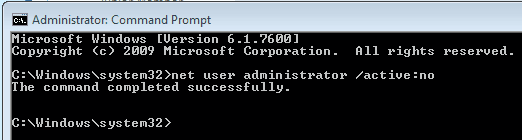
It should be this command instead used in a elevated command prompt (right click - run as administrator). ;)

net user administrator /active:no
 

My Computer

Computer type
PC/Desktop
Computer Manufacturer/Model Number
Self built custom
OS
64-bit Windows 11 Pro for Workstations
CPU
Intel i7-8700K OC'd to 5 GHz
Motherboard
ASUS ROG Maximus XI Formula Z390
Memory
64 GB (4x16GB) G.SKILL TridentZ RGB DDR4 3600 MHz
Graphics Card(s)
ASUS ROG-STRIX-GTX1080TI-O11G-GAMING
Sound Card
Integrated
Monitor(s) Displays
2 x Samsung Odyssey G7 27"
Screen Resolution
2560x1440
Hard Drives
1TB Samsung 990 PRO M.2,
4TB Samsung 990 PRO PRO M.2,
TerraMaster F8 SSD Plus NAS
PSU
Seasonic Prime Titanium 850W
Case
Thermaltake Core P3
Cooling
Corsair Hydro H115i
Keyboard
Logitech wireless K800
Mouse
Logitech MX Master 4
Internet Speed
2 Gb/s Download and 100 Mb/s Upload
Antivirus
Malwarebyte Anti-Malware Premium
Browser
Google Chrome
Other Info
Logitech Z625 speaker system,
Logitech BRIO 4K Pro webcam,
HP Color LaserJet Pro MFP M477fdn,
APC SMART-UPS RT 1000 XL - SURT1000XLI,
Galaxy S23 Plus phone
I did use "no" and the admin is still there at startup
 

Attachments

  • 000002.png
    000002.png
    2.8 KB · Views: 6

My Computer

Computer type
PC/Desktop
Computer Manufacturer/Model Number
Home built
OS
Windows 7 Home Premium 64bit
CPU
AMD Phenom II X6 1075T 3.0GHz
Motherboard
ASUS M4A88T-M
Memory
4 GB
Did you set up "Administrator" as your named User account during install or when setting up a factory-preinstall?

Go to Control Panel>User Accounts, take note of what User is showing, then click "Manage another User account." What other accounts show up then?

On some factory pre-installs Administrator is set up as the primary User Account, apart from the hidden Administrator which apprently isn't enabled. Look in your C drive to see what Users are listed and what files populate Explorer tree under Administrator if its there.
 
Back
Top