
Phantom High Definition Audio Device

np726

New member
Member
Local time
2:06 AM
Messages
31
Location
USA
I'm trying to solve a BSOD issue that I'm having. I don't think that this problem is causing the BSOD, but I want to eliminate it anyway and be sure...

I have a stereo system plugged into the rear headphone output, and there is a headphone/mic port on the front panel of the machine, connected to the mobo using High Definition Audio (currently has nothing connected to it). I also have a Logitech G110 keyboard with it's own headphone/mic ports on it (which is in use).

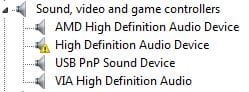
In Device Manager under "Sound, video and game controllers", this is what shows:
DeviceManager.jpg

AMD High Definition Audio Device - Graphics card HDMI sound output
High Definition Audio Device - ???
USB PnP Sound Device - Keyboard headphone/mic ports
VIA High Definition Audio - Rear output + front panel (VIA driver software has them linked as the same device)

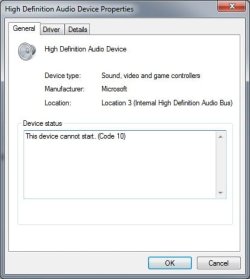
When I check the High Definition Audio Device status, this is what I get:
DeviceProperty.jpg

I've tested every possible audio output I can think of, and I still can't figure out what/where this device is. I've unplugged the front panel HD Audio connection. I tested every port on my graphics card. I removed the graphics card to make sure it wasn't detecting this device on it. I tested the onboard HDMI, as well as the onboard DVI using a DVI -> HDMI cable. I've gotten audio out of every port on this machine that will supply it, still can't figure out where this is.

I can uninstall the device, but every time I scan for new hardware, it is detected (even with the front panel HD Audio and graphics cards disconnected.

I've spent all afternoon looking for this thing. Any help would be greatly appreciated!
 

My Computer

Computer Manufacturer/Model Number
Custom Build
OS
Windows 7 Pro x64
CPU
Intel Core i5-3570K Ivy Bridge 3.4GHz (3.8GHz Turbo) LGA 115
Motherboard
Gigabyte GA-Z77X-D3H
Memory
Corsair Vengeance 16GB (4 x 4GB)
Graphics Card(s)
XFX Radeon HD 6870
Sound Card
On Board VIA High Definition Audio
Monitor(s) Displays
2 x 24" ASUS VE247
Screen Resolution
1920x1080x2
Hard Drives
Western Digital 1003FBYX - 1TB
Western Digital 15EARS - 1.5TB
Samsung HD103UJ - 1TB
PSU
Corsair Builder Series CX600 V2 600W ATX 12V v2.3 80 PLUS
Case
Antec Nine Hundred
Cooling
Zalman CNPS9500 AT 2 Ball CPU Cooling Fan/Heatsink
Keyboard
Logitech G110, Razer Nostromo
Mouse
Razer Deathadder
Internet Speed
20 Mbps down/30 Mbps up
Other Info
Internal SATA to external eSATA PCI Bracket
That is probably for the HDMI audio from the i5 processor. The i5 and 17's have built in video and HDMI. I don't know of any way to eliminate that. You can disable it in the Device Manager.
 

My Computer

Computer type
PC/Desktop
Computer Manufacturer/Model Number
My Own Build
OS
Windows 10 64 bit
CPU
Intel i7 6700K
Motherboard
ASUS ROG Maximus VIII Hero
Memory
16GB Corsair Dominator
Graphics Card(s)
Intel CPU Graphics
Sound Card
RealTek
Monitor(s) Displays
27" Dell S2719dgf
Screen Resolution
2560X1440
Hard Drives
1 TB Samsung 850 EVO SSD for Win 10 Pro
500GB Samsung 850 EVO SSD for Win 10 Insider
2 TB drive for backup
PSU
EVGA Supernova 750G2
Case
BeQuiet Silent Base 600
Cooling
Deepcool Captain 120EX
Keyboard
Microsoft Wireless 2000
Mouse
Microsoft wireless
Internet Speed
100 MB/sec (Cable)
Antivirus
Microsoft Defender and Malwarebytes
Browser
Edge/Firefox
Other Info
Cakewalk (Sonar) by BandLab and Studio One 4.1 Pro recording studio software. MOTU 896Mk3 Hybrid recording interface, Frontier Tranzport wireless control unit, Behringer X-Touch Control Surface.
Five USB connected optical drives for CD Audio production using Nero BurningROM
I'm fine with disabling it, as I'm obviously not using it. Any ideas as to why it's unable to start?
 

My Computer

Computer Manufacturer/Model Number
Custom Build
OS
Windows 7 Pro x64
CPU
Intel Core i5-3570K Ivy Bridge 3.4GHz (3.8GHz Turbo) LGA 115
Motherboard
Gigabyte GA-Z77X-D3H
Memory
Corsair Vengeance 16GB (4 x 4GB)
Graphics Card(s)
XFX Radeon HD 6870
Sound Card
On Board VIA High Definition Audio
Monitor(s) Displays
2 x 24" ASUS VE247
Screen Resolution
1920x1080x2
Hard Drives
Western Digital 1003FBYX - 1TB
Western Digital 15EARS - 1.5TB
Samsung HD103UJ - 1TB
PSU
Corsair Builder Series CX600 V2 600W ATX 12V v2.3 80 PLUS
Case
Antec Nine Hundred
Cooling
Zalman CNPS9500 AT 2 Ball CPU Cooling Fan/Heatsink
Keyboard
Logitech G110, Razer Nostromo
Mouse
Razer Deathadder
Internet Speed
20 Mbps down/30 Mbps up
Other Info
Internal SATA to external eSATA PCI Bracket

My Computer

Computer type
PC/Desktop
Computer Manufacturer/Model Number
My Own Build
OS
Windows 10 64 bit
CPU
Intel i7 6700K
Motherboard
ASUS ROG Maximus VIII Hero
Memory
16GB Corsair Dominator
Graphics Card(s)
Intel CPU Graphics
Sound Card
RealTek
Monitor(s) Displays
27" Dell S2719dgf
Screen Resolution
2560X1440
Hard Drives
1 TB Samsung 850 EVO SSD for Win 10 Pro
500GB Samsung 850 EVO SSD for Win 10 Insider
2 TB drive for backup
PSU
EVGA Supernova 750G2
Case
BeQuiet Silent Base 600
Cooling
Deepcool Captain 120EX
Keyboard
Microsoft Wireless 2000
Mouse
Microsoft wireless
Internet Speed
100 MB/sec (Cable)
Antivirus
Microsoft Defender and Malwarebytes
Browser
Edge/Firefox
Other Info
Cakewalk (Sonar) by BandLab and Studio One 4.1 Pro recording studio software. MOTU 896Mk3 Hybrid recording interface, Frontier Tranzport wireless control unit, Behringer X-Touch Control Surface.
Five USB connected optical drives for CD Audio production using Nero BurningROM
I ran Fix it, all it could tell me was to reinstall the driver, which I've already done multiple times. Someone posted on here last night saying that disabling the on board graphics in the BIOS would disable the on board HDMI, but they seem to have removed that post. A friend also suggested the same thing to me. I've disabled the on board, but the device is still showing up.

For now, it's just getting disabled. Still bugging me that I can't figure it out...

I appreciate the help and time! Thanks!
 

My Computer

Computer Manufacturer/Model Number
Custom Build
OS
Windows 7 Pro x64
CPU
Intel Core i5-3570K Ivy Bridge 3.4GHz (3.8GHz Turbo) LGA 115
Motherboard
Gigabyte GA-Z77X-D3H
Memory
Corsair Vengeance 16GB (4 x 4GB)
Graphics Card(s)
XFX Radeon HD 6870
Sound Card
On Board VIA High Definition Audio
Monitor(s) Displays
2 x 24" ASUS VE247
Screen Resolution
1920x1080x2
Hard Drives
Western Digital 1003FBYX - 1TB
Western Digital 15EARS - 1.5TB
Samsung HD103UJ - 1TB
PSU
Corsair Builder Series CX600 V2 600W ATX 12V v2.3 80 PLUS
Case
Antec Nine Hundred
Cooling
Zalman CNPS9500 AT 2 Ball CPU Cooling Fan/Heatsink
Keyboard
Logitech G110, Razer Nostromo
Mouse
Razer Deathadder
Internet Speed
20 Mbps down/30 Mbps up
Other Info
Internal SATA to external eSATA PCI Bracket
How about the Intel chipset drivers? Give them a try and see what happens. One of the prime things the chipset drivers do is define (identify) all the devices on the motherboard.
 

My Computer

Computer type
PC/Desktop
Computer Manufacturer/Model Number
My Own Build
OS
Windows 10 64 bit
CPU
Intel i7 6700K
Motherboard
ASUS ROG Maximus VIII Hero
Memory
16GB Corsair Dominator
Graphics Card(s)
Intel CPU Graphics
Sound Card
RealTek
Monitor(s) Displays
27" Dell S2719dgf
Screen Resolution
2560X1440
Hard Drives
1 TB Samsung 850 EVO SSD for Win 10 Pro
500GB Samsung 850 EVO SSD for Win 10 Insider
2 TB drive for backup
PSU
EVGA Supernova 750G2
Case
BeQuiet Silent Base 600
Cooling
Deepcool Captain 120EX
Keyboard
Microsoft Wireless 2000
Mouse
Microsoft wireless
Internet Speed
100 MB/sec (Cable)
Antivirus
Microsoft Defender and Malwarebytes
Browser
Edge/Firefox
Other Info
Cakewalk (Sonar) by BandLab and Studio One 4.1 Pro recording studio software. MOTU 896Mk3 Hybrid recording interface, Frontier Tranzport wireless control unit, Behringer X-Touch Control Surface.
Five USB connected optical drives for CD Audio production using Nero BurningROM
Just make sure they are up to date? (If so, just tried that, they are).
 

My Computer

Computer Manufacturer/Model Number
Custom Build
OS
Windows 7 Pro x64
CPU
Intel Core i5-3570K Ivy Bridge 3.4GHz (3.8GHz Turbo) LGA 115
Motherboard
Gigabyte GA-Z77X-D3H
Memory
Corsair Vengeance 16GB (4 x 4GB)
Graphics Card(s)
XFX Radeon HD 6870
Sound Card
On Board VIA High Definition Audio
Monitor(s) Displays
2 x 24" ASUS VE247
Screen Resolution
1920x1080x2
Hard Drives
Western Digital 1003FBYX - 1TB
Western Digital 15EARS - 1.5TB
Samsung HD103UJ - 1TB
PSU
Corsair Builder Series CX600 V2 600W ATX 12V v2.3 80 PLUS
Case
Antec Nine Hundred
Cooling
Zalman CNPS9500 AT 2 Ball CPU Cooling Fan/Heatsink
Keyboard
Logitech G110, Razer Nostromo
Mouse
Razer Deathadder
Internet Speed
20 Mbps down/30 Mbps up
Other Info
Internal SATA to external eSATA PCI Bracket
I have a new system with a gigabyte Z77X UD5H motherboard and an i7 3770 CPU. This M/B has RealTek audio and I show the RealTek and the Intel HD Audio nothing else. I looked at that motherboard on the Gigabyte site and didn't come up with what the phantom device is.
 

My Computer

Computer type
PC/Desktop
Computer Manufacturer/Model Number
My Own Build
OS
Windows 10 64 bit
CPU
Intel i7 6700K
Motherboard
ASUS ROG Maximus VIII Hero
Memory
16GB Corsair Dominator
Graphics Card(s)
Intel CPU Graphics
Sound Card
RealTek
Monitor(s) Displays
27" Dell S2719dgf
Screen Resolution
2560X1440
Hard Drives
1 TB Samsung 850 EVO SSD for Win 10 Pro
500GB Samsung 850 EVO SSD for Win 10 Insider
2 TB drive for backup
PSU
EVGA Supernova 750G2
Case
BeQuiet Silent Base 600
Cooling
Deepcool Captain 120EX
Keyboard
Microsoft Wireless 2000
Mouse
Microsoft wireless
Internet Speed
100 MB/sec (Cable)
Antivirus
Microsoft Defender and Malwarebytes
Browser
Edge/Firefox
Other Info
Cakewalk (Sonar) by BandLab and Studio One 4.1 Pro recording studio software. MOTU 896Mk3 Hybrid recording interface, Frontier Tranzport wireless control unit, Behringer X-Touch Control Surface.
Five USB connected optical drives for CD Audio production using Nero BurningROM
Back
Top