Phantom network connections

markg2

New member
Member
VIP
Local time
10:49 AM
Messages
477
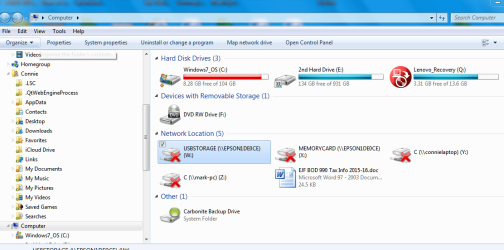
When this machine boots, after the desktop populates, there's a message that appears in the lower right in a rectangular box to the effect 'some network connections could not be found'.


I know you all want the precise message and I'll reboot to get it if you do need it. I don't think you will.


The machine sees the 3 other computers on our home network just fine. I'm fairly sure the problem is with phantom drives--drives that either once were mapped and no longer good and/or an Epson printer that created names for its onboard USB port(s) and I could never delete same once we got rid of the printer.


I'm attaching a screen shot that may be of assistance. I've tried right clicking on the 'x' drives to delete but there's no delete option.


Also, I'm not sure why this screen doesn't show the other 3 machines that do appear on file explorer.


Mark
informenter-marker-2.png
 

Attachments

  • Connie Network Connections.PNG
    Connie Network Connections.PNG
    157.2 KB · Views: 1

My Computer

Computer type
PC/Desktop
OS
Windows 7 & Windows 10
Sometimes network connections will "go dead" until you try to access them. This is a phenomenon in Windows that I haven't been able to figure out a reason for. But my guess is that Windows was designed that way. If you consider drives Y: and Z:, if those computers are off, the network connections will be broken. That would be a valid reason for the network connections to have a red 'X' on the icons. But even if the other computers are on, sometimes Windows will tell you that they are unavailable.
 

My Computer

Computer type
PC/Desktop
Computer Manufacturer/Model Number
Dell
OS
Linux Mint 18.2 xfce 64-bit (VMWare host) / Windows 8.1 Pro 32-bit (VMWare guest)
CPU
Haswell
Memory
4 GB
Monitor(s) Displays
Acer 23"
Screen Resolution
1920 x 1080
Hard Drives
Two hard drives, 1TB each: One for Linux, one for my data.
Keyboard
IBM Model M
Antivirus
Sophos (Linux), Trend Micro (Windows)
Browser
Firefox, Opera
Other Info
I use Samba to share my data drive with the other computers at my house and with my guest session in VMWare Workstation Player.
I need to cc0nfirm that Drives Y and Z on my wife's machine are mapped. If so, easy, I'll remove the mapping.


The stumper is how to get rid of the other drives that are truly phantoms left over from that awful Epson install. IOW, how can you delete a physical drive (port) that's not physically there but the OS thinks is?


informenter-marker-2.png
 

My Computer

Computer type
PC/Desktop
OS
Windows 7 & Windows 10
Go into File Explorer. Right-click on the phantom drive, and choose Disconnect.
 

My Computer

Computer type
PC/Desktop
Computer Manufacturer/Model Number
Dell
OS
Linux Mint 18.2 xfce 64-bit (VMWare host) / Windows 8.1 Pro 32-bit (VMWare guest)
CPU
Haswell
Memory
4 GB
Monitor(s) Displays
Acer 23"
Screen Resolution
1920 x 1080
Hard Drives
Two hard drives, 1TB each: One for Linux, one for my data.
Keyboard
IBM Model M
Antivirus
Sophos (Linux), Trend Micro (Windows)
Browser
Firefox, Opera
Other Info
I use Samba to share my data drive with the other computers at my house and with my guest session in VMWare Workstation Player.
Thanks, that's just what I did about a 1/2 hour ago. I thought, while showering, there's likely something in the explorer right click that might be useful.


All are now gone + the message :-).


Mark

informenter-marker-2.png
 

My Computer

Computer type
PC/Desktop
OS
Windows 7 & Windows 10
Glad you got it solved.
 

My Computer

Computer type
PC/Desktop
Computer Manufacturer/Model Number
Dell
OS
Linux Mint 18.2 xfce 64-bit (VMWare host) / Windows 8.1 Pro 32-bit (VMWare guest)
CPU
Haswell
Memory
4 GB
Monitor(s) Displays
Acer 23"
Screen Resolution
1920 x 1080
Hard Drives
Two hard drives, 1TB each: One for Linux, one for my data.
Keyboard
IBM Model M
Antivirus
Sophos (Linux), Trend Micro (Windows)
Browser
Firefox, Opera
Other Info
I use Samba to share my data drive with the other computers at my house and with my guest session in VMWare Workstation Player.
Back
Top